UI5X
An OpenUI5 and SAPUI5 library of eight composite controls under the ui5x namespace: skeleton placeholders and a container that swaps them for content, loading wrappers for the responsive and the grid table, an accordion, a copy button, a segmented input and a chat feed.
The standard UI5 libraries stop at the building blocks, so a composition such as a skeleton placeholder or a chat feed is rebuilt in each project; UI5X ships those compositions as controls, with the theme stylesheets and the accessibility behaviour already written and loading exposed as a property that binds to a model flag. Each one extends sap.ui.core.Control or the standard control it specialises, touches no private API, and is declared and bound from XML views, JavaScript or TypeScript. It enters an application through two manifest.json entries, dependencies.libs and a resourceRoots mapping to ./thirdparty/ui5x/, a path chosen so that neither the SAP Fiori tools proxy nor the deployed route for /resources can intercept the library; TypeScript projects also name the package in the compiler's types, without which the controls come out bare. The package carries no npm dependencies and declares only sap.ui.core, with sap.m and sap.ui.table requested by the controls that need them. It was developed against OpenUI5 1.151.0 and tested with SAPUI5 1.151.0 in SAP Business Application StudioSAP Business Application StudioSAP's development environment for business applications, delivered as a cloud service and opened in a browser, where work happens in preconfigured dev spaces.sap official, btp, and the README states that older UI5 versions have not been validated yet.
Facts
Where it sits
Who is behind it

In the atlas: maintains 1, contributes to 1@rdisommamaintainer
Before choosing this
Conditions
PracticalFunctional boundary
The README states that UI5X is in early development and that APIs may change before version 1.0. Styling covers the sap_horizon and sap_fiori_3 families with their dark and high-contrast variants; any other theme falls back to the base theme.
What it declares
Every artifact
- Type
- Package
- Origin
- Independently maintained
As a package
- Where it runs
- does not say
- Distributed through
- does not say
Connections
Making a UI usable with a screen reader or a keyboard alone
Custom controls, wrappers and icon fonts packaged for reuse
Framework core: module loader, MVC runtime, binding, routing, theming
Build task packaging the UI5 build result as a zip archive
Download
Install
npm add UI5XDerived from the package name. No recipe recorded; the README has the configuration.
README
quoted from rdisomma/ui5x under Apache-2.0, readUI5X

An OpenUI5 and SAPUI5 library of composite controls, with theming, accessibility and state handling built in.
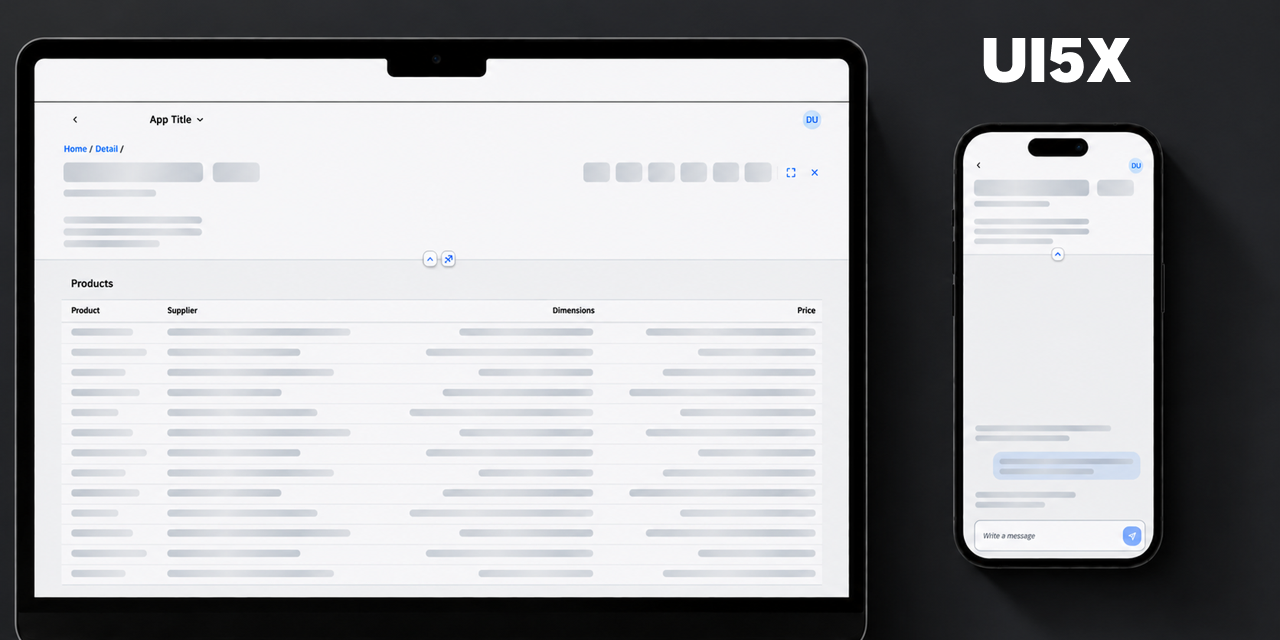
Open the live demo to see every control and have fun customising how each one behaves.
The standard libraries stop at the building blocks, so anything composed from them gets rebuilt in every project. UI5X ships those compositions as controls, with the theming, accessibility and state handling already done.
Each one extends sap.ui.core.Control or the standard control it specialises. None of them touch
a private API. You declare and bind them from XML views, JavaScript or TypeScript.
UI5X is in early development. APIs may change before version 1.0.
Features
Skeleton— a placeholder in the shape of the content you are waiting for: a paragraph of lines, a block, or an avatar disc.LoadingContainer— swaps between a placeholder and the real content: bindloadingto a model flag and it does the switch. Ships with a built-in skeleton and takes any control as a custom placeholder.LoadingResponsiveTable— wraps a responsivesap.m.Tableand replaces its rows with matching skeleton cells, in a fixed or viewport-filling count.LoadingTable— the same for a gridsap.ui.table.Table, rendered as a presentation-only copy while data is loading.Accordion— groupsAccordionItemsections with single or multiple expansion. Items take any UI5 control and can be disabled or held open.CopyButton— copies a value to the system clipboard and reports success or failure with a temporary icon, text and button type.SegmentedInput— collects numeric or alphanumeric identifiers in separate fields, with grouping, value-state feedback and paste support.ChatFeed— combines a message composer with a bindable conversation. Messages align by current user, group by date and expose edit or delete actions.- Accessibility-aware — loading containers expose
aria-busy, skeleton content is kept out of the accessibility tree, and animations respectprefers-reduced-motion. The interactive controls implement the UI5 focus and labelling contracts (getFocusDomRef,getIdForLabel,getAccessibilityInfo), sofocus()and asap.m.Labelbehave as they do on a standard control. - Theme coverage — the
sap_horizonandsap_fiori_3families, each in light, dark and both high-contrast variants, with the right-to-left stylesheets generated alongside them. The high-contrast themes replace the subtle tints of the standard palettes so placeholders stay above the 3:1 contrast ratio instead of disappearing into the background. - Verified on every change — the QUnit suite runs headless in CI against the lowest supported Node.js versions and the current LTS, together with the type check, the generated interfaces and a full library build.
- TypeScript first — written in TypeScript and shipped with type definitions, while remaining fully usable from JavaScript applications. Built with UI5 CLI 4 for OpenUI5 and SAPUI5.
Compatibility
- Developed against OpenUI5
1.151.0, and tested with SAPUI51.151.0in SAP Business Application Studio. Older UI5 versions have not been validated yet - Themes:
sap_horizon,sap_horizon_dark,sap_horizon_hcb,sap_horizon_hcw,sap_fiori_3,sap_fiori_3_dark,sap_fiori_3_hcb,sap_fiori_3_hcw. Any other theme falls back to the base theme
Installation
npm install @raffaeledisomma/ui5x1. In manifest.json, add two entries to the sap.ui5 section the application already has,
as siblings of each other:
dependencies.libsdeclares UI5X, so the runtime loads it with the componentresourceRootstells UI5 where the library is served from
{
  "sap.ui5": {
    "dependencies": {
      "libs": {
        "ui5x": {}
      }
    },
    "resourceRoots": {
      "ui5x": "./thirdparty/ui5x/"
    }
  }
}
2. TypeScript projects only — name the package in tsconfig.json:
{
  "compilerOptions": {
    "types": ["@openui5/types", "@raffaeledisomma/ui5x"]
  }
}
That is everything a locally previewed application needs. Before deploying it you have to add two build settings as well, described in Deploying an application that uses UI5X.
Applications that boot from index.html without a component
Such an application never reads manifest.json, so the same mapping goes on the bootstrap tag
instead:
<script
  id="sap-ui-bootstrap"
  src="resources/sap-ui-core.js"
  data-sap-ui-resource-roots='{"ui5x": "/thirdparty/ui5x/"}'>
</script>
Why both manifest entries are required
Without them the application starts and fails on the first control with
ModuleError: failed to load 'ui5x/library.js'.
resourceRoots is the one easy to leave out: it tells UI5 where the library lives. UI5X is served
from /thirdparty/ui5x/ rather than from /resources/, which a SAP Fiori tools project reserves
for the SAPUI5 runtime: a proxy claims it during local preview, and a route forwards it to SAP's
servers once deployed. Serving UI5X from its own path means neither has to be reconfigured and
neither can intercept the library, and it is also what makes the library resolve in SAP Build Work
Zone, where the UI5 runtime is loaded by the shell.
What the types entry changes
The control interfaces are declared as module augmentations, which TypeScript loads only when the
package is named in the compiler's types. Without that entry the imports still resolve and
nothing appears to be missing, but the controls come out bare: a settings object is rejected and
every generated getter is reported as absent.
What installing adds, and which UI5 libraries have to be available
UI5X has no npm dependencies of its own, so installing it adds one package and nothing else.
The package carries the built library, its type definitions and the -dbg.js variants UI5 loads
with sap-ui-debug=true; the TypeScript sources are not shipped. Whatever npm audit reports
afterwards comes from the application's own dependency tree, not from here.
UI5X declares sap.ui.core alone, because it is the only library every control needs:
| Library | Declared | Required by |
|---|---|---|
sap.ui.core | yes | Every control |
sap.m | no | CopyButton (which extends sap.m.Button), ChatFeed, ChatMessage, SegmentedInput, LoadingResponsiveTable |
sap.ui.table | no | LoadingTable only |
The other two are imported by the controls that use them, so they are requested when one of those
controls is loaded and not before: an application built only from Skeleton, LoadingContainer,
Accordion or LoadingTable never loads sap.m, and one that uses no grid table never loads
sap.ui.table.
Where the UI5 runtime comes from decides whether anything else is needed. A SAP Fiori tools
project proxies /resources to https://ui5.sap.com and has the whole runtime available, so
every library resolves whether or not it is named anywhere. A project that lets the UI5 tooling
serve /resources gets only what its own framework section lists, plus what those libraries
depend on, and sap.ui.table is the one LoadingTable needs there. An application using that
control declares it regardless, since the table it passes in is a sap.ui.table.Table.
Deploying an application that uses UI5X
Nothing is needed for local preview: npm start serves the library from the dependency graph.
For a deployment, add both of the following. For a SAP Fiori tools project they often belong in
ui5-deploy.yaml rather than ui5.yaml, whichever configuration the build actually uses.
builder:
  settings:
    includeDependency:
      - ui5x
  customTasks:
    - name: ui5-task-zipper
      afterTask: generateCachebusterInfo
      configuration:
        includeDependencies: true
What these two settings do, and what is missing without each
| Setting | Needed for | Symptom when missing |
|---|---|---|
includeDependency | any deployment | dist contains no thirdparty/ui5x |
includeDependencies | Cloud Foundry | the archive contains no thirdparty/ui5x |
ui5 build only writes the application's own files unless the library is declared as a build
dependency, which is what includeDependency does. If the project then packages itself with
ui5-task-zipper, the archive holds the application's own files only until includeDependencies
is set. The two options are one letter apart and both are required.
Checking that the library was deployed
Neither command changes anything. The first should print the matching line from the archive, the
second a status line ending in 200:
unzip -l dist/<archive>.zip | grep "thirdparty/ui5x/library.js"
curl -sI https://<application-url>/thirdparty/ui5x/library.js | head -1
No output from grep means the archive was built without the library, so one of the two settings
above is missing. A status other than 200 means the library never reached the server. A 200
means the deployment carries it, whether or not the application itself works.
Controls and API reference
One section per control: what it does, the full table of its properties, aggregations and events, then examples in JavaScript and in XML.
Skeleton
A Line skeleton stacks lines bars and shortens the last one to look like a paragraph;
Rectangle fills the available width; Circle uses width as its diameter.

| Property | Type | Default | Description |
|---|---|---|---|
width | sap.ui.core.CSSSize | null | Width of the skeleton, e.g. "100%", "20rem", "320px". |
height | sap.ui.core.CSSSize | null | Height of the skeleton. Only applies to type Rectangle: a line takes its height from lines, a circle from its width. |
type | ui5x.loading.SkeletonType | Line | Visual shape: Line, Rectangle or Circle. |
lines | int | 1 | Number of placeholder lines. Values outside 1–3 are clamped. Only applies to type Line. |
animated | boolean | true | Shimmer animation. Also stops when the system requests reduced motion. |
Examples
sap.ui.require(["ui5x/loading/Skeleton"], function (Skeleton) {
  new Skeleton({
    type: "Line",
    lines: 3,
    width: "20rem",
    animated: true
  }).placeAt("content");
});
In XML views:
<mvc:View
  xmlns:mvc="sap.ui.core.mvc"
  xmlns:loading="ui5x.loading">

  <loading:Skeleton type="Circle" width="3rem" />

</mvc:View>
LoadingContainer
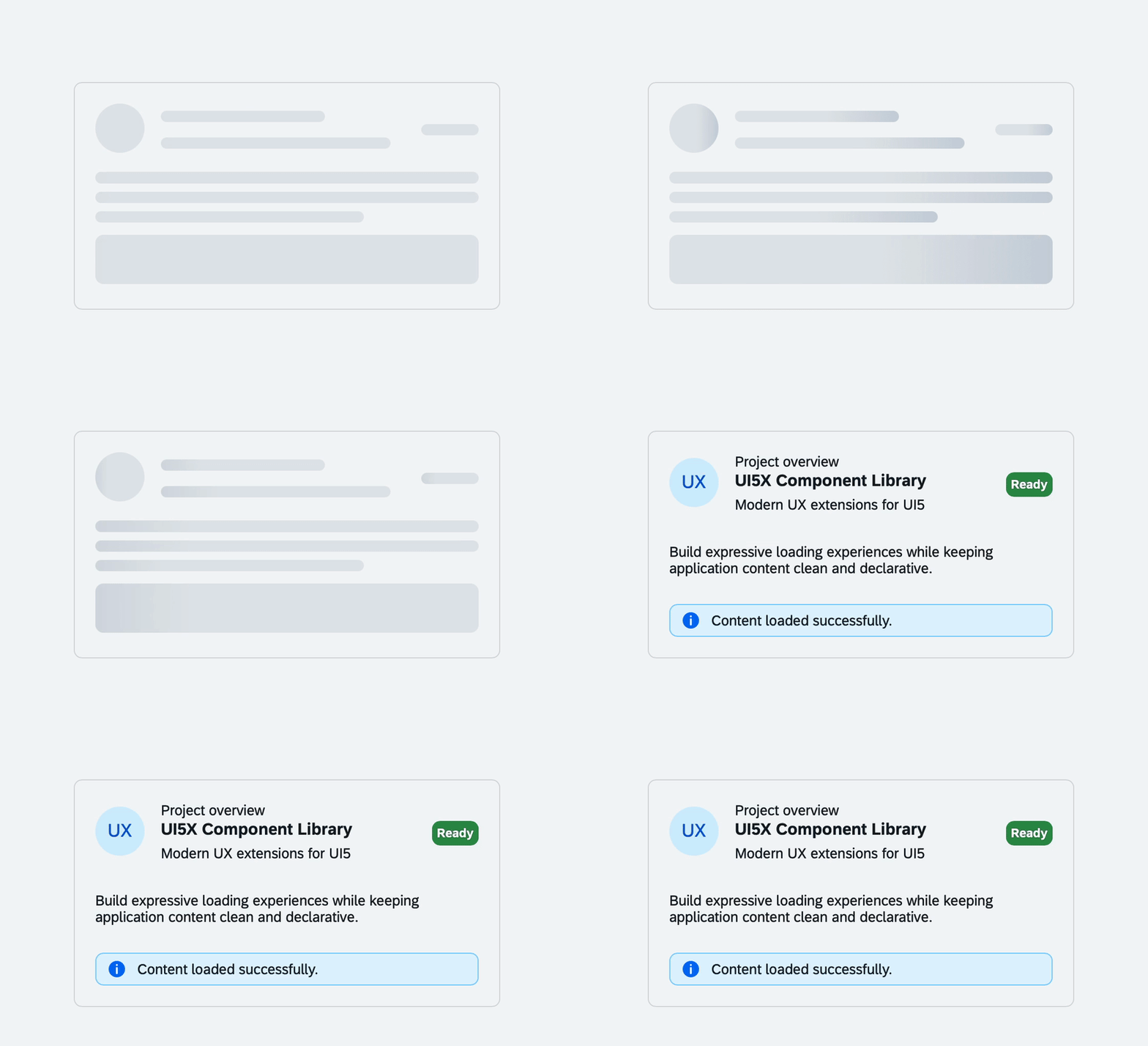
A container that swaps between a placeholder and its real content: it renders the placeholder
while loading is true, and its content otherwise. Only one of the two is in the DOM at a
time, so loading can be bound directly to a model flag.
| Property | Type | Default | Description |
|---|---|---|---|
loading | boolean | false | Show the placeholder instead of the content. |
skeletonType | ui5x.loading.SkeletonType | Line | Type of the default skeleton. Ignored when placeholder is set. |
skeletonLines | int | 1 | Lines of the default skeleton (clamped to 1–3). Ignored when placeholder is set. |
skeletonHeight | sap.ui.core.CSSSize | null | Height of the default skeleton, used only by type Rectangle. Ignored when placeholder is set. |
animated | boolean | true | Animate the default skeleton. Ignored when placeholder is set. |
width | sap.ui.core.CSSSize | null | Width of the container. Inherits the width of its parent when unset. |
| Aggregation | Type | Cardinality | Description |
|---|---|---|---|
content | sap.ui.core.Control | 0..1 | Default aggregation. Displayed when loading is false. |
placeholder | sap.ui.core.Control | 0..1 | Custom placeholder — any control, e.g. skeletons composed in a VBox. Falls back to the built-in Skeleton. |
Examples
sap.ui.require([
  "ui5x/loading/LoadingContainer",
  "sap/m/Text"
], function (LoadingContainer, Text) {
  const oContainer = new LoadingContainer({
    loading: true,
    skeletonType: "Line",
    skeletonLines: 3,
    content: new Text({ text: "Loaded content" })
  });

  oContainer.placeAt("content");

  // later, when data has arrived
  oContainer.setLoading(false);
});
With a custom placeholder:
<loading:LoadingContainer
  loading="{ui>/busy}"
  xmlns:loading="ui5x.loading"
  xmlns:m="sap.m">

  <loading:placeholder>
    <loading:Skeleton
      type="Rectangle"
      width="20rem" />
  </loading:placeholder>

  <m:Text text="Loaded content" />

</loading:LoadingContainer>
LoadingResponsiveTable
LoadingResponsiveTable wraps a sap.m.Table. While loading is true, it renders a matching
table with cloned columns and skeleton cells; when loading finishes, it renders the original table
and its bound items.
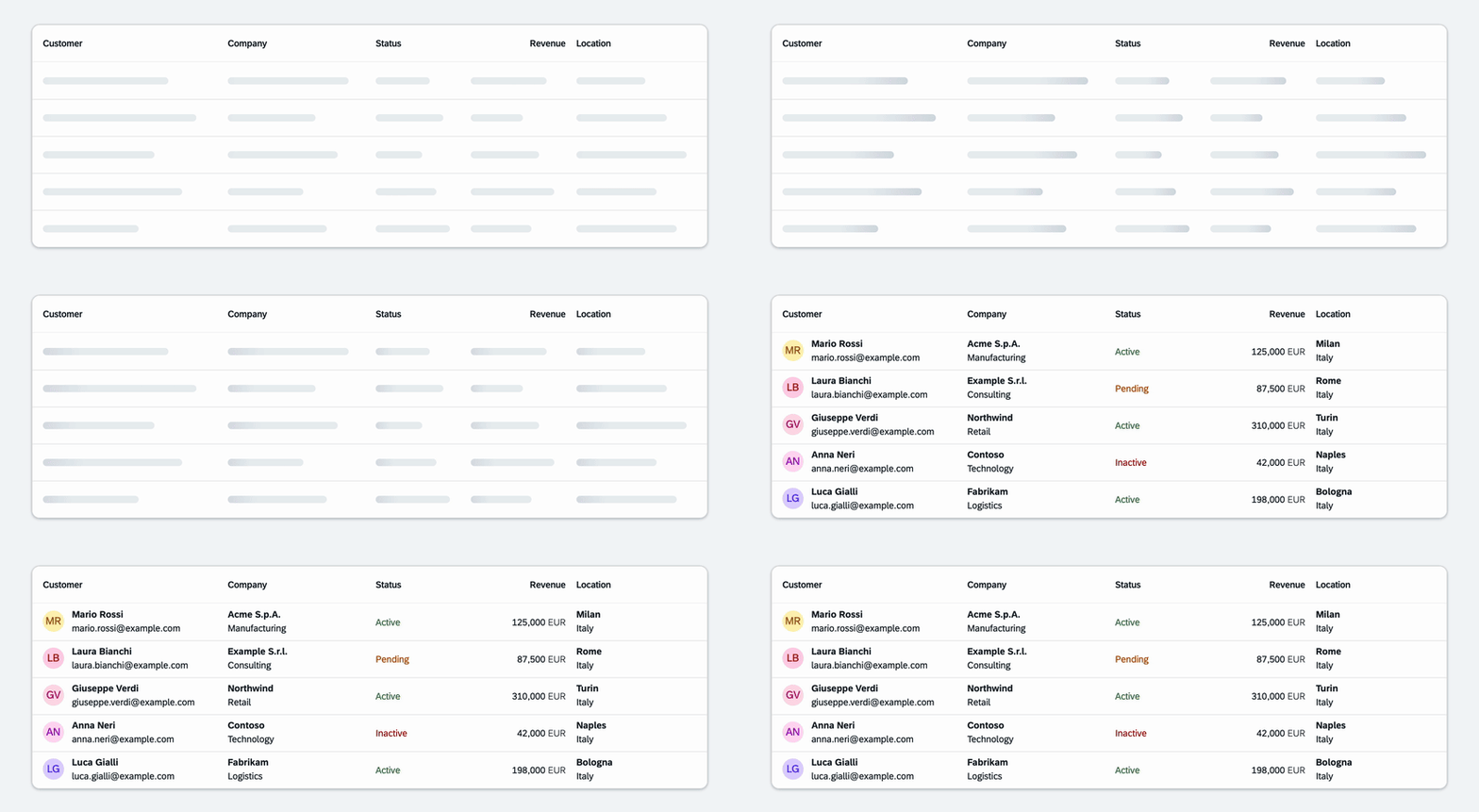
Fixed mode always renders skeletonRows. Fill mode calculates how many rows fit between the
table and the bottom of the viewport, using skeletonRows as the initial fallback and
maxSkeletonRows as the upper limit.
| Property | Type | Default | Description |
|---|---|---|---|
loading | boolean | false | Show skeleton rows instead of the original table. |
skeletonRows | int | 5 | Rows rendered in Fixed mode and fallback for Fill. |
maxSkeletonRows | int | 20 | Maximum rows calculated in Fill mode. |
skeletonRowsMode | ui5x.loading.SkeletonRowMode | Fixed | Row-count strategy: Fixed or Fill. |
skeletonRowHeight | sap.ui.core.CSSSize | "" | Height of every skeleton row. sap.m.Table sizes rows on their content, so skeleton rows are shorter than rows carrying data and the table grows when it arrives; set this to the height the application rows end up with. |
dynamicSkeletonWidths | boolean | false | Vary skeleton widths across cells. |
animated | boolean | true | Enable the skeleton shimmer animation. |
| Aggregation | Type | Cardinality | Description |
|---|---|---|---|
table | sap.m.Table | 0..1 | Default aggregation containing the actual data. |
Example
<mvc:View
  xmlns:mvc="sap.ui.core.mvc"
  xmlns:loading="ui5x.loading"
  xmlns:m="sap.m">

  <loading:LoadingResponsiveTable
    loading="{ui>/busy}"
    skeletonRowsMode="Fill"
    skeletonRows="5"
    maxSkeletonRows="20"
    dynamicSkeletonWidths="true">

    <m:Table items="{/rows}">
      <m:columns>
        <m:Column>
          <m:Text text="Name" />
        </m:Column>
        <m:Column>
          <m:Text text="Company" />
        </m:Column>
      </m:columns>

      <m:items>
        <m:ColumnListItem>
          <m:cells>
            <m:Text text="{name}" />
            <m:Text text="{company}" />
          </m:cells>
        </m:ColumnListItem>
      </m:items>
    </m:Table>

  </loading:LoadingResponsiveTable>

</mvc:View>
LoadingTable
LoadingTable provides the same loading experience for a grid sap.ui.table.Table. While
loading is true, it renders an internal table with matching columns and skeleton rows. The
original table, its row binding and its application data remain untouched.
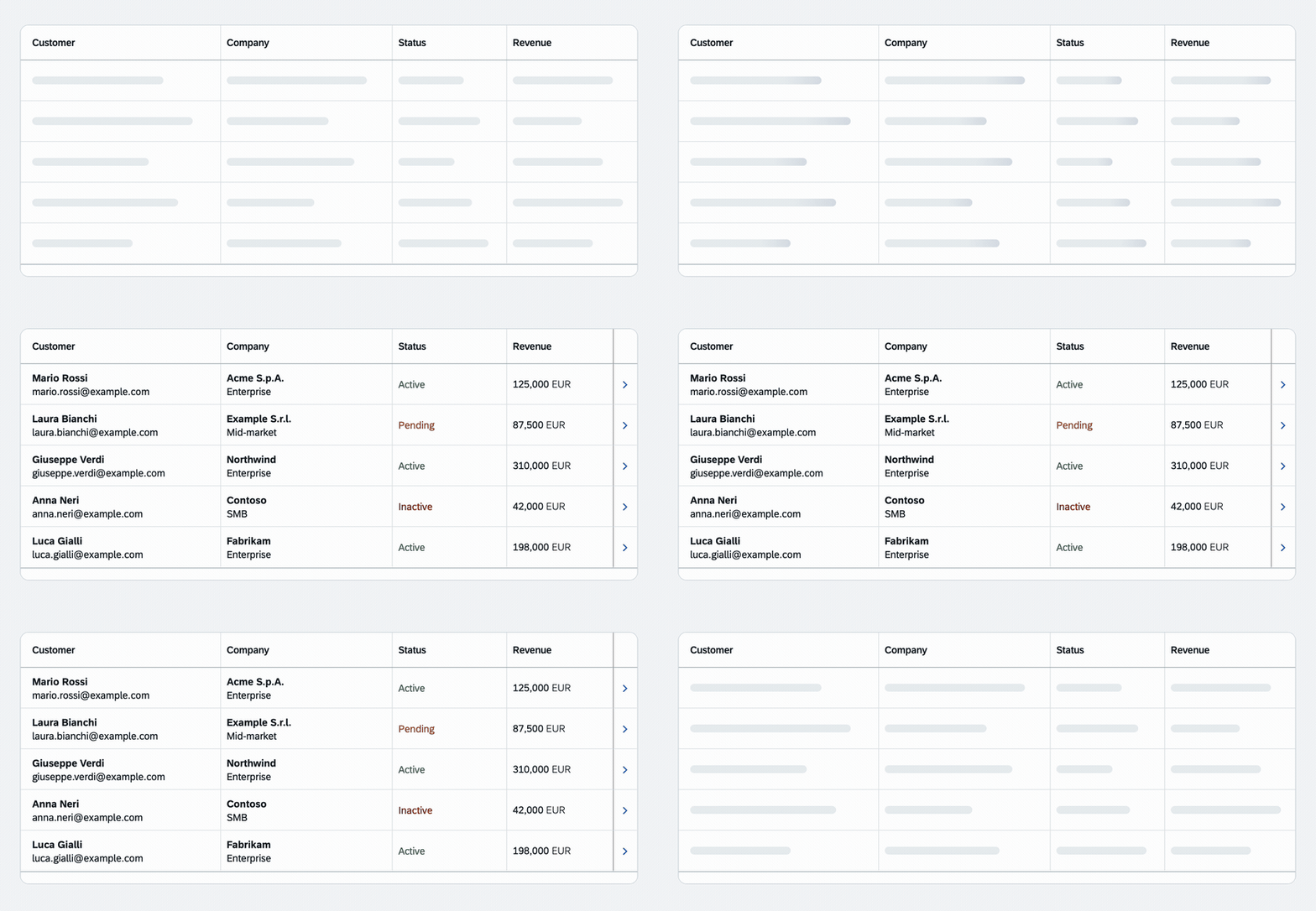
Fixed mode always renders skeletonRows. Fill mode calculates how many rows fit between the
table and the bottom of the viewport, using skeletonRows as the initial fallback and
maxSkeletonRows as the upper limit.
| Property | Type | Default | Description |
|---|---|---|---|
loading | boolean | false | Show skeleton rows instead of the original table. |
skeletonRows | int | 5 | Rows rendered in Fixed mode and fallback for Fill. |
maxSkeletonRows | int | 20 | Maximum rows calculated in Fill mode. |
skeletonRowsMode | ui5x.loading.SkeletonRowMode | Fixed | Row-count strategy: Fixed or Fill. |
dynamicSkeletonWidths | boolean | false | Vary skeleton widths across cells. |
animated | boolean | true | Enable the skeleton shimmer animation. |
| Aggregation | Type | Cardinality | Description |
|---|---|---|---|
table | sap.ui.table.Table | 0..1 | Default aggregation containing the actual data. |
Example
<mvc:View
  xmlns:mvc="sap.ui.core.mvc"
  xmlns:loading="ui5x.loading"
  xmlns:m="sap.m"
  xmlns:t="sap.ui.table">

  <loading:LoadingTable
    loading="{ui>/busy}"
    skeletonRowsMode="Fixed"
    skeletonRows="5"
    maxSkeletonRows="20"
    dynamicSkeletonWidths="true">

    <t:Table
      rows="{/rows}"
      visibleRowCount="5"
      visibleRowCountMode="Fixed">

      <t:columns>
        <t:Column width="15rem">
          <m:Label text="Customer" />
          <t:template>
            <m:Text text="{name}" />
          </t:template>
        </t:Column>

        <t:Column width="13rem">
          <m:Label text="Company" />
          <t:template>
            <m:Text text="{company}" />
          </t:template>
        </t:Column>
      </t:columns>

    </t:Table>

  </loading:LoadingTable>

</mvc:View>
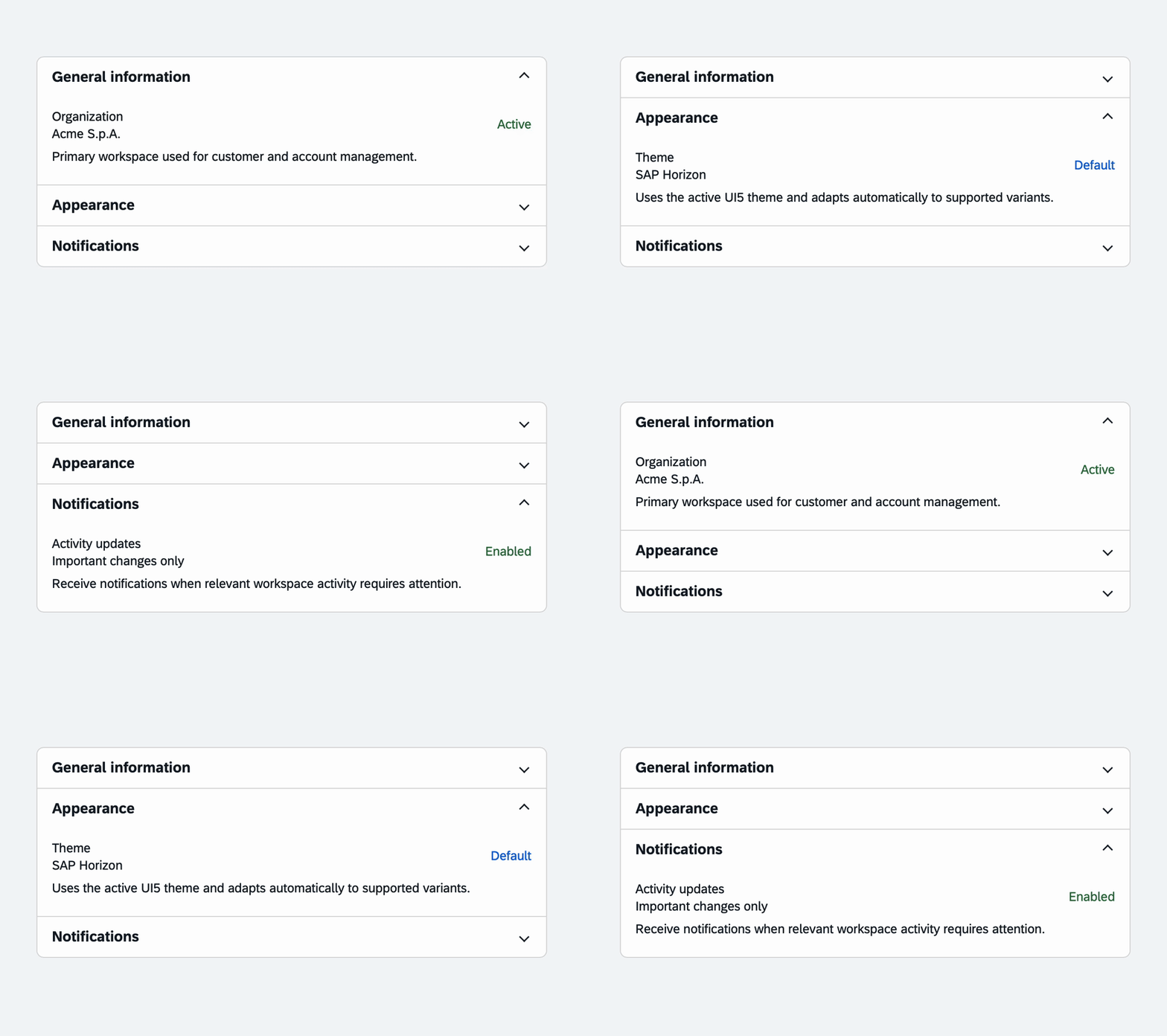
Accordion
Accordion displays a collection of expandable AccordionItem sections. By default, expanding
one item collapses the other toggleable items. Set multipleExpansion to true to allow several
sections to remain open at the same time.
Accordion property | Type | Default | Description |
|---|---|---|---|
multipleExpansion | boolean | false | Allow more than one item to be expanded. |
width | sap.ui.core.CSSSize | null | Width of the accordion, such as "100%". |
AccordionItem property | Type | Default | Description |
|---|---|---|---|
title | string | "" | Text displayed in the item header. |
expanded | boolean | false | Whether the content is expanded. |
toggleable | boolean | true | Whether user and accordion logic may change the state. |
enabled | boolean | true | Whether the item can be toggled through user input. |
| API | Type | Description |
|---|---|---|
items | AccordionItem[] | Default aggregation containing the accordion sections. |
itemToggle | Event | Fired after an item is toggled through user input. |
Example
<mvc:View
  xmlns:mvc="sap.ui.core.mvc"
  xmlns:layout="ui5x.layout"
  xmlns:m="sap.m">

  <layout:Accordion
    width="30rem"
    multipleExpansion="false"
    itemToggle=".onItemToggle">

    <layout:AccordionItem
      title="General information"
      expanded="true">
      <m:Text text="Content of the first section" />
    </layout:AccordionItem>

    <layout:AccordionItem title="Details">
      <m:VBox>
        <m:Label
          text="Company name"
          labelFor="companyName" />
        <m:Input
          id="companyName"
          value="{/company/name}"
          width="100%" />
        <m:HBox class="sapUiSmallMarginTop">
          <m:Button
            text="Save"
            type="Emphasized"
            press=".onSave" />
          <m:Button
            text="Cancel"
            press=".onCancel"
            class="sapUiTinyMarginBegin" />
        </m:HBox>
      </m:VBox>
    </layout:AccordionItem>

    <layout:AccordionItem
      title="Always expanded"
      expanded="true"
      toggleable="false">
      <m:Text text="This section cannot be collapsed" />
    </layout:AccordionItem>

  </layout:Accordion>

</mvc:View>
CopyButton
CopyButton extends sap.m.Button with clipboard support and visual success feedback. The
feedback is shown only after the value has been copied successfully, then the original icon, text
and button type are restored automatically.
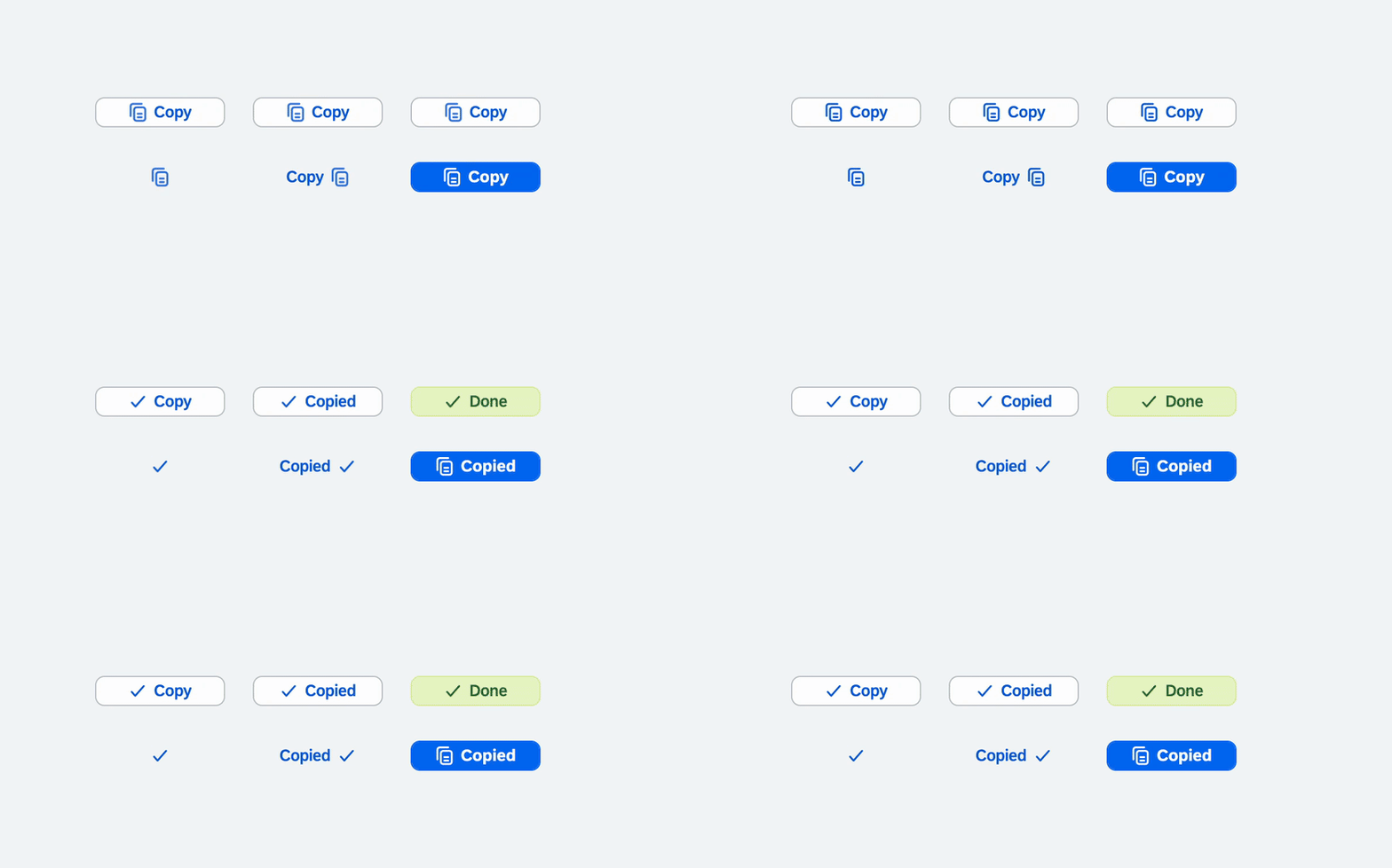
When successType or errorType is omitted, the button keeps its current type. Set
successIcon or errorIcon to an empty string to keep the original icon during feedback.
Clipboard access requires a secure context and a press initiated by the user, and the write is
asynchronous, so it can fail after the press succeeded. The failure shows on the button and
reaches the application through copyError; without either, a copy that never happened looks
exactly like one that did.
| Property | Type | Default | Description |
|---|---|---|---|
value | string | "" | Value written to the system clipboard. |
successIcon | sap.ui.core.URI | sap-icon://accept | Temporary success icon. An empty value preserves the icon. |
successText | string | "" | Temporary text, applied only when the button already has text. |
successType | sap.m.ButtonType | Current button type | Temporary type. An explicitly configured value takes priority. |
errorIcon | sap.ui.core.URI | sap-icon://error | Temporary icon when the write fails. Set by default, because nothing else on screen would say so. |
errorText | string | "" | Temporary text on failure, applied only when the button already has text. |
errorType | sap.m.ButtonType | Current button type | Temporary type on failure. An explicitly configured value takes priority. |
| Event | Parameters | Description |
|---|---|---|
copySuccess | value: string | Fired once the value has reached the clipboard. |
copyError | value: string, reason: string | Fired when the write failed, which press cannot report. |
Examples
sap.ui.require(["ui5x/button/CopyButton"], function (CopyButton) {
  new CopyButton({
    value: "npm i @raffaeledisomma/ui5x",
    text: "Copy",
    successText: "Copied",
    successType: "Accept"
  }).placeAt("content");
});
In XML views:
<mvc:View
  xmlns:mvc="sap.ui.core.mvc"
  xmlns:button="ui5x.button">

  <button:CopyButton
    value="{invoice>/id}"
    text="Copy ID"
    successText="Copied"
    successType="Accept" />

</mvc:View>
SegmentedInput
SegmentedInput collects a fixed-length value in individual fields. It supports numeric codes
such as PINs and one-time passwords, as well as alphanumeric identifiers such as fiscal codes,
license keys, VINs and IBANs. Pasted content is distributed across the segments automatically.
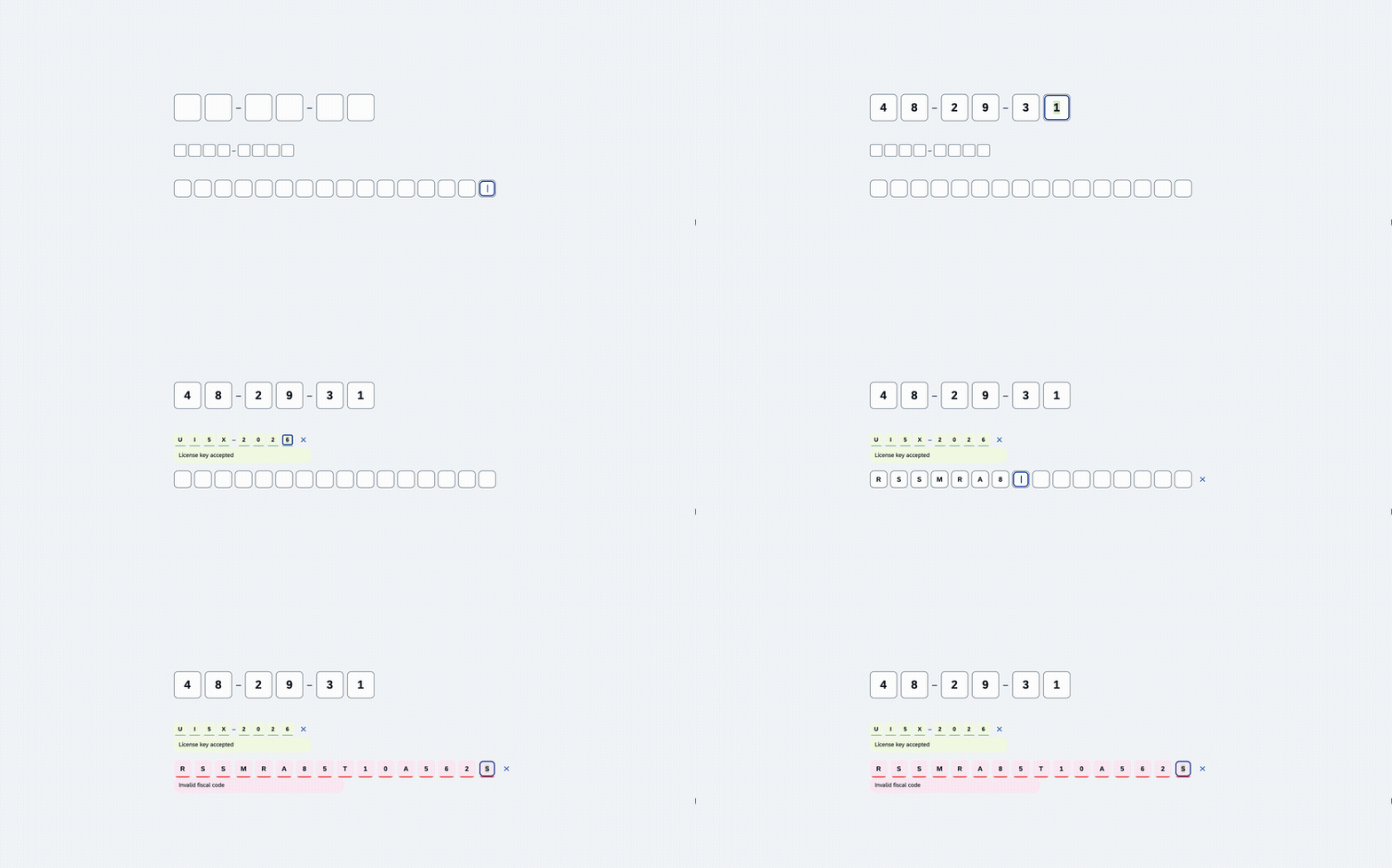
The exposed value is always a string, including in Numeric mode, so leading zeroes are
preserved. Medium matches the standard sap.m.Input height; Small is suitable for compact
forms and Large emphasizes short verification codes.
| Property | Type | Default | Description |
|---|---|---|---|
segmentCount | int | 6 | Number of segments, clamped between 1 and 34. |
inputType | ui5x.input.SegmentedInputType | Numeric | Accepted characters: Numeric or Alphanumeric. |
size | ui5x.input.SegmentedInputSize | Medium | Segment size: Small, Medium or Large. |
value | string | "" | Current normalized value, limited to the configured segment count. |
showSeparators | boolean | false | Display visual separators between groups. |
separatorInterval | int | 3 | Number of segments in each group; values below 1 become 1. |
valueState | sap.ui.core.ValueState | None | Fiori value state applied to every segment. |
valueStateText | string | "" | Message associated with the current value state. |
showClearIcon | boolean | false | Show a transparent Fiori clear button while a value is present. |
| API | Type | Description |
|---|---|---|
liveChange | Event | Fired after every user change with the current value. |
complete | Event | Fired when every segment contains a character. |
clear() | Method | Clears all segments without firing user-interaction events. |
Examples
sap.ui.require(["ui5x/input/SegmentedInput"], function (SegmentedInput) {
  new SegmentedInput({
    segmentCount: 16,
    inputType: "Alphanumeric",
    size: "Small",
    showClearIcon: true,
    complete: function (oEvent) {
      this.setValueState("Success");
      this.setValueStateText(`Completed: ${oEvent.getParameter("value")}`);
    }
  }).placeAt("content");
});
In XML views:
<mvc:View
  xmlns:mvc="sap.ui.core.mvc"
  xmlns:input="ui5x.input">

  <input:SegmentedInput
    segmentCount="6"
    inputType="Numeric"
    size="Large"
    showSeparators="true"
    separatorInterval="3"
    value="{/verificationCode}"
    valueState="{/codeState}"
    valueStateText="{/codeStateText}"
    liveChange=".onCodeChange"
    complete=".onCodeComplete" />

</mvc:View>
ChatFeed
ChatFeed combines a growing sap.m.TextArea composer with a chat-style message list. Its default
messages aggregation accepts ChatMessage controls and can be bound directly to a model. Set
ownMessage on each message to align messages from the current user to the end side.
When sendOnEnter is enabled, Enter sends the message and Shift+Enter inserts a new line. When it
is disabled, Enter keeps the standard multiline text-area behavior.

The control emits actions and leaves model mutations to the application, so the same API works
with JSONModel, OData and other UI5 models. Sending clears the composer after the send event.
Message appearance is configured independently for own and incoming messages. Conversation
uses a transparent surface, while Bubble uses a neutral Fiori bubble. Bottom alignment preserves
chronological order while initially showing the latest messages.
ChatFeed property | Type | Default | Description |
|---|---|---|---|
value | string | "" | Current composer value. |
placeholder | string | "" | Composer placeholder. |
enabled | boolean | true | Enables the composer and send action. |
editable | boolean | true | Allows the composer value to be changed. |
loading | boolean | false | Replaces messages with chat skeleton placeholders. |
sendOnEnter | boolean | true | Sends when the user presses Enter. |
sendButtonText | string | "" | Optional send button text. |
sendButtonIcon | sap.ui.core.URI | sap-icon://paper-plane | Send button icon. |
sendButtonType | sap.m.ButtonType | Emphasized | Send button type. |
sendButtonTooltip | string | sap.m localized text | Accessible send button tooltip. |
showComposer | boolean | true | Renders the composer. A read-only feed sets it to false, and send is then never fired. |
showSendButton | boolean | true | Displays the send button. |
sendButtonEnabled | boolean | true | Enables the button independently from Enter. |
messageTimestampFormat | ui5x.chat.ChatMessageTimestampFormat | Time | Displays each timestamp as Time, as DateTime, or hides it with None. Without date separators, Time alone leaves the day ambiguous. |
groupByDate | boolean | true | Inserts date separators between message groups. |
highlightOwnMessage | boolean | false | Highlights every message marked as ownMessage. |
ownMessageAppearance | ui5x.chat.ChatMessageAppearance | Bubble | Selects the appearance of messages from the current user. |
incomingMessageAppearance | ui5x.chat.ChatMessageAppearance | Conversation | Selects the appearance of incoming messages. |
composerPosition | ui5x.chat.ChatFeedComposerPosition | Top | Places the composer above or below the messages. |
messageAlignment | ui5x.chat.ChatFeedMessageAlignment | Top | Starts short conversations at the top or bottom and controls the initial scroll position. |
height | sap.ui.core.CSSSize | 100% | Height of the whole chat, which keeps the composer in place as messages arrive; a percentage needs a parent with a height of its own, and an empty value lets the content decide. |
width | sap.ui.core.CSSSize | 100% | Width of the control. |
ChatMessage property | Type | Default | Description |
|---|---|---|---|
key | string | "" | Stable application key for the message. |
text | string | "" | Message body. |
sender | string | "" | Displayed sender name. |
ownMessage | boolean | false | Aligns messages from the current user to the end. |
editable | boolean | false | Enables inline editing with save and cancel actions. |
deletable | boolean | false | Displays a Fiori reject delete action. |
timestamp | any | null | Date, ISO string or numeric message timestamp. |
| Event | Parameter | Description |
|---|---|---|
liveChange | value: string | Fired whenever the composer value changes. |
send | value: string | Fired after a non-empty value is submitted. |
messageEdit | message: ChatMessage, value: string | Fired when an inline edit is confirmed. |
messageDelete | message: ChatMessage | Fired when a message delete action is pressed. |
Examples
sap.ui.require([
  "ui5x/chat/ChatFeed",
  "ui5x/chat/ChatMessage"
], function (ChatFeed, ChatMessage) {
  const oChatFeed = new ChatFeed({
    value: "{/draft}",
    placeholder: "Write a message",
    sendOnEnter: true,
    sendButtonText: "Send",
    groupByDate: true,
    messageTimestampFormat: "Time",
    ownMessageAppearance: "Bubble",
    incomingMessageAppearance: "Conversation",
    composerPosition: "Bottom",
    messageAlignment: "Bottom",
    height: "100%",
    send: function (oEvent) {
      // Add oEvent.getParameter("value") to the application model.
    },
    messageEdit: function (oEvent) {
      // Update oEvent.getParameter("message").getBindingContext().
    },
    messageDelete: function (oEvent) {
      // Remove the corresponding entry from the application model.
    }
  });

  oChatFeed.bindAggregation("messages", {
    path: "/messages",
    template: new ChatMessage({
      key: "{id}",
      text: "{text}",
      sender: "{sender}",
      ownMessage: "{ownMessage}",
      editable: "{editable}",
      deletable: "{deletable}",
      timestamp: "{timestamp}"
    }),
    templateShareable: false
  });
});<mvc:View
xmlns:mvc="sap.ui.core.mvc"
xmlns:chat="ui5x.chat">
<chat:ChatFeed
value="{/draft}"
placeholder="Write a message"
sendOnEnter="true"
groupByDate="true"
messageTimestampFormat="Time"
ownMessageAppearance="Bubble"
incomingMessageAppearance="Conversation"
composerPosition="Bottom"
messageAlignment="Bottom"
height="100%"
messages="{/messages}"
send=".onSend"
messageEdit=".onMessageEdit"
messageDelete=".onMessageDelete">
<chat:messages>
<chat:ChatMessage
key="{id}"
text="{text}"
sender="{sender}"
ownMessage="{ownMessage}"
editable="{editable}"
deletable="{deletable}"
timestamp="{timestamp}" />
</chat:messages>
</chat:ChatFeed>
</mvc:View>Development
Requires Node.js 20.19+ or 22.12+ and npm 8+. UI5 CLI 4 itself accepts Node.js 20.11+,
but the interface generator loads an ESM-only dependency and require() of an ES module needs
those versions. Node.js 21 is not supported by UI5 CLI 4.
npm install
npm start
npm start regenerates the control interfaces in watch mode and serves one manual demo page per
control at http://localhost:8080/test-resources/ui5x/Skeleton.html. Each carries a toolbar that
changes the layout and the behaviour of its control, and a theme selector covering every theme
the library ships, which is the practical way to look at the dark and high-contrast palettes.
| Script | What it does |
|---|---|
npm start | Interface generator (watch) + dev server |
npm test | QUnit suite in headless Chrome; exits non-zero on the first failing assertion, so it works as a CI gate |
npm run test:unit:browser | The same suite in a visible browser, which is easier to debug |
npm run interfaces | Generate the *.gen.d.ts control interfaces once |
npm run typecheck | tsc --noEmit |
npm run build | Interfaces + typecheck + regular UI5 build into dist/ |
npm run start:dist | Serve the built library from dist/ |
npm run package:pack | Build, prepare and create the distributable npm tarball |
npm run package:dry-run | Validate the distributable package without creating a tarball |
npm run clean | Remove dist/ |
Controls are written in TypeScript under src/ui5x/, grouped by namespace, with the LESS sources
in src/ui5x/themes/ and the tests in test/ui5x/. After changing control metadata (properties,
aggregations, events), run npm run interfaces so the generated *.gen.d.ts declarations stay
in sync.
Contributing
Issues and pull requests are welcome at
github.com/rdisomma/ui5x. Please run
npm run typecheck and the QUnit suite before opening a PR.
License
Apache-2.0 — see LICENSE.
Others providing
- custom-controlscustom-controlsThirteen custom controls for abap2UI5, a signature pad and a scanner that reads several barcodes at once among them, each one an ABAP builder class with a single render( ) method and all of them shipped in a BSP of their own.community org, abapThirteen custom UI5 controls for abap2UI5 apps
- @abap2ui5/embed-control@abap2ui5/embed-controlA UI5 custom control that runs an abap2UI5 app inside a host UI5 app, with the abap2UI5 frontend loaded from the backend the app talks to.community org, ui5UI5 custom control that runs an abap2UI5 app inside a host app
- ui5-cc-timerbuttonui5-cc-timerbuttonA UI5 control library with TimerButton, an sap.m.Button that delays becoming enabled or visible and shows other text or an icon in the meantime, with the delay set in milliseconds.independent, ui5UI5 control library with a button that delays enabling or showing
- ui5-control-generatorui5-control-generatorA command-line generator that writes UI5 custom controls, in JavaScript or TypeScript, from the html files in a project, with control logic and renderer split into two files by default.independent, ui5Command line generator of UI5 custom controls from html
- @marianfoo/ui5-cc-dayjs@marianfoo/ui5-cc-dayjsA UI5 custom control that writes a date to the page through Day.js, with the input format, the output format and any shift of days or months set as control properties.independent, ui5UI5 custom control formatting dates with Day.js
- ui5-cc-pdfviewerui5-cc-pdfviewerA UI5 custom control that renders a PDF from a base64 data URI with pdfjs-dist, so a file picked in the browser can be shown before it has been uploaded anywhere and has a URL.independent, ui5UI5 custom control rendering a PDF from a base64 data URI
- openui5-passwordopenui5-passwordAn OpenUI5 input control of password type that checks the typed value against length and character-class rules set as properties, and scores password strength in a separate property.independent, ui5OpenUI5 password input with strength scoring and rules
- openui5-touropenui5-tourAn OpenUI5 control library for a step-by-step guided tour inside a UI5 app, where each TourStep has a title, content, a target control from the view and a placement.independent, ui5OpenUI5 control library for guided app tours
- ui5-lib-visualizationui5-lib-visualizationA UI5 control library that wraps the C3.js charting library as ui5.viz controls (Chart, ChartSeries, ChartDataPoint, ChartAxis, ChartLine, ChartArea and Color) declared in an XML view with data binding.independent, ui5UI5 control library wrapping C3.js charts as ui5.viz controls
- openui5-cameraopenui5-cameraA UI5 control that renders a live camera preview from the device's camera and hands the app the picture as a base64-encoded PNG when the user taps it.independent, ui5UI5 control for live camera preview and PNG capture
- ui5-cc-chartui5-cc-chartA UI5 custom control that wraps Chart.js to render a line chart from label and value records, installed as a plain npm dependency with ui5-tooling-modules in ui5.yaml.community org, ui5UI5 custom control wrapping Chart.js for line charts
- ui5-cc-mdui5-cc-mdA UI5 custom control that renders Markdown, including GitHub-flavoured syntax, to HTML inside an XML view, taking its content from a string, a file path or a model binding.community org, ui5UI5 custom control rendering Markdown to HTML
- ui5-fontawesome-libui5-fontawesome-libA UI5 library that adds Font Awesome's regular, solid and brand icon sets to the sap-icon:// namespace, addressable from a standard Icon control, for UI5 1.120.33 or later.community org, ui5UI5 library adding Font Awesome icon sets to sap-icon://
- openui5-paginatoropenui5-paginatorA UI5 custom control that pages through large data in a table, for backends that serve pages over REST rather than OData.independent, ui5A UI5 custom control that pages through large data in a table, for backends that serve pages over REST rather than OData.
- @openui5/sap.ui.core@openui5/sap.ui.coreThe OpenUI5 core: the module loader, the MVC runtime, data binding, routing, theming and the test stack, which is everything a UI5 app does before a single community package is added.sap official, ui5Framework core: module loader, MVC runtime, binding, routing, theming
Details
Sources
Sources are graph entities: the same page may back several entries, and an unreachable source flags every row that rests on it.
Compatibility and provenance
History in the atlas
- First seen.
For your agent
- Ref
artifact:rdisomma-ui5x- JSON
- /artifacts/rdisomma-ui5x.json
- MCP
- Connecting an agent