openui5-paginator
A UI5 custom control that pages through large data in a table, for backends that serve pages over REST rather than OData.
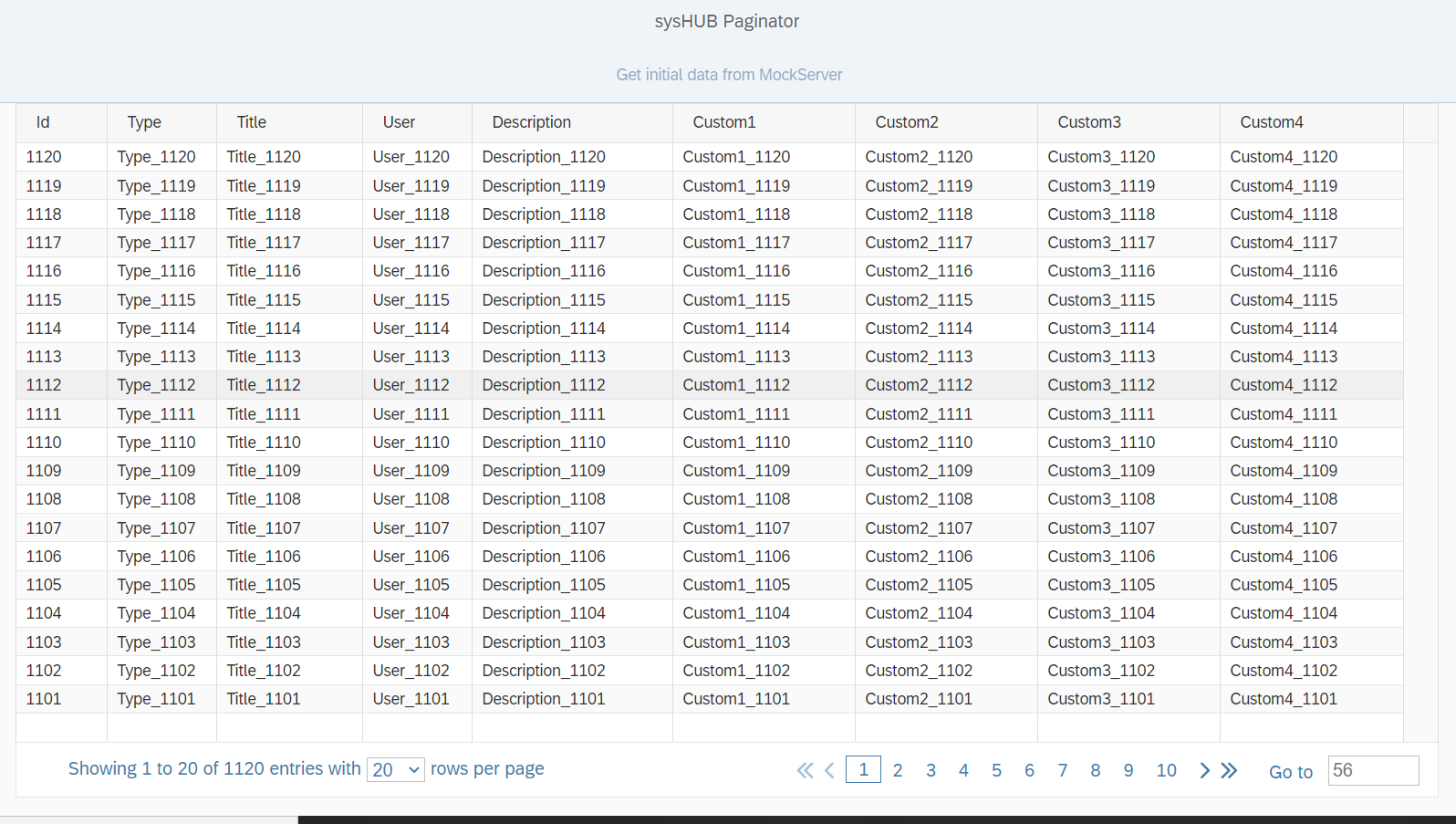
The README says an earlier openUI5 version included a paginator and removed it around 1.45, and that the maintainers need one for the REST-based server API of their sysHUB product. The control goes in a table footer as lab:Paginator from the syshub.controls library, bound to currentPage, entriesAbsolute, entriesPerPage and showSpinner, and raises page and entriesPerPageChanged events carrying the offset and limit for the next request. It does not fetch anything: the application sends those values to its own endpoint, which the README expects to accept offset, limit, orderBy and search parameters. The paginator stays hidden while entriesAbsolute is 0, so the count is set after each query, and the README lists a known inconsistency in the page calculation when entries are deleted while paging.
Facts
Where it sits
Who is behind it

In the atlas: maintains 1, contributes to 1@wolfe100maintainer
Before choosing this
Signals
ActivityQuietRelease and repository quiet for 50 months
Both observable publication channels have been quiet for at least 24 full months. This may be normal for stable software; check whether its current state still fits your use.
What it declares
Every artifact
- Type
- Package
- Origin
- Independently maintained
As a package
- Where it runs
- Inside its host
- Distributed through
- npm
Connections
Custom controls, wrappers and icon fonts packaged for reuse
Download
Install
npm add openui5-paginatorDerived from the package name. No recipe recorded; the README has the configuration.
README
quoted from wolfe100/openui5-paginator under Apache-2.0, readopenui5-paginator
openui5-paginator is a UI5 Custom Control that allow you to handle large data in a Table. Navigation is done via paging.
Motivation
We use openUI5 on the client side as the base technology for our product "sysHUB". On the server side, we are using our REST-based API. The main thing is that we are working with large table entries. The base technology of openUI5 and sapUI5 is oData V4 to get data from the backend. In our case, this is not a good choice because we are providing some REST-Services for our customers, and we can not implement REST-Services and oData Services to the same time in our product. In an earlier version of openUI5, a paginator was included, but it was removed since 1.45 (I think). We are going on to develop the paginator to work with all newer versions and extend it with some valuable features.
Demo
If you check out this project, there is a "demo" app to see how the paginator works. We are using WebStorm as a development IDE. Configure it as a "JavaScript Debug" run configuration to debug the demo app.
You can also use this link to see a working example: openui5-paginator-demo
Usage the control
Download
Check out the GIT-Project or download it as ZIP. Furthermore the package is deployed also in NPM
npm install openui5-paginator
Configure manifest.json
Add the library to sap.ui5 dependencies list and configure the resourceRoots to point where you uploaded the custom library. In this case it is the "thirdparty" folder in your project. This folder must be in the webapp root location.
"sap.ui5": {
    ...
	"dependencies": {
		"minUI5Version": "1.102.2",
		"libs": {
    		...
			"syshub.controls": {}
		}
	},
	"resourceRoots": {
		"syshub.controls": "./thirdparty/syshub/controls/"
	}
}
Add the custom control inside an XML View
First of all add the namespace to the View
xmlns:lab="syshub.controls"
xmlns:t="sap.ui.table"
And then you can simply add the Paginator custom control to your "sap.ui.table". As followed you can see some data bindings.
<t:Table ...>
    <t:footer>
        <lab:Paginator id="idPaginator"
                       currentPage="{modelEntriesMetadata>/currentPage}"
                       entriesAbsolute="{modelEntriesMetadata>/entriesAbsolute}"
                       entriesPerPage="{modelEntriesMetadata>/entriesPerPage}"
                       numberOfVisiblePages="10"
                       showGoto="true"
                       entriesPerPageVisible = "true"
                       showSpinner="{modelEntriesMetadata>/showSpinner}"
                       page="onPage"
                       entriesPerPageChanged = "onEntriesPerPageChanged">
        </lab:Paginator>
    <t:footer>
    <t:columns>
        ...
    </t:columns>
</t:Table>
Parameters
| Name | Type | Default | Description |
|---|---|---|---|
| currentPage | number | 0 | The current selected page or the page to set |
| entriesAbsolute | number | 0 | The absolute count of the entires given by the query |
| showGoto | boolean | false | Shows the direct GOTO input field |
| entriesPerPage | int | 10 | How much entries should shown of each page |
| numberOfVisiblePages | number | 10 | How much pages shown which are directly selectable |
| showSpinner | boolean | false | Shows a spinner to give the user information to get data from the server |
Events
entriesPerPageChanged
| Parameter | Type | Description |
|---|---|---|
| offset | int | The offset where to start the new query |
| limit | int | The new limit is how many entries must be get |
page
| Parameter | Type | Description |
|---|---|---|
| srcPage | int | The page which is the current one before the page event is fired (and another page is displayed) |
| targetPage | int | The page that shall be displayed next after the page event is fired |
| offset | int | The offset where to start the new query |
| limit | int | The limit how many entries must get |
| type | syshub.controls.PaginatorEvent | Provides the values 'First', 'Last', 'Next', 'Previous', 'Goto'. The event parameter informs the application how the user navigated to the new page: Whether the 'Next' button was used, or another button, or whether the page was directly selected |
Methods
| Name | Description |
|---|---|
| setCurrentPage(PageNumber) | Sets the current page |
| getCurrentPage | Gets the current selected page |
| setEntriesAbsolute(AbsoluteQueryEntries) | Sets the absolute query entries to compute the pages |
| getEntriesAbsolute(AbsoluteQueryEntries) | Gets the absolute entries of the current query |
| setShowGoto(boolean value) | If true, the show "GOTO" input field is shown |
| getShowGoto() | Return the status of the showGoto property |
| setEntriesPerPage(Number) | Set the count of the page entries are shown |
| GetEntriesPerPage() | Returns the number of page entries shown |
| SetNumberOfVisiblePages(Number) | Set the count of visible pages are shown |
| getNumberOfVisiblePages() | Gets the number of visible pages shown |
| setShowSpinner(boolean value) | If true a spinner is shown, to give the user a feedback |
| getShowSpinner() | Gets the status of the spinner |
Build
If you would like to extend and customize the control, you can easily do that but re-building the code with just a simple ui5 cli commands:
npm install
ui5 build
ui5 startApp
How to work with the control
It is important to have a REST-Service with the following parameters.
eg: /webapi/v3/data/list?offset=0&limit=20&orderBy=id.desc&search=id<1000
We use RSQL-Queries in the orderBy and search criteria.
The first query has no "id" inside the search criteria. This means we got a snapshot view of the table and got in the response header the "abs_count" and the "highest_id". All queries while paging limited the query in the search criteria with the highest_id. The reason for this is, that growing up the table with new entries will destroy paging if we don't have the highest_id in the search criteria.
Known issues
One problem which we don't found a solution is removing of entries while paging. This means, if another instance removes entries which are included in the query, the result is different, regarding the abs_count and the computing of paging can run in some problems but we live with this limitation. One idear can be, if while paing the abs_count changed the current page can be set to the first one.
Please have a look of the DataService.js and the mockserver.js to understand how paging is working.
Important
If the value "entriesAbsolute" = 0, the paginator is not shown. Be sure, to set this value after a query.
Credits
Wolfgang Haag
- Email: whaag@nt-ware.com
License
This project is licensed under the Apache 2.0 License - see the LICENSE file for details
History
v1.0.0
Others providing
Compare all 15 on the Custom controls and libraries page →- custom-controlscustom-controlsThirteen custom controls for abap2UI5, a signature pad and a scanner that reads several barcodes at once among them, each one an ABAP builder class with a single render( ) method and all of them shipped in a BSP of their own.community org, abapThirteen custom UI5 controls for abap2UI5 apps
- @abap2ui5/embed-control@abap2ui5/embed-controlA UI5 custom control that runs an abap2UI5 app inside a host UI5 app, with the abap2UI5 frontend loaded from the backend the app talks to.community org, ui5UI5 custom control that runs an abap2UI5 app inside a host app
- ui5-cc-timerbuttonui5-cc-timerbuttonA UI5 control library with TimerButton, an sap.m.Button that delays becoming enabled or visible and shows other text or an icon in the meantime, with the delay set in milliseconds.independent, ui5UI5 control library with a button that delays enabling or showing
- ui5-control-generatorui5-control-generatorA command-line generator that writes UI5 custom controls, in JavaScript or TypeScript, from the html files in a project, with control logic and renderer split into two files by default.independent, ui5Command line generator of UI5 custom controls from html
- @marianfoo/ui5-cc-dayjs@marianfoo/ui5-cc-dayjsA UI5 custom control that writes a date to the page through Day.js, with the input format, the output format and any shift of days or months set as control properties.independent, ui5UI5 custom control formatting dates with Day.js
- ui5-cc-pdfviewerui5-cc-pdfviewerA UI5 custom control that renders a PDF from a base64 data URI with pdfjs-dist, so a file picked in the browser can be shown before it has been uploaded anywhere and has a URL.independent, ui5UI5 custom control rendering a PDF from a base64 data URI
- openui5-passwordopenui5-passwordAn OpenUI5 input control of password type that checks the typed value against length and character-class rules set as properties, and scores password strength in a separate property.independent, ui5OpenUI5 password input with strength scoring and rules
- openui5-touropenui5-tourAn OpenUI5 control library for a step-by-step guided tour inside a UI5 app, where each TourStep has a title, content, a target control from the view and a placement.independent, ui5OpenUI5 control library for guided app tours
- ui5-lib-visualizationui5-lib-visualizationA UI5 control library that wraps the C3.js charting library as ui5.viz controls (Chart, ChartSeries, ChartDataPoint, ChartAxis, ChartLine, ChartArea and Color) declared in an XML view with data binding.independent, ui5UI5 control library wrapping C3.js charts as ui5.viz controls
- UI5XUI5XAn OpenUI5 and SAPUI5 library of eight composite controls under the ui5x namespace: skeleton placeholders and a container that swaps them for content, loading wrappers for the responsive and the grid table, an accordion, a copy button, a segmented input and a chat feed.independent, ui5UI5 library of eight composite controls under the ui5x namespace
- openui5-cameraopenui5-cameraA UI5 control that renders a live camera preview from the device's camera and hands the app the picture as a base64-encoded PNG when the user taps it.independent, ui5UI5 control for live camera preview and PNG capture
- ui5-cc-chartui5-cc-chartA UI5 custom control that wraps Chart.js to render a line chart from label and value records, installed as a plain npm dependency with ui5-tooling-modules in ui5.yaml.community org, ui5UI5 custom control wrapping Chart.js for line charts
- ui5-cc-mdui5-cc-mdA UI5 custom control that renders Markdown, including GitHub-flavoured syntax, to HTML inside an XML view, taking its content from a string, a file path or a model binding.community org, ui5UI5 custom control rendering Markdown to HTML
- ui5-fontawesome-libui5-fontawesome-libA UI5 library that adds Font Awesome's regular, solid and brand icon sets to the sap-icon:// namespace, addressable from a standard Icon control, for UI5 1.120.33 or later.community org, ui5UI5 library adding Font Awesome icon sets to sap-icon://
Details
Sources
Sources are graph entities: the same page may back several entries, and an unreachable source flags every row that rests on it.
Compatibility and provenance
History in the atlas
- First seen.
For your agent
- Ref
artifact:wolfe100-openui5-paginator- JSON
- /artifacts/wolfe100-openui5-paginator.json
- MCP
- Connecting an agent