CDS pluginCDS plugintypeInstalls into a CAP project and extends the runtime. CAP loads it through cds.requires or the plugin hook.See every one →What this type is →by SAPby SAPoriginPublished by SAP itself. A visible facet, never an input to a reading — a dormant official plugin reads exactly like a dormant independent one.See every one →

@cap-js/telemetry

Automatic OpenTelemetry instrumentation for CAP Node.js services and their database calls, exported as traces and metrics to the console, SAP Cloud Logging, Dynatrace, Jaeger or an OTLP endpoint.

@cap-js/telemetry instruments a CAP Node.js server for OpenTelemetry without the application writing any of it. Added as a dependency it wraps the essential functions of cds.Service and its derivates, and for @cap-js/cds-dbs-based databases it wraps prepare() and the statement run as well, so a finished request comes out as a tree of elapsed times on the console. Beside the traces it observes host metrics, the database pool and, from @sap/cds 9, CAP's persistent queue. Where the data goes is one setting, cds.requires.telemetry.kind: the console by default in development and in production, or SAP Cloud Logging, Dynatrace, Jaeger or an OTLP endpoint, each of which needs its exporter packages added by hand and its target prepared first. Database tracing reaches no other driver, exporting logs over OpenTelemetry is an experimental opt-in, and the environment variable NO_TELEMETRY disables the plugin.

Facts

Latestv2.1.1ReleasedLast pushLicenceApache-2.0

Where it sits

Lives in
Provides
TelemetryCAPTelemetrycapabilitySeeing what a running service did — traces across handlers and database calls, metrics, and correlation that survives an async boundary.
Add-on to
@sap/cds@sap/cdsartifactThe CAP Node.js runtime, which compiles the CDS model, serves the services declared in it, answers generic requests before any handler runs, and loads every cds-plugin.
Flavors
Node.jsfrom its runtime
Requires
@sap/cds^10 || ^9@sap/cdsartifactTo run as a CDS plugin extending the CAP Node.js runtime it instruments.

Who is behind it

SAP Cloud Application Programming ModelSAP Cloud Application Programming ModelOrganisationMaintains this
In the atlas: maintains 34
@cap-js
maintainerBob den OsPersonContributes to this
In the atlas: contributes to 13
@BobdenOs
Christian SchüringsPersonContributes to this
In the atlas: contributes to 25
@cschuerings
Heiko WitteborgPersonContributes to this
In the atlas: contributes to 18
@hm23
ankulPersonContributes to this
In the atlas: contributes to 4
@kulliax
Lars PlessingPersonContributes to this
In the atlas: contributes to 9
@larsPlessing
mariayordPersonContributes to this
In the atlas: contributes to 10
@mariayord
Mauricio LaufferPersonContributes to this
In the atlas: maintains 16, contributes to 41, wrote 4
@mauriciolauffer
PaulPersonContributes to this
In the atlas: contributes to 12
@PDT42
M SahuPersonContributes to this
In the atlas: contributes to 2
@sahumadhusudan
Marten SchiwekPersonContributes to this
In the atlas: contributes to 16
@schiwekM
16 contributors

Before choosing this

Conditions

LicenceSAP Developer License Agreement 3.2 CAP§ 1, 2, 3A cds-plugin is used with SAP CAP materials, or an artifact is explicitly identified as a CAP plugin or application.
  • § 1 License. Productive customer applications are limited to SAP BTP or another SAP-licensed platform, and mass extraction to a non-SAP product is restricted except where solely required for SAP interoperability.
  • § 2 Intellectual Property. The agreement retains SAP's rights in the covered materials and limits making APIs, tools or software available to third parties, while preserving ownership of customer applications subject to SAP's underlying rights.
  • § 3 Artificial Intelligence Training. The agreement prohibits use of the covered materials and customer applications for training artificial-intelligence models or systems.
SAP Developer License Agreement 3.2 CAP →

What it declares

Every artifact

Type
CDS plugin
Origin
By SAP
Runtime
Node.js

As a CDS plugin

Declared for
^10 || ^9
Distributed through
npm

For telemetry

Signals
TracesMetricsLogs
Where it sends data
ConsoleSAP Cloud LoggingDynatraceJaegerOTLP endpoint
Instrumented by
AutomaticallyApplication code

Tasks this contributes to4Beta

Count a business event as a metricA count the business asks for, how often an order is released or a document read, is emitted as a metric beside the runtime's technical ones, with the tenant on it.Node.js, JavaShown workingmetric written in application code
What it does

The plugin's own metrics are technical, host, database pool and the persistent queue. A business count is added by the application through the OpenTelemetry JavaScript API, and the plugin exports it with the rest; the README's example registers a counter on listening and raises it in a middleware with the tenant as an attribute.

Remaining work

Write the meter and the counter, decide where they are raised, and carry the attributes; the model says nothing about such a metric on this route.

All options on the Telemetry page →
See what the browser did before the request arrivedThe time a UI5 interaction took in the browser, and the JavaScript errors it hit, land in the backend beside the server's own telemetry, so a complaint about a slow or broken screen can be checked.Node.jsAssessed, not knownruntime instrumentation
What it does

Its instrumentation starts at the server: the spans wrap the functions of cds.Service and the database calls, and nothing on the pages read states that it reads a FESR header or accepts anything the browser measured. Absence of a statement is not a refusal, so this stays unknown rather than a no.

Remaining work

Read the plugin's instrumentations option and its list of default instrumentations for a browser or FESR source before treating this as settled.

All options on the Telemetry page →
See where a slow request spent its timeA request that takes too long is broken down into the service calls, handlers and database statements it ran, with the elapsed time of each, so the slow part can be named.Node.js, JavaCoversruntime instrumentation
What it does

Adding the plugin to the dependencies is the whole setup: it wraps the essential functions of cds.Service and its derivates, and the prepare and statement run of a @cap-js/cds-dbs database, and prints the finished request as a tree of elapsed times. The console is its default kind in development and in production, so the breakdown is there without an export target.

Remaining work

Read the tree and decide which span is the problem; nothing names it. A service on another database driver gets the service spans without the database ones.

All options on the Telemetry page →
Send a service's traces and metrics to SAP Cloud LoggingThe spans and metrics a deployed CAP service produces arrive in an SAP Cloud Logging instance, where they can be searched and put on a dashboard.Node.js, JavaShown workingexporter in the application
What it does

One of the plugin's five predefined kinds exports its traces and metrics to SAP Cloud Logging. The README states the instance and the binding as requirements, names the three exporter packages the project has to add itself, and gives the instance configuration that makes the binding carry OpenTelemetry credentials.

Conditions

cds.requires.telemetry.kind is set to to-cloud-logging; An SAP Cloud Logging instance exists and the application is bound to it; The instance was created or updated with ingest_otlp enabled, so the binding carries OpenTelemetry credentials; @grpc/grpc-js, @opentelemetry/exporter-trace-otlp-grpc and @opentelemetry/exporter-metrics-otlp-grpc are added as dependencies; A user-provided service instance used for the binding carries the tag Cloud Logging

Remaining work

Create or update the instance with ingest_otlp, add the three exporter packages, set the kind per profile, and check the binding resolves. Nothing in the plugin creates or configures the instance.

All options on the Telemetry page →

Connections5

@cap-js/telemetry connections@cap-js/telemetryPROVIDES→ provides1provides stated Produces the traces and metrics of a CAP Node.js server: spans around the essential functions of cds.Service and around the prepare and run of a @cap-js/cds-dbs database, host, database-pool and persistent-queue metrics beside them, and one configured kind that prints them or exports them to SAP Cloud Logging, Dynatrace, Jaeger or an OTLP endpoint. CAP Plugins & Enhancements — Telemetry: https://cap.cloud.sap/docs/plugins/ @cap-js/telemetry — README, Traces: https://raw.githubusercontent.com/cap-js/telemetry/e97874b47272abb9f8bbae776c0df5378d6cf1a3/README.md @cap-js/telemetry — README, Setup: https://raw.githubusercontent.com/cap-js/telemetry/e97874b47272abb9f8bbae776c0df5378d6cf1a3/README.mdTelemetryUSED BY← needed by1needed by derived The metrics are produced through the telemetry plugin this library extends, and its README lists telemetry enabled in the CAP application configuration among the prerequisites. Through: inverted from its requires edge Business-metrics — README, About this project: https://raw.githubusercontent.com/cap-js-community/business-metrics/eee01d0e28e5a76bdb3d58900f8068d516d1ab17/README.md Business-metrics — README, Requirements and Setup: https://raw.githubusercontent.com/cap-js-community/business-metrics/eee01d0e28e5a76bdb3d58900f8068d516d1ab17/README.md@cap-js-community/business-metricsNEEDS→ connects to2connects to stated Contributing CDS spans into the SAP Cloud ALM agent's tracing pipeline instead of running its own OpenTelemetry SDK. telemetry README: https://github.com/cap-js/telemetrySAP Cloud ALMconnects to stated If: `cds.requires.telemetry.kind` is `to-cloud-logging`. Exporting traces and metrics to a bound SAP Cloud Logging instance, whose OTLP ingestion has to be enabled for the binding to carry OpenTelemetry credentials. @cap-js/telemetry — README, telemetry-to-cloud-logging: https://raw.githubusercontent.com/cap-js/telemetry/c76713c64c2cb59b00b4fd8651409ddc64b56f7b/README.md @cap-js/telemetry — README, telemetry-to-cloud-logging: https://raw.githubusercontent.com/cap-js/telemetry/c76713c64c2cb59b00b4fd8651409ddc64b56f7b/README.md @cap-js/telemetry — README, telemetry-to-cloud-logging: https://raw.githubusercontent.com/cap-js/telemetry/c76713c64c2cb59b00b4fd8651409ddc64b56f7b/README.md @cap-js/telemetry — README, telemetry-to-cloud-logging: https://raw.githubusercontent.com/cap-js/telemetry/e97874b47272abb9f8bbae776c0df5378d6cf1a3/README.mdSAP Cloud Loggingif→ needs1needs stated To run as a CDS plugin extending the CAP Node.js runtime it instruments. telemetry README: https://github.com/cap-js/telemetry@sap/cds

Install

npm add @cap-js/telemetry

Derived from the package name. No recipe recorded; the README has the configuration.

Learn more2

Readings
  1. CAP in the age of AI #5 - agents wrap-upDJ Adams, Johannes Vogt, Simon Engel, Stefan Rudi, Daniel Schlachter, YouTube — SAP Developers playlists
  2. Kyma Integration with SAP Cloud Logging. Part 2: Let's ship some tracesgabbi, SAP Community
What changed
  1. v2.0.0

    Support for @sap/cds 8 is removed and @sap/cds 10 is supported. The plugin works with OpenTelemetry SDK 2.0, which 1.3.0 did not support, and host metrics come from @opentelemetry/instrumentation-host-metrics instead of the deprecated @opentelemetry/host-metrics.

    Makes stale:

    Setups that pair the plugin with CAP 8, or that install @opentelemetry/host-metrics beside it.

1 earlier
  1. v1.3.0

    The telemetry-to-otlp kind switches to gRPC on its own when the endpoint uses port 4317, where it exported over http/protobuf before. @cap-js/hana's promisified driver API is traced by default, switched off with cds.requires.telemetry.tracing._hana_prom = false.

Where it sits in your app

Download
Your CAP applicationYour SAP BTP subaccountSAP cloud@cap-js/telemetry — README, telemetry-to-cloud-logging, checked 2026-09-19: “Exports traces and metrics to SAP Cloud Logging.”OTLPoutboundif`cds.requires.telemetry.kind`is `to-cloud-logging`telemetry README, checked 2026-10-18: “`@cap-js/telemetry` detects it and, instead of setting up its own tracer provider, contributes its CDS spans to the agent's tracing pipeline (as a delegate on the agent's span processor).”outbound@cap-js/telemetry, module@cap-js/telemetrySAP Cloud Logging, service instanceSAP Cloud LoggingSAP Cloud ALM, SAP solutionSAP Cloud ALMSAP solution
SAPnot SAP's, or the project's ownstated in the document

README

quoted from cap-js/telemetry under Apache-2.0, read
cap-js/telemetry/README.mdOn GitHub

Welcome to @cap-js/telemetry

REUSE status

About This Project

@cap-js/telemetry is a CDS plugin providing observability features, including automatic OpenTelemetry instrumentation.

Documentation can be found at cap.cloud.sap and opentelemetry.io.

Table of Contents

Requirements

See Getting Started on how to jumpstart your development and grow as you go with SAP Cloud Application Programming Model.

Setup

Simply add @cap-js/telemetry to your dependencies via npm add @cap-js/telemetry and you will find telemetry output written to the console like so:

[odata] - GET /odata/v4/processor/Incidents 
[telemetry] - elapsed times:
    0.00 →   2.85 =   2.85 ms  GET /odata/v4/processor/Incidents
    0.47 →   1.24 =   0.76 ms    ProcessorService - READ ProcessorService.Incidents
    0.78 →   1.17 =   0.38 ms      db - READ ProcessorService.Incidents
    0.97 →   1.06 =   0.09 ms        @cap-js/sqlite - prepare SELECT json_object('ID',ID,'createdAt',createdAt,'creat…
    1.10 →   1.13 =   0.03 ms        @cap-js/sqlite - stmt.all SELECT json_object('ID',ID,'createdAt',createdAt,'crea…
    1.27 →   1.88 =   0.61 ms    ProcessorService - READ ProcessorService.Incidents.drafts
    1.54 →   1.86 =   0.32 ms      db - READ ProcessorService.Incidents.drafts
    1.74 →   1.78 =   0.04 ms        @cap-js/sqlite - prepare SELECT json_object('ID',ID,'DraftAdministrativeData_Dra…
    1.81 →   1.85 =   0.04 ms        @cap-js/sqlite - stmt.all SELECT json_object('ID',ID,'DraftAdministrativeData_Dr…

See Predefined Kinds for additional dependencies you need to bring yourself as well as some additional setup steps you need to perform when exporting to Dynatrace, SAP Cloud Logging, Jaeger, etc.

The plugin can be disabled by setting environment variable NO_TELEMETRY to something truthy.

Database tracing is limited to @cap-js/cds-dbs-based databases, such as @cap-js/sqlite and @cap-js/hana.

Telemetry Signals

There are three categories of telemetry data, also referred to as signals. The following briefly describes, how each is addressed in @cap-js/telemetry.

For more information on signals in general, please refer to https://opentelemetry.io/docs/concepts/signals.

Traces

Traces allow you to analyze how a request, message, task, etc. is being processed throughout your distributed system. For this, @cap-js/telemetry wraps all essential functions of cds.Service and its derivates. For @cap-js databases (e.g., @cap-js/sqlite), this includes prepare() and subsequent stmt.run() and the likes.

Example trace in Dynatrace: Example trace in Dynatrace
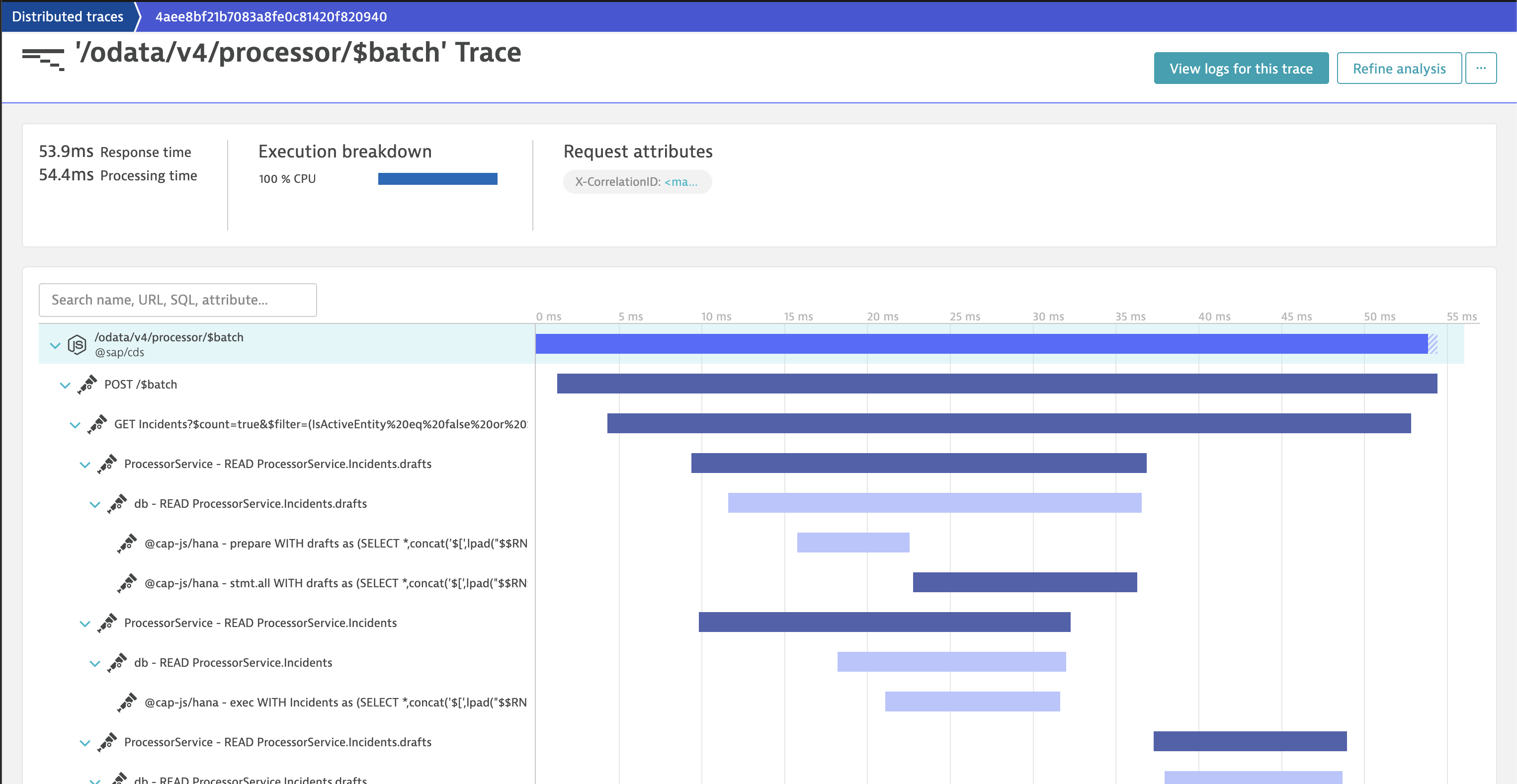
An example trace printed to the console can be found in telemetry-to-console.

To export traces to Dynatrace, use the predefined kind telemetry-to-dynatrace. If Dynatrace OneAgent is present, the CDS spans can alternatively be captured in-process by OneAgent, without the OTLP trace exporter.

Metrics

Metrics are "measurements captured at runtime", which help you understand your app's health and performance.

The @cap-js/telemetry enables the observation of some metrics out of the box. These include generic host metrics collected by @opentelemetry/instrumentation-host-metrics (if the package is found in the app's dependencies), metrics regarding the app's database pool, namely the pool info statistics of generic-pool, as well as metrics regarding CAP's Persistent Queue.

Host Metrics

@opentelemetry/instrumentation-host-metrics allows you to optionally restrict collection to one or more metric groups via config option metricGroups. For backward compatibility, @cap-js/telemetry limits collection to ['process.cpu', 'process.memory'] if not configured manually (via cds.requires.telemetry.instrumentations) or disabled via environment variable HOST_METRICS_RETAIN_SYSTEM=true.

To avoid spamming the console, only process.* metrics are printed by default, regardless of whether the system.* metrics are ignored or not. Printing the system.* metrics (if not ignored) in the built-in console exporter can be enabled via environment variable HOST_METRICS_LOG_SYSTEM=true.

Example host metrics outputs:
[telemetry] - host metrics:
  Process Cpu time in seconds: { user: 1691.832, system: 218.223 }
  Process Cpu usage time 0-1: { user: 82.07801878654074, system: 10.586932682237526 }
  Process Memory usage in bytes: 141049856
Database Pool

The collection of db.pool metrics, can be disabled by setting cds.requires.telemetry.metrics._db_pool to false. Please note, that the specific name and structure of this option should be considered beta and may well be subject to future change.

Example db.pool output:
[telemetry] - db.pool:
     size | available | pending
      1/1 |       1/1 |       0
Queue

To capture measurements about CAP's persistent queue, interactions with and the current status of the relevant database table - cds.outbox.Messages - are observed. The interaction-based metrics incoming and outgoing are observed per app instance, whereas the table-based metrics cold, remaining and * storage times are observed per database (but by each app instance, nevertheless). Observation for a specific queued service starts, once a message targeting that service is queued for the first time. All observations of storage times are measured in seconds.

The collection of queue metrics, can be disabled by setting cds.requires.telemetry.metrics._queue to false. Please note, that the specific name and structure of this option should be considered beta and may well be subject to future change. Further, queue metrics are only available when using @sap/cds >= 9.

Example queue output:
[telemetry] - queue:
     cold | remaining | min storage time | med storage time | max storage time | incoming | outgoing
        2 |        32 |                2 |               16 |              128 |      256 |      512 
Custom Metrics

Finally, custom metrics can be added as shown in the following example (tenant-aware request counting):

// server.js

const cds = require('@sap/cds')

let counter
cds.middlewares.add((req, _, next) => {
  counter.add(1, { 'sap.tenancy.tenant_id': cds.context.tenant })
  next()
})
cds.on('listening', () => {
  const { metrics } = require('@opentelemetry/api')
  const meter = metrics.getMeter('@capire/incidents:req.counter')
  counter = meter.createCounter('req.counter')
})

module.exports = cds.server
Logs

Exporting logs via OpenTelemetry is supported as an experimental opt-in feature. Enable it by adding section logging to cds.requires.telemetry as follows (using grpc as an example):

"logging": {
  "exporter": {
    "module": "@opentelemetry/exporter-logs-otlp-grpc",
    "class": "OTLPLogExporter"
  }
}

cds.log()'s custom fields configuration for SAP Cloud Logging determines the additional attributes added to the LogRecord. See cds.log() - Custom Fields for details.

Please note that in order for logs to be exported via OpenTelemetry, cds.log()'s JSON log formatter must be active, which is the default in production but not in development.

Predefined Kinds

There are five predefined kinds as follows:

telemetry-to-console

Prints traces and metrics to the console as previously depicted (traces in Setup and metrics in Telemetry Signals - Metrics).

No additional dependencies are needed. This is the default kind in both development and production.

telemetry-to-dynatrace

Exports traces and metrics to Dynatrace. Hence, a Dynatrace instance is required and the app must be bound to that Dynatrace instance.

Use via cds.requires.telemetry.kind = 'to-dynatrace'.

Required additional dependencies:

  • @opentelemetry/exporter-trace-otlp-proto
  • @opentelemetry/exporter-metrics-otlp-proto

The necessary scopes for exporting traces (openTelemetryTrace.ingest) and metrics (metrics.ingest) are not part of the standard apitoken and must be requested. This can be done via parameterizing the binding to a "managed service instance" (i.e., not a user-provided service instance) as follows.

Excerpt from example mta.yaml:

requires:
  - name: my-dynatrace-instance
    parameters:
      config:
        tokens:
          - name: ingest_apitoken #> default lookup name, configurable via cds.requires.telemetry.token_name
            scopes:
              - openTelemetryTrace.ingest
              - metrics.ingest

In the user-provided service case, you'll need to generate a token in Dynatrace with the necessary scopes, add it to the credentials of the user-provided service, and configure cds.requires.telemetry.token_name if the token's key in the credentials object is not ingest_apitoken.

In Dynatrace itself, you need to ensure that the following two features are enabled:

  1. OpenTelemetry Node.js Instrumentation agent support:
    • From the Dynatrace menu, go to Settings > Preferences > OneAgent features.
    • Find and turn on OpenTelemetry Node.js Instrumentation agent support.
  2. W3C Trace Context:
    • From the Dynatrace menu, go to Settings > Server-side service monitoring > Deep monitoring > Distributed tracing.
    • Turn on Send W3C Trace Context HTTP headers.
Dynatrace OneAgent

If Dynatrace OneAgent is present, for example on SAP BTP CF, and the OTLP trace exporter is not installed, @cap-js/telemetry does not export traces itself. Instead it registers a recording tracer provider without an exporter and relies on OneAgent's in-process OpenTelemetry capture to pick up the CDS spans — no OTLP export, no duplicate spans.

Installing the OTLP trace exporter (@opentelemetry/exporter-trace-otlp-proto, see Required additional dependencies above) takes precedence: @cap-js/telemetry then exports the spans itself instead of relying on in-process capture, and the openTelemetryTrace.ingest scope must be granted.

telemetry-to-cloud-logging

Exports traces and metrics to SAP Cloud Logging. Hence, a SAP Cloud Logging instance is required and the app must be bound to that SAP Cloud Logging instance.

Use via cds.requires.telemetry.kind = 'to-cloud-logging'.

Required additional dependencies:

  • @grpc/grpc-js
  • @opentelemetry/exporter-trace-otlp-grpc
  • @opentelemetry/exporter-metrics-otlp-grpc

In order to receive OpenTelemetry credentials in the binding to the SAP Cloud Logging instance, you need to include the following configuration while creating the SAP Cloud Logging instance (or by updating an existing instance):

{
  "ingest_otlp": {
    "enabled": true
  }
}

If you are binding your app to SAP Cloud Logging via a user-provided service instance, make sure that it has the tag Cloud Logging.

Tip: To add the required tag to an existing user-provided service, you can use:

cf update-user-provided-service {service-name} -t "Cloud Logging"

For detailed information about binding resolution in CAP, consult cds.connect() → Service Bindings.

telemetry-to-jaeger

Exports traces to Jaeger.

Use via cds.requires.telemetry.kind = 'to-jaeger'.

Required additional dependencies (As Jaeger does not support metrics, only a trace exporter is needed.):

  • @opentelemetry/exporter-trace-otlp-proto

Provide custom credentials like so:

{
  "cds": {
    "requires": {
      "telemetry": {
        "kind": "to-jaeger",
        "tracing": {
          "exporter": {
            "config": { //> this object is passed into constructor as is
              // add credentials here as decribed in
              // https://www.npmjs.com/package/@opentelemetry/exporter-trace-otlp-proto
            }
          }
        }
      }
    }
  }
}

Run Jaeger locally via docker:

  • Run docker run -d --name jaeger -e COLLECTOR_ZIPKIN_HOST_PORT=:9411 -e COLLECTOR_OTLP_ENABLED=true -p 6831:6831/udp -p 6832:6832/udp -p 5778:5778 -p 16686:16686 -p 4317:4317 -p 4318:4318 -p 14250:14250 -p 14268:14268 -p 14269:14269 -p 9411:9411 jaegertracing/all-in-one:latest
    • With this, no custom credentials are needed
  • Open localhost:16686 to see the traces
telemetry-to-otlp

Exports traces and metrics to an OTLP/gRPC or OTLP/HTTP endpoint based on environment variables.

Use via cds.requires.telemetry.kind = 'to-otlp'.

Required additional dependencies (* = grpc|proto|http):

  • @grpc/grpc-js (in case of OTLP/gRPC)
  • @opentelemetry/exporter-trace-otlp-*
  • @opentelemetry/exporter-metrics-otlp-*

Please note that @cap-js/telemetry does not validate the configuration via environment variables!

Running with SAP Cloud ALM (beta)

When your application already runs the SAP Cloud ALM agent extension (@sap/xotel-agent-ext-js), that agent owns the OpenTelemetry SDK. @cap-js/telemetry detects it and, instead of setting up its own tracer provider, contributes its CDS spans to the agent's tracing pipeline (as a delegate on the agent's span processor). Both run on a single, shared OpenTelemetry SDK instance, so the CDS spans appear alongside the data the agent already collects — no second SDK, no duplicate setup.

This requires @sap/xotel-agent-ext-js 2.0.4 or later. For enabling and onboarding the SAP Cloud ALM agent itself, refer to the SAP Cloud ALM documentation.

Note: this coexistence is currently in beta. Running the SAP Cloud ALM agent together with Dynatrace OneAgent is not supported.

Detailed Configuration Options

Configuration Pass Through

In general, you can influence the configuration of a used module via the respective config node in cds.env.requires.telemetry. For example, it is possible to specify the temporalityPreference setting of the respective metrics exporter like so:

{
  "cds": {
    "requires": {
      "telemetry": {
        "metrics": {
          "exporter": {
            "config": { //> this object is passed into constructor as is
              "temporalityPreference": "DELTA"
            }
          }
        }
      }
    }
  }
}
Resource Attributes

Resource attributes describe the entity producing telemetry. See Resources and Resource semantic conventions for more details.

@cap-js/telemetry automatically derives resource attributes from the app's info (package.json) as well as the app's environment (). You can configure additional attributes or also overwrite the derived attributes via cds.requires.telemetry.resource.attributes = { <key>: <value>, ... }

Example:

{
  "service.version": "1.2.3",
  "my.custom.attribute": "foo"
}
Instrumentations

Configure via cds.requires.telemetry.instrumentations = { <name>: { module, class, config? } }

Default:

{
  "http": {
    "module": "@opentelemetry/instrumentation-http",
    "class": "HttpInstrumentation"
  },
  "undici": {
    "module": "@opentelemetry/instrumentation-undici",
    "class": "UndiciInstrumentation"
  }
}
Sampler

Configure via cds.requires.telemetry.tracing.sampler = { kind, root?, ratio?, ignoreIncomingPaths? }

Default:

{
  "kind": "ParentBasedSampler",
  "root": "AlwaysOnSampler",
  "ignoreIncomingPaths": [
    "/health"
  ]
}
Propagators

Configure via cds.requires.telemetry.tracing.propagators = [<name> | { module, class, config? }]

Default:

["W3CTraceContextPropagator", "W3CBaggagePropagator"]
Span Processor

Configure via cds.requires.telemetry.tracing.processor = { kind, config? }, where kind is one of BatchSpanProcessor or SimpleSpanProcessor and config is passed through to the processor's constructor.

Default: BatchSpanProcessor, except in the [development] profile, which uses SimpleSpanProcessor so spans are exported immediately.

{
  "kind": "BatchSpanProcessor"
}

Note

The ConsoleSpanExporter (the default telemetry-to-console exporter) has only been tested with the SimpleSpanProcessor. Combining it with the BatchSpanProcessor is not recommended.

Exporters

Configure via:

  • cds.requires.telemetry.tracing.exporter = { module, class, config? }
  • cds.requires.telemetry.metrics.exporter = { module, class, config? }

Default:

{
  {
    "kind": "telemetry-to-console",
    "tracing": {
      "module": "@cap-js/telemetry",
      "class": "ConsoleSpanExporter"
    },
    "metrics": {
      "module": "@cap-js/telemetry",
      "class": "ConsoleMetricExporter"
    }
  },
  {
    "kind": "telemetry-to-dynatrace",
    "tracing": {
      "exporter": {
        "module": "@opentelemetry/exporter-trace-otlp-proto",
        "class": "OTLPTraceExporter"
      }
    },
    "metrics": {
      "exporter": {
        "module": "@opentelemetry/exporter-metrics-otlp-proto",
        "class": "OTLPMetricExporter"
      }
    }
  },
  {
    "kind": "telemetry-to-cloud-logging",
    "tracing": {
      "exporter": {
        "module": "@opentelemetry/exporter-trace-otlp-grpc",
        "class": "OTLPTraceExporter"
      }
    },
    "metrics": {
      "exporter": {
        "module": "@opentelemetry/exporter-metrics-otlp-grpc",
        "class": "OTLPMetricExporter"
      }
    }
  },
  {
    "kind": "telemetry-to-jaeger",
    "tracing": {
      "exporter": {
        "module": "@opentelemetry/exporter-trace-otlp-proto",
        "class": "OTLPTraceExporter"
      }
    }
  }
}
Some Alternative Exporters
  1. For JSON output to the console, use:
    {
      "tracing": {
        "exporter": {
          "module": "@opentelemetry/sdk-trace-base",
          "class": "ConsoleSpanExporter"
        }
      },
      "metrics": {
        "exporter": {
          "module": "@opentelemetry/sdk-metrics",
          "class": "ConsoleMetricExporter"
        }
      }
    }
  2. For HTTP, use:
    {
      "tracing": {
        "exporter": {
          "module": "@opentelemetry/exporter-trace-otlp-http",
          "class": "OTLPTraceExporter"
        }
      },
      "metrics": {
        "exporter": {
          "module": "@opentelemetry/exporter-metrics-otlp-http",
          "class": "OTLPMetricExporter"
        }
      }
    }
High Resolution Timestamps (beta)

By default, the start time of a span is taken from Date.now() and, hence, has only millisecond resolution. Via cds.requires.telemetry.tracing.hrtime = true, you can instruct the plugin to specify the start and end times of spans, which it does with nanosecond resolution. This may result in minor drifts, especially for spans created by other instrumentations such as @opentelemetry/instrumentation-http. Hence, the hrtime mode is on by default in development but not in production.

Environment Variables
  • NO_TELEMETRY: Disables the plugin
  • NO_LOCATE: Disables function location in tracing
  • SAP_PASSPORT: Enables propagating W3C trace context to SAP HANA (experimental!)
  • OTEL_LOG_LEVEL: If not specified, the log level of cds logger telemetry is used
  • OTEL_SERVICE_NAME: If not specified, the name is determined from package.json (defaulting to "CAP Application")
  • OTEL_SERVICE_VERSION: If not specified, the version is determined from package.json (defaulting to "1.0.0")

For the complete list of environment variables supported by OpenTelemetry, see Environment Variable Specification.

Please note that process.env.VCAP_APPLICATION and process.env.CF_INSTANCE_GUID, if present, are used to determine some Attributes.

Custom Spans (beta)

Custom spans can be added to the trace hierarchy via tracer.startActiveSpan(). For this, you need to create your own tracer via TraceAPI.getTracer().

Support, Feedback, Contributing

This project is open to feature requests/suggestions, bug reports etc. via GitHub issues. Contribution and feedback are encouraged and always welcome. For more information about how to contribute, the project structure, as well as additional contribution information, see our Contribution Guidelines.

Code of Conduct

We as members, contributors, and leaders pledge to make participation in our community a harassment-free experience for everyone. By participating in this project, you agree to abide by its Code of Conduct at all times.

Licensing

Copyright 2023 SAP SE or an SAP affiliate company and contributors. Please see our LICENSE for copyright and license information. Detailed information including third-party components and their licensing/copyright information is available via the REUSE tool.


Apache-2.0, read

History

Latest

v2.1.1

Fixes 2

Notes
Fixed
  • Instrumentations are now constructed before tracing setup so https is reliably patched by @opentelemetry/instrumentation-http (outbound sub-requests made via the SAP Cloud SDK are traced again) (#524)
  • db.query.text is kept on HANA @cap-js/hana - exec and db - READ spans when a prepared statement is served from the statement cache (@cap-js/hana >= 3.1 skips the prepare step on a cache hit, where the SQL text used to ride — so it was dropped)
  1. v2.1.0

    Features 4, Fixes 6

    Notes
    Added
    • Support for telemetry-to-caas kind for CaaS (Collector as a Service). By default, mTLS certificates are provisioned and rotated automatically via the Zero Trust Identity (ZTI) sidecar; alternatively, mTLS certificates can be provided manually via x509 credentials.
    • Queue worker transactions are traced as coherent <service> - tx spans under the cds.spawn - run task root, instead of orphaned per-call spans
    • The span processor is now configurable via cds.requires.telemetry.tracing.processor = { kind, config? } (BatchSpanProcessor or SimpleSpanProcessor); defaults to BatchSpanProcessor, and to SimpleSpanProcessor in the [development] profile
    • Exported log records now carry the tenant as attribute sap.tenancy.tenant_id (when available from cds.context), aligning log metadata with traces and metrics
    Fixed
    • No longer crashes on startup when Dynatrace OneAgent is active (DT_NODE_PRELOAD_OPTIONS set, kind *-to-dynatrace, no @opentelemetry/exporter-trace-otlp-proto dependency): the tracing factory no longer builds a tracer provider with an undefined span processor (which crashed on the first span in MultiSpanProcessor.onStart). On this path it now registers a recording tracer provider without an exporter, so the CDS spans exist for OneAgent's in-process OpenTelemetry capture to pick up (no export by us, no duplicates)
    • Logging no longer recurses through @opentelemetry/sdk-logs 0.221's export path: the log-processor construction now adapts to the installed sdk-logs version (0.221+ takes an { exporter } options object, earlier versions the positional exporter), and a re-entrancy guard was added to the cds.log.format interception
    • Cloud SDK outbound requests are traced again (patch getter-only @sap-cloud-sdk/http-client exports via Object.defineProperty)
    • Raw SQL no longer leaks into HANA INSERT prepare span names (now uses operation + table, matching SELECT)
    • db.client.response.returned_rows is recorded again for INSERT/UPDATE/DELETE on HANA when a cached prepared statement is reused (the execute span carries no SQL text in that case, which previously suppressed the attribute)
    • Queue *_storage_time_in_seconds metrics are now correct on HANA (timezone-naive min/max timestamp aggregates were parsed as local time, skewing the values by the machine's UTC offset)
  2. v2.0.1

    Fixes 2

    Notes
    Fixed
    • Readability of span names for DB and Cloud SDK traces
    • Peer dependency allows @sap/cds^10
  3. v2.0.0dated in the atlas

    Removed 1, Features 3, Changed 1, Fixes 1

    Notes
    Added
    • Support for OpenTelemetry SDK 2.0
    • @opentelemetry/instrumentation-undici added to the list of default instrumentations
    • Support for @sap/cds^10
    Changed
    • @opentelemetry/instrumentation-host-metrics replaces deprecated @opentelemetry/host-metrics
    Fixed
    • Prefer VCAP_APPLICATION.name over name in package.json for app name resolution
    Removed
    • Support for @sap/cds^8
  4. v1.6.0

    Features 4, Changed 1, Fixes 5

    Notes
    Added
    • Provide custom resource attributes via cds.requires.telemetry.resource.attributes
    • Added new queue statistic queue.processing_failed that tracks the number of failed attempts at processing tasks per instance, per tenant, per service
    • Support for optimized queue runner (in @sap/cds^9.6)
    • Support for @cap-js/hana's built-in pool
    Changed
    • W3CBaggagePropagator added to the list of default propagators (cds.requires.telemetry.tracing.propagators)
    Fixed
    • Resolving of OTEL_LOG_LEVEL
    • Skip registration of queue metrics collection for unknown service
    • queue.med_storage_time_in_seconds is now correctly calculated per service and ignoring cold entries
    • queue.min_storage_time_in_seconds and queue.max_storage_time_in_seconds are no longer switched up
    • Trace propagation in production by ensuring https gets wrapped
  5. v1.5.4

    Fixes 1

    Notes
    Fixed
    • Handle pre-initialized LoggerProvider
  6. v1.5.3

    Fixes 1

    Notes
    Fixed
    • Skip persistent queue metrics setup if no database is connected
  7. v1.5.2

    Fixes 1

    Notes
    Fixed
    • SAP Passport propagation with cds.requires.telemetry.tracing._hana_prom = true
  8. v1.5.1

    Fixes 1

    Notes
    Fixed
    • Ensure initialization of persistent queue statistics
  9. v1.5.0

    Features 2

    Notes
    Added
    • Adopt stable semantic conventions
    • Observation of Persistent Queue metrics (beta)
      • Disable via config cds.requires.telemetry.metrics._queue = false
  10. v1.4.1

    Fixes 1

    Notes
    Fixed
    • Missing SQL-related attributes with cds.requires.telemetry.tracing._hana_prom = true
  11. v1.4.0

    Features 1, Fixes 1

    Notes
    Added
    • Support for @sap/cds^9
    Fixed
    • Remove stack from log message, if present
  12. v1.3.1

    Fixes 1

    Notes
    Fixed
    • Version check in TypeScript projects
  13. v1.3.0dated in the atlas

    Removed 1, Features 3, Changed 1, Fixes 1

    Notes
    Added
    • Skip instrumentation of HANA driver, if it does it itself
    • telemetry-to-otlp: Automatically switch to gRPC (from default http/protobuf) when exporting to an endpoint with port 4317
    • Version check for @opentelemetry dependencies (OpenTelemetry SDK 2.0 is not yet supported)
    Changed
    • By default, @cap-js/hana's promisification of the driver API is wrapped
      • Disable via config cds.requires.telemetry.tracing._hana_prom = false
    Fixed
    • NonRecordingSpans do not have attributes
    Removed
    • Inofficial instrumentation of legacy OData server
  14. v1.2.4

    Fixes 1

    Notes
    Fixed
    • User-provided instances of SAP Cloud Logging should have either tag cloud-logging or Cloud Logging
  15. v1.2.3

    Fixes 2

    Notes
    Fixed
    • Database span attributes
    • Don't crash in case there are errors while determining the attributes for the current span
  16. v1.2.2

    Fixes 1

    Notes
    Fixed
    • Handle SAP Passport inside tracer.startActiveSpan()
  17. v1.2.1

    Fixes 1

    Notes
    Fixed
    • Don't crash in case property instrumentationLibrary of parent span is undefined
  18. v1.2.0

    Removed 1, Features 8, Changed 1, Fixes 1

    Notes
    Added
    • Improved support for tracing messaging services and cds.spawn
    • Support for adding custom spans to trace hierarchy via tracer.startActiveSpan()
    • Trace attribute db.client.response.returned_rows for queries via cds.ql
    • Option to pass custom config to span processor via cds.requires.telemetry.tracing.processor.config
    • Support for loading instrumentation hooks via path relative to cds.root.
      • The respective module must export either a function or, for bundling purposes, an object with a function named after the respective hook.
      • Example based on @opentelemetry/instrumentation-http:
        "instrumentations": {
          "http": {
            "config": {
              "ignoreIncomingRequestHook": "./lib/MyIgnoreIncomingRequestHook.js"
            }
          }
        }
    • Support for ignoring incoming requests that match a certain base path via cds.requires.telemetry.tracing.sampler.ignoreIncomingPaths = [] (beta)
    • Experimental!: Trace HANA interaction via @cap-js/hana's promisification of the driver API for increased accuracy
      • Enable via config cds.requires.telemetry.tracing._hana_prom
      • Requires @cap-js/hana^1.7.0
    • Experimental!: Intercept and export application logs (cf. cds.log()) via OpenTelemetry
      • Enable by adding section logging to cds.requires.telemetry as follows (using grpc as an example):
        "logging": {
          "exporter": {
            "module": "@opentelemetry/exporter-logs-otlp-grpc",
            "class": "OTLPLogExporter"
          }
        }
      • Requires additional dependencies @opentelemetry/api-logs, @opentelemetry/sdk-logs, and the configured exporter module (cds.requires.telemetry.logging.module)
    Changed
    • Default config ignoreIncomingPaths: ['/health'] moved from cds.requires.telemetry.instrumentations.http.config to cds.requires.telemetry.tracing.sampler
    Fixed
    • User-provided instances of SAP Cloud Logging should have a tag cloud-logging (not a name matching cloud-logging)
    Removed
    • Internal cds._telemetry
  19. v1.1.2

    Fixes 1

    Notes
    Fixed
    • ConsoleSpanExporter: cds.context may be undefined in local scripting scenarios
  20. v1.1.1

    Fixes 1

    Notes
    Fixed
    • Use attribute url.path (with fallback to deprecated http.target) for sampling decision
  21. v1.1.0

    Features 3, Changed 1, Fixes 2

    Notes
    Added
    • Predefined kind telemetry-to-otlp that creates exporters based on OTLP exporter configuration via environment variables
    • If @opentelemetry/instrumentation-runtime-node is in the project's dependencies but not in cds.requires.telemetry.instrumentations, it is registered automatically
      • Disable via cds.requires.telemetry.instrumentations.instrumentation-runtime-node = false
    • Experimental!: Propagate W3C trace context to SAP HANA via session context SAP_PASSPORT
      • Enable via environment variable SAP_PASSPORT
    Changed
    • Base config moved to new cds.requires.kinds.telemetry for improved config merging
    Fixed
    • Built-in ConsoleMetricExporter uses correct attribute name process.cpu.state while exporting host metrics
    • Exporting traces to the console in the presence of a traceparent header
  22. v1.0.1

    Fixes 1

    Notes
    Fixed
    • Explicitly pass own providers when registering instrumentations (the global providers may be influenced by, for example, Dynatrace OneAgent)
  23. v1.0.0

    Features 3, Changed 2, Fixes 1

    Notes
    Added
    • Support for tracing native db statements (i.e., cds.run('SELECT * FROM DUMMY'))
    • Support for SAP Cloud Logging credentials via user-provided service
    • Support for adding @opentelemetry/instrumentation-runtime-node
      • npm add @opentelemetry/instrumentation-runtime-node
      • To cds.requires.telemetry.instrumentations, add:
        "instrumentation-runtime-node": {
          "class": "RuntimeNodeInstrumentation",
          "module": "@opentelemetry/instrumentation-runtime-node"
        }
    Changed
    • Instrumentations are registered after tracing and metrics are set up
    • telemetry-to-dynatrace: Regardless of whether Dynatrace OneAgent is present or not, if dependency @opentelemetry/exporter-trace-otlp-proto is present, @cap-js/telemetry will export the traces via OpenTelemetry.
    Fixed
    • Tracing of db statements without active span
  24. v0.2.3

    Fixes 1

    Notes
    Fixed
    • Only startup plugin if invoked for runtime (e.g., via cli cds serve)
  25. v0.2.2

    Fixes 1

    Notes
    Fixed
    • Detect build job started via @sap/cds-dk/bin/cds.js
  26. v0.2.1

    Fixes 1

    Notes
    Fixed
    • Avoid credentials validation during cds build
  27. v0.2.0

    Features 2, Fixes 3

    Notes
    Added
    • Support for local modules (e.g., exporters) via [...].module = '<path relative to cds.root>'
    • Disable pool metrics via cds.requires.telemetry.metrics._db_pool = false (beta)
    Fixed
    • Get credentials from cds.env
    • Validate existence of credentials only for configured kind
    • HTTP attributes only for root spans (reduces trace payload size)
  28. v0.1.0

    Features 1

    Notes
    Added
    • Support for own, high resolution timestamps
      • Enable via cds.requires.telemetry.tracing.hrtime = true
      • Enabled by default in development profile
  29. v0.0.5

    Features 3, Changed 2, Fixes 1

    Notes
    Added
    • Register span processor also if tracer provider is initialized by a different module
    • Support for so-called Pull Metric Exporter (e.g., @opentelemetry/exporter-prometheus)
    • Tenant-dependent DB attributes
    Changed
    • By default, all system.* metrics collected by @opentelemetry/host-metrics are ignored
      • Disable change via environment variable HOST_METRICS_RETAIN_SYSTEM=true
    • Metric exporter's property temporalityPreference always gets defaulted to DELTA
      • Was previously only done for kind telemetry-to-dynatrace
      • Set custom value via cds.requires.telemetry.metrics.exporter.config.temporalityPreference
    Fixed
    • Identification of first-level spans in built-in ConsoleSpanExporter
  30. v0.0.4

    Features 1, Fixes 1

    Notes
    Added
    • Re-use TracerProvider and MeterProvider that were initialized by a different module (OpenTelemetry only allows one-time initialization)
    Fixed
    • NonRecordingSpans are handled correctly
  31. v0.0.3

    Features 3

    Notes
    Added
    • Support for exporting traces to Dynatrace via OpenTelemetry exporter (instead of Dynatrace OneAgent)
    • Support for Dynatrace credentials via user-provided service
    • @opentelemetry/host-metrics is automatically fired up, if it is in the project's dependencies
  32. v0.0.2

    Features 2

    Notes
    Added
    • Predefined kind for SAP Cloud Logging (telemetry-to-cloud-logging)
    • Built-in ConsoleMetricExporter prints DB pool and other metrics separately
  33. v0.0.1

    Features 1

    Notes
    Added
    • Initial release
8,628downloads per week, npm
Weekly downloads for @cap-js/telemetry26 complete calendar weeks from 2026-04-20 to 2026-10-18; the latest total is 8628.20 Apr – 26 Apr: 9,04127 Apr – 3 May: 7,4314 May – 10 May: 8,49511 May – 17 May: 7,66818 May – 24 May: 9,13825 May – 31 May: 7,9601 Jun – 7 Jun: 4,6038 Jun – 14 Jun: 8,13515 Jun – 21 Jun: 10,29022 Jun – 28 Jun: 6,76429 Jun – 5 Jul: 8,8936 Jul – 12 Jul: 8,45313 Jul – 19 Jul: 9,36120 Jul – 26 Jul: 10,10027 Jul – 2 Aug: 12,0033 Aug – 9 Aug: 16,38310 Aug – 16 Aug: 13,98717 Aug – 23 Aug: 12,21424 Aug – 30 Aug: 13,37131 Aug – 6 Sept: 13,3037 Sept – 13 Sept: 12,31014 Sept – 20 Sept: 13,51821 Sept – 27 Sept: 12,58428 Sept – 4 Oct: 14,6995 Oct – 11 Oct: 13,04012 Oct – 18 Oct: 8,628
Telemetry
  1. com.sap.cds:cds-services-bomMaven bill of materials pinning CAP Java module versions
  2. @cap-js-community/business-metricsBusiness-level metrics from CDS annotations via @cap-js/telemetry
  3. cds-cachingCAP caching plugin for query results and remote service responses
  4. cap-mcp-guardPolicy enforcement and field masking for MCP-enabled CAP apps
  5. @sanjay-sde/cap-js-log-controlCAP plugin controlling CDS logger and OpenTelemetry log verbosity
  6. @sap-ux/telemetryLibrary for sending usage telemetry data
  7. cap-ui-telemetryUI5 frontend performance and error capture for CAP
  8. opentelemetry-cdsOpenTelemetry support for the CDS Node.js runtime

Details

Sources5
npm registrydiscovered herechecked
GitHub APIdiscovered here, cap-jschecked
npm registry, @cap-js/telemetryversion, releases, installschecked
github.com/git+https://github.com/cap-js/telemetry.gittree, pushes, contributors, CIchecked
README.mdquoted, and what the entry declareschecked

Sources are graph entities: the same page may back several entries, and an unreachable source flags every row that rests on it.

Compatibility and provenance
runtimesnode
declared for^10 || ^9
latestv2.1.1
first release
releases and cadence37, ~26d median
discovered vianpm registry, GitHub API · cap-js
first seen in the atlas
ecosystem and domaincap, operations-and-runtime
Contributors16
History in the atlas3
  1. what it does for telemetry, its three stated properties, and the binding sentence on the Cloud Logging edge
  2. @cap-js/telemetry names SAP Cloud Logging as one of its predefined export targets, and the graph had no edge between the two.
  3. First seen.
For your agent
Ref
artifact:cap-js-telemetry
JSON
/artifacts/cap-js-telemetry.json
MCP
Connecting an agent