erpl-adt
One C++ binary that speaks the ADT REST API as a CLI and as an MCP server — no Eclipse, no NetWeaver RFC SDK, no JVM — and reaches BW/4HANA modelling as well as ABAP.
The same HTTP endpoints Eclipse ADT uses, in a binary you can put in a pipeline. Search and browse objects, packages, DDIC tables and CDS views; read and write source with lock management and transport integration; run ABAP Unit and ATC; create, list and release transports. Every command takes --json, so the CLI and the MCP server are the same capability through two doors. The BW/4HANA side is unusual for this group: search across ADSOs, composite providers, DTPs, transformations and queries, inspect an ADSO's fields with the InfoObject each maps to, and export an InfoProvider's dataflow as Mermaid.
Facts
Where it sits
Who is behind it

In the atlas: maintains 3@DataZooDEmaintainerBaijack-starContributes to this

In the atlas: contributes to 1@Baijack-starJoachim RosskopfContributes to this

In the atlas: contributes to 3@jrosskopf2 contributors
Before choosing this
Conditions
PracticalFunctional boundary
A compiled binary rather than an npm package, shipped prebuilt per platform and through pip and uvx. It collects anonymous usage telemetry by default, switched off with --no-telemetry or DATAZOO_DISABLE_TELEMETRY=1. And the BW reach is what distinguishes it — if the work is plain ABAP, that half is weight you are not using.
PolicySAP API Policy 4.2026a§ 1.1, 1.2, 2.2.2from Agent access to your codeAn MCP server calls ADT or another SAP API of a running system for an agent.
- § 1.1 Published APIs. Published APIs are made available for the documented purposes identified by SAP, including integration, extensions and data exchange.
- § 1.2 Non-Published APIs. Customer and third-party applications must not access non-published APIs except where documentation permits it or SAP otherwise authorizes it.
- § 2.2.2 AI call sequences and data extraction. Outside SAP-endorsed architectures, data services or expressly identified pathways, the policy prohibits specified agentic API use and systematic or large-scale extraction.
An agent that plans and executes ADT calls is the case section 2.2.2 names. Check that the endpoints are published for the intended use, and that the design runs within a pathway SAP identifies for it.
SAP API Policy 4.2026a →What it declares
Every artifact
- Type
- MCP server
- Origin
- Independently maintained
As an MCP server
- Transport
- stdioHTTP
- Authentication
- user and password
- Read-only
- nostates it is not
- Guardrails
6 quoted from README show all
annotates every tool as read-only, mutating or destructive.
Both HTTP servers (
mcp --httpandcatalog webui) refuse cross-origin browser requestsa browser asking for any other name is refused until
and require a token with
Every catalog command needs an explicit scope (
--package/--infoarea)It is on by default and easy to disable:
For agent access to ABAP code
- Read
- sourcesearchwhere-usedDDICCDStable data
- Change
- writecreateactivatetransportsgit
- Check
- syntaxATCABAP Unit
- Run
- run codedumps
Connections
Letting a coding agent read and act on your project or system
Download
Architecture
Download
README
quoted from DataZooDE/erpl-adt under Apache-2.0, readerpl-adt
CLI and MCP server for the SAP ADT REST API — a single binary that talks the same HTTP endpoints Eclipse ADT uses. No Eclipse, no SAP NW RFC SDK, no JVM.

Part of the Datazoo ERPL family.
What it does
- Search and browse ABAP objects, packages, data dictionary tables, CDS views
- Read and write source code with lock management and transport integration
- Run tests — ABAP Unit and ATC quality checks from the command line
- Manage transports — create, list, and release transport requests
- MCP server — expose all capabilities to AI agents over JSON-RPC (MCP 2025-06-18, negotiating down to 2024-11-05)
Every command accepts --json for machine-readable output.
In action
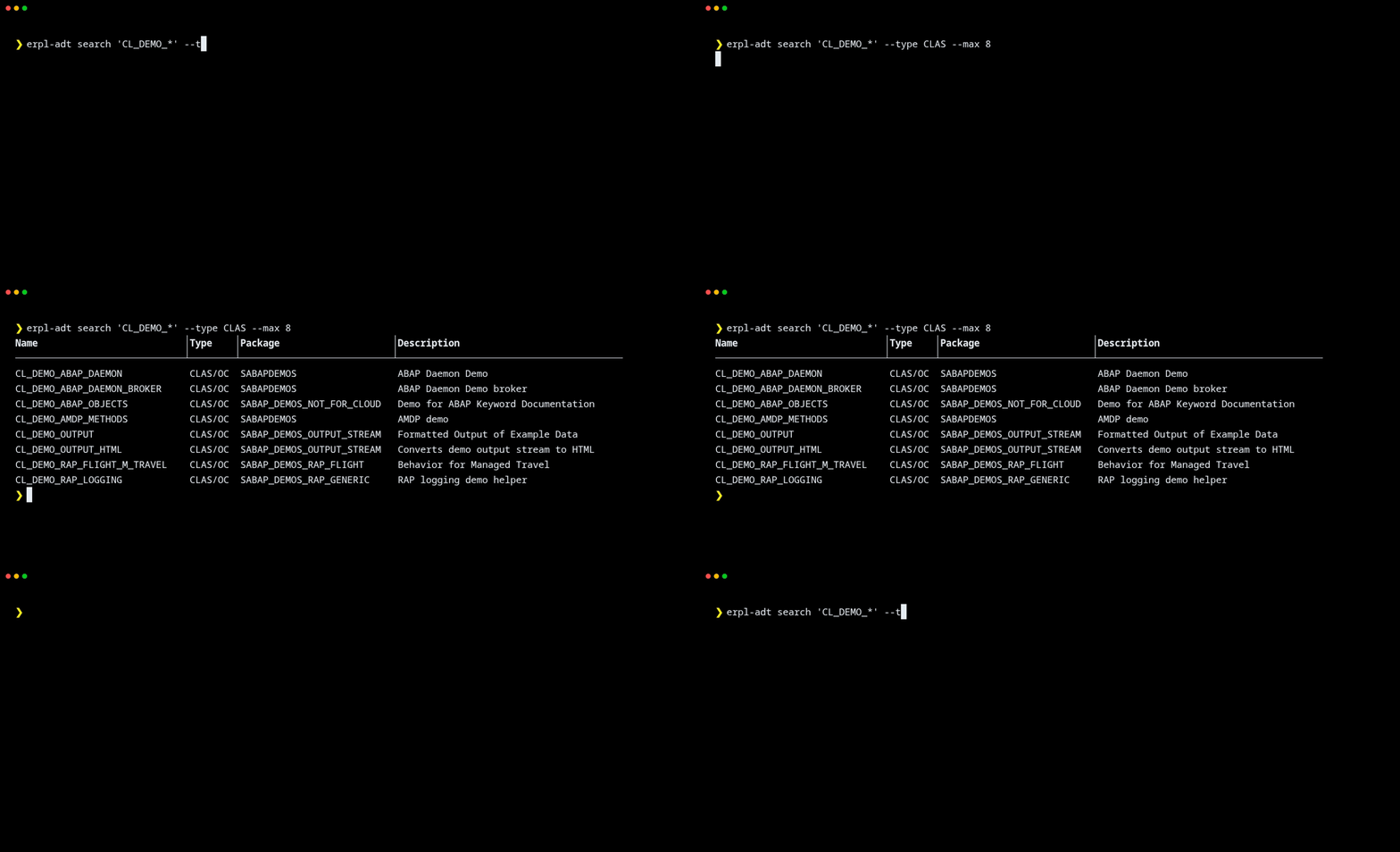
Find ABAP objects by name pattern:
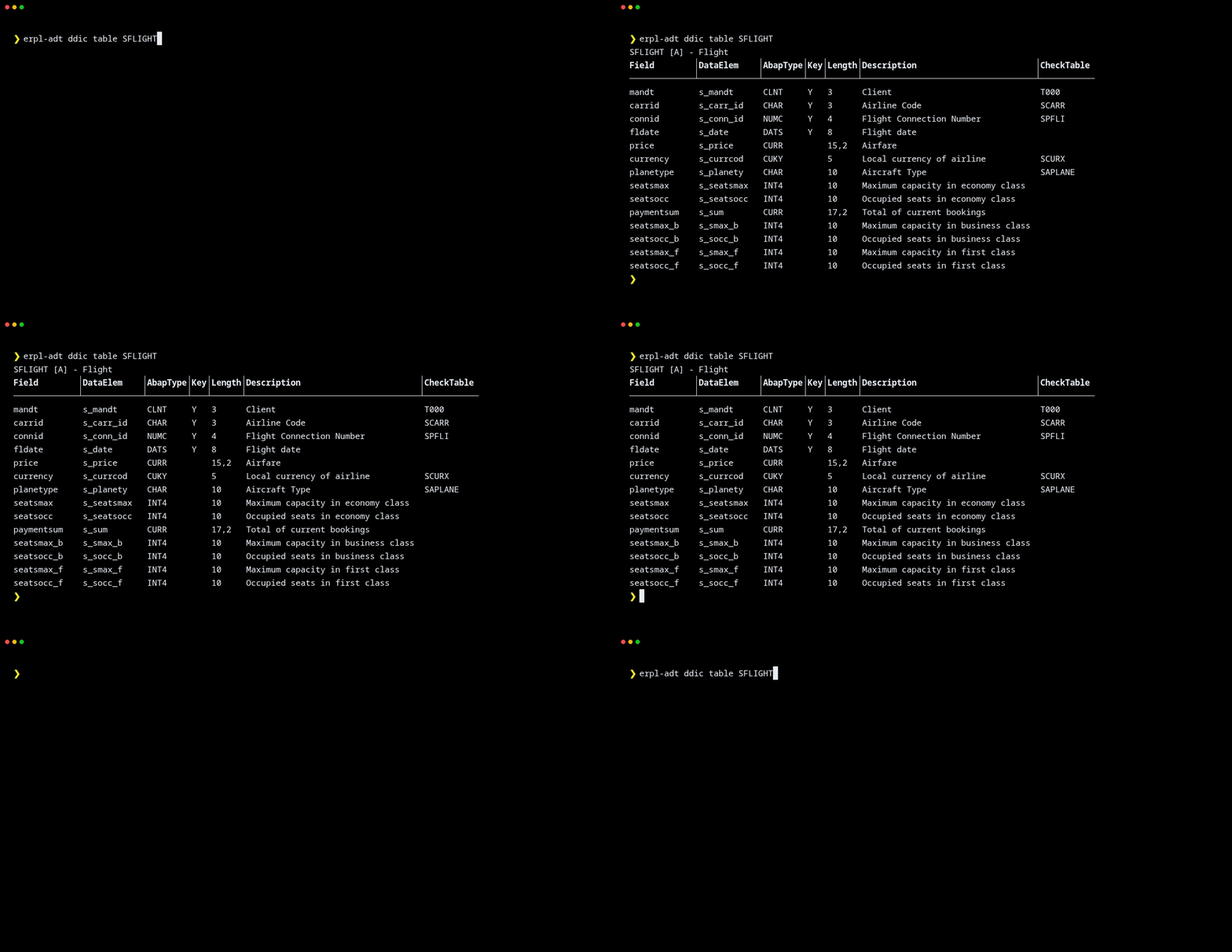
Read a data-dictionary table, with field types and check tables resolved:
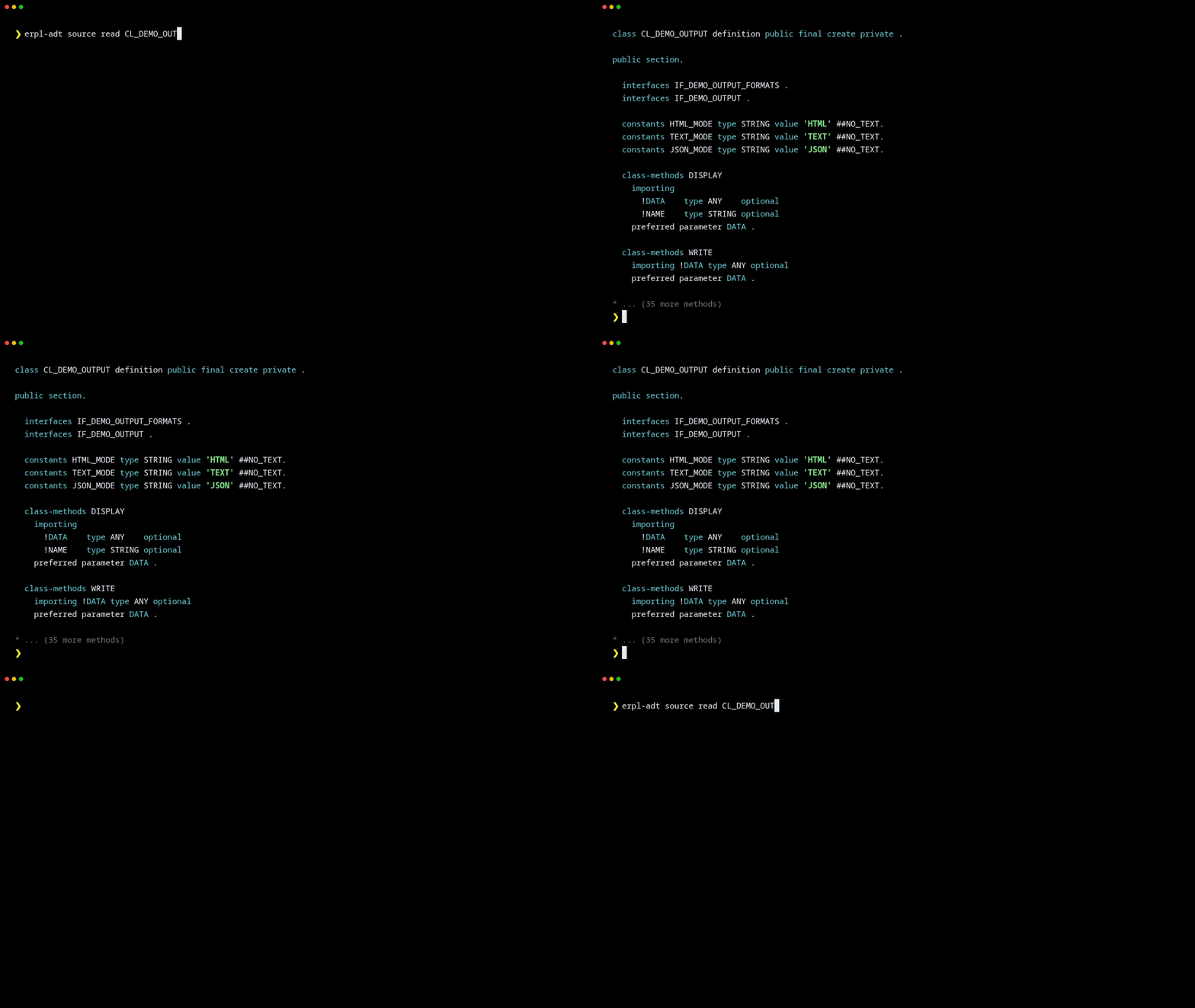
Read ABAP source code with built-in syntax highlighting:
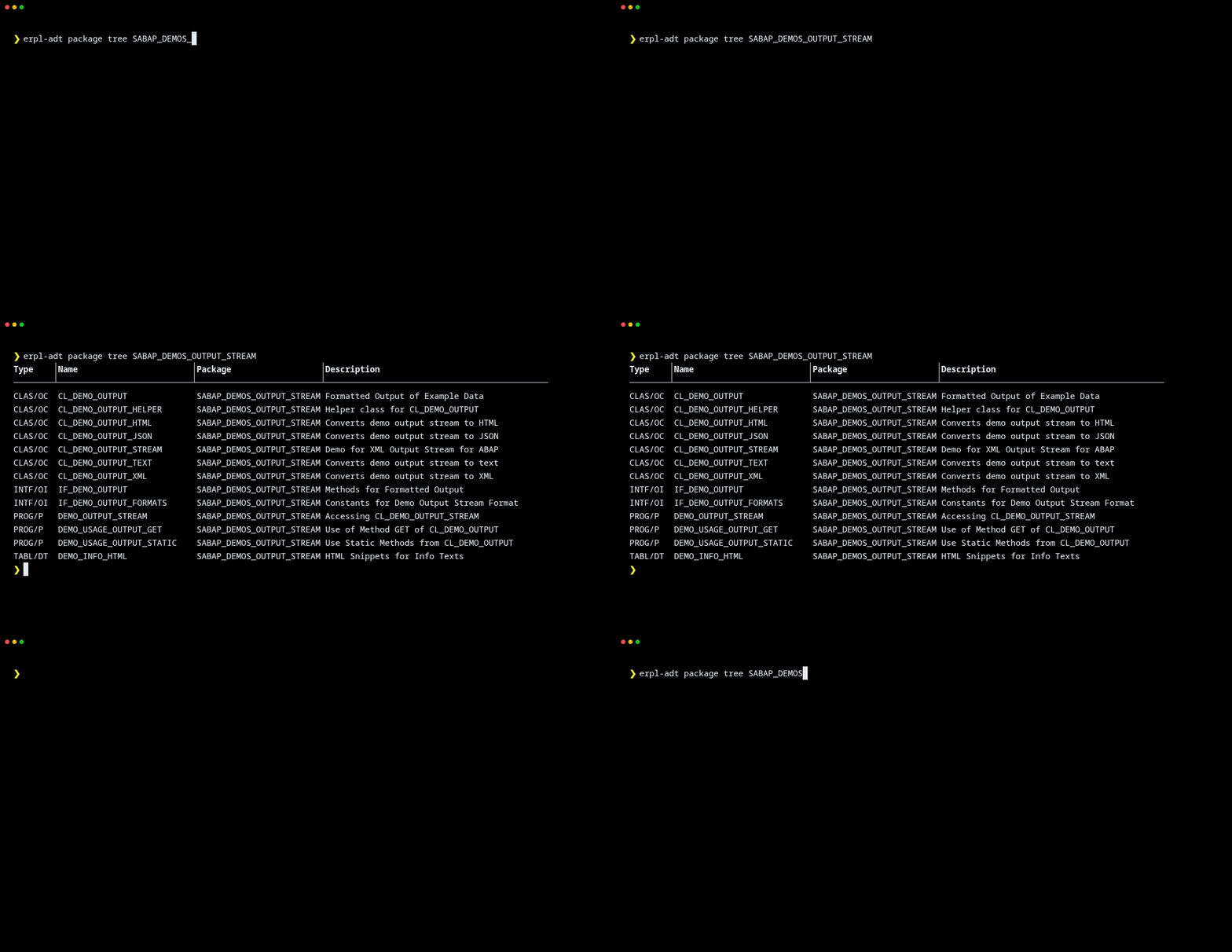
Browse a package recursively to enumerate everything it contains:
BW/4HANA Modeling
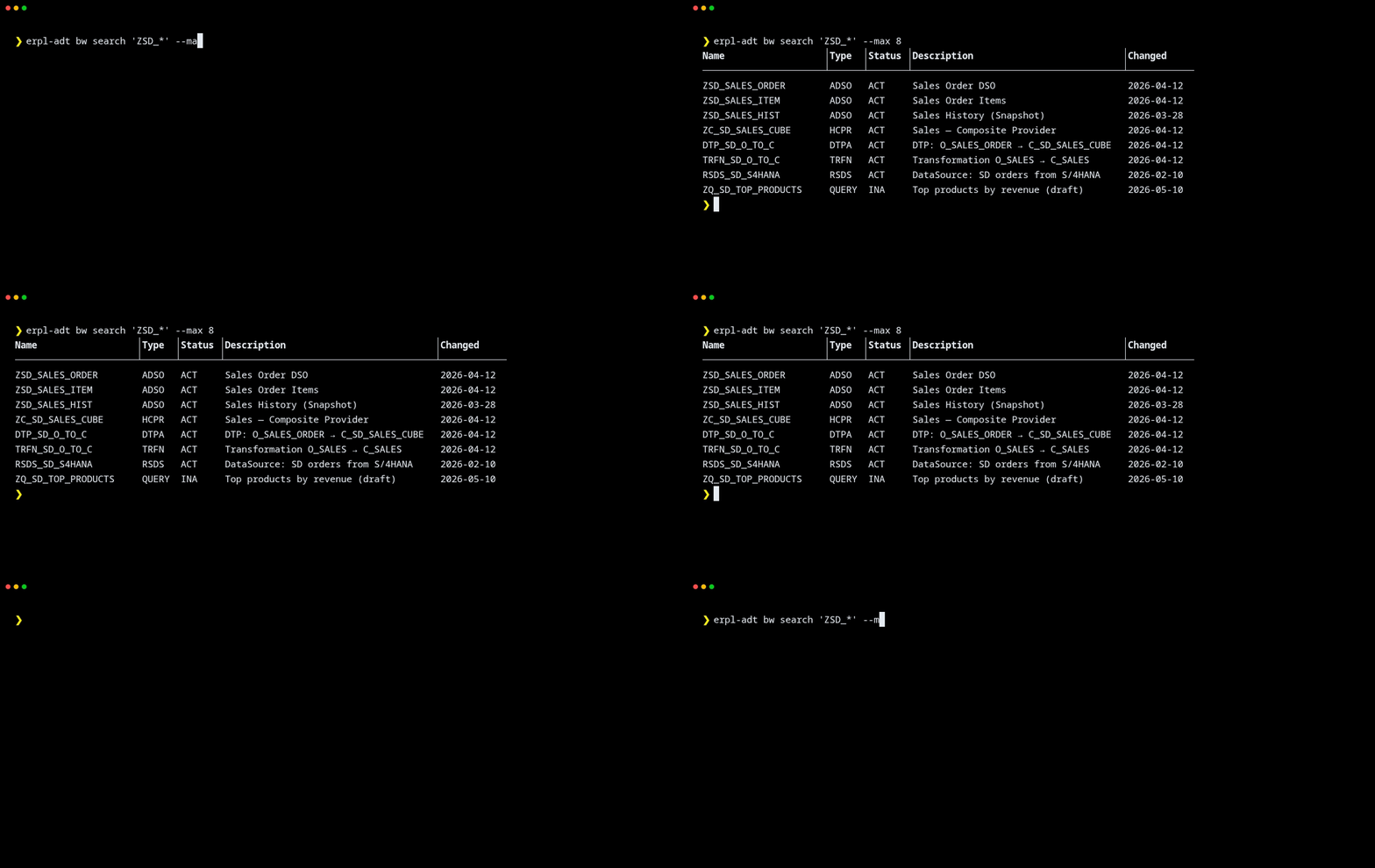
Search the BW catalog across ADSOs, composite providers, DTPs, transformations, and queries:
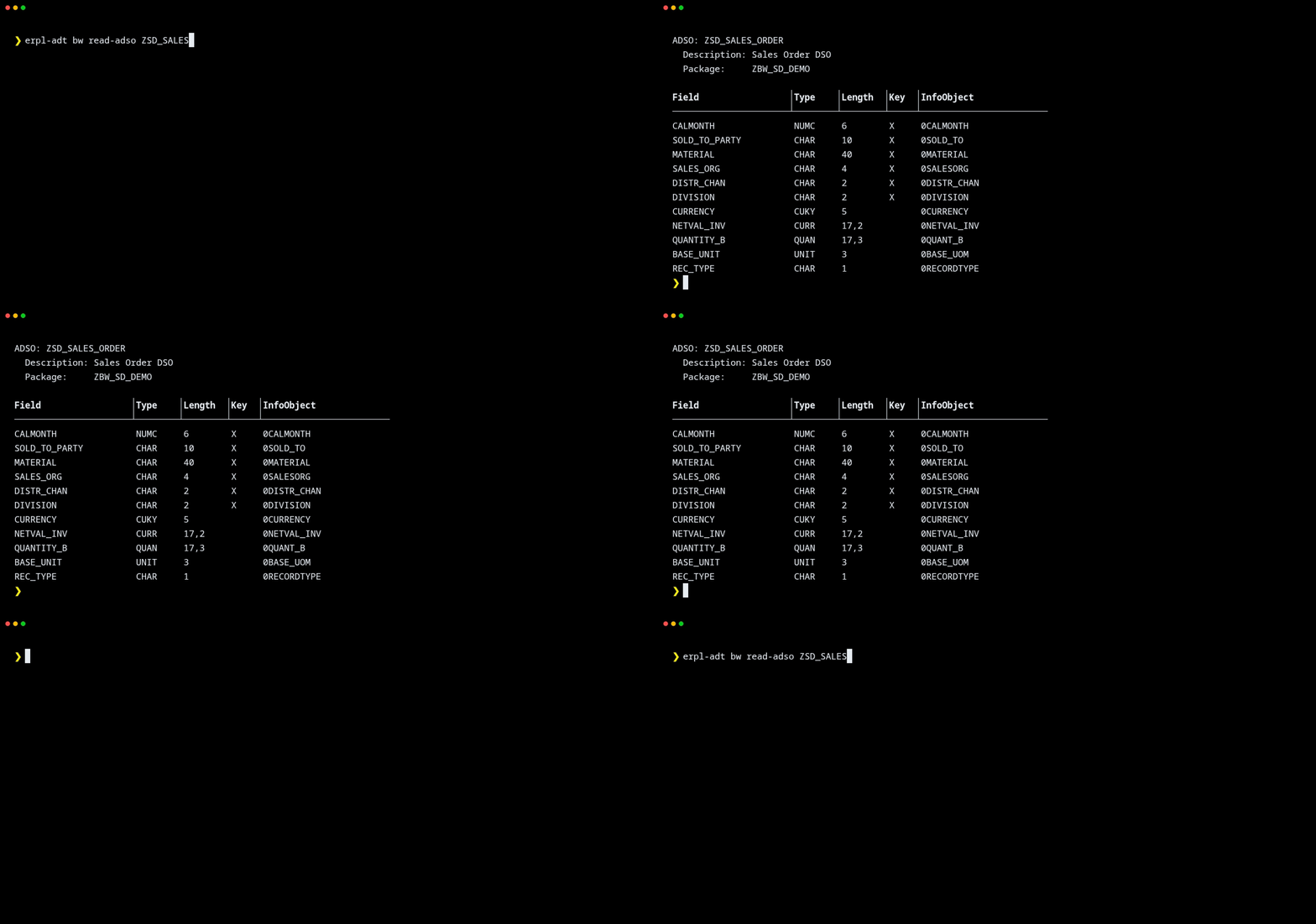
Inspect an ADSO's field structure, complete with the InfoObject each field maps to:
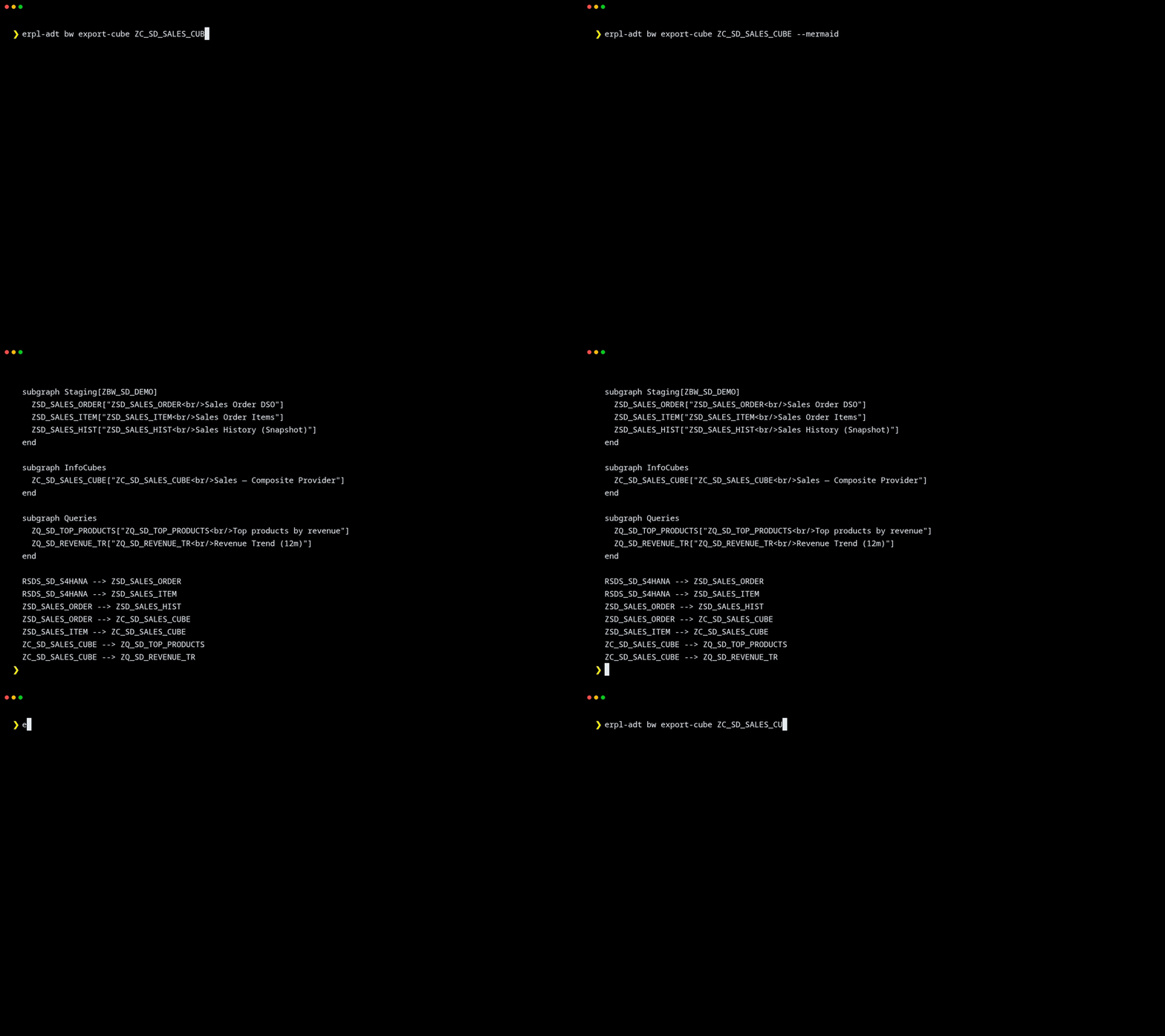
Export an InfoProvider's dataflow as Mermaid — pipe it straight into a renderer or commit it next to the model:
Quick examples
# Save connection credentials (prompts for password)
erpl-adt login --host sap.example.com --port 44300 --https --user DEVELOPER

# Search for classes matching a pattern
erpl-adt search ZCL_MY_* --type CLAS --max 20

# Connect in a specific logon language (descriptions come back translated)
erpl-adt --language DE search T000 --max 1     # -> description "Mandanten"

# Read object metadata and source code
erpl-adt object read /sap/bc/adt/oo/classes/zcl_my_class
erpl-adt source read /sap/bc/adt/oo/classes/zcl_my_class/source/main

# Write source code (auto-locks, writes, unlocks)
erpl-adt source write /sap/bc/adt/oo/classes/zcl_my_class/source/main --file impl.abap

# Write and activate in one step
erpl-adt source write /sap/bc/adt/oo/classes/zcl_my_class/source/main --file impl.abap --activate

# Activate an object by name
erpl-adt activate ZCL_MY_CLASS

# Run unit tests and ATC checks (by name or URI)
erpl-adt test ZCL_MY_CLASS
erpl-adt check ZCL_MY_CLASS --variant DEFAULT

# Create a transport request and release it
erpl-adt transport create --desc "Feature XYZ" --package ZPACKAGE
erpl-adt transport release NPLK900042

# Browse packages and data dictionary
erpl-adt package tree ZPACKAGE --type CLAS
erpl-adt ddic table SFLIGHT
erpl-adt ddic cds I_AIRLINE

# Check syntax
erpl-adt source check /sap/bc/adt/oo/classes/zcl_my_class/source/main
Installation
The quickest way to run erpl-adt — no download needed:
uvx erpl-adt --helpOr install permanently:
pip install erpl-adtAlternatively, download the binary for your platform from the latest release, or build from source.
| Platform | Architecture |
|---|---|
| Linux | x86_64 |
| macOS | arm64, x86_64 |
| Windows | x64 |
Full reference
Run erpl-adt --help for the complete command listing. Key commands:
SEARCH — Search for ABAP objects
  search <pattern>                        Search for ABAP objects
      --type <type>                       Object type: CLAS, PROG, TABL, INTF, FUGR
      --max <n>                           Maximum number of results

OBJECT — Read, create, delete, lock/unlock ABAP objects
  object create                           Create an ABAP object
      --type, --name, --package           (required)
      --description, --transport
      --responsible <user>                Person responsible (default: logon user)
  object delete <uri>                     Delete an ABAP object
  object lock <uri>                       Lock an object for editing
  object read <name-or-uri>               Read object structure
  object run <class-name-or-uri>          Run an ABAP console class (IF_OO_ADT_CLASSRUN)
  object unlock <uri>                     Unlock an object

SOURCE — Read, write, and check ABAP source code
  source check <name-or-uri>              Check syntax
  source edit <name-or-uri>               Open source in $EDITOR and write back
  source read <name-or-uri>               Read source code
      --version <version>                 active or inactive (default: active)
      --section <section>                 main, localdefinitions, localimplementations, testclasses, all
      --color / --no-color                ANSI syntax highlighting
  source write <name-or-uri>              Write source code
      --file <path>                       Path to local source file  (required)
      --activate                          Activate the object after writing
                                          (not combinable with --handle: SAP
                                          refuses to activate a locked object)
      --optimistic                        Try lockless write first (pre-7.51 SAP)

ACTIVATE — Activate inactive ABAP objects
  activate <name-or-uri>

TEST / CHECK
  test <name-or-uri>                      Run ABAP unit tests
  check <name-or-uri>                     Run ATC quality checks
      --variant <name>                    ATC variant (default: DEFAULT)

TRANSPORT — List, create, and release transports
  transport create --desc <text> --package <pkg>
  transport list [--user <user>]
  transport release <number>

DATA DICTIONARY — Tables and CDS views
  ddic table <name>                       Get table definition (fetches lengths + descriptions by default)
      --no-resolve-types                  Skip data-element lookup; show field names and types only
      --raw                               Print raw SAP XML response
  ddic cds <name>                         Get CDS view source

PACKAGE — List contents and check package existence
  package exists <name>
  package list <name>
  package tree <name>                     Recursive BFS traversal
      --type <type>                       Filter: CLAS, PROG, TABL, INTF, FUGR
      --max-depth <n>                     (default: 50)

GLOBAL FLAGS
  --host, --port, --user, --password, --client
  --language <iso>                        SAP logon language (ISO, e.g. EN, DE; default: EN)
  --https, --insecure
  --json                                  Machine-readable JSON output
  --color / --no-color
  --timeout <sec>
  --session-file <path>                   Persist session for lock/write/unlock workflows
  -v / -vv                                INFO / DEBUG logging

EXIT CODES
  0  Success   1  Connection/auth/authorization   2  Not found   5  Activation error
  6  Lock conflict   7  Test failure   8  ATC check error   99  Internal error
MCP server
erpl-adt includes a built-in MCP server (Model Context Protocol) that exposes all ADT operations as tools over JSON-RPC 2.0 on stdin/stdout. This lets AI agents search, read, write, test, and manage ABAP code directly. It negotiates 2025-06-18, 2025-03-26 or 2024-11-05 with the client, returns structuredContent as well as text, and annotates every tool as read-only, mutating or destructive.
erpl-adt mcp --host sap.example.com --port 44300 --httpsConfigure it in your MCP client (e.g., Claude Desktop, Claude Code):
{
  "mcpServers": {
    "erpl-adt": {
      "command": "erpl-adt",
      "args": ["mcp", "--host", "sap.example.com", "--port", "44300", "--https"],
      "env": {
        "SAP_PASSWORD": "your_password"
      }
    }
  }
}
Catalog
A unified, cross-domain (ABAP + DDIC + CDS + BW) metadata catalog, persisted in a single DuckDB file so search/lineage/where-used run in milliseconds instead of round-tripping SAP. Covers full-text + semantic (Gemini embeddings) hybrid search, end-to-end lineage stitching, a business-glossary overlay (definitions/owner/line-of-business/confidentiality) layered on top of the technical metadata, and incremental sync.
Every catalog command needs an explicit scope (--package/--infoarea) — there's no "catalog the whole system" default, because SAP has no call to enumerate every BW infoarea and ABAP/DDIC package search has no pagination, so a silent "everything" default risks quietly missing content past the result cap. Discover packages first with the regular search command:
erpl-adt search 'Z*' --type DEVC --json # all custom-namespace packagesBuild — erpl-adt catalog build always builds the feed; add --db to persist it, --format to render it differently, both, or neither:
erpl-adt catalog build --sid A4H --package ZMY_PACKAGE --infoarea ZBW_AREA
# -> just a summary, nothing is written anywhere

erpl-adt catalog build --sid A4H --package ZMY_PACKAGE --db catalog.duckdb
# -> persists into a DuckDB file (full rebuild, replaces any prior content) —
#    this is the file catalog search/annotate/sync/webui all read from

erpl-adt catalog build --sid A4H --package ZMY_PACKAGE --db catalog.duckdb --embed
# -> also computes embeddings for semantic/hybrid search (needs GEMINI_API_KEY)

erpl-adt catalog build --sid A4H --package ZMY_PACKAGE --format mermaid
erpl-adt catalog build --sid A4H --package ZMY_PACKAGE --format openmetadata
catalog build --db is a single-shot, all-or-nothing write with no progress output and no resume — fine for a small scope. For anything large (thousands of packages, an hour-plus run), use catalog sync instead, even for the very first build:
erpl-adt catalog sync catalog.duckdb --sid A4H --package ZMY_PACKAGE
# [1/1] package ZMY_PACKAGE (elapsed 0m4s, ETA 0s)   <- one progress line per item, on stderr

# interrupted (connection drop, auth expiry, Ctrl-C)? everything already synced is
# durably committed — pick up exactly where it left off instead of starting over:
erpl-adt catalog sync catalog.duckdb --sid A4H --package ZMY_PACKAGE --resume
Checkpoint/audit state (which items are done, whether the last attempt was interrupted) lives in the same DuckDB file as the catalog data — one artifact, no sidecar file to lose track of or leave behind. Removal detection (deleting entities that disappeared from the scope) only runs on a plain, non-resumed sync — a resumed run only sees the items it personally processed, not the whole scope's picture, so it skips removal rather than risk flagging a still-valid item as gone.
Maintain:
# Incremental sync — diffs against what's already stored, writes only the delta
erpl-adt catalog sync catalog.duckdb --sid A4H --package ZMY_PACKAGE

# Curate business context — optional; the catalog works fine without it.
# Technical metadata gives you the *what* (a table's fields); this adds the
# *why* a human would write: what an entity means, who owns it, how
# sensitive it is. Turns a search for "procurement spend" into a real hit
# on 0PUR_VALUE even before anyone remembers what that technical name means.
# Never touches SAP — only writes to catalog.duckdb's overlay columns.
erpl-adt catalog annotate catalog.duckdb --id <entity_id> \
    --definition "Total procurement value" --owner "jane@example.com" --lob Procurement
erpl-adt catalog annotate catalog.duckdb --file overlay.yaml   # bulk, keyed by entity_id
View:
# CLI — fast, cache-only, no SAP round-trip
erpl-adt catalog search catalog.duckdb "procurement value" --mode hybrid

# Web UI — search, browse, lineage, curate, sync status, feed export
erpl-adt catalog webui catalog.duckdb --port 8383   # then open http://127.0.0.1:8383/

# MCP — catalog_search/catalog_get/catalog_lineage/catalog_where_used/... for AI agents
erpl-adt mcp --catalog-db catalog.duckdb            # stdio
erpl-adt mcp --catalog-db catalog.duckdb --http     # JSON-RPC over HTTP
Both HTTP servers (mcp --http and catalog webui) refuse cross-origin browser requests
with 403 — a page you visit cannot post writes to your SAP system through them. Requests
without an Origin header (curl, native MCP clients), same-origin requests and loopback
origins are always allowed; add others with --cors-origin, and require a token with
--auth-token / --auth-token-env. Origin checking cannot see DNS rebinding, where the
attacker controls the Host too, so the Host is checked as well: loopback, IP literals
and the address bound are served, and a browser asking for any other name is refused until
you name it with --allowed-hosts (or ERPL_ADT_ALLOWED_HOSTS, or http.allowed_hosts
in a --config file). See docs/cli-usage.md.
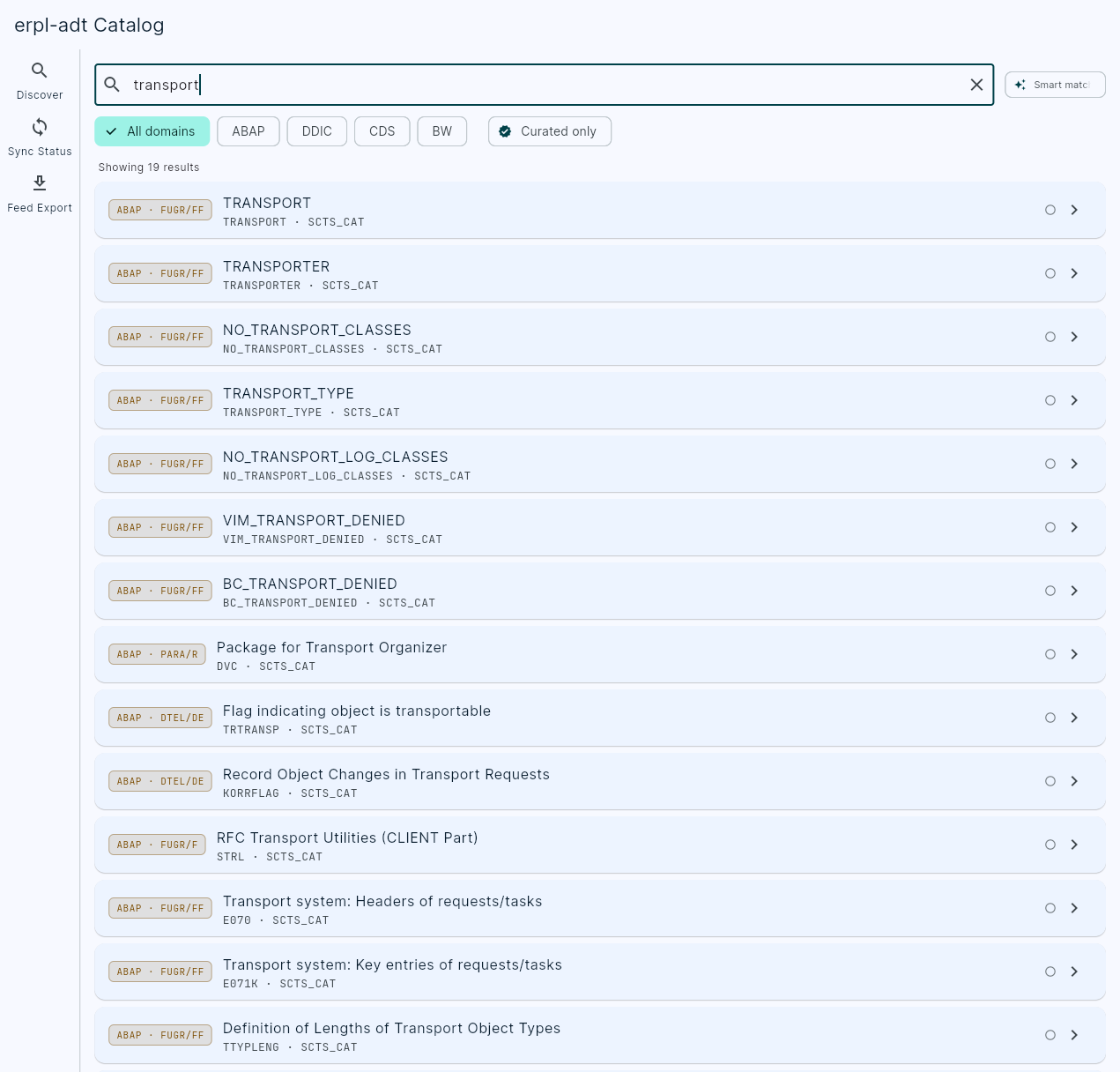
The web UI (flutter/erpl_catalog_kit, compiled and embedded straight into the erpl-adt binary — see Building from source) is read-only against the cache except for curation: Search, Browse, Entity Detail, Lineage, and Driver Tree all query the same fast catalog_* MCP tools the CLI and AI agents use; the Curate screen is the only one that writes, via catalog_annotate. There's no build/sync button — catalog webui doesn't hold a live SAP connection, so building, exporting, and syncing stay CLI-only operations. The Sync Status screen shows past sync runs and cache health, and Feed Export surfaces the exact erpl-adt catalog build --format ... command to run for each format, rather than re-implementing either client-side.
Deploy workflow
erpl-adt also includes the original deploy workflow for automated abapGit package deployment via YAML configuration:
cat > config.yaml <<EOF
connection:
  host: localhost
  port: 50000
  use_https: false
  client: "001"
  user: DEVELOPER
  password_env: SAP_PASSWORD

repos:
  - name: flight
    url: https://github.com/SAP-samples/abap-platform-refscen-flight.git
    branch: refs/heads/main
    package: /DMO/FLIGHT
    activate: true
EOF

export SAP_PASSWORD=your_password
erpl-adt deploy -c config.yaml
The deploy workflow is an idempotent state machine: discover → create package → clone → pull → activate. Each step checks preconditions and skips if already satisfied. Re-running is safe. Supports multi-repo deployments with depends_on for topological ordering.
Building from source
git clone --recurse-submodules https://github.com/datazooDE/erpl-adt.git
cd erpl-adt
make release
Requires CMake 3.21+, Ninja, and a C++17 compiler (GCC 13+, Apple Clang 15+, or MSVC 17+). vcpkg is included as a git submodule.
To also embed the catalog web UI into the binary (optional — not required for the CLI/MCP server), build the Flutter client first, then rebuild:
make webui      # flutter build web — requires the Flutter SDK
make release    # picks up the build output and embeds it via CMakeRC
Without make webui, erpl-adt catalog webui still builds and runs, but serves an instructional message instead of the app.
To run the tests:
make test                          # Unit tests (offline, no SAP system needed)
make test-integration-py           # Integration tests (requires SAP system)
Docker
docker build -t erpl-adt .
docker run --rm -v $(pwd)/config.yaml:/config.yaml \
    -e SAP_PASSWORD=your_password \
    erpl-adt deploy -c /config.yaml
Or use Docker Compose for end-to-end provisioning with a SAP ABAP Cloud Developer Trial:
docker compose upFeedback
If erpl-adt misbehaves or does something surprising, please
open an issue. ADT talks to real SAP
systems whose configurations we cannot reproduce here, so a report with your setup is
the fastest path to a fix — every human-readable error ends with that link for exactly
this reason.
If it saved you a trip through Eclipse, a star on the repo helps other people find it.
The first time you run erpl-adt interactively each day, a small banner says the same
thing. It never prints when output is piped, under --json or --quiet, or in CI.
Silence it with DATAZOO_NO_BANNER=1.
Telemetry
erpl-adt collects anonymous, aggregate usage telemetry (feature usage, outcomes, and durations) — never source code, object/package names, transport IDs, SAP hosts/users, or error text. It is on by default and easy to disable:
erpl-adt --no-telemetry ...          # per invocation
export DATAZOO_DISABLE_TELEMETRY=1   # or DO_NOT_TRACK=1
See TELEMETRY.md for exactly what is collected and the privacy contract.
License
Apache License 2.0 — Copyright 2026 Datazoo GmbH
History
Notes
Create RAP service objects directly through the CLI or MCP: behavior definitions (BDEF/BDO), service definitions (SRVD/SRV), and service bindings (SRVB/SVB). Previously these types were rejected as unknown before reaching SAP.
Service bindings accept explicit binding type, version, category, and service-definition metadata:
erpl-adt object create --type SRVB/SVB --name ZORDER_BIND \
  --package '$TMP' --description 'Order binding' \
  --binding-type ODATA --binding-version V4 --binding-category 0 \
  --service-definition ZORDER_SRV
The MCP tool adt_create_object exposes the equivalent binding_type, binding_version, binding_category, and service_definition parameters. Service definitions send SAP's required source-type metadata, and all three types use their ADT XML media types.
Validated with six live a4h regression cases covering creation, source access, service-definition activation, OData V2/V4 bindings in both SAP categories, metadata read-back, and cleanup. The unit suite and all four platform CI builds passed. The broader live integration run encountered intermittent SAP lock-service failures, also reproduced with the previous release; details are recorded in the PR.
Notes
Bumps the posthog-telemetry submodule to f550a66 (DataZooDE/posthog-telemetry#10): CaptureError() now stamps exception_fingerprint so PostHog Error Tracking actually creates issues from captured errors instead of rejecting every event at ingestion.
Others providing
Compare all 43 on the Agent access to ABAP code page →- @abap2ui5/mcp-server@abap2ui5/mcp-serverAn MCP server that puts the abap2UI5 development loop on the machine an agent runs on: check the view the ABAP builds, photograph it, deploy the class into a sandbox, boot the app headless and read the errors.community org, abapMCP server for the abap2UI5 check, deploy and run loop
- arc-1-bopf-enharc-1-bopf-enhAn extension of four tools for arc-1, with an ABAP service behind it, that lets an agent read and maintain classic BOPF enhancements of SAP standard business objects.independent, abaparc-1 extension for reading and maintaining BOPF enhancements
- HammerHammerA native macOS code editor for ABAP and CDS, with an Object Navigator, Transport Organizer, Data Browser and Gateway Client in the same app as the editor.independent, abapNative macOS code editor for ABAP and CDS
- arc-1-lsparc-1-lspAn edition of ARC-1 that hands every ADT interaction to SAP's own embedded adt-ls language server instead of a hand-rolled HTTP client.independent, abapEdition of ARC-1 that runs ADT calls through adt-ls
- arc-1arc-1An MCP server in front of the ADT REST API that runs locally and on Cloud Foundry with twelve tools that read, search, write, activate, lint and transport ABAP objects.independent, abapMCP server over the ADT REST API for ABAP objects
- arc1-abap-bridgearc1-abap-bridgeA VS Code extension between arc-1 and ABAP Development Tools for VS Code, so GitHub Copilot can open an ABAP object by name, diff the inactive version and ask the system whether an edit would be accepted.independent, abapVS Code bridge between arc-1 and ADT for VS Code
- arc1-adt-abap-mcp-extarc1-adt-abap-mcp-extOne JAR in Eclipse's dropins that turns on SAP's own ADT MCP server and adds read-only repository tools beside it — so an AI client reads your system without leaving Eclipse.independent, abapEclipse add-on enabling the ADT MCP server with read-only tools
- ABAP Accelerator MCP ServerABAP Accelerator MCP ServerAWS's ABAP MCP server for Amazon Q Developer and Kiro, deployable locally, in Docker or centrally on ECS Fargate with OAuth principal propagation; its repository is no longer maintained.partner, abapAWS's ABAP MCP server for Amazon Q Developer and Kiro
- Modernization Agents for SAP on AWSModernization Agents for SAP on AWSAWS's suite of agents for SAP modernisation work: custom ABAP converted for S/4HANA, PI/PO interfaces moved to Integration Suite, BW objects moved to SAP Datasphere, deployed into a customer's own AWS account and reached only after registration.partner, abapAWS agents for ABAP, PI/PO and BW modernisation work
- @mcp-abap-adt/core@mcp-abap-adt/coreA descendant of the Andreschak and fr0ster servers rebuilt on its own architecture, published as an npm scope and a Claude Code plugin, with Korean and Japanese documentation beside the English.independent, abapABAP ADT MCP server published as an npm scope and plugin
- chandrashekhar-mahajan/abap-mcp-serverchandrashekhar-mahajan/abap-mcp-serverFifteen ADT tools behind five pluggable authentication strategies — Kerberos/SPNEGO, OAuth 2.0, X.509, browser SSO and basic — for systems where basic auth is not an option.independent, abapABAP MCP server with ADT tools and five authentication strategies
- dassian-adtdassian-adtA fork of mcp-abap-abap-adt-api hardened for use: 25 tools, input validation, error intelligence, MCP elicitation, session recovery and a test suite.independent, abapFork of mcp-abap-abap-adt-api with 25 tools and session recovery
- bw-modeling-mcpbw-modeling-mcpReads, creates and modifies BW/4HANA modelling objects through the same internal APIs Eclipse BWMT and the BW/4HANA Cockpit use — and can run centrally on BTP with each caller reaching BW as themselves.independent, btpMCP server for BW/4HANA modelling objects
- EPOD ADT MCP ServerEPOD ADT MCP ServerAn MCP server for ABAP that runs inside ABAP Development Tools for Eclipse on the ADT session of each connected project, with a standalone mode that runs with no IDE open.independent, abapMCP server for ABAP on the ADT session, in Eclipse or standalone
- ZARC1_EXTENSION_FORMSZARC1_EXTENSION_FORMSAn extension of four tools for arc-1, with an ABAP backend behind it, that reaches the classic form objects ADT has no API for: SAPscript layout sets, Smart Styles and the TADIR record of a Smart Form.independent, abaparc-1 extension for SAPscript and Smart Forms objects
- fgalastri/MCP_ABAPfgalastri/MCP_ABAPValidates an ABAP class before it is deployed by converting the global class to a local one and syntax-checking that — plus CDS DDL and table metadata retrieval.independent, abapValidates an ABAP class before it is deployed by converting the global class to a local one and syntax-checking that — plus CDS DDL and table metadata retrieval.
- fr0ster/mcp-abap-adtfr0ster/mcp-abap-adtFull CRUD across on-premise and ABAP Cloud systems, with five authentication methods and three transports: a library under Apache-2.0 and a standalone server under AGPL-3.0-only.independent, abapABAP MCP server with full CRUD on on-premise and ABAP Cloud
- abapsmithabapsmithAn MCP server that lets an LLM develop in ABAP on a live system over ADT, with writes off by default and every mutation recorded in a local journal that can undo it.independent, abapABAP MCP server over ADT with a local journal that can undo writes
- sap-ai-dev-toolkitsap-ai-dev-toolkitAn MCP proxy that pins an agent's ABAP tools to one SAP system: setup reads the BAS destinations or the local SAP GUI landscape and writes one stdio server per system, leaving the credentials in the destination or in the editor's own login prompts.independent, abapMCP proxy pinning an agent's ABAP tools to one SAP system
- aibap.mcpaibap.mcpA Go server that closes the loop: after create, write and activate it can run the class it just wrote through ADT's classrun and hand the console output back.independent, abapGo MCP server that writes, activates and runs ABAP classes via ADT
- BellaBellaAn Eclipse plugin that puts Claude into ABAP Development Tools: explain, generate, rework and implement from the editor's context menu, completion as ghost text, and a chat whose tools reach the system through the developer's existing ADT logon.independent, abapEclipse plugin bringing Claude into ABAP Development Tools
- Maherd18/sap-mcp-serverMaherd18/sap-mcp-serverAn MCP server for ABAP development over the ADT resources: eight tools, each checked against a JSON policy file before the call reaches the system, with activation and transport release held for a person to approve.independent, abapPolicy-checked MCP server for ABAP development over ADT
- sapdumpmcpsapdumpmcpAn MCP server for SAP dumps: it connects to an ABAP system over the ADT resources and lets an MCP client ask a dump for its description and call stack.independent, abapMCP server reading ABAP short dumps over ADT
- ABAP remote filesystemABAP remote filesystemA Visual Studio Code extension that opens an ABAP system over ADT as an editable filesystem and exposes system tools to GitHub Copilot and external MCP clients.independent, abapVS Code extension editing ABAP systems over ADT as a filesystem
- mcp-abap-abap-adt-apimcp-abap-abap-adt-apiThe write half of the same pair: a thin wrapper over Marcello Urbani's abap-adt-api, exposing lock, edit, activate, transport and syntax check for a full development loop.independent, abapWrite-oriented MCP server over abap-adt-api
- mcp-abap-adtmcp-abap-adtThe read-oriented half of a pair of ABAP MCP servers: high-level tools such as GetProgram, GetClass and GetTable that fetch from a system, aimed at understanding it rather than changing it.independent, abapRead-oriented MCP server fetching ABAP programs, classes, tables
- SAP MCP Connection ManagerSAP MCP Connection ManagerA Windows desktop manager that holds SAP connections and hands them to Claude Desktop or Codex through a local MCP server, each connection carrying a policy that decides what the assistant may change and what data it may read.independent, abapWindows desktop manager handing SAP connections to assistants over MCP
- ABAPilotABAPilotAn MIT-licensed MCP connector for ECC and on-premise S/4HANA that reads ABAP source and dictionary context, whose SAP-side half is a licensed product you install in the system.independent, abapMCP connector for ECC and on-premise S/4HANA with a licensed SAP side
- vibing-steampunkvibing-steampunkAn ADT-to-MCP bridge in Go that reaches past what ADT exposes — cluster tables decoded, spool and job logs read as tables, the IMG searched, selection texts written back.independent, abapADT-to-MCP bridge in Go reaching past what ADT exposes
- ADT MCP ServerADT MCP ServerSAP's own ADT MCP server, and not a package: a preference inside ABAP Development Tools for VS Code that starts a local HTTP MCP server on a port you choose.sap official, abapLocal HTTP MCP server started from ABAP Development Tools for VS Code
- ABAP Development Tools for VS CodeABAP Development Tools for VS CodeSAP's ABAP tools in VS Code: editing, debugging, ABAP Unit, ATC and transports for classes, CDS and RAP objects, over RFC to an on-premise or Private Cloud system and HTTP to a cloud one, with Joule's ADT MCP server and code completion behind an AI-unit licence.sap official, abapSAP's ABAP tools in VS Code for editing, debugging, ATC and transports
- SAP Joule for Developers, ABAP AI capabilitiesSAP Joule for Developers, ABAP AI capabilitiesSAP's AI for ABAP development in ADT for Eclipse and VS Code: chat, code completion, explain, test and CDS generation, RAP logic prediction, and since June 2026 an agentic mode over the ADT MCP Server, metered in AI units through the ABAP AI Hub Service on BTP.sap official, abapSAP's AI for ABAP development in ADT for Eclipse and VS Code
- ABAPDocMCPABAPDocMCPTurns a transport request into a WRICEF technical specification: reads the transport's objects and source over ADT and writes a structured Markdown document with an object-relationship diagram.independent, abapMCP server turning a transport request into a WRICEF specification
- claude-sap-kitclaude-sap-kitA Claude Code plugin of three skills that extends arc-1 with five Custom_* tools for an on-premise ABAP system: running a report and reading its ALV as JSON, previewing a NAST message as PDF, and reading, writing and replacing SmartForms as XML.independent, abapClaude Code plugin adding Custom_* tools to arc-1
- Skybuffer AI MCP serverSkybuffer AI MCP serverAn ABAP add-on that serves SAP business data, transactions and development context as MCP tools from an ICF node inside SAP ECC and S/4HANA, each call running as the signed-in user under PFCG authorization checks.independent, abapABAP add-on serving business data and transactions as MCP tools
- abap-adt-cliabap-adt-cliPulls an ABAP package to local files over the ADT REST API in parallel, and pushes edited objects back under a transport — bulk sync rather than one object at a time in SE80 or Eclipse.independent, abapCLI that pulls and pushes ABAP packages as local files over ADT
- workskong/mcp-abap-adtworkskong/mcp-abap-adtA deliberately light MCP adapter over ABAP ADT for object search, source, DDIC metadata, a data preview and runtime diagnostics, read-only in practice and documented in Korean.independent, abapLight MCP adapter for ABAP over ADT, documented in Korean
- KlystronKlystronAn MCP server written in ABAP that runs inside the application server behind an ICF service and exposes typed tools for ABAP development, quality, transports, customizing, roles, Basis operations and integration, with a client-side plugin of SAP skills.independent, abapMCP server in ABAP inside the application server, with agent skills
- pyrfc-mcppyrfc-mcpAn MCP server for calling an SAP system's RFC-enabled function modules from an agent, built so that discovering a function does not authorise calling it: a read or a write is denied unless the function name matches an allowlist the server is configured with.independent, abapMCP server calling RFC-enabled function modules behind an allowlist
- ABAP-AI-CODE-TOOLSABAP-AI-CODE-TOOLSAn optional abapGit package that adds create, modify and delete tools to ABAP AI Code, for ABAP programs and classes, with each diff block approved before it is saved.independent, abapabapGit package adding create, modify and delete tools to ABAP AI Code
- ABAP AI CodeABAP AI CodeAn agentic coding assistant written in ABAP that runs as a SAP GUI report and reads, explains and reviews repository objects inside the system, running an LLM's tool calls as ABAP.independent, abapAgentic coding assistant in ABAP that runs as an SAP GUI report
- VERTEXVERTEXAn extension for ABAP Development Tools for Eclipse and VS Code that shows Simple Data Explorer, AVE and ACE in the editor over the developer's ADT connection.independent, abapADT extension for Eclipse and VS Code showing three SAP GUI tools
Details
Sources
Sources are graph entities: the same page may back several entries, and an unreachable source flags every row that rests on it.
Compatibility and provenance
Flavors
“Try lockless write first (pre-7.51 SAP)” — DataZooDE/erpl-adt — README
Contributors
History in the atlas
- corrected against the README
- Triaged out of data/crawled/mcp-candidates.json, the sap-ai-mcp-servers sweep. Written from the repository's own README; the catalogue is credited as where it was found and its words are not reused.
- First seen.
For your agent
- Ref
artifact:datazoode-erpl-adt- JSON
- /artifacts/datazoode-erpl-adt.json
- MCP
- Connecting an agent