abap-db-browser
An SAP GUI program for browsing tables, views, CDS views, custom queries and joins, installed with abapGit together with two other repositories from the same maintainer and needing ABAP 7.50.
One SAP GUI program for reading what a system holds: tables, views, CDS views, custom queries and joins, reached from the selection screen that is the only screenshot the README carries. The README itself is four short sections; the documentation lives on the maintainer's own site, filed under its SAP GUI projects, so what each object type looks like in the browser is there rather than here. It installs with abapGitabapGitA Git client written in ABAP that runs inside the system, so objects are cloned, pulled and pushed without leaving it; with no package manager in ABAP, a cloned repository is how code is distributed.community org, abap and needs two other repositories from the same maintainer, abap-search-toolsabap-search-toolsThe ADT backend the separate ABAP Search and Analysis Tools Eclipse plugin needs, installed in the ABAP system.independent, abap and abap-ui-toolboxabap-ui-toolboxA collection of ABAP classes for classic SAP GUI development: an enhanced, editable ALV grid, a single-container screen framework, and a tree wrapper.independent, abap, which the README lists under Dependencies without saying what each one contributes.
Facts
Where it sits
Who is behind it

In the atlas: maintains 11@DevEposmaintainerMarc BernardContributes to this

In the atlas: contributes to 26@mbtoolsreichr-devContributes to this

In the atlas: contributes to 3@reichr-devLudwig Stockbauer-MuhrContributes to this

In the atlas: maintains 5, contributes to 21@stockbal3 contributors
Before choosing this
Conditions
PracticalFunctional boundary
A system below ABAP 7.50: some of the classes it uses are only available from 7.50, and the maintainer states that downward compatibility to 7.40 in a single branch is currently not possible without resorting to dynamic programming.
What it declares
Every artifact
- Type
- App
- Origin
- Independently maintained
As an app
- Where it runs
- Inside the system it serves
- Distributed through
- abapGit
Connections
Looking at the data a system holds while developing or supporting it
ADT backend for the ABAP Search and Analysis Tools plugin
ABAP classes for classic SAP GUI development: ALV, screens, trees
Git client written in ABAP that runs inside the system
Download
README
quoted from DevEpos/abap-db-browser under MIT, read
abap-db-browser
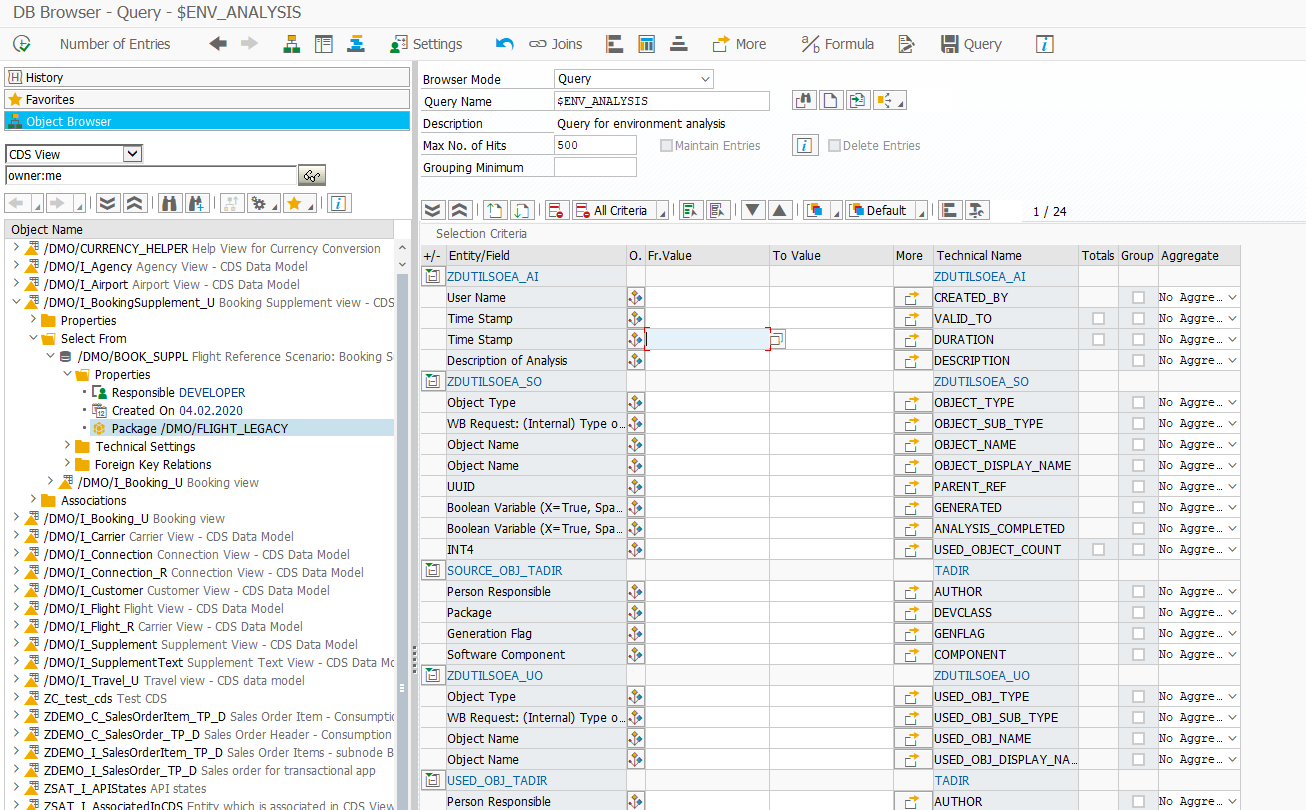
Documentation
See here
Important Information
Dependencies
Installation Guide
Install this repository using abapGit.
See the Installation Guide
SAP NetWeaver Compatibility
Due to some used classes which are only available starting from v7.50 a downwards compatibility to v7.40 in a single branch is currently not possible, without resorting to some dynamic programming.
History
Features 10
Notes
Features
- Data selection from DB-Table, DB-View, CDS View, Custom Queries
- Use Grouping and Aggregation functions
- Jump into data maintenance
Note: This is only possible if transaction
SE16Nis installed on the system - Create Favorites for your most used DB entities (Like SAP Easy Access Tree menu)
- History of your most recently used DB entities
- Create custom value helps for your selection fields
- Integrated advanced search capabilities for DB entities
- Advanced ALV Data Output
- Live Filter => Filter is directly converted to selection criteria and triggers a new DB select
Can be turned off in user settings
- Perform Row Grouping - Like SQL Group By
- Quick Filter via Keybinding
F9- Currently selected Cells are converted into ALV Filter - Hide/Discard Rows which are not relevant
- Compare one or several rows - The rows should be sorted
- Show additional text columns for columns whose data type has domain fixed values or an assigned text table
- Show the cell content in a popup code editor
- Easy search and navigation to columns
- Total calculation for arbitrary selected cells
- Direct navigation to SQL Console defaulted with the current select statement
- Live Filter => Filter is directly converted to selection criteria and triggers a new DB select
- Advanced Features for CDS View
- Support for Parameters
- Follow Defined Associations (like ADT Data Output) up to 8 Levels deep
- Navigate to Sub Entity (Association or Base Entity)
- Show the dependency tree of the CDS View (like ADT feature)
- Feature if CDS View has Annotation
@Analytics.query=true:- Open in Analysis for Office (Excel)
- Open in Transaction
RSRT(i.e. Query Monitor) - Open the Query in the SAP UI5 App Design Studio
- Calculation of virtual elements
- Create Custom Queries (Non-SQL)
- Create Joins (Inner, Left/Right Outer) to DB-Table, DB-View or CDS View
- Create custom selection mask for your Query
- Customize output field order
- Customize sorting
- Create Custom Queries (SQL)
- Create custom query with SQL
- Declare parameters to parameterize your SQL query
Others providing
Compare all 13 on the Browsing table data page →- sapguisapguiThirty classic transactions, SE80 and SE16N among them, rebuilt as abap2UI5 apps and installed with abapGit into a standard ABAP system.independent, abapThirty classic transactions rebuilt as abap2UI5 appsfrom ABAP
- se16nse16nAn abap2UI5 app that browses and filters the content of a table in the browser, on ABAP Cloud systems that have no SE16N as well as on premise.independent, abapTable content browser in abap2UI5, for ABAP Cloud and on premisefrom ABAP
- sql-consolesql-consoleA browser-based SQL console built on abap2UI5, in an Open SQL and a native ADBC variant, that shows a query's result as a filterable table without Eclipse or SAP GUI.independent, abapBrowser-based SQL console built on abap2UI5from ABAP
- HammerHammerA native macOS code editor for ABAP and CDS, with an Object Navigator, Transport Organizer, Data Browser and Gateway Client in the same app as the editor.independent, abapNative macOS code editor for ABAP and CDSfrom ABAP
- ABAP_DATABASE_MANAGERABAP_DATABASE_MANAGERA report that runs custom SQL queries against the SAP database or an external connection, shows the results in an ALV grid, and inserts, updates and deletes data in the connected database.independent, abapABAP report running custom SQL queries into an ALV gridfrom ABAP
- urbani-saplinkurbani-saplinkAn SE16 clone shipped as SAPlink files: an ABAP report that reads a table named at runtime with up to 190 select-options, and a Web Dynpro application beside it.independent, abapSE16 clone shipped as SAPlink filesfrom ABAP
- ABAP remote filesystemABAP remote filesystemA Visual Studio Code extension that opens an ABAP system over ADT as an editable filesystem and exposes system tools to GitHub Copilot and external MCP clients.independent, abapVS Code extension editing ABAP systems over ADT as a filesystemfrom ABAP
- ztoadztoadAn Open SQL editor for ABAP that runs a query written in the editor pane on the server and shows the rows in an ALV window, with a pane of saved queries to reuse and share.independent, abapOpen SQL editor for ABAP with ALV outputfrom ABAP
- ABAP Development Tools for EclipseABAP Development Tools for EclipseSAP's Eclipse plugins for ABAP: source, dictionary and CDS editors, Project Explorer, Outline and ABAP Unit, calling ADT resources on the connected system.sap official, abapSAP's Eclipse plugins for ABAP development over ADTfrom ABAP
- HR_DMEHR_DMEA read-only SAP GUI report that lists every infotype, payroll cluster and assignment table holding data for one SAP HCM person or organisational object.independent, abapRead-only SAP GUI report listing where HCM object data is storedfrom ABAP
- Simple Data ExplorerSimple Data ExplorerA multi-window SAP GUI explorer for tables, views and CDS SQL views, with filters that re-read as they change, foreign-key navigation, a join builder and pivot tables.independent, abapMulti-window SAP GUI explorer for tables, views and CDS SQL viewsfrom ABAP
- VERTEXVERTEXAn extension for ABAP Development Tools for Eclipse and VS Code that shows Simple Data Explorer, AVE and ACE in the editor over the developer's ADT connection.independent, abapADT extension for Eclipse and VS Code showing three SAP GUI toolsfrom ABAP
Details
Sources
Sources are graph entities: the same page may back several entries, and an unreachable source flags every row that rests on it.
Compatibility and provenance
abaplint
Contributors
History in the atlas
- First seen.
For your agent
- Ref
artifact:devepos-abap-db-browser- JSON
- /artifacts/devepos-abap-db-browser.json
- MCP
- Connecting an agent