SAP-samples/btp-ai-core-usage-monitor
A Python background agent on the SAP BTP, Cloud Foundry RuntimeSAP BTP, Cloud Foundry RuntimeThe Cloud Foundry runtime of SAP BTP: memory for applications in a Cloud Foundry org, run from SAP's Java, Node.js and Python buildpacks or community buildpacks and managed with the standard Cloud Foundry tools.sap official, btp that checks SAP AI CoreSAP AI CoreSAP's AI service on BTP: the runtime for AI assets, and through the Generative AI Hub inside it the access to foundation models, the orchestration service with its templating, masking, filtering and grounding modules, the Prompt Registry and Document Grounding.sap official, btp capacity unit consumption daily and emails or alerts as it approaches a monthly spending limit.
A team consuming SAP AI CoreSAP AI CoreSAP's AI service on BTP: the runtime for AI assets, and through the Generative AI Hub inside it the access to foundation models, the orchestration service with its templating, masking, filtering and grounding modules, the Prompt Registry and Document Grounding.sap official, btp capacity units wants to know before a monthly budget is spent rather than after. A scheduled check, at 07:00 UTC unless configured otherwise, sums the capacity units recorded for the current calendar month for one subaccount, or for a single AI Core resource group within it, from the Usage Data Management reporting API, and compares that month-to-date total with a configured spending limit. Crossing the warning threshold sends a warning email and crossing the alert threshold sends an alert, by SMTP or through SAP Alert Notification serviceSAP Alert Notification service for SAP BTPA BTP service with one API for publishing alerts and subscribing to them: built-in events about BTP resources and an application's own, delivered to a communication channel or monitoring tool.sap official, btp; both thresholds are environment variables and default to 60 and 80 per cent of the limit. Four Flask endpoints expose a liveness probe, the last result, the active configuration and a manual trigger, the last three behind a JSON Web Token from SAP Authorization and Trust Management serviceSAP Authorization and Trust Management serviceThe OAuth server behind a BTP application: issues the JWT the app checks, holds the scopes and role collections it checks against, and brokers trust to an identity provider. Bound, never installed.sap official, btp. It stops at reading and notifying: nothing in the agent throttles or blocks further AI Core usage.
Facts
Where it sits
Who is behind it

In the atlas: maintains 222@SAP-samplesmaintainerdaniil-bolobonovContributes to this

In the atlas: contributes to 1@daniil-bolobonov1 contributor
What it declares
Every artifact
- Type
- App
- Origin
- By SAP
As an app
- Where it runs
- On SAP BTP
- Distributed through
- does not say
Connections
Tracking what a cloud account consumes, with budget warnings
Publishing and subscribing to alerts about BTP resources and apps
REST APIs for SAP BTP usage per metric and monthly cost
AI runtime on BTP with the Generative AI Hub
OAuth server issuing JWTs and holding scopes for BTP apps
Cloud Foundry runtime of SAP BTP for polyglot applications
REST APIs for SAP BTP usage per metric and monthly cost
Publishing and subscribing to alerts about BTP resources and apps
Download
Where it sits in your app
Download
README
quoted from SAP-samples/btp-ai-core-usage-monitor under Apache-2.0, readAI Core Consumption Monitor
A Python background agent that runs on SAP BTP Cloud Foundry and monitors daily AI Core capacity unit consumption. When consumption approaches a configured monthly spending limit, it sends notifications via SMTP email or SAP Alert Notification Service (ANS).
How It Works
┌─────────────────────────────────────────────────────────────┐
│  SAP BTP Cloud Foundry                                      │
│                                                             │
│  ┌──────────────────────────────────────────────────────┐   │
│  │  ai-core-monitor (Python / Flask)                    │   │
│  │                                                      │   │
│  │  APScheduler ──► run_monitoring_job() [daily 07:00]  │   │
│  │       │                                              │   │
│  │       ▼                                              │   │
│  │  UAS Reporting API ──► fetch usage (OAuth2)          │   │
│  │       │                                              │   │
│  │       ▼                                              │   │
│  │  Aggregate ai-core capacity_units                    │   │
│  │       │                                              │   │
│  │       ▼                                              │   │
│  │  Compare vs. SPENDING_LIMIT                          │   │
│  │       │                                              │   │
│  │       ├── < 60%  → INFO  (daily email if enabled)    │   │
│  │       ├── ≥ 60%  → WARNING email 🟡                  │   │
│  │       └── ≥ 80%  → ALERT email 🔴                    │   │
│  │                                                      │   │
│  │  Flask endpoints: /health  /status  /trigger         │   │
│  └──────────────────────────────────────────────────────┘   │
└─────────────────────────────────────────────────────────────┘
Metric tracked: serviceId=ai-core + measureId=capacity_units — summed across all models (Claude, GPT, embedding models, etc.) for the current calendar month. When RESOURCE_GROUP is set, only records matching that AI Core resource group (instanceId) are included.
Project Structure
ai-core-monitor/
├── server.py          # Flask app entry point (health, /status, /trigger, /config)
├── agent.py           # APScheduler + core monitoring logic
├── usage_client.py    # UAS Reporting API client (OAuth2 + aggregation)
├── notifier.py        # SMTP HTML email + SAP Alert Notification Service
├── config.py          # All configuration from environment variables
├── manifest.yml       # CF deployment manifest
├── xs-security.json   # XSUAA security descriptor
├── Procfile           # gunicorn startup command
├── requirements.txt   # Python dependencies
├── runtime.txt        # Python version
├── .env.example       # Template for local development
└── README.md
Configuration Reference
All configuration is via environment variables (set in manifest.yml or via cf set-env).
| Variable | Required | Default | Description |
|---|---|---|---|
SUBACCOUNT_ID | ✅ | — | SAP BTP subaccount UUID to monitor |
RESOURCE_GROUP | `` (all) | AI Core resource group (instanceId) to monitor. When set, only capacity units from this resource group are counted. Leave empty to aggregate all resource groups in the subaccount. | |
SPENDING_LIMIT | ✅ | 100 | Monthly AI Core capacity unit budget |
WARNING_THRESHOLD_PERCENT | 60 | % of limit that triggers a warning email | |
ALERT_THRESHOLD_PERCENT | 80 | % of limit that triggers an alert email | |
RECEIVE_DAILY_UPDATE_EMAILS | true | Send a daily summary even below warning threshold | |
NOTIFICATION_EMAIL | ✅ (SMTP) | — | Comma-separated recipient email addresses |
SENDER_NAME | AI Core Consumption Monitor | Display name in the From field | |
CHECK_TIME_UTC | 07:00 | Time of day (UTC) to run the daily check | |
ENABLE_SMTP | true | Enable SMTP email notifications | |
SMTP_HOST | ✅ (SMTP) | — | SMTP server hostname |
SMTP_PORT | 587 | SMTP port | |
SMTP_USER | ✅ (SMTP) | — | SMTP login username |
SMTP_FROM | SMTP_USER | Sender address in the From header — set if your SMTP server requires a specific authorized address | |
SMTP_PASSWORD | ✅ (SMTP) | — | SMTP password |
SMTP_USE_TLS | true | Use STARTTLS (true) or SMTP_SSL (false) | |
ENABLE_ANS | false | Enable SAP Alert Notification Service | |
ANS_SERVICE_NAME | ai-core-monitor-ans | CF service instance name to use. When only one ANS instance is bound, it is found automatically by service label — this variable is only needed if multiple ANS instances are bound and you need to select a specific one |
Prerequisites
- SAP BTP subaccount with a Cloud Foundry environment enabled
- Cloud Foundry memory quota — at least 256 MB available in the CF org/space (
memory: 256Minmanifest.yml) - SAP AI Core (Extended plan) active in the subaccount whose usage you want to monitor — this is the
SUBACCOUNT_IDyou configure - Usage Data Management (
uas) service instance (reporting-ga-adminplan) — for fetching consumption data via the UAS Reporting API - XSUAA service instance — for JWT-based endpoint protection
- CF CLI installed and authenticated (
cf login) - Python 3.11+ (local development only — CF deployment uses
python-3.11.xas specified inruntime.txt) - Notification channel — choose one:
- SMTP server (e.g. Office 365, Gmail, SendGrid) — set
ENABLE_SMTP=true(default) - SAP Alert Notification Service instance — set
ENABLE_ANS=true
- SMTP server (e.g. Office 365, Gmail, SendGrid) — set
Step-by-Step Deployment
1. Create the XSUAA service instance
cf create-service xsuaa application ai-core-monitor-xsuaa -c xs-security.json2. Create and bind the UAS service instance
Create a Usage Data Management (uas) service instance and bind it to the app. Credentials are then read automatically from VCAP_SERVICES — no env vars needed.
The service has two relevant plans:
| Plan | Use case | Scope granted |
|---|---|---|
reporting-ga-admin | Reports for an entire global account (use this for subaccount monitoring) | Reporting.GA_Admin |
reporting-directory | Reports scoped to a specific directory | reporting.Directory_Admin |
For monitoring a subaccount, use reporting-ga-admin:
cf create-service uas reporting-ga-admin uas-reportingRole requirement: The service principal must have access to the global account that owns the subaccount being monitored. If you receive a
403 Forbidden, ensure the service instance was created at the correct account level.
🔧 Alternative: explicit credentials (local dev or UAS provisioned in a different subaccount)
Create a service key to extract credentials:
cf create-service-key uas-reporting uas-reporting-key
cf service-key uas-reporting uas-reporting-key
The service key JSON contains:
{
  "clientid":     "sb-xxxxxxxx!bXXXXX|uas-reporting!bXXX",
  "clientsecret": "xxxxxxxxxxxxxxxxxxxxxxxxxxxxxxxx",
  "url":          "https://<global-account-id>.authentication.<region>.hana.ondemand.com"
}
Set the following environment variables in manifest.yml (BTP) or .env (local dev):
| Service key field | Environment variable | Notes |
|---|---|---|
clientid | UAS_CLIENT_ID | |
clientsecret | UAS_CLIENT_SECRET | Set via cf set-env — never in manifest.yml |
url | UAS_TOKEN_URL | Append /oauth/token to the base URL |
3. Configure notifications
Choose one notification channel:
Option A — SMTP email (default)
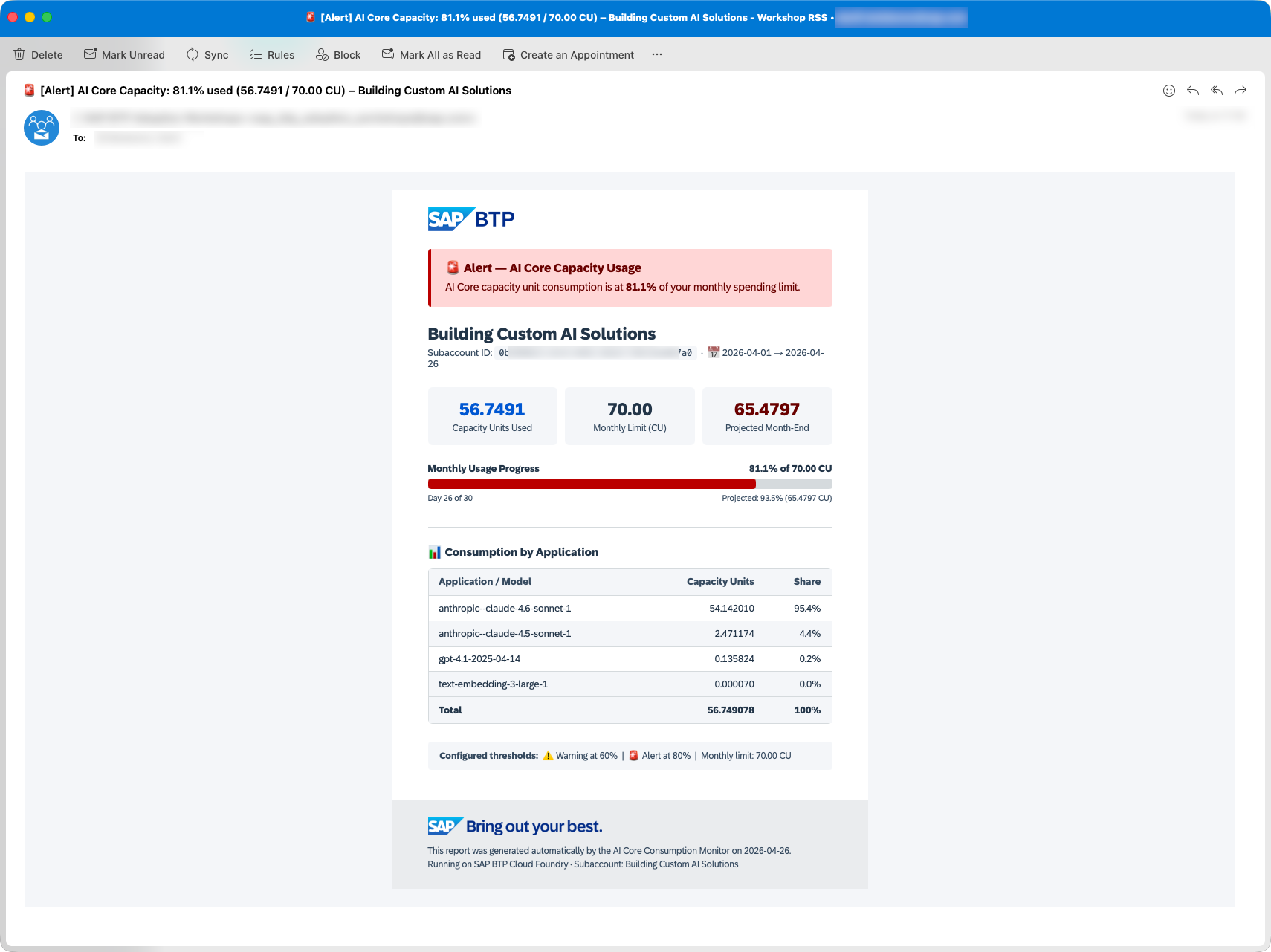
The HTML email uses SAP BTP styling ('72 Brand' font, SAP colour palette) and includes:
- 🟢/🟡/🔴 colour-coded alert banner with left-border accent
- Key metrics: CU used, monthly limit, projected month-end
- Visual progress bar (Outlook-compatible, table-based)
- Per-model consumption breakdown table
- Configured threshold reference
SMTP is enabled by default in manifest.yml. Fill in your SMTP server details:
services:
  - uas-reporting
  - ai-core-monitor-xsuaa

env:
  SUBACCOUNT_ID: "your-subaccount-uuid"
  SPENDING_LIMIT: "50"
  NOTIFICATION_EMAIL: "your-team@company.com"
  ENABLE_SMTP: "true"
  SMTP_HOST: "smtp.office365.com"
  SMTP_PORT: "587"
  SMTP_USER: "monitor@company.com"
  SMTP_USE_TLS: "true"
  # SMTP_FROM: "monitor@company.com"  # only if your server requires a specific sender address
Set the SMTP password after cf push (see Step 5):
cf set-env ai-core-monitor SMTP_PASSWORD 'your-smtp-password'Option B — SAP Alert Notification Service
When ENABLE_ANS=true, the agent posts a structured event to the ANS Producer API (/cf/producer/v1/resource-events). ANS routes the event to email, Slack, MS Teams, PagerDuty, or any other configured action.
Event payload fields:
| Field | Value |
|---|---|
eventType | AI_CORE_CAPACITY_MONITOR |
severity | INFO / WARNING / ERROR |
category | NOTIFICATION / ALERT |
subject | AI Core Capacity <label>: <pct>% used (max 36 chars) |
body | Subaccount, CU consumed, % of limit, projected month-end, top consumer (max ~280 chars) |
resource.resourceType | SAP BTP Subaccount |
tags | subaccountId, percentageUsed, spendingLimit, projectedCu, periodStart/End, thresholds, colour tokens |
All field values are well within ANS character limits (subject ≤ 255, body ≤ 2000, tag values ≤ 255).
See the official tutorial: Getting Started with SAP Alert Notification Service for SAP BTP
Create the ANS service instance and bind it — credentials are read automatically from VCAP_SERVICES:
cf create-service alert-notification standard ai-core-monitor-ansUpdate manifest.yml:
services:
  - uas-reporting
  - ai-core-monitor-xsuaa
  - ai-core-monitor-ans

env:
  SUBACCOUNT_ID: "your-subaccount-uuid"
  SPENDING_LIMIT: "50"
  ENABLE_SMTP: "false"
  ENABLE_ANS: "true"
🔧 Alternative: explicit credentials (local dev or ANS provisioned in a different subaccount)
Create a service key to extract credentials:
cf create-service-key ai-core-monitor-ans ai-core-monitor-ans-key
cf service-key ai-core-monitor-ans ai-core-monitor-ans-key
The service key contains url, client_id, client_secret, oauth_url. Set the following environment variables in manifest.yml (BTP) or .env (local dev):
| Service key field | Environment variable | Notes |
|---|---|---|
url | ANS_URL | ANS API base URL |
client_id | ANS_CLIENT_ID | |
client_secret | ANS_CLIENT_SECRET | Set via cf set-env — never in manifest.yml |
oauth_url | ANS_TOKEN_URL | Already includes /oauth/token — use as-is |
Create a condition and subscription
In the ANS dashboard (BTP cockpit → your ANS service instance → Manage):
-
Go to Actions → Create and configure your delivery channel.
ANS supports multiple action types — choose whichever fits your setup (or any other channel available in your ANS instance):
Type Notes EMAILPlain-text email (default, no extra config needed) EMAIL+ HTMLRich HTML email — requires a custom Payload Template (see below) SLACKPost to a Slack channel via webhook MS_TEAMSPost to a Microsoft Teams channel via webhook … Any other channel configured in your ANS instance For a plain-text email, just fill in the recipient address and leave Subject/Payload Templates empty.
For a rich HTML email, additionally:
- Check Use HTML ✅
- Fill in Subject Template and Payload Template as shown below
⚠️ Two requirements for HTML emails in ANS:
- A custom Payload Template must be provided (leaving it empty gives "Using HTML is not allowed for the default email payload template")
- The template must contain the placeholder
{ans-disclaimer}(ANS appends its mandatory legal footer there)
📋 Optional: HTML Subject & Payload Templates (click to expand)
Subject Template:
{subject}
Payload Template:
ANS template variables use single-brace syntax:
{subject},{body},{tags.<key>}. The template must be compact — ANS enforces a payload length limit.
<!DOCTYPE html><html><head><meta charset="UTF-8"></head>
<body style="margin:0;padding:0;background:#f4f6f9;font-family:Arial,Helvetica,sans-serif;">
<table width="100%" cellpadding="0" cellspacing="0" style="padding:20px 0;"><tr><td align="center">
<table width="600" cellpadding="0" cellspacing="0" style="background:#fff;">
<tr><td style="padding:20px 40px;background:#fff;">
<img src="https://www.sap.com/dam/application/shared/logos/sap-group/sap-btp-blu.png" alt="SAP BTP" height="28" style="height:28px;width:auto;vertical-align:top;">
</td></tr>
<tr><td style="padding:0 40px;">
<table width="100%" cellpadding="0" cellspacing="0"><tr>
<td style="background:{tags.alertBg};border-left:4px solid {tags.alertBorder};padding:14px 16px;border-radius:4px;">
<b style="color:{tags.alertColor};font-size:15px;">{tags.alertEmoji} {tags.alertLabel} — AI Core Capacity Usage</b>
<p style="margin:5px 0 0;color:{tags.alertColor};font-size:13px;">Consumption is at <b>{tags.percentageUsed}%</b> of your monthly spending limit.</p>
</td>
</tr></table>
</td></tr>
<tr><td style="padding:16px 40px 0;">
<b style="font-size:18px;color:#223548;">{tags.subaccountName}</b>
<p style="margin:3px 0 0;font-size:12px;color:#354a5f;">Subaccount: {tags.subaccountId} · {tags.periodStart} → {tags.periodEnd}</p>
</td></tr>
<tr><td style="padding:14px 40px 0;">
<table width="100%" cellpadding="0" cellspacing="0"><tr>
<td width="32%" style="text-align:center;padding:12px 8px;background:#f4f6f9;border-radius:6px;">
<div style="font-size:20px;font-weight:700;color:#0057d2;">{tags.totalCapacityUnits}</div>
<div style="font-size:11px;color:#354a5f;margin-top:3px;">CU Used</div>
</td>
<td width="2%"></td>
<td width="32%" style="text-align:center;padding:12px 8px;background:#f4f6f9;border-radius:6px;">
<div style="font-size:20px;font-weight:700;color:#223548;">{tags.spendingLimit}</div>
<div style="font-size:11px;color:#354a5f;margin-top:3px;">Monthly Limit</div>
</td>
<td width="2%"></td>
<td width="32%" style="text-align:center;padding:12px 8px;background:#f4f6f9;border-radius:6px;">
<div style="font-size:20px;font-weight:700;color:{tags.alertColor};">{tags.projectedCu}</div>
<div style="font-size:11px;color:#354a5f;margin-top:3px;">Projected</div>
</td>
</tr></table>
</td></tr>
<tr><td style="padding:12px 40px 0;font-size:12px;color:#354a5f;">
Day {tags.daysElapsed} of {tags.daysInMonth} | ⚠️ warn at {tags.warningThreshold}% | 🚨 alert at {tags.alertThreshold}%
</td></tr>
<tr><td style="padding:14px 40px;">
<div style="background:#f4f6f9;border-radius:4px;padding:10px 14px;font-size:12px;color:#354a5f;">
<pre style="margin:0;white-space:pre-wrap;font-family:Arial,Helvetica,sans-serif;">{body}</pre>
</div>
</td></tr>
<tr><td style="background:#EAECEE;padding:16px 40px;">
<img src="https://www.sap.com/dam/application/shared/logos/sap-group/sap-tagline-straight-r-grad-blu.png" alt="SAP" height="20" style="height:20px;width:auto;vertical-align:top;display:block;margin-bottom:8px;">
<p style="margin:0;font-size:11px;color:#8396a8;">{ans-disclaimer}</p>
</td></tr>
</table></td></tr></table>
</body></html>-
Go to Conditions → Create:
- Property:
eventType - Predicate:
EQUALS - Value:
AI_CORE_CAPACITY_MONITOR
- Property:
-
Go to Subscriptions → Create, then:
- Select the condition created in step 2
- Select the action created in step 1
4. Deploy
cf push5. Set secrets
# Only required if ENABLE_SMTP=true:
cf set-env ai-core-monitor SMTP_PASSWORD 'your-smtp-password'

# Only required when using explicit credentials (not CF service binding):
cf set-env ai-core-monitor UAS_CLIENT_SECRET 'your-uas-client-secret'
cf set-env ai-core-monitor ANS_CLIENT_SECRET 'your-ans-client-secret'

# cf restart is sufficient after cf set-env (no rebuild needed)
# Use cf restage only if you changed services: bindings or requirements.txt
cf restart ai-core-monitor
6. Verify
# Check app is running – the output shows the assigned random route
cf app ai-core-monitor

# Get just the URL
APP_URL="https://$(cf app ai-core-monitor | grep -E '^routes:' | awk '{print $2}')"

# View logs
cf logs ai-core-monitor --recent

# Check health endpoint (no auth required)
curl "$APP_URL/health"

# Get a Bearer token from XSUAA (clientid/clientsecret from the xsuaa service key)
TOKEN=$(curl -s -X POST \
  'https://<subaccount>.authentication.<region>.hana.ondemand.com/oauth/token' \
  -u '<clientid>:<clientsecret>' \
  -d 'grant_type=client_credentials' | jq -r .access_token)

# View last monitoring result
curl -H "Authorization: Bearer $TOKEN" "$APP_URL/status"

# Manually trigger a check (dry run – no emails sent)
curl -X POST "$APP_URL/trigger" \
  -H "Authorization: Bearer $TOKEN" \
  -H "Content-Type: application/json" \
  -d '{"dry_run": true}'

# Manually trigger a real check (sends notifications if thresholds are met)
curl -X POST "$APP_URL/trigger" -H "Authorization: Bearer $TOKEN"
Multi-team Monitoring
To send per-resource-group alerts to different recipients, deploy the app multiple times — one instance per team. Each instance monitors its own resource group and emails its own recipient list independently.
# Team A — resource group "default", 50 CU limit
cf push ai-core-monitor-team-a -f manifest.yml
cf set-env ai-core-monitor-team-a RESOURCE_GROUP default
cf set-env ai-core-monitor-team-a SPENDING_LIMIT 50
cf set-env ai-core-monitor-team-a NOTIFICATION_EMAIL team-a@company.com
cf restart ai-core-monitor-team-a

# Team B — resource group "research", 30 CU limit
cf push ai-core-monitor-team-b -f manifest.yml
cf set-env ai-core-monitor-team-b RESOURCE_GROUP research
cf set-env ai-core-monitor-team-b SPENDING_LIMIT 30
cf set-env ai-core-monitor-team-b NOTIFICATION_EMAIL team-b@company.com
cf restart ai-core-monitor-team-b
API Endpoints
| Method | Path | Protected | Description |
|---|---|---|---|
GET | /health | ❌ | Liveness probe — returns {"status": "ok"} |
GET | /status | ✅ | Last monitoring result as JSON |
GET | /config | ✅ | Active configuration (credentials masked) |
POST | /trigger | ✅ | Run a monitoring check immediately |
/trigger request body (optional)
{ "dry_run": true }When dry_run=true, usage is fetched and the alert level is computed, but no notifications are sent. Useful for testing.
/status response example
{
  "status": "ok",
  "last_run_utc": "2026-04-22T07:00:01.234567+00:00",
  "alert_level": "INFO",
  "usage": {
    "total_cu": 17.6328,
    "spending_limit": 100.0,
    "percentage_used": 17.63,
    "projected_cu": 24.12,
    "days_elapsed": 22,
    "days_in_month": 30,
    "period_start": "2026-04-01",
    "period_end": "2026-04-22",
    "subaccount_name": "Building Custom AI Solutions",
    "by_application": {
      "anthropic--claude-4.6-sonnet-1": 15.0546,
      "anthropic--claude-4.5-sonnet-1": 2.4712,
      "gpt-4.1-2025-04-14": 0.1070,
      "text-embedding-3-large-1": 0.0001
    }
  },
  "notification_results": {
    "smtp": true
  },
  "error": null
}
Security
The app uses SAP XSUAA (OAuth2 JWT) to protect the /status, /config, and /trigger endpoints.
On BTP: An xsuaa service instance must be bound to the app (see Step 1). If the binding is missing, all protected endpoints return 401.
Locally: JWT validation is automatically disabled when VCAP_SERVICES is not set — all endpoints are accessible without a token.
To obtain a token for testing against a deployed instance:
# Get a token from XSUAA (clientid/clientsecret from the xsuaa service key)
TOKEN=$(curl -s -X POST \
  'https://<subaccount>.authentication.<region>.hana.ondemand.com/oauth/token' \
  -u '<clientid>:<clientsecret>' \
  -d 'grant_type=client_credentials' | jq -r .access_token)

curl -H "Authorization: Bearer $TOKEN" "$APP_URL/status"
Local Development
⚠️ CF service bindings (
VCAP_SERVICES) are not available locally. Use explicit credentials for both UAS and ANS when running locally — set all required values in.env.
# Install dependencies
pip install -r requirements.txt

# Copy and fill in environment variables
cp .env.example .env
# Edit .env with your actual values:
#   UAS_CLIENT_ID, UAS_CLIENT_SECRET, UAS_TOKEN_URL  (always required locally)
#   ANS_URL, ANS_CLIENT_ID, ANS_CLIENT_SECRET, ANS_TOKEN_URL  (if testing ANS)
#   SMTP_HOST, SMTP_USER, SMTP_PASSWORD  (if testing SMTP)

# Run locally (loads .env automatically via python-dotenv)
python server.py

# Test endpoints
curl http://localhost:8080/health
curl -X POST http://localhost:8080/trigger -H "Content-Type: application/json" -d '{"dry_run": true}'
Troubleshooting
| Symptom | Likely cause | Fix |
|---|---|---|
SUBACCOUNT_ID is required in logs | Env var not set | cf set-env ai-core-monitor SUBACCOUNT_ID "..." then cf restage |
401 Unauthorized on /status, /trigger, /config | Missing or invalid Bearer token | Obtain a token from XSUAA (see Security section) |
401 with XSUAA service binding not configured | XSUAA not bound | Ensure ai-core-monitor-xsuaa is in services: and cf push was run |
401 Unauthorized from UAS API | Wrong UAS credentials | Verify UAS_CLIENT_ID, UAS_CLIENT_SECRET, UAS_TOKEN_URL |
0.0 CU reported | No AI Core usage this month, wrong subaccount ID, or RESOURCE_GROUP set to a name that doesn't exist | Check subaccount ID, date range, and resource group name |
| Emails not arriving | SMTP misconfiguration | Check SMTP_HOST, SMTP_PORT, SMTP_USER, SMTP_PASSWORD |
| ANS events not routing | No ANS subscription configured | Create a subscription in the ANS dashboard for event type AI_CORE_CAPACITY_MONITOR |
| Scheduler fires twice | Multiple CF instances | Keep instances: 1 in manifest.yml |
Known Issues
How to obtain support
Create an issue in this repository if you find a bug or have questions about the content.
For additional support, ask a question in SAP Community.
Contributing
If you wish to contribute code, offer fixes or improvements, please send a pull request. Due to legal reasons, contributors will be asked to accept a DCO when they create the first pull request to this project. This happens in an automated fashion during the submission process. SAP uses the standard DCO text of the Linux Foundation.
License
Copyright (c) 2026 SAP SE or an SAP affiliate company. All rights reserved. This project is licensed under the Apache Software License, version 2.0 except as noted otherwise in the LICENSE file.
Others providing
Compare all 2 on the Consumption monitoring page →- SAP Usage Data Management Service for SAP BTPSAP Usage Data Management Service for SAP BTPREST APIs that return BTP usage per metric for an account, directory or region, monthly or daily, and monthly cost per subaccount under the CPEA consumption-based model.sap official, btpREST APIs for SAP BTP usage per metric and monthly costfrom BTP/BAIP
Details
Sources
Sources are graph entities: the same page may back several entries, and an unreachable source flags every row that rests on it.
Compatibility and provenance
Contributors
History in the atlas
- First seen.
For your agent
- Ref
artifact:sap-samples-btp-ai-core-usage-monitor- JSON
- /artifacts/sap-samples-btp-ai-core-usage-monitor.json
- MCP
- Connecting an agent