ui5-cc-spreadsheetimporter
A UI5 component that adds a spreadsheet upload dialog to a Fiori elements or freestyle app and submits the rows it reads through the app's own OData model.
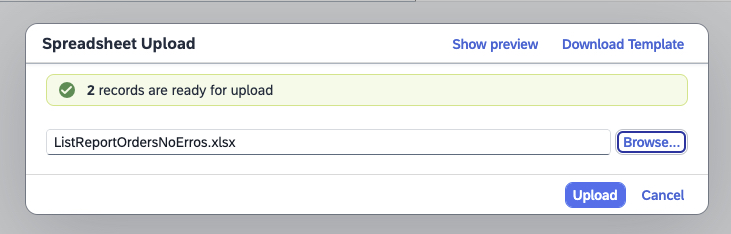
Declared in manifest.json as a component usage against a version-pinned name such as cc.spreadsheetimporter.v2_4_0, it opens an upload dialog in a running UI5 app, reads the file in the browser and submits the extracted rows through the model the app already has. The file itself is never sent, which is what its documentation rests the claim on that the component works independent of the backend, OData version and Fiori scenario. That is also where it stops: the rows arrive at the service as ordinary OData requests, so the service's own checks decide what is written, and nothing parses a file on a server. For server-side parsing instead, cds-spreadsheetimporter-plugincds-spreadsheetimporter-pluginA CAP plugin that adds an ImporterService accepting an uploaded Excel file, parses it on the server and writes its rows into the CDS entity named in the URL.community org, cap takes the file in CAP and the ABAP Spreadsheet ImporterABAP Spreadsheet ImporterA server-side ABAP component that parses an uploaded XLSX or CSV file and creates instances of a named RAP business object through dynamic EML, so its validations and authorizations run on every row.community org, abap takes it in RAP. Version 1.x is Apache-2.0 and is kept in the ui5-cc-spreadsheetimporter-community repository; 2.0.0 and above are published under the SpreadsheetImporter Commercial License, free for non-production use and paid for production or resale.
Facts
Where it sits
Who is behind it

In the atlas: maintains 35, contributes to 86, wrote 25@marianfooSpreadsheet ImporterSpreadsheet ImporterMaintains this

In the atlas: maintains 9@spreadsheetimportermaintainersWouter LemaireContributes to this

In the atlas: maintains 25, contributes to 39, wrote 12@lemaiwoM̷̱̥̳͔̖̠̙͈̫͕͔̳͉̱̣̭̮̠̰̄͊̒̈͛͗̈̇͆͗͆͋̾̋̅ͅͅẠ̴̡̬̭͓̟̠̣̤̓̽͛̋̌̆̆̔́̊̋́͜Ŕ̶͈̹̯̹͈̠̮̰̓̈́̐̊͐̕̕͝C̷̨̡̖̱̭͉̞̗̳͈̩͚̏͛̓̃͂͌̀̆͊̅̃̒̄͐̿̽̚͝Contributes to this

In the atlas: contributes to 2@MARCxGAMBITMarco BeierContributes to this

In the atlas: contributes to 13@wridgeuXexerContributes to this

In the atlas: maintains 7, contributes to 8@Xexer4 contributors
What it declares
Every artifact
- Type
- Package
- Origin
- By a community org
As a package
- Where it runs
- Inside its host
- Distributed through
- npm
Connections
Getting files into tables and table content back out as files
CAP Risks and Mitigations project with a Spreadsheet Upload button
UI5 app opening the Spreadsheet Importer on on-premise OData services
UI5 Tooling task writing the service name into the importer manifest
Download
Install
npm add ui5-cc-spreadsheetimporterDerived from the package name. No recipe recorded; the README has the configuration.
README
quoted from spreadsheetimporter/ui5-cc-spreadsheetimporter, readUI5 custom control ui5-cc-spreadsheetimporter

A UI5 Module to integrate a Spreadsheet Upload for Fiori Element Apps.
This control simply enables the mass upload of data, independent of the backend, OData version and Fiori scenario.
This is made possible by reading the Spreadsheet file and using the standard APIs.
The control will submit not the file, but just the data from the Spreadsheet File.
The integration of the control is designed to be as simple as possible and, in the best case, requires no configuration.
The aim is to support as many Fiori Scenarios and UI5 Versions as possible.
See here for all currently supported Versions.
History
Features 1, Fixes 2
Features 1, Fixes 2
Features 3, Fixes 1
Features 3, Fixes 4
Breaking 1, Other 1
Fixes 2
Fixes 1
Fixes 1
Features 3, Fixes 1
Features 1, Fixes 1
Fixes 1
Fixes 2
Features 2, Fixes 2
Fixes 1
Fixes 1
Fixes 1
Features 1
Features 1, Fixes 1
Fixes 1
Fixes 1
Features 1, Fixes 2
Fixes 1
Features 2
Breaking 1, Features 2, Fixes 1
Fixes 1
Breaking 1, Features
Fixes 1
Fixes 3
Fixes 2
Fixes 1
Features 1
Features 1
Fixes 1
Fixes 1
Fixes 1
Fixes 1
Fixes 1
Fixes 1
Features 4, Fixes 1
Features 4
Fixes 5
Features 2, Fixes 2
Fixes 2
Features 1
Fixes 1
Features 2, Fixes 1
Fixes 1
Breaking 1, Features 1
Fixes 1
Fixes 2
Fixes 1
Fixes 1
Features 1, Fixes 2
Features 1
Fixes 1
Features 3, Fixes 1
Features 2, Fixes 1
Fixes 1
Fixes 1
Breaking 1, Features 1
Features 3
Fixes 1
Features 1
Fixes 1
Features 2, Fixes 4
Fixes 2
Fixes 1
Fixes 1
Fixes 2
Fixes 2
Breaking 1, Features 6
Fixes 1
Fixes 1
Fixes 1
Fixes 1
Features 3, Fixes 2
Breaking 1, Features 2
Fixes 2
Features 2
Features 2
Fixes 1
Fixes 1
Fixes 1
Features 4
Fixes 1
Fixes 1
Fixes 1
Fixes 1
Features 1
Breaking 1
Fixes 1
Features 2, Fixes 2
Fixes 1
Features 1
Features 1, Fixes 3
Features 4, Fixes 1
Features 4
Features 1
Features 1, Fixes 2
Features 1, Fixes 1
Features 1
Fixes 1
Breaking 1
Fixes 1
Fixes 1
Features 2
Others providing
Compare all 9 on the Importing and exporting table data page →- abap2UI5 for Excelabap2UI5 for ExcelAn Office add-in that runs an abap2UI5 app in Excel's task pane, where the app reads and writes the workbook through the z2ui5.cc.ExcelBridge control.community org, abapOffice add-in running an abap2UI5 app in Excel's task panefrom ABAP
- abap2UI5-addons/table-content-loaderabap2UI5-addons/table-content-loaderAn abap2UI5 developer tool that moves the content of an ABAP table in and out of JSON, CSV or XLSX files, with a preview before download or saving to the database.independent, abapUpload, edit and download ABAP table content as JSON, CSV or XLSXfrom ABAP
- boy0korea/abap2jsonboy0korea/abap2jsonA report that exports ABAP table content to a JSON zip file, per table or per package, imports it back into its table, and compares or copies table content across servers.independent, abapExports and imports ABAP table content as zipped JSONfrom ABAP
- boy0korea/ABAP2XLSX_HELPERboy0korea/ABAP2XLSX_HELPERHelper methods over abap2xlsx to download, email or upload a table as Excel, and to convert between Excel, JSON and an ABAP table.independent, abapHelper methods over abap2xlsx for Excel, JSON and tablesfrom ABAP
- abapDataToTableImportabapDataToTableImportAn ABAP framework that declares a target structure in code and maps data a user supplies from a clipboard, an Excel file, a text file or an internal table onto it, with drag-and-drop column mapping.independent, abapMaps clipboard, Excel or text data onto a declared ABAP structurefrom ABAP
- mkysoft/xlsxreadermkysoft/xlsxreaderAn ABAP library that reads the content of Excel spreadsheets in the OpenXML format; its documentation states only that scope, with no detail on the class it exposes or on writing a file back.independent, abapReader for Excel spreadsheets in OpenXML format from ABAPfrom ABAP
- ABAP Spreadsheet ImporterABAP Spreadsheet ImporterA server-side ABAP component that parses an uploaded XLSX or CSV file and creates instances of a named RAP business object through dynamic EML, so its validations and authorizations run on every row.community org, abapABAP component importing XLSX or CSV files into RAP business objectsfrom ABAP
- cds-spreadsheetimporter-plugincds-spreadsheetimporter-pluginA CAP plugin that adds an ImporterService accepting an uploaded Excel file, parses it on the server and writes its rows into the CDS entity named in the URL.community org, capSpreadsheet upload into a CDS entity, parsed on the serverfrom CAP
Details
Sources
Sources are graph entities: the same page may back several entries, and an unreachable source flags every row that rests on it.
Compatibility and provenance
Flavors
“Usable across all Fiori scenarios (Fiori Elements, Freestyle, OpenUI5, V2/V4)” — Spreadsheet Importer documentation — UI5 Custom Control Spreadsheet Upload
“Usable across all Fiori scenarios (Fiori Elements, Freestyle, OpenUI5, V2/V4)” — Spreadsheet Importer documentation — UI5 Custom Control Spreadsheet Upload
Contributors
History in the atlas
- First seen.
For your agent
- Ref
artifact:spreadsheetimporter-ui5-cc-spreadsheetimporter- JSON
- /artifacts/spreadsheetimporter-ui5-cc-spreadsheetimporter.json
- MCP
- Connecting an agent