ABAP Statistical Tools
A single ABAP class that computes descriptive statistics over an internal table, with group-by, correlation, histograms and generators for the common probability distributions.
ztbox_cl_stats wraps an internal table and answers statistical questions about one column at a time, picked with ->col( ) or named on the main instance. It covers the elementary measures (minimum, maximum, range, sum, mean, median, variance, standard deviation, mean absolute deviation from either centre, coefficient of variation, dispersion index and counts of distinct and non-initial values), the quartiles with the interquartile range and the values outside 1.5 IQR of it, the harmonic, geometric and quadratic means, and skewness and kurtosis computed with the adjusted Fisher-Pearson standardized moment coefficient. ->group_by( ) repeats any of those per group of one or more columns, returning the group-by conditions beside the statistic, and ->covariance( ) and ->correlation( ) take a pair of column names at once. For empirical inference it bins the values by the Freedman-Diaconis rule into a histogram, derives the empirical probability density and distribution functions, and answers ->are_normal( ) with a Jarque-Bera test whose p-value comes back as an exported parameter. Static methods draw samples from the uniform, normal, standard, Bernoulli, binomial, geometric and Poisson distributions, ->normalize( ) and ->standardize( ) rescale a column, and it installs with abapGit.
Facts
Where it sits
Who is behind it

In the atlas: maintains 2, contributes to 2@zenrosadiramaintainer
What it declares
Every artifact
- Type
- Package
- Origin
- Independently maintained
As a package
- Where it runs
- does not say
- Distributed through
- abapGit
Connections
Describing a set of values with statistics
Download
README
quoted from zenrosadira/abap-tbox-stats under MIT, readABAP Statistical Tools
Statistics with ABAP: why not? This project consist of an ABAP class ztbox_cl_stats where some of the most common descriptive statistics functions have been included together with simple tools to generate distributions and produce empirical inference analyses.
Basic Features & Elementary Statistics
Let's compute some statistics on SBOOK table
SELECT * FROM sbook INTO TABLE @DATA(T_SBOOK).

DATA(stats) = NEW ztbox_cl_stats( t_sbook ).
Use ->col( ) method to select a column on which make calculations
DATA(prices) = stats->col( `LOCCURAM` ).Each statistic has its own method
* The smallest value
DATA(min)        = prices->min( ).                       " [148.00]

* The largest value
DATA(max)        = prices->max( ).                       " [6960.12]

* The range, i.e. the difference between largest and smallest values
DATA(range)      = prices->range( ).                     " [6812.12]

* The sum of the values
DATA(tot)        = prices->sum( ).                       " [25055655.41]

* The sample mean of the values
DATA(mean)       = prices->mean( ).                      " [922.96]

* The mean absolute deviation (MAD) from the mean
DATA(mad_mean)   = prices->mad_mean( ).                  " [480.41]

* The sample median of the values
DATA(median)     = prices->median( ).                    " [670.34]

* The mean absolute deviation (MAD) from the median
DATA(mad_median) = prices->mad_median( ).                " [436.36]

* The sample variance of the values
DATA(variance)   = prices->variance( ).                  " [572404.48]

* The sample standard deviation of the values
DATA(std_dev)    = prices->standard_deviation( ).        " [756.57]

* The coefficent of variation, ratio of the standard deviation to the mean
DATA(coeff_var)  = prices->coefficient_variation( ).     " [0.819]

* The dispersion index, ratio of the variance to the mean
DATA(disp_index) = prices->dispersion_index( ).          " [620.18]

* The number of distinct values
DATA(dist_val)   = prices->count_distinct( ).            " [324]

* The number of not initial values
DATA(not_init)   = prices->count_not_initial( ).         " [27147]
Alternatively, you can use the main instance, which represents the entire table, passing the name of the relevant column:
DATA(min_price) = stats->min( `LOCCURAM` ).More specific descriptive statistics
Quartiles
25% of the data is below the first quartile
DATA(first_quartile) = prices->first_quartile( ). " [566.10]50% of the data is below the second quartile or median
DATA(second_quartile) = prices->second_quartile( ). " [670.34]
DATA(median)          = prices->median( ). " It's just a synonym for second_quartile( )
75% of the data is below the third quartile
DATA(third_quartile) = prices->third_quartile( ). " [978.50]The difference between third and first quartile is called interquartile range , and it is a measure of spread of the data
DATA(iqr) = prices->interquartile_range( ). " [412.40]A value outside the range can be considered an outlier
DATA(outliers) = prices->outliers( ). " Found 94 outliers, from 1638.36 to 6960.12Means
Harmonic Mean is , used often in averaging rates
DATA(hmean) = prices->harmonic_mean( ). " [586.17]Geometric Mean is , used for population growth or interest rates
DATA(gmean) = prices->geometric_mean( ). " [731.17]Quadratic Mean is , used, among other things, to measure the fit of an estimator to a data set
DATA(qmean) = prices->quadratic_mean( ). " [1193.42]

* The values calculated so far confirm the HM-GM-AM-QM inequalities
* harmonic mean <= geometric mean <= arithmetic mean <= quadratic mean
Moments
Skewness is a measure of the asymmetry of the distribution of a real random value about its mean. We estimate it with a sample skewness computed with the adjusted Fisher-Pearson standardized moment coefficient (the same used by Excel).
DATA(skewness) = prices->skenewss( ). " [3.19]
* positive skewness: right tail is longer, the mass of the distribution is concentrated on the left
Kurtosis is a measure of the tailedness of the distribution of a real random value: higher kurtosis corresponds to greater extremity of outliers
DATA(kurtosis) = prices->kurtosis( ). " [19.18]
* positive excess kurtosis (kurtosis minus 3): leptokurtic distribution with fatter tails
Empirical Inference
The histogram is a table of couples where is the first endpoint of the -th bin, i.e. the interval with which the values were partitioned, and is the -th frequency, i.e. the number of values inside the -th bin.
DATA(histogram) = prices->histogram( ).
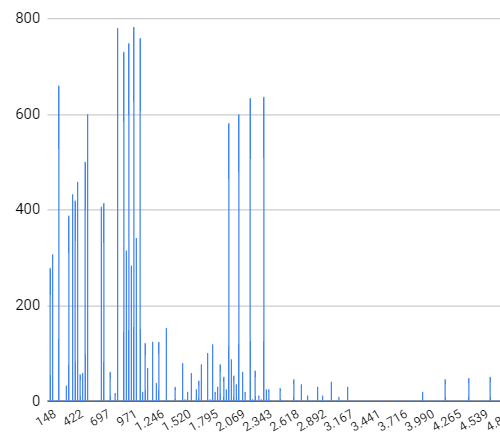
The bins are created using Freedman-Diaconis rule: the bins width is where is the interquartile range, and the total number of bins is
Dividing each frequency by the total we get an estimate of the probability to draw a value in the corresponding bin, this is the empirical probability
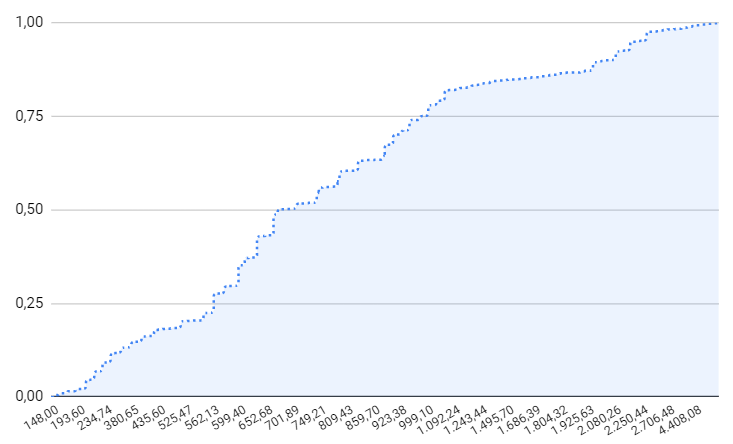
DATA(empirical_prob) = prices->empirical_pdf( ).Similarly, for each distinct value , we can compute the number , this is the empirical distribution function
DATA(empirical_dist) = prices->empirical_cdf( ).
In order to answer the question "are the values normally distributed?" you can use method ->are_normal( )
DATA(normality_test) = prices->are_normal( ) " [abap_false].This method implements the Jarque-Bera normality test. The -value is an exported parameter and the test is considered passed if where by default (it's an optional parameter).
Distributions
The following are static methods to generate samples from various distributions
" Continuous Uniform Distribution
DATA(uniform_values) = ztbox_cl_stats=>uniform( low = 1 high = 50 size = 10000 ).
" Generate a sample of 10000 values from a uniform distribution in the interval [1, 50]
" default is =>uniform( low = 0 high = 1 size = 1 )

" Continuous Normal Distribution
DATA(normal_values) = ztbox_cl_stats=>normal( mean = `-3` variance = 13 size = 1000 ).
" Generate a sample of 1000 values from a normal distribution with mean = -3 and variance 13
" default is =>normal( mean = 0 variance = 1 size = 1 )

" Continuous Standard Distribution
DATA(standard_values) = ztbox_cl_stats=>standard( size = 100 ).
" Generate a sample of 100 values from a standard distribution, i.e. a normal distribution
" with mean = 0 and variance = 1
" default is =>normal( size = 1 )

" Discrete Bernoulli Distribution
DATA(bernoulli_values) = ztbox_cl_stats=>bernoulli( p = `0.8` size = 100 ).
" Generate a sample of 100 values from a bernoulli distribution with probability parameter = 0.8
" default is =>bernoulli( p = `0.5` size = 1 )

" Discrete Binomial Distribution
DATA(binomial_values) = ztbox_cl_stats=>binomial( n = 15 p = `0.4` size = 100 ).
" Generate a sample of 100 values from a binomial distribution
" with probability parameter = 0.4 and number of trials = 15
" default is =>binomial( n = 2 p = `0.5` size = 1 )

" Discrete Geometric Distribution
DATA(geometric_values) = ztbox_cl_stats=>geometric( p = `0.6` size = 100 ).
" Generate a sample of 100 values from a geometric distribution with probability parameter = 0.6
" default is =>geometric( p = `0.5` size = 1 )

" Discrete Poisson Distribution
DATA(poisson_values) = ztbox_cl_stats=>poisson( l = 4 size = 100 ).
" Generate a sample of 100 values from a poisson distribution with lambda parameter = 4
" default is =>poisson( l = `1.0` size = 1 )
Let's plot the empirical probability density function of a sample of 100000 values drawn from a generated standard normal distribution:
DATA(gauss)      = ztbox_cl_stats=>standard( size = 100000 ).
DATA(gauss_stat) = NEW ztbox_cl_stats( gauss ).
DATA(g_pdf)      = gauss_stat->empirical_pdf( ).
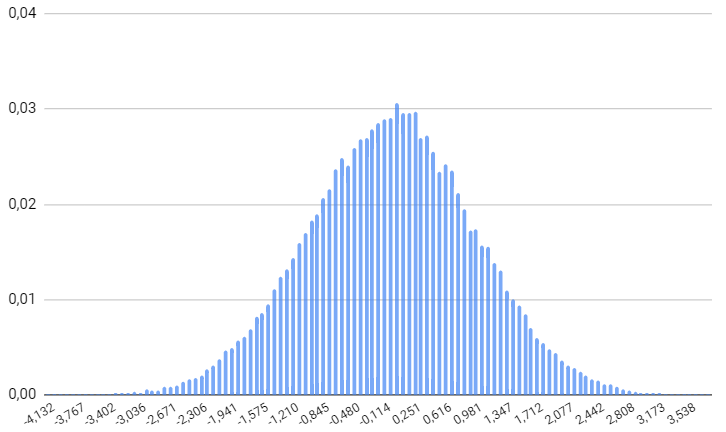
yep! I recognize this shape.
Feature Scaling
In some cases can be useful to work with normalized data
DATA(normalized_prices) = prices->normalize( ).
" Each value is transformed subtracting the minimal value and dividing by the range (max - min)

DATA(standardized_prices) = prices->standardize( ).
" Each value is transformed subtracting the mean and dividing by the standard deviation
Joint Variability
Covariance
In order to compute the sample covariance of two columns call method ->covariance passing the columns separated by comma
DATA(stats)      = NEW ztbox_cl_stats( t_sbook ).
DATA(covariance) = stats->covariance( `LOCCURAM, LUGGWEIGHT` ). " [1037.40]
Correlation
The sample correlation coefficient is computed by calling ->correlation method
DATA(stats)      = NEW ztbox_cl_stats( t_sbook ).
DATA(covariance) = stats->covariance( `LOCCURAM, LUGGWEIGHT` ). " [0.17]
Aggregations
Each descriptive statistics explained so far can be calculated performing first a group-by with other columns
DATA(stats)               = NEW ztbox_cl_stats( sbook ).
DATA(grouped_by_currency) = stats->group_by( `FORCURKEY` ).
" You can also perform a group-by with multiple columns, just comma-separate them
" e.g. stats->group_by( `FORCURKEY, SMOKER` ).
DATA(prices_per_currency) = grouped_by_currency->col( `FORCURAM` ).
DATA(dev_cur)             = prices_per_currency->standard_deviation( ).
dev_cur is a table with two fields: the first one is a table with the group-by conditions (group-by field and value), the second one contains the statistics computed (standard deviation in this example).
The same result can be obtained passing a table having the group-by fields and an additional field for the statistic
TYPES: BEGIN OF ty_dev_cur,
         forcurkey          TYPE sbook-forcurkey,
         price_std_dev      TYPE f,
       END OF ty_dev_cur.

DATA t_dev_cur TYPE TABLE OF ty_dev_cur.

prices_per_currency->standard_deviation( IMPORTING e_result = t_dev_cur ).| FORCURKEY | PRICE_STD_DEV |
|---|---|
| EUR | 5.1572747413790194E+02 |
| USD | 4.5762828742456850E+02 |
| GBP | 2.9501066968757806E+02 |
| JPY | 5.2009995569407386E+02 |
| CHF | 8.5376086718562442E+02 |
| AUD | 3.9095624219014348E+02 |
| ZAR | 4.3830708141667837E+03 |
| SGD | 1.0340758423220680E+03 |
| SEK | 4.4754710657225996E+03 |
| CAD | 7.7769277990938747E+02 |
Contributions
Many features can be improved or extended (new distribution generators? implementing statistic tests?) every contribution is appreciated
Installation
Install this project using abapGit
Details
Sources
Sources are graph entities: the same page may back several entries, and an unreachable source flags every row that rests on it.
Compatibility and provenance
abaplint
History in the atlas
- First seen.
For your agent
- Ref
artifact:zenrosadira-abap-tbox-stats- JSON
- /artifacts/zenrosadira-abap-tbox-stats.json
- MCP
- Connecting an agent