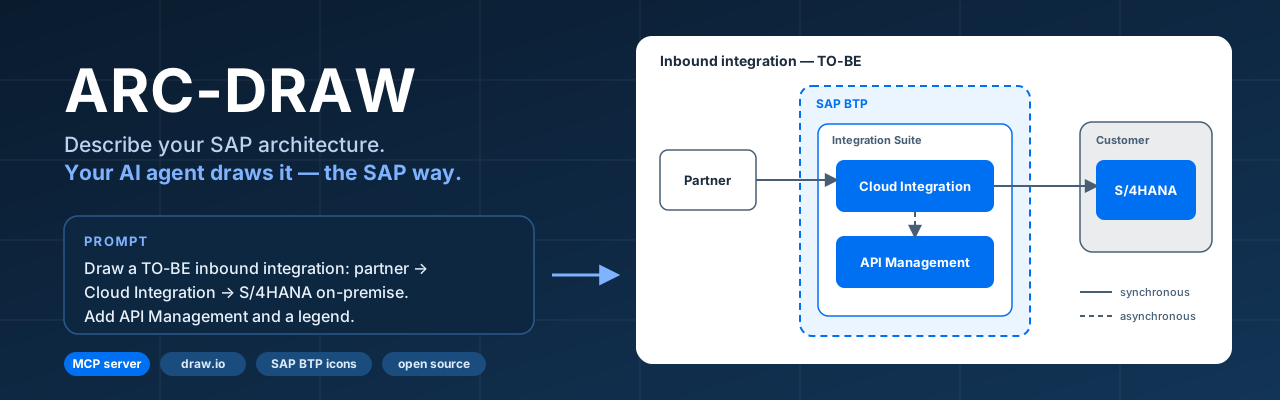
An MCP server that draws BTP solution diagrams onto a live draw.io canvas, with 111 SAP BTP icons as native shapes and SAP's diagram guidelines handed to the client as drawing rules.
The agent gets two things: 111 SAP BTP icons as native sap.* shapes, so it places sap.cloud_integration instead of a labelled box, and the SAP BTP Solution Diagram GuidelinesSAP BTP Solution Diagram GuidelinespracticeSAP's visual language for BTP solution diagrams, in line with the SAP Fiori Horizon principles and colour palette, with editable templates for draw.io and PowerPoint.sap official, btp distilled into a drawing constitution that reaches the MCP client the moment it connects, covering colours, connector semantics, area nesting and compose order. Two further tools let the agent ask for a canonical pattern or for a rule by topic. It draws onto a live canvas rather than writing a file: draw.iodraw.iooutside the atlasA diagram editor, on the web and as a desktop app. The BTP diagram skills here write .drawio files, and a person opens and edits them in it. has to be open at http://localhost:3000/, and the drawing tools work only while that tab is connected. The draw.io half is drawio-mcp-server by Ladislav Gazo, which the maintainer credits as what ARC-DRAW stands on. Installation is from source with pnpm, and a one-line npx install sits on the maintainer's list of what is still to come.
Architecture diagramsBTPArchitecture diagramscapabilityDrawing the architecture and components of a solution so another person can understand their responsibilities and connections. Shared notation makes diagrams readable across teams.Agent guidanceBTPAgent guidancecapabilityPackaged knowledge you hand a coding agent so it gets a framework right unprompted — skills, rule files, instruction packs. Distinct from agent tooling, which is about building agentic features into your application, and from [agent access to your code](capability:agent-code-access), where the agent reads the real project instead of being handed a file about it.
Requires
draw.iodraw.iooutside the atlasThe server draws onto a live draw.io canvas, and its drawing tools work only while that canvas is open and connected.Node.jsNode.jsoutside the atlasThe MCP client starts the server as a Node process from the built output, and the repository names the runtime version it is built and run with.
Who is behind it
Emerson TosinEmerson TosinPersonMaintains this In the atlas: maintains 1, contributes to 1@etosinmaintainer
Before choosing this
crawled
Conditions
PracticalFunctional boundary
Any run nobody is watching: the drawing tools work only while the draw.io canvas at http://localhost:3000/ is open and connected, so there is no diagram to produce on a build agent or a server. Nothing checks the result either, because the maintainer keeps a diagram linter on the roadmap rather than in the release. The maintainer marks the status early at v0.x, installs it from source, and records testing with Claude Code alone.
What it declares
Every artifact
Type
MCP server
Origin
Independently maintained
Runtime
Node.js
declared
As an MCP server
Runs as
local process
declared, where the process lives, read /absolute/path/to/arc-draw/packages/drawio-mcp-server/build/index.js — ARC-DRAW — README, MCP client configuration, 2026-09-28
Transport
stdio
declared, how a client reaches it, read "type": "stdio" — ARC-DRAW — README, MCP client configuration, 2026-09-28
stated by its maintainer“Checks the file: - [ ] Diagram linter: check an existing `.drawio` file against the SAP guideline” ARC-DRAW — README, Roadmap,
Diagram format
drawio
stated by its maintainer“**An open-source [MCP](https://modelcontextprotocol.io) server that lets your AI agent draw SAP BTP solution diagrams on a live [draw.io](https://www.drawio.com) canvas, with the official SAP icons and the SAP diagram rules built in.**” ARC-DRAW — README,
Check a BTP solution diagram against the guidelineA BTP solution diagram exists, and before it goes into a document or a review someone wants to know whether it follows SAP's visual language rather than only looking about right.Stated not supportednone for this outcome
What it does
The maintainer lists a diagram linter that would check an existing .drawio file against the SAP guideline on the roadmap, so the release carries no such check. The guideline reaches the agent as a drawing constitution before the diagram, not as a check after it.
Remaining work
Read the drawn canvas by eye, or run one of the other contributions over the exported file.
Hand an agent SAP's BTP diagram rulesSomeone asks an agent for a BTP solution diagram and wants it drawn in SAP's own visual language without the rules being typed into the prompt.Coversthe rules pushed to the client on connect
What it does
The guideline reaches the MCP client as a drawing constitution the moment it connects, rather than being loaded as a skill the agent decides to read. Two tools, get-sap-examples and get-sap-guideline, let the agent ask for a canonical pattern or a rule by topic afterwards.
Remaining work
Install from source and keep a draw.io canvas open and connected, since that is what the drawing tools work against. Nothing here checks the result: the maintainer keeps a diagram linter on the roadmap.
Agent guidanceAgent guidancecapabilityPackaged knowledge that teaches a coding agent a frameworkSAP and community, core adopted it
→provides
Sends SAP's diagram guideline to the MCP client as a drawing constitution when the client connects, and answers the agent's own calls for a canonical pattern or for a rule by topic.
provides Agent guidance
Functional, stated
For
Sends SAP's diagram guideline to the MCP client as a drawing constitution when the client connects, and answers the agent's own calls for a canonical pattern or for a rule by topic.
Basis
“The SAP BTP Solution Diagram guideline distilled into a drawing *constitution*, sent to your MCP client the moment it connects”ARC-DRAW — README, checked “Two tools the agent can call by itself: `get-sap-examples` (canonical patterns with ground-truth styles) and `get-sap-guideline` (specific rules by topic: areas, connectors, icons, numbering…).”ARC-DRAW — README, checked
stated
provides Agent guidance
Functional, stated
For
Sends SAP's diagram guideline to the MCP client as a drawing constitution when the client connects, and answers the agent's own calls for a canonical pattern or for a rule by topic.
Basis
“The SAP BTP Solution Diagram guideline distilled into a drawing *constitution*, sent to your MCP client the moment it connects”ARC-DRAW — README, checked “Two tools the agent can call by itself: `get-sap-examples` (canonical patterns with ground-truth styles) and `get-sap-guideline` (specific rules by topic: areas, connectors, icons, numbering…).”ARC-DRAW — README, checked
Packaged knowledge that teaches a coding agent a framework
Architecture diagramsArchitecture diagramscapabilityDrawing a solution's architecture and componentsSAP and community, narrow by design
→provides
Draws BTP solution diagrams onto a live draw.io canvas, placing SAP's own icons as native shapes rather than labelled boxes.
provides Architecture diagrams
Functional, stated
For
Draws BTP solution diagrams onto a live draw.io canvas, placing SAP's own icons as native shapes rather than labelled boxes.
Basis
“111 SAP BTP icons as native `sap.*` shapes, plus draw.io's own SAP palette (`mxgraph.sap.*`) when your draw.io ships it”ARC-DRAW — README, checked “It is the live canvas, and drawing tools only work while it is connected.”ARC-DRAW — README, checked
stated
provides Architecture diagrams
Functional, stated
For
Draws BTP solution diagrams onto a live draw.io canvas, placing SAP's own icons as native shapes rather than labelled boxes.
Basis
“111 SAP BTP icons as native `sap.*` shapes, plus draw.io's own SAP palette (`mxgraph.sap.*`) when your draw.io ships it”ARC-DRAW — README, checked “It is the live canvas, and drawing tools only work while it is connected.”ARC-DRAW — README, checked
The MCP client starts the server as a Node process from the built output, and the repository names the runtime version it is built and run with.
needs Node.js
Technical, stated
For
The MCP client starts the server as a Node process from the built output, and the repository names the runtime version it is built and run with.
Basis
“Node.js 22 LTS, Git, and pnpm”ARC-DRAW — README, checked
stated
needs Node.js
Technical, stated
For
The MCP client starts the server as a Node process from the built output, and the repository names the runtime version it is built and run with.
Basis
“Node.js 22 LTS, Git, and pnpm”ARC-DRAW — README, checked
A cross-platform JavaScript runtime that servers, command line tools and scripts written in JavaScript are run with. For the things here, the prerequisite a repository names when its build is a set of npm scripts.
draw.iooutside the atlasA diagram editor, on the web and as a desktop app. The BTP diagram skills here write .drawio files, and a person opens and edits them in it.
Node.jsoutside the atlasA cross-platform JavaScript runtime that servers, command line tools and scripts written in JavaScript are run with. For the things here, the prerequisite a repository names when its build is a set of npm scripts.
ARC-DRAWmcp-serverAn MCP server that draws BTP solution diagrams onto a live draw.io canvas, with 111 SAP BTP icons as native shapes and SAP's diagram guidelines handed to the client as drawing rules.independent, btp
Your MCP client → ARC-DRAWStated in the document, dataARC-DRAW — README, MCP client configuration, checked 2026-09-28: “"type": "stdio"”
ARC-DRAW → draw.ioDocumented onlyThe server draws onto a live draw.io canvas, and its drawing tools work only while that canvas is open and connected.
ARC-DRAW → Node.jsDocumented onlyThe MCP client starts the server as a Node process from the built output, and the repository names the runtime version it is built and run with.
SAPnot SAP's, or the project's ownstated in the documentdocumented only
An open-source MCP server that lets your AI agent draw SAP BTP solution diagrams on a live draw.io canvas, with the official SAP icons and the SAP diagram rules built in.
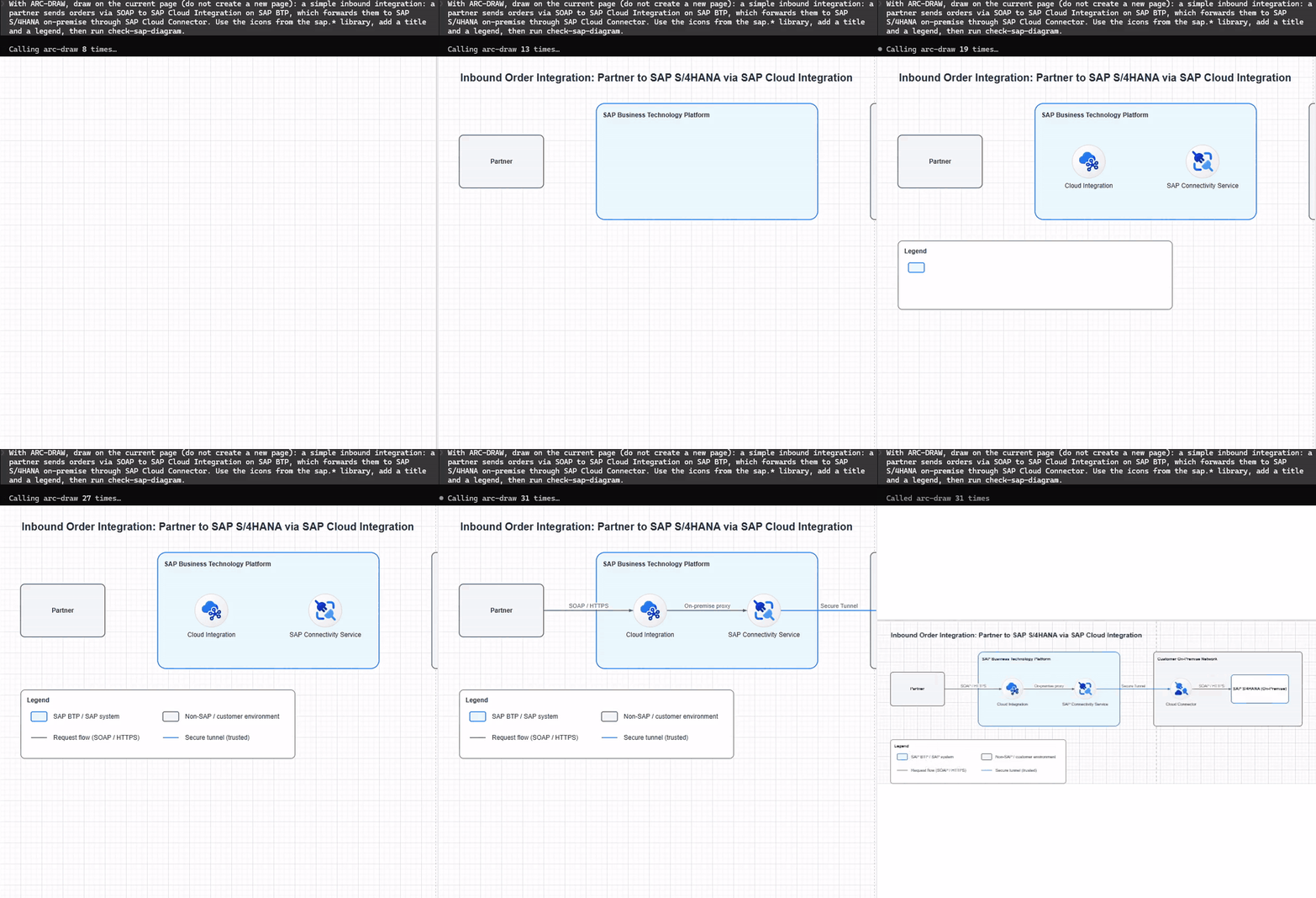
One prompt to Claude Code, a diagram built live on the draw.io canvas (sped up ~3.5×). The agent finishes by checking its own work with check-sap-diagram.
Why this exists
Every SAP architect knows the routine. A whiteboard sketch turns into forty minutes of hunting for the right BTP icon, fixing colours and re-routing connectors, just so the diagram looks like something SAP would publish.
Generic AI diagram tools don't fix that. They draw boxes, not SAP products. They use black arrows and random colours, and they put your on-premise S/4HANA inside the BTP boundary.
ARC-DRAW gives your agent the two things it is missing.
What it is
Why it matters
🎨 Vocabulary
111 SAP BTP icons as native sap.* shapes, plus draw.io's own SAP palette (mxgraph.sap.*) when your draw.io ships it
The agent places sap.cloud_integration, not "a blue box labelled CPI". Icons live in the plugin, so they never eat your model's context.
📐 Grammar
The SAP BTP Solution Diagram guideline distilled into a drawing constitution, sent to your MCP client the moment it connects
Colours, connector semantics (solid = sync, dashed = async), area nesting and compose order become rules the agent follows, not suggestions.
On top of that, two tools the agent can call by itself: get-sap-examples (canonical patterns with ground-truth styles) and get-sap-guideline (specific rules by topic: areas, connectors, icons, numbering…).
🚀 Quick start
Status: early (v0.x). It works and we use it, but expect rough edges. Installation is from source for now; a one-line npx install is on the roadmap.
You need: Node.js 22 LTS, Git, and pnpm (corepack enable, or npm i -g pnpm@10).
On Windows use forward slashes: C:/Users/you/dev/arc-draw/packages/drawio-mcp-server/build/index.js.
Port 3000 already taken?
Corporate security agents like port 3000. Add "--http-port", "4000" to args and open http://localhost:4000/ instead.
Restart your MCP client, open http://localhost:3000/ and leave that tab open. It is the live canvas, and drawing tools only work while it is connected.
💬 Try these prompts
"Draw a TO-BE inbound integration: partner → SOAP sender adapter → Cloud Integration iFlow (enrichment) → REST receiver → S/4HANA on-premise via a standard API. Put Cloud Integration and API Management inside an Integration Suite area and add a legend."
"Show an AS-IS / TO-BE comparison for replacing a PI/PO interface with Cloud Integration."
"Side-by-side extension: a CAP app on Cloud Foundry reads S/4HANA through a Destination and Cloud Connector, users sign in through Cloud Identity Services. Number the flow steps."
Then edit the result by hand in the canvas, or ask the agent to change it. Got a prompt that works well, or one that goes wrong? Share it: that is the most useful thing you can do.
🧰 What's inside
Category
Icons
sap.foundation
43
sap.integration_suite
15
sap.app_dev_and_automation
17
sap.data_and_analytics
8
sap.btp_saas
17
sap.ai
11
ARC-DRAW is built on drawio-mcp-server v2.3, so everything from upstream still works: multi-page and multi-document targeting, layers, edges, Mermaid import, TLS, the browser extension, and the AWS/Azure/GCP/Cisco stencils. You can mix them with SAP shapes in one diagram.
🙋 Help build this
This project needs SAP practitioners more than it needs programmers. The agent is only as good as the rules and patterns we give it, and you know how these diagrams should look.
You don't need to write a line of TypeScript to make a real difference:
Installation is from source. The /plugin marketplace entry and the npx drawio-mcp-server install command inherited from upstream install the plain draw.io server, without the SAP layer. Use the manual setup above until the npx install lands.
Tested with Claude Code. Other MCP clients should work, since this is a standard MCP server, but we have not verified them yet. Tell us what you find.
Diagram quality depends on the model. The constitution steers the agent; it can't make every model perfect. That is why diagram feedback is so valuable.
Windows: build and run work from PowerShell, but pnpm test needs Git Bash or WSL, and a few inherited upstream tests assume Linux/macOS.
🧭 Related projects
ARC-DRAW is not the only attempt at teaching an AI agent to draw SAP BTP
diagrams. btp-drawio-skill
by Wouter Lemaire is a Claude Code plugin: a skill that authors .drawio
files directly, with the full official SAP BTP icon library bundled and a
structural + style validator script. ARC-DRAW takes a different route: an
MCP server that edits a live draw.io canvas, so a person and the agent
can work on the same diagram together. The two approaches complement each
other, and both follow the official SAP BTP Solution Diagram guideline.
If you know of another one, open an issue and it will be
added here.
🔧 Troubleshooting
The agent says there is no document / list-documents is empty. The canvas tab isn't open. Open http://localhost:3000/ and keep it open, then hard-refresh (Ctrl+F5).
MCP client shows Failed to reconnect: -32000. The build didn't run on this machine. Run pnpm install && pnpm -r build and check that packages/drawio-mcp-server/build/index.js exists.
The first launch is slow, or fails with "Could not download the draw.io editor assets". The built-in editor downloads draw.io once and caches it. If GitHub rate-limits your network (common on shared IPs and behind corporate proxies), ARC-DRAW retries through the GitHub release page on its own. If that fails too, it prints the fix. Either:
set a GITHUB_TOKEN environment variable (any token, no scopes needed) and start again; or
install the assets by hand: download draw.war from the draw.io releases, unzip it into <folder>/webapp (so that index.html sits directly inside), delete the WEB-INF and META-INF folders in there, and start the server with --asset-path <folder>.
ARC-DRAW stands on the shoulders of drawio-mcp-server by Ladislav Gazo (MIT). The MCP server, the draw.io plugin, the browser extension and all live-canvas tooling are his work; ARC-DRAW adds the SAP vocabulary and grammar. If you like this, please star the upstream project too. The original README is kept as README.upstream.md.
ARC-DRAW is an independent community project. It is not affiliated with, sponsored by, or endorsed by SAP SE. SAP, SAP BTP, SAP S/4HANA and other SAP product names are trademarks of SAP SE. SAP icon assets remain subject to their own license terms.
MIT, read
Others providing24
Architecture diagramsArchitecture diagramscapabilityDrawing the architecture and components of a solution so another person can understand their responsibilities and connections. Shared notation makes diagrams readable across teams.SAP and community, narrow by design
btp-solution-diagram-generatorbtp-solution-diagram-generatorskillA Claude plugin that writes BTP solution diagrams as .drawio files in the style of the SAP BTP Solution Diagram Guidelines.independent, btpClaude plugin writing BTP solution diagrams as .drawio files
abap-skillsabap-skillsskillSeventeen agent skills for ABAP development in one repository: RAP, CDS view entities, ABAP SQL and AMDP, unit testing, authorisation, eventing, abapGit, ABAP Cloud and the clean core levels.independent, abapSeventeen agent skills for ABAP development
drawio-skill-sapdrawio-skill-sapskillA GitHub Copilot agent skill that writes BTP solution diagrams as uncompressed draw.io XML against the SAP BTP Solution Diagram Design Guideline, with SAP's own shape library bundled.independent, btpGitHub Copilot skill writing BTP solution diagrams as draw.io XML
sap-architecturesap-architectureskillA Claude Code plugin and portable agent skill that turns a plain-English description into a BTP diagram in SAP Architecture Center style, checked by a validator before it is handed over.independent, btpClaude Code plugin and skill drawing validated BTP diagrams
drawio-btp-diagram-skillsdrawio-btp-diagram-skillsskillTwo Claude Code skills that take a BTP architecture described in words through a Mermaid sketch to draw.io XML, with a structural and a visual review after the drawing.independent, btpClaude Code skills for BTP architecture diagrams in draw.io
SAP BTP Solution Diagram GuidelinesSAP BTP Solution Diagram GuidelinespracticeSAP's visual language for BTP solution diagrams, in line with the SAP Fiori Horizon principles and colour palette, with editable templates for draw.io and PowerPoint.sap official, btpSAP's visual language and templates for BTP solution diagrams
Agent guidanceAgent guidancecapabilityPackaged knowledge you hand a coding agent so it gets a framework right unprompted — skills, rule files, instruction packs. Distinct from agent tooling, which is about building agentic features into your application, and from agent access to your code, where the agent reads the real project instead of being handed a file about it.SAP and community, core adopted it
sap-cx-developer-companionsap-cx-developer-companionskillAn agent skill for SAP Customer Experience work that routes a request to one of three jobs: finding a Commerce Cloud, Sales Cloud or Service Cloud API, writing CDS for a CX extension, or explaining an error.independent, commerceAgent skill for SAP Customer Experience APIs, CDS and errors
sap-cloud-integration-pipeline-assistantsap-cloud-integration-pipeline-assistantskillAn agent skill for the Pipeline Concept framework in SAP Integration Suite Cloud Integration, covering implementation, the Partner Directory, XSLT and Groovy examples and troubleshooting.independent, btpAgent skill for the Pipeline Concept in SAP Cloud Integration
DanKromp/skillOverflowDanKromp/skillOverflowskillA collection of 41 agent skills, 37 for CAP, Fiori, BTP, UI5, ABAP, Integration Suite and HANA work and four for creating, reviewing and retiring skills, each with its own eval.independent, capCollection of 41 agent skills, 37 for SAP development tasks
sap-ai-dev-toolkitsap-ai-dev-toolkitmcp-serverAn MCP proxy that pins an agent's ABAP tools to one SAP system: setup reads the BAS destinations or the local SAP GUI landscape and writes one stdio server per system, leaving the credentials in the destination or in the editor's own login prompts.independent, abapMCP proxy pinning an agent's ABAP tools to one SAP system
sap-odata-explorersap-odata-explorerdesktop-appA Rust CLI and desktop app for exploring and testing SAP OData services against real systems — catalog discovery, metadata browsing, an F4 value-help picker and a Fiori-readiness linter — with an agent skill shipped beside it.independent, btpRust CLI and desktop app for exploring SAP OData services
btp-solution-diagram-generatorbtp-solution-diagram-generatorskillA Claude plugin that writes BTP solution diagrams as .drawio files in the style of the SAP BTP Solution Diagram Guidelines.independent, btpClaude plugin writing BTP solution diagrams as .drawio files
abap-skillsabap-skillsskillSeventeen agent skills for ABAP development in one repository: RAP, CDS view entities, ABAP SQL and AMDP, unit testing, authorisation, eventing, abapGit, ABAP Cloud and the clean core levels.independent, abapSeventeen agent skills for ABAP development
drawio-skill-sapdrawio-skill-sapskillA GitHub Copilot agent skill that writes BTP solution diagrams as uncompressed draw.io XML against the SAP BTP Solution Diagram Design Guideline, with SAP's own shape library bundled.independent, btpGitHub Copilot skill writing BTP solution diagrams as draw.io XML
sap-mdk-appssap-mdk-appsskillAn agent skill for Mobile Development Kit projects: the project layout, the metadata syntax, and the rules that prevent the failures those two produce on iOS, Android and the web.independent, btpAgent skill for Mobile Development Kit projects
sap-architecturesap-architectureskillA Claude Code plugin and portable agent skill that turns a plain-English description into a BTP diagram in SAP Architecture Center style, checked by a validator before it is handed over.independent, btpClaude Code plugin and skill drawing validated BTP diagrams
SAP Datasphere Plugin for ClaudeSAP Datasphere Plugin for ClaudeskillEighteen Datasphere skills over a bundled 45-tool MCP server — exploration, view and analytic-model design, BW Bridge migration, security architecture and catalog governance.independent, btpEighteen Datasphere skills over a bundled MCP server
SAP Power for KiroSAP Power for KiroskillA set of thirty-five-plus SAP skills packaged as a power for Kiro IDE rather than Claude Code, spanning BTP, UI5, data and analytics, ABAP, CAP and CLI tooling, with automatic context activation in Kiro.independent, btpSAP skills for the Kiro IDE
drawio-btp-diagram-skillsdrawio-btp-diagram-skillsskillTwo Claude Code skills that take a BTP architecture described in words through a Mermaid sketch to draw.io XML, with a structural and a visual review after the drawing.independent, btpClaude Code skills for BTP architecture diagrams in draw.io
aicore-skillsaicore-skillsskillFour agent skills for SAP AI Core, published as a plugin inside SAP's AI Skills Library: admin resources, the deployment lifecycle, the foundation models in the Generative AI Hub, and the Context Registry behind tabular prediction.sap official, btpFour agent skills for SAP AI Core in SAP's AI Skills Library
SAP/automation-pilot-agent-skillsSAP/automation-pilot-agent-skillsskillEight skills for writing, reviewing and operating SAP Automation Pilot content — command generation, catalogue exploration, code review, the content and executions APIs, debugging, schedules, and generating an MCP server from a command.sap official, btpEight skills for writing and operating SAP Automation Pilot content
SAP Developers MCPSAP Developers MCPmcp-serverThe hosted MCP server of developers.sap.com, over which an agent searches SAP's tutorials, reads missions and queries the site's knowledge graph of tutorials and concepts.sap official, umbrellaHosted MCP server of developers.sap.com tutorials and missions
sap-fiori-iossap-fiori-iosskillAn agent skill SAP publishes for SAP Fiori for iOS: it maps a node of the Fiori iOS UI Kit in Figma onto SwiftUI code, and answers which Fiori component a Figma variant becomes.sap official, btpAgent skill mapping Fiori iOS UI Kit nodes in Figma to SwiftUI
SAP/leanix-ai-pluginsSAP/leanix-ai-pluginsskillOne Claude Code plugin, sap-leanix, bundling two skills that build and debug LeanIX automation scripts and create and manage calculations, both working through the LeanIX MCP server.sap official, btpClaude Code plugin with two skills for SAP LeanIX scripting
SAP-samples/html5-applications-migration-skills-for-sap-btpSAP-samples/html5-applications-migration-skills-for-sap-btpskillA Claude Code plugin with migrate, validate and cleanup skills that move an HTML5 app from SAP Neo, html5-apps-repo or a standalone approuter to the SAP BTP Application Frontend (appFront) service.sap official, btpClaude Code plugin with skills migrating HTML5 apps to appFront
SAP-samples/joule-a2a-agent-toolkitSAP-samples/joule-a2a-agent-toolkitskillFour skills for building an agent that talks to SAP Joule over A2A and getting it onto Cloud Foundry — the agent itself, and the three CLIs the deployment goes through.sap official, btpSkills for building an A2A agent for Joule and deploying it to CF
SAP-samples/sap-devs-cliSAP-samples/sap-devs-clicliA CLI that injects current SAP developer knowledge packs into an AI coding tool's context and wires up SAP's own MCP servers for it, shipped as a single binary through Homebrew, Scoop or GitHub Releases.sap official, btpCLI adding SAP developer knowledge and MCP servers to AI coding tools
sap-tutorials-contentsap-tutorials-contentskillAn agent skill that maps the public developers.sap.com content API: the catalogue, the navigation, a tutorial's HTML or JSON, and full-text search, all anonymous and read-only.sap official, btpAgent skill mapping the developers.sap.com content API
secondsky/sap-skillssecondsky/sap-skillsskillForty SAP development plugins installed through the skills command line or the Claude Code and Codex marketplaces, with a record per plugin of what its claims were checked against.independent, btpForty SAP development plugins for coding agents
README.mdquoted, and what the entry declareschecked
Sources are graph entities: the same page may back several entries, and an unreachable source flags every row that rests on it.
Compatibility and provenance
runtimesnode
discovered viaAdded by hand
first seen in the atlas
ecosystem and domainbtp, developer-experience
History in the atlas2
Any run nobody is watching: the drawing tools work only while the draw.io canvas at `http://localhost:3000/` is open and connected, so there is no diagram to produce on a build agent or a server. Nothing checks the result either, because the maintainer keeps a diagram linter on the [roadmap](https://github.com/etosin/arc-draw#-roadmap) rather than in the release. The maintainer marks the status early at v0.x, installs it from source, and records testing with Claude Code alone.