
 SAP Automation Pilot Agent Skills
The fastest way to build SAP BTP automations — describe what you want, deploy in minutes.
This repository brings AI-powered development to SAP Automation Pilot. Using Claude Code, you can generate production-ready Commands through natural conversation — the AI handles JSON schemas, jq expressions, and best practices while you focus on what to automate. Review code, deploy to your tenant, trigger Executions, and troubleshoot failures — all without leaving your IDE or terminal.
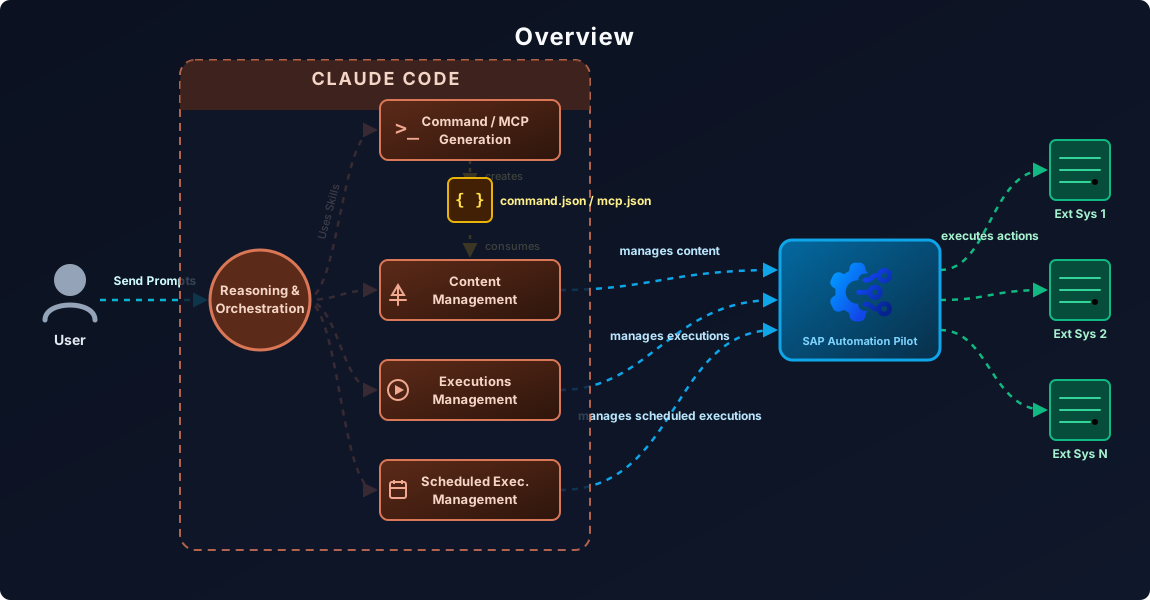
What makes the difference:
- Instant expertise — SAP's proven patterns and best practices guide every Command you create
- End-to-end workflow — From "I need an automation that..." to deployed and running
- Production quality by default — Error handling, retry logic, security flags, and validation included automatically
- Zero context switching — Generate, review, deploy, trigger, monitor, and troubleshoot in one place
Table of contents
About SAP Automation Pilot
SAP Automation Pilot is SAP's native automation engine for Business Technology Platform — the control plane for your BTP operations. From routine maintenance to complex incident response, it handles the workflows that keep your landscape running.
Think of it as Infrastructure-as-Code meets workflow automation, purpose-built for SAP BTP. Commands define your automations, Inputs store credentials and configuration, and Executions are running instances you can monitor and troubleshoot.
What you can automate:
| Category | Services & Capabilities |
|---|
| SAP HANA Cloud | Lifecycle management, updates, mass operations, backups, audit logs, credential rotation |
| BTP Management | Subaccount creation, environment setup, entitlements, identity provider configuration |
| Cloud Foundry | Apps, services, spaces, routes, mass restart/stop/start, quota notifications, certificate checks |
| Kubernetes/Kyma | Deployments, pods, services, jobs, config maps, secrets, script execution via K8s |
| Neo | Application lifecycle, auto-scaling, process management |
| Service Manager | Instances, bindings, plans, platforms, service keys |
| SAP Cloud ALM | Health monitoring, Cloud Connector status, metrics collection |
| AI Core | GPT completions, AI model orchestration |
| Monitoring | Dynatrace integration, availability checks, alert correlation |
| DevOps | GitHub workflows, Jenkins pipelines, JIRA issue management |
| Notifications | Email/SMTP, Alert Notification Service (ANS), Slack via webhooks |
| Security | XSUAA token management, destination service, credential rotation |
| Database | SQL operations, database lifecycle management |
| Transport | Cloud Transport Management System (cTMS) operations |
| HTTP/REST | Any API with OAuth, basic auth, certificates, Cloud Connector |
| Scripting | Bash, Python, Node.js, PowerShell, Terraform with BTP Provider |
| Utilities | Data transformation, JSON-to-HTML, parallel execution (ForEach), delays |
Why this repository
SAP Automation Pilot provides a powerful automation engine with hundreds of built-in Commands and a rich expression language. This repository amplifies that power with AI-assisted development.
Think of it as a force multiplier: these skills encode expert-level patterns — Command structures, expression syntax, security requirements, error handling strategies — and apply them automatically as you work. You focus on what you want to automate; the AI handles the implementation details.
Who benefits:
| You are... | How AI skills help |
|---|
| Getting started | Generate your first Command in minutes through natural conversation |
| Building complex workflows | Get production-quality Commands with error handling and validation built in |
| Reviewing team code | Automated checks for security, naming conventions, and best practices |
| Operating at scale | Trigger, monitor, and troubleshoot Executions — all via CLI |
| Integrating with CI/CD | API skills plug directly into your automation pipelines |
What's included
| Skill | Description |
|---|
| Command Generation | Create Commands from natural language descriptions using patterns and best practices |
| Catalog Explorer | Discover available Commands and executors in your tenant via API |
| Code Review | Validate security, naming conventions, expression sanitization, and best practices |
| Content Management API | Deploy, update, list, and delete Commands, Inputs, and MCP servers via API |
| Executions API | Trigger Commands, monitor status, view logs |
| Execution Debugger | Debug failed Executions, error pattern matching, troubleshooting workflows |
| Scheduled Executions API | Create and manage recurring Command schedules |
| MCP Server Generation | Create MCP server definitions to expose Commands as AI assistant tools |
| HTTP Executor | Guidance for HTTP requests with retry, timeout, and error handling |
| Script Executor | Guidance for ExecuteScript with Base64 encoding and language wrappers |
Getting started
Prerequisites
| Tool | Purpose |
|---|
| Claude Code | Required to use the skills (VS Code extension, CLI, or desktop app) |
curl | API calls to SAP Automation Pilot |
jq | JSON parsing and transformation |
You'll also need an SAP Automation Pilot tenant with API credentials.
1. Clone the repository
git clone https://github.com/SAP/automation-pilot-agent-skills.git
cd automation-pilot-agent-skills
2. Configure authentication
Create a .env file in the repository root:
# SAP Automation Pilot credentials
export AUTOPI_HOSTNAME='emea.autopilot.cloud.sap'
export AUTOPI_USERNAME='your-tenant-technical-user'
export AUTOPI_PASSWORD='your-password-here'
export AUTOPI_DEFAULT_CATALOG='your-catalog-id'
Important notes:
- Use single quotes for
AUTOPI_PASSWORD if it contains special characters ($, !, etc.) to prevent shell expansion
- Supported hostnames:
emea.autopilot.cloud.sap (Europe)amer.autopilot.cloud.sap (Americas)apac.autopilot.cloud.sap (Asia Pacific)aus.autopilot.cloud.sap (Australia)ksa.autopilot.cloud.sap (Saudi Arabia)
- The
.env file is gitignored — your credentials stay local
3. Load environment variables
Before using the API skills, load your credentials:
source .env
4. Verify connection
Test your setup by listing your Catalogs:
curl -s -u "$AUTOPI_USERNAME:$AUTOPI_PASSWORD" \
  "https://$AUTOPI_HOSTNAME/api/v1/catalogs?own=true" | jq .
How to use
Open this repository in Claude Code and start a conversation. The skills are automatically available.
Generate a Command
Create an Automation Pilot Command that restarts a Cloud Foundry app
and waits for it to become healthy, with proper error handling.
Review a Command
Review MyCommand.command.json for production readiness
Deploy to Automation Pilot
Upload MyCommand.command.json to my Automation Pilot tenant
Trigger and monitor an Execution
Trigger the Command my-catalog:MyCommand:1 with Input {"appName": "my-app"}
and show me the results when it finishes
Troubleshoot a failed Execution
The Execution abc123 failed — show me the logs and help me understand what went wrong
Check recent Execution health
Show me my last 15 executions — how many passed and how many failed?
Manage scheduled Executions
Do I have any enabled scheduled executions? List them and disable the ones that are active.
Resources
SAP Automation Pilot:
Claude Code:
Support and contributing
This project is open to feature requests, bug reports, and contributions via GitHub Issues.
For contribution guidelines, see CONTRIBUTING.md.
Security
If you discover a security vulnerability, please follow our security policy on how to report it. Please do not create GitHub issues for security-related doubts or problems.
Code of conduct
We as members, contributors, and leaders pledge to make participation in our community a harassment-free experience for everyone. By participating in this project, you agree to abide by its Code of Conduct at all times.
License
Copyright 2026 SAP SE or an SAP affiliate company and automation-pilot-agent-skills contributors. See LICENSE for details. Third-party component information is available via the REUSE tool.

