ui5-upload-controls
A reusable UI5 control library for file upload and download under the miyasuta.ui5uploadcontrols namespace, built to sit in front of a CAP service.
Facts
Where it sits
Who is behind it

In the atlas: maintains 47, contributes to 47, wrote 10@miyasutamaintainer
What it declares
Every artifact
- Type
- Package
- Origin
- Independently maintained
As a package
- Where it runs
- Inside its host
- Distributed through
- npm
Connections
Storing uploaded files next to the record they belong to
Fiori Elements page embedding upload controls on @cap-js/attachments
Download
Install
npm add ui5-upload-controlsDerived from the package name. No recipe recorded; the README has the configuration.
README
quoted from miyasuta/ui5-upload-controls under Apache-2.0, readui5-upload-controls
Reusable UI5 control library for file upload and download.
Namespace: miyasuta.ui5uploadcontrols
Controls
SingleFileUpload
A control for uploading and downloading a single file stored as a LargeBinary property on an OData entity.
- Displays a file picker. After upload, shows a download link and a delete button.
- Automatically derives the OData service URL and entity path from the binding context — no URL configuration needed.
- Supports both draft-enabled and non-draft entities.

MultiFileUpload
A control for managing multiple file attachments on an OData entity, backed by the @cap-js/attachments composition pattern.
- Displays a table of attached files with per-row delete buttons and an upload button in the toolbar. The columns shown between the fixed File Name and Delete columns are controlled by the
displayPropertiesproperty. - Automatically binds to the attachments navigation property from the parent entity's binding context.
- Supports both draft-enabled and non-draft entities.
Before upload:

After upload:

Prerequisites
- Runtime environment: SAP BTP (HTML5 Application Repository). Other hosting environments are not supported.
- Backend: CAP Node.js exposing an OData V4 service. OData V2 and non-CAP backends are not supported. The upload/download logic targets CAP's media stream endpoints (
$value). - UI5 version: SAPUI5 1.124+ (required for
sap.m.plugins.UploadSetwithTable). OpenUI5 is not supported. MultiFileUpload: backend entity must expose anattachmentscomposition compatible with@cap-js/attachments.
Internationalization (i18n)
Error messages (e.g. file type mismatch) are displayed in the user's locale. The following locales are supported:
| Locale | Language |
|---|---|
en (default) | English |
de | German |
ja | Japanese |
Installation
npm install --save-dev ui5-upload-controls--save-dev is correct here. The library is bundled into the consuming app's build output at build time (via includeDependency in ui5-deploy.yaml), so it is not needed as a runtime dependency. At runtime, the browser loads the library's resources directly from the HTML5 Application Repository alongside the app.
Usage
SingleFileUpload
Place the control in an XML View or Fragment that is bound to an OData entity. Bind fileName to the entity property that stores the file name — the control derives the OData model name and property name from the binding expression automatically.
<mvc:View
    xmlns:mvc="sap.ui.core.mvc"
    xmlns:upload="miyasuta.ui5uploadcontrols">

    <!-- Default (unnamed) model — Fiori Elements Object Page -->
    <upload:SingleFileUpload
        fileName="{fileName}"
        contentProperty="content" />

</mvc:View>
With a named model and automatic draft management:
<upload:SingleFileUpload
    fileName="{myModel>fileName}"
    contentProperty="content"
    draftOnly="false" />
Properties
| Property | Type | Default | Description |
|---|---|---|---|
fileName | string (binding) | null | Bound to the entity property that stores the file name (e.g. fileName="{myModel>fileName}"). The binding path is used as the OData property name in PATCH requests; the model name is used to resolve the binding context. Omit the model prefix for the default (unnamed) model: fileName="{fileName}" |
contentProperty | string | "content" | Property name of the LargeBinary field |
draftOnly | boolean | true | When true, upload is enabled only while the entity is in draft mode. When false, the control manages the draft lifecycle automatically (see Draft Handling) |
width | sap.ui.core.CSSSize | "auto" | Width of the control |
enabled | boolean | true | Master switch. When false, upload and delete are disabled regardless of draft state |
mediaTypes | string | null | Comma-separated MIME types allowed (e.g. "application/pdf,image/png"). null means no restriction |
fileTypes | string | null | Comma-separated file extensions allowed, leading dots optional (e.g. "pdf,png"). null means no restriction |
File Type Filtering
Use mediaTypes and/or fileTypes to restrict which files a user can select. Specifying both provides the most robust client-side check.
<!-- Both properties together — most robust -->
<upload:SingleFileUpload
    fileName="{fileName}"
    contentProperty="content"
    mediaTypes="application/pdf,image/png"
    fileTypes="pdf,png" />

<!-- mediaTypes only — use when a wildcard covers multiple extensions (e.g. all images) -->
<upload:SingleFileUpload
    fileName="{fileName}"
    contentProperty="content"
    mediaTypes="image/*" />

<!-- fileTypes only — use when MIME type is unreliable (varies by OS) -->
<upload:SingleFileUpload
    fileName="{fileName}"
    contentProperty="content"
    fileTypes="pdf,xlsx" />
The browser file picker shows only allowed types. Drag & drop is not visually restricted, but the control shows an error dialog and blocks the upload if a dropped file does not match.
MultiFileUpload
Place the control in an XML View or Fragment bound to the parent entity. Bind attachments to the navigation property for the attachments composition — the control derives the OData model name and navigation segment from the binding expression automatically.
<mvc:View
    xmlns:mvc="sap.ui.core.mvc"
    xmlns:upload="miyasuta.ui5uploadcontrols">

    <!-- Default (unnamed) model — navigation property is "attachments" -->
    <upload:MultiFileUpload
        attachments="{attachments}" />

</mvc:View>
With a named model, custom navigation property, and automatic draft management:
<upload:MultiFileUpload
    attachments="{myModel>files}"
    draftOnly="false" />
Showing only the MIME type column (no created date / created by):
<upload:MultiFileUpload
    attachments="{attachments}"
    displayProperties="mimeType" />
Showing MIME type and created date in that order:
<upload:MultiFileUpload
    attachments="{attachments}"
    displayProperties="mimeType,createdAt" />
Properties
| Property | Type | Default | Description |
|---|---|---|---|
attachments | object (binding) | null | Bound to the navigation property segment for the attachments composition (e.g. attachments="{myModel>files}"). The binding path is used as the OData navigation segment in POST/DELETE requests; the model name is used to resolve the binding context. Omit the model prefix for the default (unnamed) model: attachments="{attachments}" |
displayProperties | string (comma-separated) | "createdAt,createdBy" | Ordered list of attachment property names to display as columns between the fixed File Name column (first) and the Delete column (last). Column headers are resolved from @Common.Label annotations in the OData metadata; the raw property name is used as a fallback. Example: displayProperties="mimeType,createdAt" |
draftOnly | boolean | true | When true, upload and delete are enabled only while the entity is in draft mode. When false, the control manages the draft lifecycle automatically (see Draft Handling) |
enabled | boolean | true | Master switch. When false, upload and delete are disabled regardless of draft state |
mediaTypes | string | null | Comma-separated MIME types allowed (e.g. "application/pdf,image/png"). null means no restriction |
fileTypes | string | null | Comma-separated file extensions allowed, leading dots optional (e.g. "pdf,png"). null means no restriction |
File Type Filtering
Use mediaTypes and/or fileTypes to restrict which files a user can upload. Specifying both provides the most robust client-side check.
<!-- Both properties together — most robust -->
<upload:MultiFileUpload
    attachments="{attachments}"
    mediaTypes="application/pdf,image/png"
    fileTypes="pdf,png" />

<!-- mediaTypes only — use when a wildcard covers multiple extensions (e.g. all images) -->
<upload:MultiFileUpload
    attachments="{attachments}"
    mediaTypes="image/*" />

<!-- fileTypes only — use when MIME type is unreliable (varies by OS) -->
<upload:MultiFileUpload
    attachments="{attachments}"
    fileTypes="pdf,xlsx" />
The browser file picker shows only allowed types. Drag & drop is not visually restricted, but the control shows an error dialog and blocks the upload if a dropped file does not match. For backend enforcement, annotate the CAP Attachments entity with @Core.AcceptableMediaTypes.
Draft Handling
Both controls automatically detect draft capability by checking for the IsActiveEntity property on the binding context.
IsActiveEntity | draftOnly | Behavior |
|---|---|---|
| not present | any | Non-draft entity — upload proceeds directly |
false | any | Entity is in draft (edit) mode — upload proceeds directly |
true | true | Entity is active (display mode) — upload and delete are disabled |
true | false | Entity is active — the control manages the draft lifecycle automatically (see below) |
Fiori Elements Object Page: In the standard case, use
draftOnly="true"(the default) and let the Object Page manage the Edit/Save/Cancel lifecycle. UsedraftOnly="false"when you want users to be able to upload files without pressing Edit first — for example, when file attachment should feel like a lightweight action separate from the main form editing flow.
Automatic Draft Management (draftOnly="false")
When draftOnly is false and the entity is in display mode (IsActiveEntity=true), the control handles the full draft lifecycle transparently on each upload or delete:
draftEdit— creates a draft copy of the active entity (equivalent to pressing the Edit button)- Upload / Delete — performs the file operation on the draft entity
draftActivate— activates the draft, making the change permanent (equivalent to pressing Save)
This allows file operations without requiring the user to manually enter and exit edit mode.
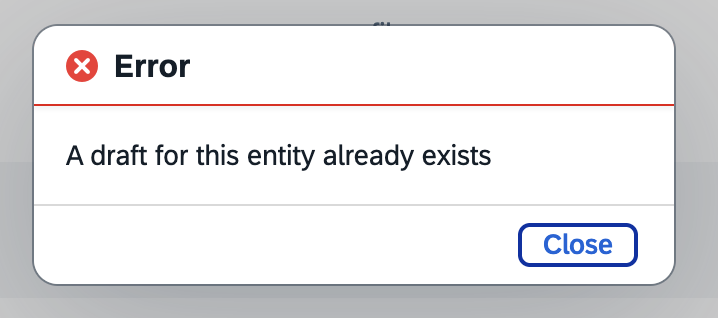
Lock conflict
draftEdit acquires an exclusive lock on the entity. If another user is already editing the same entity (i.e. a draft lock exists), draftEdit returns an error and the operation is aborted. The error message from the server is displayed in a dialog so the user knows the record is locked.
Backend Requirements
SingleFileUpload
The entity must have a LargeBinary property for file content and a String property for the file name:
entity YourEntity : managed {
  content  : LargeBinary @Core.MediaType: 'application/octet-stream'
                          @Core.ContentDisposition.Filename: fileName;
  fileName : String;
}
The
@Core.ContentDisposition.Filenameannotation is required for the browser to use the stored file name when downloading. Without it the downloaded file may be saved with a generic name (e.g.content).
MultiFileUpload
The entity must expose an attachments composition that follows the @cap-js/attachments pattern:
using { Attachments } from '@cap-js/attachments';

entity YourEntity : managed, cuid {
  // ...your properties
  attachments : Composition of many Attachments;
}
@cap-js/attachments sets @Core.ContentDisposition.Type: 'inline' by default on the content property, which causes the browser to display the file inline instead of downloading it. Override this with 'attachment' in your CDS model:
annotate Attachments with {
    content @Core.ContentDisposition: {
        Filename: filename,
        Type    : 'attachment'
    };
}
Without this annotation, clicking a file name link opens a blank page in a new tab instead of downloading the file.
Integrating into a Consuming App
1. Install the library
npm install --save-dev ui5-upload-controls2. Declare the library dependency in manifest.json
"sap.ui5": {
  "dependencies": {
    "libs": {
      "miyasuta.ui5uploadcontrols": { "lazy": false }
    }
  }
}
3. Local development
The default ui5.yaml typically routes /resources to the SAPUI5 CDN via fiori-tools-proxy, which prevents node_modules libraries from being served. Use one of the following approaches:
Option A: Use a separate ui5-local.yaml (recommended)
If ui5-local.yaml does not already exist, create one. The key is to configure fiori-tools-proxy without the ui5 section (which routes /resources to the SAPUI5 CDN). Without that routing, UI5 tooling automatically serves library resources from node_modules/ instead.
If ui5-local.yaml already exists and includes a mock server configuration, either comment out the mock server section or create a separate file (e.g. ui5-nock.yaml) without it.
specVersion: "4.0"
metadata:
  name: your-app
type: application
framework:
  name: SAPUI5
  version: "1.124.0"
  libraries:
    - name: sap.m
    - name: sap.ui.core
    - name: sap.fe.templates
    - name: sap.ushell
    - name: themelib_sap_horizon
server:
  customMiddleware:
    - name: fiori-tools-appreload
      afterMiddleware: compression
      configuration:
        port: 35729
        path: webapp
        delay: 300
    - name: fiori-tools-preview
      afterMiddleware: fiori-tools-appreload
      configuration:
        flp:
          theme: sap_horizon
          path: test/flpSandbox.html
          intent:
            object: your-app
            action: tile
    - name: fiori-tools-proxy
      afterMiddleware: compression
      configuration:
        backend:
          - path: /odata
            url: http://localhost:4004
    # - name: sap-fe-mockserver   # comment out if not using mock server
    #   beforeMiddleware: csp
    #   configuration:
    #     ...
Run with:
fiori run --config ./ui5-local.yamlOption B: Add fiori-tools-servestatic to your existing ui5.yaml
List fiori-tools-proxy first in the YAML so it is registered before fiori-tools-servestatic references it. The beforeMiddleware directive inserts fiori-tools-servestatic before the proxy in the actual request chain, so the library is served before the CDN proxy can intercept the request.
server:
  customMiddleware:
    - name: fiori-tools-proxy       # must be listed first
      afterMiddleware: compression
      configuration:
        # ... your existing proxy config
    - name: fiori-tools-servestatic
      beforeMiddleware: fiori-tools-proxy   # inserted before proxy in request chain
      configuration:
        paths:
          - path: /resources/miyasuta/ui5uploadcontrols
            src: node_modules/ui5-upload-controls/dist/resources/miyasuta/ui5uploadcontrols
            fallthrough: false
5. Cloud Foundry deployment
ui5-deploy.yaml
Two settings are required to include the library in the build output and deployment archive:
builder.settings.includeDependency— tells the UI5 build toolchain to bundle the library's resources into the build outputcustomTasks[ui5-task-zipper].configuration.includeDependencies— tellsui5-task-zipperto include those resources in the.ziparchive uploaded to the HTML5 Application Repository
Both must list miyasuta.ui5uploadcontrols:
builder:
  settings:
    includeDependency:
      - miyasuta.ui5uploadcontrols   # bundle library resources into build output
  customTasks:
    - name: ui5-task-zipper
      afterTask: generateCachebusterInfo
      configuration:
        archiveName: your-app
        relativePaths: true
        additionalFiles:
          - xs-app.json
        includeDependencies:
          - miyasuta.ui5uploadcontrols   # include library resources in the zip archive
xs-app.json
Add a route so library resources are served from the HTML5 Application Repository instead of the UI5 CDN:
{
  "source": "^/resources/miyasuta/ui5uploadcontrols/(.*)$",
  "target": "/resources/miyasuta/ui5uploadcontrols/$1",
  "service": "html5-apps-repo-rt",
  "authenticationType": "xsuaa"
}
Place this route before the generic /resources route.
manifest.json — resourceRoots
Required for resolving the library when launched from SAP Build Work Zone:
"sap.ui5": {
  "resourceRoots": {
    "miyasuta.ui5uploadcontrols": "./resources/miyasuta/ui5uploadcontrols"
  }
}
index.html — data-sap-ui-resource-roots
Required for resolving the library when running from the HTML5 Application Repository:
<script
    id="sap-ui-bootstrap"
    src="resources/sap-ui-core.js"
    data-sap-ui-resource-roots='{
        "your-app": "./",
        "miyasuta.ui5uploadcontrols": "./resources/miyasuta/ui5uploadcontrols"
    }'
></script>History
Others providing
Compare all 13 on the Attachments page →- AttachmentCommentODataServiceAttachmentCommentODataServiceAn ABAP OData service that uploads, downloads and deletes attachments and posts and deletes comments on an SAP business object through Generic Object Services, with a demo SAPUI5 app.independent, abapABAP OData service for attachments and comments via GOSfrom ABAP
- SAP Document Management service, application optionSAP Document Management service, application optionA standalone, ready-to-use web application for enterprise content, with file and folder management, viewers, versioning and status, over SAP's own repository or a CMIS-compliant one.sap official, btpReady-to-use web application for enterprise contentfrom BTP/BAIP
- SAP Document Management service, integration optionSAP Document Management service, integration optionA BTP service of APIs and a reusable UI5 component for adding document management, with folders, versions and status, to a business application over SAP's repository or a CMIS-compliant one.sap official, btpAPIs and a UI5 component for document management in appsfrom BTP/BAIP
- cap-attachments-pluscap-attachments-plusA CAP Node.js attachments plugin with an Attachments aspect and a Fiori elements upload facet, storing content in the database locally or in AWS, Azure or GCP through a BTP destination.independent, capCAP Node.js attachments plugin with database or cloud storagefrom CAP
- com.sap.cds:cds-feature-attachmentscom.sap.cds:cds-feature-attachmentsA CAP Java attachments package that adds an Attachments aspect and stores content in the database by default, or in AWS, Azure or Google Object Store through a separate module.sap official, capCAP Java attachments with database storage and an Object Store modulefrom CAP
- com.sap.cds:sdmcom.sap.cds:sdmA CAP Java plugin that stores attachments in an SAP Document Management repository through an Attachments aspect, with draft handling and direct creation on active entities; versioned repositories are excluded.sap official, capCAP Java plugin for attachments in SAP Document Managementfrom CAP
- @cap-js/attachments@cap-js/attachmentsAn official CAP Node.js plugin for attachment handling, with local database storage and AWS S3, Azure Blob or GCP Object Store integration.sap official, capCAP Node.js attachments with database, S3, Azure or GCP storagefrom CAP
- @cap-js/sdm@cap-js/sdmStores attachments in an SAP Document Management repository instead of a bucket, for the case where the documents have to live in the system of record.sap official, capCAP attachments stored in an SAP Document Management repositoryfrom CAP
- @sap/cds@sap/cdsThe CAP Node.js runtime, which compiles the CDS model, serves the services declared in it, answers generic requests before any handler runs, and loads every cds-plugin.sap official, capCAP Node.js runtimefrom CAP
- @tklein1801/cap-js-attachments@tklein1801/cap-js-attachmentsA CAP Node.js attachments plugin with a draft-based upload table, Object Store integration and configurable malware scanning for the files that are uploaded.independent, capCAP Node.js attachments plugin with Object Store and malware scanningfrom CAP
- @ui5/webcomponents@ui5/webcomponentsSAP's UI elements as standard custom elements, ui5-button among them, implementing SAP Fiori design and usable from plain HTML, React, Angular or Vue.sap official, ui5SAP's UI elements as standard custom elementsfrom UI5
- sap-cap-sdm-pluginsap-cap-sdm-pluginA CAP Node.js plugin that maps annotated CDS entities to SAP Document Management and exposes CMIS and repository-administration clients, in an early release.independent, capCAP Node.js plugin mapping CDS entities to SAP Document Managementfrom CAP
Details
Sources
Sources are graph entities: the same page may back several entries, and an unreachable source flags every row that rests on it.
Compatibility and provenance
Flavors
“Place the control in an XML View or Fragment that is bound to an OData entity.” — miyasuta/ui5-upload-controls — README
“let the Object Page manage the Edit/Save/Cancel lifecycle” — miyasuta/ui5-upload-controls — README
History in the atlas
- Typed cds-plugin by placement, which defaults every candidate to that. It is not one.
- Placement assumes cap for everything it accepts.
- A reusable UI5 control library for file upload and download under the miyasuta.ui5uploadcontrols namespace, built to sit in front of a CAP service.
- First seen.
For your agent
- Ref
artifact:miyasuta-ui5-upload-controls- JSON
- /artifacts/miyasuta-ui5-upload-controls.json
- MCP
- Connecting an agent