sac-workbench-mcp
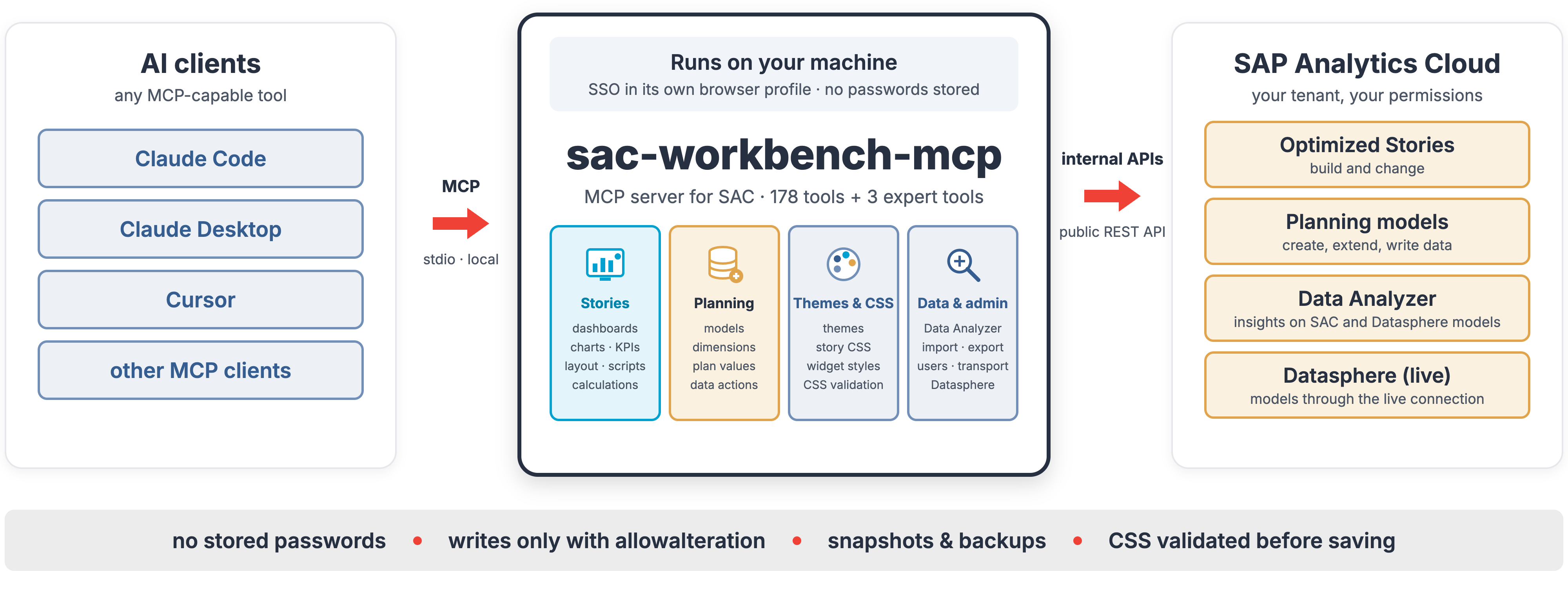
An unofficial MCP server that lets an assistant author in SAP Analytics CloudSAP Analytics CloudSAP's SaaS front end for analytics: business intelligence, planning and predictive in one product, and the place a Datasphere analytic model is meant to end up being read.sap official, btp: 178 tools sent as the requests the SAC web UI itself sends, from a Chrome session the server signs in once.
178 tools over SAP Analytics CloudSAP Analytics CloudSAP's SaaS front end for analytics: business intelligence, planning and predictive in one product, and the place a Datasphere analytic model is meant to end up being read.sap official, btp's own authoring surface. Stories with the charts inside them, down to feeds, filters, colours, hierarchy levels; themes whose CSS is validated against the SAC rules; story scripts; planning models with dimensions, hierarchies, members; plan reads and writes; data actions; files; and the public REST APIs for data import, export, SCIM users, content transport, schedules. Most of that has no documented API behind it: the server starts its own Chrome profile with PlaywrightPlaywrightA library that drives Chromium, Firefox and WebKit from code, written for end-to-end browser testing. For the things here it is the browser a tool starts itself, to get through an SAP login or to load a page headless and photograph it., you sign in once via SSO, and requests then run inside the signed-in SAC page with the CSRF handling the UI uses, so the content library, the modeler and the InA service answer as they do for the browser. Those URLs and payloads were found by recording the UI, and the README states what follows from that: they are not a stable API and may change or break with any SAC update, 2026.21 being the version it was tested against. The public-API tools started from sap_analytics_cloud_mcpsap_analytics_cloud_mcpThe SAP Analytics Cloud REST API as ninety tools across eleven service areas — content, data import and export, user management, transport, scheduling and translation.independent, btp and the authoring tools were added on top of them; those documented /api/v1 calls stay the one part that can run as a technical user instead, with an OAuth client.
Facts
Where it sits
Before choosing this
Conditions
PracticalFunctional boundary
Large parts of it ride on undocumented SAC internals, and the maintainer states both halves of that: the interfaces may change or break with any SAC update, and SAP does not support this software or any change it makes to your tenant. Writes are gated, since a changing tool refuses without allowalteration: true and readOnly: true blocks them altogether, and the README still asks you to test in a sandbox tenant or folder first and keep backups. The three expert tools (raw JavaScript in the SAC page, raw HTTP to the tenant, replay of a recorded request) bypass the guard rails the regular tools apply, from the automatic snapshot to the signal-colour check, which is why they are off by default.
PolicySAP API Policy 4.2026a§ 1.1, 1.2, 2.2.2from Agent access to your systemsAn MCP server uses SAP APIs to supply tools, resources or data to an agent.
- § 1.1 Published APIs. Published APIs are made available for the documented purposes identified by SAP, including integration, extensions and data exchange.
- § 1.2 Non-Published APIs. Customer and third-party applications must not access non-published APIs except where documentation permits it or SAP otherwise authorizes it.
- § 2.2.2 AI call sequences and data extraction. Outside SAP-endorsed architectures, data services or expressly identified pathways, the policy prohibits specified agentic API use and systematic or large-scale extraction.
MCP does not replace the API's documented-use boundary. Check that every endpoint is published for the intended use and whether the policy's AI-call or extraction provisions apply to the design.
SAP API Policy 4.2026a →PolicySAP API Policy 4.2026a§ 1.1, 1.2, 2.2.2, 3from Tool governanceAn agent tool calls SAP APIs, or a governance workflow assesses whether a proposed SAP API use is within the policy's documented-use boundary.
- § 1.1 Published APIs. Published APIs are made available for the documented purposes identified by SAP, including integration, extensions and data exchange.
- § 1.2 Non-Published APIs. Customer and third-party applications must not access non-published APIs except where documentation permits it or SAP otherwise authorizes it.
- § 2.2.2 AI call sequences and data extraction. Outside SAP-endorsed architectures, data services or expressly identified pathways, the policy prohibits specified agentic API use and systematic or large-scale extraction.
- § 3 Monitoring and remedies. SAP states that it may monitor API use and take enforcement actions when use does not comply with the documentation and policy.
Technical controls decide what an agent can call; the SAP API Policy separately governs whether the API is published for the intended use and identifies special AI-call and extraction cases. An evidence-gathering tool can assess against that policy but cannot issue a binding compliance decision.
SAP API Policy 4.2026a →What it declares
Every artifact
- Type
- MCP server
- Origin
- Independently maintained
- Runtime
- Node.js
- Runs on
- local
As an MCP server
- Transport
- stdio
- Language
- TypeScript
Connections
Giving an AI agent access to the systems you run over MCP
Measures, dimensions and hierarchies an analytical client reads
Getting data into an analytical store and keeping it current
Controlling what an agent may call, with an audit trail
SaaS for business intelligence, planning and predictive analytics
Google's web browser, installed on the developer's own machine. For the things here it is the browser a server starts with a persistent profile of its own, so an SAP login happens once in a real session and later requests run from inside the signed-in page.
SaaS for business intelligence, planning and predictive analytics
Cloud data warehouse with spaces, views and analytic models
Download
Install
npm add sac-workbench-mcpDerived from the package name. No recipe recorded; the README has the configuration.
Architecture
Download
@modelcontextprotocol/sdk, stdio transport”/api/v1 REST APIs are called beside them.SAC_BROWSER_CHANNEL.Legend and provenance
README
quoted from RafaelSachsNL/sac-workbench-mcp under MIT, readsac-workbench-mcp
An unofficial Model Context Protocol server that lets an AI assistant (Claude Desktop, Claude Code or any other MCP client) work with SAP Analytics Cloud: build and change stories, charts, KPIs, themes and CSS, create planning models and dimensions, write plan values, load data, and use the public REST APIs.
⚠️ Disclaimer — read before use
- This project is not affiliated with, endorsed, sponsored or supported by SAP SE. "SAP" and "SAP Analytics Cloud" are trademarks of SAP SE; they are used here only to describe what the software works with.
- Large parts of this server use undocumented, internal SAP Analytics Cloud interfaces (the requests the SAC web UI itself sends). They were found by recording the UI, not from SAP documentation.
- These URLs, payloads and behaviours are not a stable API. They may change or break with any SAC update, without notice.
- SAP does not support this software or any change it makes to your tenant. Do not open SAP support tickets for problems caused by it.
- Use at your own risk. Test in a sandbox tenant or folder first, keep backups, and review what the assistant is about to change. The authors accept no liability (see LICENSE).
📖 Featured Blog Posts
sac-workbench-mcp is built at NextLytics, a consultancy for data platforms, analytics and planning. More on SAP Analytics Cloud on the NextLytics blog.
- Trick or Theme: Dark Mode in SAP Analytics Cloud — a use case built with this server: the dark theme, the story CSS and the dashboard in the post were created and tuned through the MCP server. https://www.nextlytics.com/blog/trick-or-theme-dark-mode-in-sap-analytics-cloud
- Controlling SAP Analytics Cloud with Claude: a home-built MCP server — the introduction to this server: what it does, how it works and what we learned building it. https://www.nextlytics.com/blog/controlling-sap-analytics-cloud-with-claude-a-home-built-mcp-serve
Sister project for SAP BW/4HANA: bw-modeling-mcp — Agentic AI meets SAP BW.
What's new — v0.3.0
First public release. Highlights: complete dashboards in one call (on Datasphere models and on SAC models — planning, Seamless and analytic), declarative chart editing (type, feeds, filters, hierarchy, colours), restricted and calculated measures, KPI tiles as Numeric Point, layout checks per screen width, planning models with dimensions, hierarchies and data reloads, and Datasphere model search. See CHANGELOG.md.
What it can do
178 tools in these areas, plus 3 expert tools for extending the server (see below) — the full list with parameters is in TOOLS.md, how it works inside in ARCHITECTURE.md:
| Area | Examples |
|---|---|
| Stories | sac_story_generate_dashboard (complete dashboard in one call), sac_story_add_widget, sac_story_add_kpi (KPI tile as Numeric Point), sac_story_duplicate, sac_story_set_text, sac_story_set_layout, sac_story_set_position, sac_story_remove_widget |
| Charts | sac_story_chart / sac_story_chart_get (type, measures, dimensions, colour/pattern, legend, hierarchy level, member and dynamic date filters), sac_story_set_colors, sac_story_calculation (restricted and calculated measures), sac_story_add_variance, sac_story_add_threshold |
| Look & feel | sac_theme_create / sac_theme_update (with CSS validation against the SAC rules), sac_story_css, sac_story_style_widget, sac_story_format_widget, sac_composite_header_create |
| Scripting | sac_scripts_get, sac_script_event_set, sac_script_function_set, sac_script_variable_set, sac_story_check_runtime, sac_story_inspect (layout check: scrollbars, overhang, errors per widget) |
| Story internals | sac_story_get, sac_story_transform (patch by function in an isolated context — not a security boundary, automatic snapshot), sac_story_restore, sac_story_snapshot, sac_story_diff, sac_story_patch |
| Planning | sac_planning_model_create, sac_model_dimension_add, sac_model_hierarchy_set, sac_model_members_set, sac_model_data_reload, sac_plan_read / sac_plan_write / sac_plan_publish / sac_plan_revert, sac_dataaction_create / _run, sac_multiaction_create, sac_planning_story_create, sac_planning_forecast_story_create |
| Data Analyzer & models | sac_insight_create / _update, sac_live_model_create, sac_models_list, sac_model_metadata, sac_datasphere_search (find a Datasphere model's space without a Datasphere login) |
| Files | sac_files_list, sac_folder_create, sac_resource_move / _rename / _delete (to Deleted Files), sac_stories_copy |
| Public REST APIs | data import / export, users & teams (SCIM), content transport, schedules, calendar, translation, audit, multi actions |
| Exploring | sac_capture_start / _stop / _get (record what the SAC UI sends), sac_contentlib, sac_browser_ui, sac_browser_screenshot; expert tools 🔧 sac_replay, sac_api_request, sac_browser_eval (off by default) |
Try it
Once the server is connected, just ask in plain language. A few prompts to start with (use your own model and folder names):
Build me an overview dashboard on the model
SALES_PLANin my folder "Test": four KPI tiles for revenue and quantity, actual vs. plan, two bar charts by region and by product, and a table by product. Use the Horizon template and show the numbers in millions.
Which models can I build stories on? Show me the dimensions and measures of
SALES_PLAN.
Create a dark theme for our stories: dark grey background, white text, blue as accent colour, and apply it to the story "Sales Overview".
In
SALES_PLAN, raise the 2026 plan for Germany by 5 % in the private version and show me before and after — don't publish yet.
The button on page 1 of "Sales Overview" should filter the chart by the selected year. Write the script and check the story for errors.
The assistant asks for whatever it needs (model, theme, layout) and states every change before it makes it.
Guidance for good stories (layout, naming, minimal look, colours) is in docs/STORY_GUIDELINES.md
and is also offered to the client as the MCP prompt story_guidelines.
Skills for scripting and CSS
skills/ contains two Agent Skills — sac-scripting (SAC scripts against the official API reference) and
sac-css (story/theme CSS with only the classes and properties SAC accepts). They work with this server and on their
own. The scripting reference is built locally from SAP's public documentation; see skills/README.md.
How it works
- Browser session (main path). The server starts its own Chrome profile with Playwright. You sign in once via
SSO (
npm run login); the session is kept in the profile. Requests are sent from inside the signed-in SAC page, with the CSRF handling the UI uses. No passwords are stored or entered by the server. - OAuth client (optional). No tool needs one: without it, the documented public REST APIs (
/api/v1/...— data import/export, users and teams, transport, schedules, calendar, translation, audit) also go through the browser session. Configure an OAuth client (client credentials) only if those calls should run as a technical user. Everything else always uses the browser session. - Recorded templates.
templates/contains payloads recorded from the SAC UI with placeholders; the server fills in your tenant, user, folder, model and ids at runtime.
Requirements
- Node.js 22 or newer
- Google Chrome (or set
SAC_BROWSER_CHANNEL) - An SAP Analytics Cloud tenant and a user with the rights you want the assistant to use. For Datasphere models a live connection to SAP Datasphere.
Setup
From npm
npm install -g sac-workbench-mcp
sac-workbench-mcp setup     # asks for the tenant URL and defaults, opens Chrome for the SSO login
The configuration goes to ~/.sac-mcp/config.json, so updates (npm install -g sac-workbench-mcp@latest) keep it.
Sign in again later with sac-workbench-mcp login. With Claude Code: claude mcp add sac -- sac-workbench-mcp.
From source
git clone https://github.com/RafaelSachsNL/sac-workbench-mcp.git
cd sac-workbench-mcp
npm install
npm run setup     # asks for the tenant URL and defaults, builds, opens Chrome for the SSO login
Recordings, snapshots and data backups go to captures/ in the repository folder (git-ignored).
npm run setup writes sac-mcp.config.json (see sac-mcp.config.example.json) and can
register the server in Claude Desktop. Manual registration:
{
  "mcpServers": {
    "sac": { "command": "node", "args": ["/absolute/path/to/sac-workbench-mcp/build/index.js"] }
  }
}
With Claude Code, one line does the same:
claude mcp add sac -- node /absolute/path/to/sac-workbench-mcp/build/index.jsOn Windows use the full path with escaped backslashes in JSON, e.g.
"args": ["C:\\Users\\you\\sac-workbench-mcp\\build\\index.js"].
Sign in again later with npm run login.
Tested against SAP Analytics Cloud 2026.21 (Optimized Story Experience). SAC updates can change the internal interfaces; the smoke test (see Development) shows quickly what broke.
Configuration
sac-mcp.config.json (lookup: $SAC_MCP_CONFIG → <repo>/sac-mcp.config.json → ~/.sac-mcp/config.json);
environment variables override it.
| Setting | Env variable | Meaning |
|---|---|---|
tenantUrl | SAC_BASE_URL | e.g. https://mytenant.eu10.hcs.cloud.sap |
user | SAC_USER | SAC user id; detected when empty |
readOnly | SAC_READ_ONLY | true blocks every write operation |
expertTools | SAC_EXPERT_TOOLS | true also loads sac_browser_eval, sac_api_request and sac_replay (raw access, off by default) |
defaults.connection / .space / .folderId | SAC_DEFAULT_CONNECTION / _SPACE / _FOLDER | defaults for Datasphere models and new stories |
browser.profileDir / .channel / .headless | SAC_BROWSER_PROFILE / _CHANNEL / _HEADLESS | Chrome profile and mode |
oauth.clientId / .clientSecret / .tokenUrl | SAC_CLIENT_ID / _SECRET / SAC_TOKEN_URL | optional OAuth client for /api/v1 |
| – | SAC_BRAND_PREFIX | e.g. ACME|AC: your own themes/templates are recommended first |
| – | SAC_CAPTURE_DIR | where recordings, snapshots and data backups go (default captures/) |
Troubleshooting
| Symptom | Fix |
|---|---|
| "Not logged into SAC within …" | The SSO session expired: call sac_browser_login from the assistant, or run npm run login (sac-workbench-mcp login for an npm install), and sign in. |
Chrome does not start: profile "in use" / SingletonLock | Another server instance (or a Chrome window) uses the same profile. Close it; if no Chrome is running any more, delete the Singleton* files in the profile folder. Two instances need two profiles (SAC_BROWSER_PROFILE). |
| HTTP 403 on a write | The server already retries once with a fresh CSRF token. A 403 that stays means your SAC user lacks the right (e.g. on the folder or model); check it in SAC. |
Nothing happens with SAC_HEADLESS=true | The SSO login needs a visible window. Log in once without headless, then switch it on. |
| A tool that worked before fails after an SAC update | See docs/SAC_UPDATE.md; if you cannot fix it, open an issue with the failing step and your SAC version (Help → About). |
Safety
- Every tool that changes something requires
allowalteration: true. Without it the tool refuses, so the assistant has to ask for and state the change. readOnly: trueblocks all writes, whatever the assistant sends.sac_resource_deletemoves files to Deleted Files (recoverable). Some public-API tools delete for good (e.g.sac_users_delete,sac_transport_delete_content,sac_import_delete_job) — their descriptions say so.sac_story_transformsaves a snapshot before every change;sac_story_restorebrings it back.sac_model_data_reloadwrites a CSV backup of the facts before replacing them.- Planning values are written to the private version first; publishing (
sac_plan_publish) is a separate step. - Red/green series colours are refused until confirmed (
confirmSignalColors) — they are signal colours. captures/(recordings, snapshots, backups) can contain business data and is git-ignored. Do not commit it.
Recommendation: give the assistant a test folder (defaults.folderId) and test models first.
Development
npm run build                                              # TypeScript → build/
npm run smoke -- <folderId> [model] [connection] [space]   # end-to-end test against your tenant (creates and deletes test objects)
SMOKE_FORECAST="<seamless model>,<row dimension>,<measure>" npm run smoke -- …   # includes the forecast planning story
Extending the server (expert tools)
Three tools give raw access to the tenant and are meant for developing new tools, not for everyday use. They are
off by default and only loaded with "expertTools": true in sac-mcp.config.json or SAC_EXPERT_TOOLS=true:
| Tool | What it does |
|---|---|
sac_browser_eval | runs any JavaScript inside the signed-in SAC page (UI5/FPA runtime) |
sac_api_request | sends any HTTP request to the tenant, documented or internal |
sac_replay | replays a recorded UI request, optionally with changed parameters |
They bypass the guard rails of the regular tools (snapshots, validation, signal-colour check), so switch them on only in a sandbox tenant while you develop.
To teach the server something new, record it: sac_capture_start, do the action in the SAC UI
(sac_browser_ui or by hand), sac_capture_stop, inspect with sac_capture_get, try the changed call with
sac_replay, then turn the payload into a tool. For stories, sac_story_snapshot → change in the UI → sac_story_diff
shows what SAC stores. See CONTRIBUTING.md. Releases: docs/RELEASE.md.
Acknowledgements
The public REST API tools (data import/export, users, transport, schedules …) started from JumenEngels/sap_analytics_cloud_mcp (MIT). The story, chart, theme, planning and model tools were added on top.
License
MIT. Provided "as is", without warranty of any kind — see the disclaimer above.
History
Security 2, Features 14
Notes
Added
- Stories in one call —
sac_story_generate_dashboardbuilds a complete dashboard (header, filter bar, KPI row, charts, optional table) on a Datasphere model, canvas or responsive, with theme and story template; scale and decimals per KPI and chart, percentage measures unscaled, readable filter labels. - Dashboards on SAC models — the generator also builds dashboards (responsive, or canvas with a story
template such as the Horizon template) on SAC planning models (native and Seamless) and analytic models (Version Actual on every widget, per-tile KPI filters such as Plan or the current year, story filter and filter bar, table scaled like the KPIs);
sac_model_metadataandsac_models_listknow these models. - Charts, declaratively —
sac_story_chart/sac_story_chart_get: type, measures, dimensions, colour and pattern dimension, legend, hierarchy and level, member filters and dynamic date ranges; the chart query is kept consistent. - Calculations and colours —
sac_story_calculation(restricted measures on several dimensions with Constant Selection, calculated measures with formulas),sac_story_set_colors(per member, measure and version). - KPI tiles as Numeric Point charts (
sac_story_add_kpi) and duplicating widgets or whole cards with their own texts (sac_story_duplicate). - Layout and checks —
sac_story_set_layout,sac_story_set_position,sac_story_set_text;sac_story_check_runtime(script and console errors) andsac_story_inspect(scrollbars, overhang and errors per widget at several widths, widget screenshot). - Story internals —
sac_story_transform(patch by function in an isolated context, automatic snapshot),sac_story_restore, snapshots and structural diffs. - Themes and CSS —
sac_theme_create/sac_theme_updatewith CSS validation against the SAC editor rules, rule-wise CSS updates and syncing of the stories' theme copies; story CSS and widget classes. - Planning — planning models (SAC and Seamless),
sac_model_dimension_add,sac_model_hierarchy_set,sac_model_members_set,sac_model_data_reload(reload facts with a derived column, backup and totals check), plan values without a story (sac_plan_write/read/publish/revert), data actions and multi actions, planning stories including a forecast layout story. - Datasphere —
sac_datasphere_searchfinds a model's space through the live connection; metadata and the dashboard generator locate the space themselves. - Data Analyzer — insights on Datasphere models.
- Public REST APIs — data import/export, users and teams (SCIM), content transport, schedules, calendar, translation, audit.
- Exploring — record and replay what the SAC UI sends (
sac_capture_*,sac_replay), raw requests. The expert toolssac_browser_eval,sac_api_requestandsac_replayare only loaded withexpertTools/SAC_EXPERT_TOOLS=true. - Skills —
sac-scriptingandsac-cssAgent Skills (see skills/).
Security
readOnlyis enforced centrally for every tool; write tools needallowalteration: true.- No SAC passwords are stored; the SSO session lives in the server's own browser profile.
Others providing
- mcp-integration-suitemcp-integration-suiteAn experimental Node MCP server covering the general CPI functions of the Integration Suite, which its author recommends running alongside the TPM server for Trading Partner Management.independent, btpMCP server for the general Integration Suite functions
- mcp-is-tpmmcp-is-tpmA Java MCP server for Trading Partner Management in the Integration Suite, where trading partners, their agreements and their B2B configuration live, paired by its author with the general server.independent, btpJava MCP server for Integration Suite Trading Partner Management
- calmcpcalmcpAn MCP server in front of the SAP Cloud ALM APIs: four read tools over tasks, projects, features, documents, tests and analytics, run over stdio locally or Streamable HTTP on Cloud Foundry.independent, btpMCP server with read tools over the SAP Cloud ALM APIs
- CostingGeek/sap-mcpCostingGeek/sap-mcpA Python server that fetches sales orders from SAP's business data graph and hands them to Claude Desktop — the only entry here pointed at that API rather than at one system's own services.independent, btpPython MCP server fetching sales orders from SAP's business data graph
- mcp-sap-focusedrunmcp-sap-focusedrunSAP Focused Run's Landscape Management Database as MCP tools — hosts, systems, databases, cloud tenants, technical instances, ABAP clients, software components and product versions.independent, btpMCP tools over SAP Focused Run's Landscape Management Database
- cloud-alm-itsm-mcpcloud-alm-itsm-mcpQueries installations through SAP Cloud ALM's ITSM API — filtered by system type or customer number, with OAuth token handling and caching done for you.independent, btpMCP server querying installations via the SAP Cloud ALM ITSM API
- hana-mcp-serverhana-mcp-serverSchema discovery and guard-railed SQL against SAP HANA and HANA Cloud, with an optional layer of business metadata so an agent reads a coded column the way the business does.independent, btpMCP server for schema discovery and guarded SQL on SAP HANA
- sap_analytics_cloud_mcpsap_analytics_cloud_mcpThe SAP Analytics Cloud REST API as ninety tools across eleven service areas — content, data import and export, user management, transport, scheduling and translation.independent, btpMCP server for the SAP Analytics Cloud REST API
- mcp-sap-cpimcp-sap-cpiThe runtime half of Cloud Integration: failed messages with their full processing logs and traces, artifact deployment, security material, and a health summary.independent, btpMCP server for Cloud Integration runtime: messages, logs, deployment
- AI Core MCP ServerAI Core MCP ServerAn MCP server that exposes SAP AI Core's APIs as tools, defined entirely in one JSON config file for a proxy, so deployments, configurations and scenarios are managed through an assistant.independent, btpSAP AI Core APIs as MCP tools from one JSON config file
- BTP CF MCP ServerBTP CF MCP ServerThe Cloud Foundry V3 API on SAP BTP as MCP tools — apps, orgs, spaces, services, routes and quotas — declared in one JSON config file and run by odata-mcp-proxy.independent, btpCloud Foundry V3 API on SAP BTP as MCP tools
- BTP MCP ServerBTP MCP ServerBTP Core Services as MCP tools, and the only server in this corner that renders dashboards inside the chat — a subaccount overview with drill-down, a geomap of data-centre locations, consumption and users.independent, btpBTP Core Services as MCP tools with in-chat dashboards
- btp-sap-odata-to-mcp-serverbtp-sap-odata-to-mcp-serverExposes every OData service on an S/4HANA or ECC system as MCP tools, in three discovery levels so a large catalogue does not have to be loaded at once.independent, btpExposes S/4HANA or ECC OData services as MCP tools
- CI MCP ServerCI MCP ServerAn MCP server that exposes SAP Cloud Integration's OData APIs as tools, defined entirely in one JSON config file, so an assistant works integration content, logs and configurations in natural language.independent, btpSAP Cloud Integration OData APIs as MCP tools
- odata-mcp-proxyodata-mcp-proxyA config-driven proxy that turns OData and REST endpoints into MCP tools from a JSON file — no code — and runs on BTP Cloud Foundry against BTP Destinations.independent, btpConfig-driven proxy turning OData and REST endpoints into MCP tools
- sap-pi-mcp-serversap-pi-mcp-serverThe only entry pointed at SAP PI and PO rather than at Cloud Integration — monitoring and Integration Directory metadata from the middleware that came before.independent, btpMCP server for SAP PI and PO monitoring and directory metadata
- sap-bdc-mcp-serversap-bdc-mcp-serverAn MCP server over SAP's BDC Connect SDK that creates, validates, publishes and deletes Databricks Delta shares as data products in SAP Business Data Cloud.independent, btpMCP server managing Delta shares in SAP Business Data Cloud
- @mariodefe/sap-datasphere-mcp@mariodefe/sap-datasphere-mcpForty-five tools across a Datasphere tenant — discovery, metadata, analytics, ETL extraction, database users, lineage and column profiling — with config-driven PII masking applied before anything reaches the model.independent, btpMCP server with forty-five tools across a Datasphere tenant
- midasol/sap-mcp-servermidasol/sap-mcp-serverA Python MCP server for SAP Gateway with four read-only tools that authenticate, query, fetch one entity and list services, and one of the few here that publishes its test results.independent, btpPython MCP server for SAP Gateway OData operations
- odata_mcp_goodata_mcp_goA Go binary that bridges any OData v2 or v4 service to MCP — and can collapse the whole service into one tool when the generated tool list is too large to be usable.independent, btpGo binary bridging any OData v2 or v4 service to MCP
- odata_mcpodata_mcpThe Python original: reads an OData v2 service's metadata and generates MCP tools from it, with the SAP-specific conversions the raw protocol leaves to you.independent, btpPython bridge generating MCP tools from OData v2 metadata
- sap-bdc-mcpsap-bdc-mcpDiscovery and contract tooling for SAP Business Data Cloud — ORD discovery, CSN contract checks and non-executing share planning — behind redaction, policy gates and bounded output.independent, btpMCP tooling for SAP Business Data Cloud discovery and contracts
- mcp-sap-datasphere-servermcp-sap-datasphere-serverThe read-only Datasphere server: explore spaces, list assets, preview rows, profile columns and summarise analytical models — and nothing that changes anything, by design.independent, btpRead-only MCP server for exploring SAP Datasphere
- MCP Server for SAP BTP AdministrationMCP Server for SAP BTP AdministrationSAP-hosted MCP endpoint that exposes BTP account administration — accounts, security, services and connectivity — as tools an AI client discovers and calls on your behalf.sap official, btpSAP-hosted MCP endpoint for BTP account administration
- SAP LeanIX MCP ServerSAP LeanIX MCP ServerHosted MCP endpoint onto an SAP LeanIX instance, exposing selected enterprise-architecture APIs as tools — fact sheets, applications, completeness and custom reports.sap official, btpHosted MCP endpoint onto an SAP LeanIX instance
- SAP-samples/hana-cli-claude-pluginSAP-samples/hana-cli-claude-pluginA Claude Code plugin that registers the MCP server of hana-cli, so Claude Code can work on SAP HANA Cloud and on-premise SAP HANA databases.sap official, btpClaude Code plugin registering hana-cli's MCP server
- SAP-samples/hana-developer-cli-tool-exampleSAP-samples/hana-developer-cli-tool-exampleA developer-centric command line for SAP HANA, built for local development outside SAP tooling and connecting to a local, cloud or remote HANA instance the same way.sap official, btpDeveloper-centric command line for SAP HANA
- cpi-mcp-servercpi-mcp-serverA Go server over Cloud Integration's design-time content — integration packages and integration flows, listed and searched by id, version, name, vendor or mode.independent, btpGo MCP server over Cloud Integration packages and integration flows
- SAP Analytics CloudSAP Analytics CloudSAP's SaaS front end for analytics: business intelligence, planning and predictive in one product, and the place a Datasphere analytic model is meant to end up being read.sap official, btpSaaS for business intelligence, planning and predictive analytics
- SAP DatasphereSAP DatasphereSAP's cloud data warehouse: spaces, modelled views and analytic models over data brought in or federated from source systems, with the business context carried along rather than rebuilt.sap official, btpCloud data warehouse with spaces, views and analytic models
- bw-modeling-mcpbw-modeling-mcpReads, creates and modifies BW/4HANA modelling objects through the same internal APIs Eclipse BWMT and the BW/4HANA Cockpit use — and can run centrally on BTP with each caller reaching BW as themselves.independent, btpMCP server for BW/4HANA modelling objects
- sap_analytics_cloud_mcpsap_analytics_cloud_mcpThe SAP Analytics Cloud REST API as ninety tools across eleven service areas — content, data import and export, user management, transport, scheduling and translation.independent, btpMCP server for the SAP Analytics Cloud REST API
- SAP Datasphere Plugin for ClaudeSAP Datasphere Plugin for ClaudeEighteen Datasphere skills over a bundled 45-tool MCP server — exploration, view and analytic-model design, BW Bridge migration, security architecture and catalog governance.independent, btpEighteen Datasphere skills over a bundled MCP server
- @mariodefe/sap-datasphere-mcp@mariodefe/sap-datasphere-mcpForty-five tools across a Datasphere tenant — discovery, metadata, analytics, ETL extraction, database users, lineage and column profiling — with config-driven PII masking applied before anything reaches the model.independent, btpMCP server with forty-five tools across a Datasphere tenant
- SAP Analytics CloudSAP Analytics CloudSAP's SaaS front end for analytics: business intelligence, planning and predictive in one product, and the place a Datasphere analytic model is meant to end up being read.sap official, btpSaaS for business intelligence, planning and predictive analytics
- SAP DatasphereSAP DatasphereSAP's cloud data warehouse: spaces, modelled views and analytic models over data brought in or federated from source systems, with the business context carried along rather than rebuilt.sap official, btpCloud data warehouse with spaces, views and analytic models
- bw-modeling-mcpbw-modeling-mcpReads, creates and modifies BW/4HANA modelling objects through the same internal APIs Eclipse BWMT and the BW/4HANA Cockpit use — and can run centrally on BTP with each caller reaching BW as themselves.independent, btpMCP server for BW/4HANA modelling objects
- sap_analytics_cloud_mcpsap_analytics_cloud_mcpThe SAP Analytics Cloud REST API as ninety tools across eleven service areas — content, data import and export, user management, transport, scheduling and translation.independent, btpMCP server for the SAP Analytics Cloud REST API
- @mariodefe/sap-datasphere-mcp@mariodefe/sap-datasphere-mcpForty-five tools across a Datasphere tenant — discovery, metadata, analytics, ETL extraction, database users, lineage and column profiling — with config-driven PII masking applied before anything reaches the model.independent, btpMCP server with forty-five tools across a Datasphere tenant
- dbt-sap-hana-clouddbt-sap-hana-cloudA dbt adapter, installed as a Python package beside dbt-core, that lets a dbt project target SAP HANA Cloud as its warehouse through a profile in profiles.yml.sap official, btpdbt adapter targeting SAP HANA Cloud as its warehouse
- arc-mcp-hubarc-mcp-hubA hub on SAP BTP that puts several arc-1 instances, one per SAP system, behind one login and a route each, exchanging the caller's token through a destination so each system still sees the real user.independent, btpHub on SAP BTP putting several arc-1 instances behind one login
- API ManagementAPI ManagementAPI proxies in front of backend services, with security and traffic management policies attached to them, and Developer Hub where consumers subscribe.sap official, btpAPI proxies with security and traffic policies and Developer Hub
- bw-modeling-mcpbw-modeling-mcpReads, creates and modifies BW/4HANA modelling objects through the same internal APIs Eclipse BWMT and the BW/4HANA Cockpit use — and can run centrally on BTP with each caller reaching BW as themselves.independent, btpMCP server for BW/4HANA modelling objects
- SAP API Policy Evidence SkillSAP API Policy Evidence SkillAssesses whether a described SAP API usage aligns with the SAP API Policy, gathering live evidence from SAP's own sources and returning a sourced assessment with a stated confidence — and routing the legal questions away from itself.independent, btpSkill assessing API usage against the SAP API Policy
Details
Sources
Sources are graph entities: the same page may back several entries, and an unreachable source flags every row that rests on it.
Compatibility and provenance
History in the atlas
- First seen.
For your agent
- Ref
artifact:sac-workbench-mcp- JSON
- /artifacts/sac-workbench-mcp.json
- MCP
- Connecting an agent