sap-odata-explorer
A Rust CLI and desktop app for exploring and testing SAP OData services against real systems — catalog discovery, metadata browsing, an F4 value-help picker and a Fiori-readiness linter — with an agent skill shipped beside it.
Exploration rather than exposure: where the OData servers in this corpus turn a service into agent tools, this is for the person working out what the service actually offers before any of that. OData V2 and V4, SAP Gateway catalog discovery, and three authentication modes that cover how people really log in — basic, Windows SSO through Kerberos and SPNEGO, and browser-based SSO through Azure AD, SAP IAS or SAML. Beside the explorer it carries a SAP View annotation overlay, an F4 reference tooltip, a FilterRestrictions warning, a Fiori-readiness linter and a pre-flight validator. The skills/sap-odata-cli directory is what the catalogue lists: an agent skill for driving the CLI.
Facts
Where it sits
Who is behind it

In the atlas: maintains 2, contributes to 5@kts982maintainer
Before choosing this
Conditions
PracticalFunctional boundary
Its README calls it early-stage — the core workflows run end-to-end against real systems and packaging, documentation and polish are stated as still evolving. A Rust binary rather than an npm install, so the platform build matters.
What it declares
Every artifact
- Type
- Desktop app
- Origin
- Independently maintained
As a desktop app
- Runs on
- WindowsLinuxmacOS
- Distributed through
- does not say
Connections
Packaged knowledge that teaches a coding agent a framework
Download
README
quoted from kts982/sap-odata-explorer under MIT, readsap-odata-explorer
A focused SAP OData explorer for real systems, with catalog discovery, metadata browsing, and query tooling.



Tip
📸 Take the visual tour in the Showcase before reading further — system setup, SAP View annotation overlay, F4 value-help picker, Fiori-readiness linter, and pre-flight validator. Screenshots before commitment.
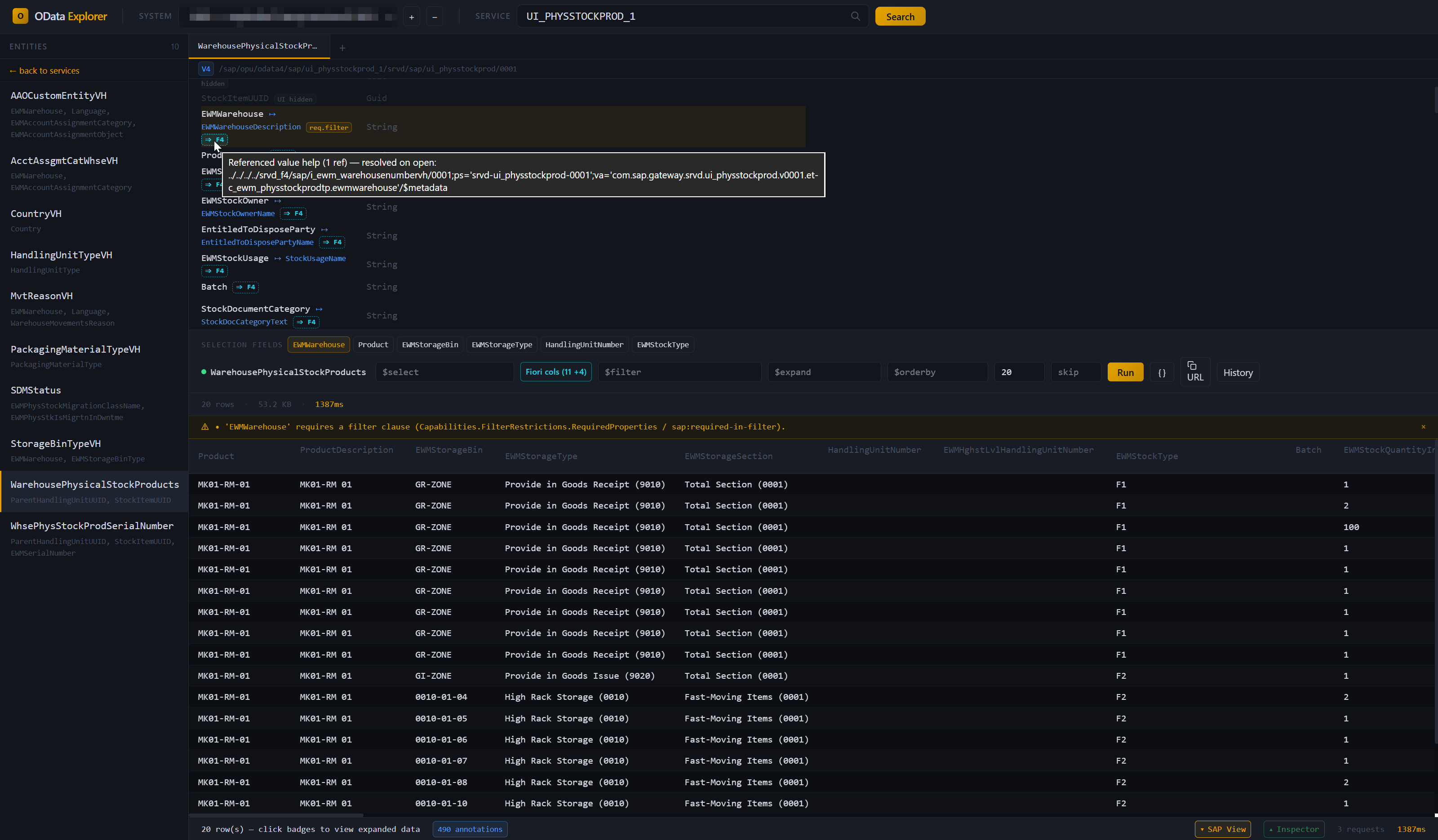
A CLI tool and desktop app for exploring and testing SAP OData services against real customer systems. It supports OData V2 and V4, SAP Gateway catalog discovery, and three common authentication modes: basic auth, Windows SSO (Kerberos / SPNEGO), and browser-based SSO (Azure AD / SAP IAS / SAML flows).
Note
Early-stage project. Core workflows work end-to-end on real SAP systems, but packaging, docs, and polish are still evolving.
This is an independent project and is not affiliated with, endorsed by, or sponsored by SAP SE.
Why
Working with SAP OData often means choosing between SAP-native tools that are awkward to use and generic API clients that do not understand SAP conventions.
- SAP Gateway Client (
/IWFND/GW_CLIENT) is useful, but dated and tied to a single SAP session. - Postman / Insomnia / Bruno are strong general-purpose API clients, but they do not know about SAP CSRF handling,
sap-client, Gateway catalogs, or OData V4 service discovery. - SAP Business Accelerator Hub is useful for standard SAP APIs, not for customer-specific services behind real SAP landscape authentication.
- SAP Business Application Studio is a full cloud IDE, not a focused OData exploration tool.
This project is aimed at a narrower problem: understand a real SAP OData service quickly, query it safely, and move on.
Features
- Service discovery — browse V2 and V4 services from SAP Gateway catalogs with search
- Entity explorer — inspect entity sets, properties, keys, navigation properties, and labels
- Visual query builder — build
$select,$expand,$filter,$orderby,$top, and$skipinteractively, with autocomplete from the entity's metadata (properties, navigations, operators, functions) - Results grid — tabular results with expandable nested data from
$expand, paging with totals (follows server-driven next links), row details with one-click navigation drill-down, and copy as TSV / CSV (TSV pastes straight into Excel) - HTTP inspector — per-tab request/response trace in the desktop app (headers, body preview, timing) with copy-as-curl; same data on the CLI via
--verbose - SAP-aware error hints — 404/403/5xx responses get actionable hints pointing at
/IWFND/MAINT_SERVICE,/IWFND/ERROR_LOG,ST22, or the browser SSO sign-in flow when appropriate - SAP View — opt-in overlay that reads a service's SAP/UI5 annotations and renders the explorer as a Fiori-aware view: Fiori-ordered columns, filter chips, value-help (F4) pickers, restriction validation. Toggle from the status bar. See docs/SAP-VIEW.md for the full annotation list.
- Fiori-readiness linter — evaluates a service's annotations against a Fiori list-report / object-page checklist: profile-aware (list-report / object-page / value-help / analytical / transactional), catches dangling
Pathreferences, and emits ABAP CDS fix hints pointing at the source annotation. Severity levels filter the output. Available in the CLI (sap-odata lint) and the desktop describe panel. - Connection profiles — save SAP systems and store Basic-auth passwords in the OS keyring
- Three auth modes — basic auth, Windows SSO (SPNEGO), and browser SSO
- Service aliases — use short names for long service paths
- Auto resolution — type
API_WAREHOUSE_2and resolve it from the catalog - Tabs — keep multiple independent workspaces open, each with its own profile, service, and trace
- Favorites and history — star services — catalog entries or pasted paths — and replay recent queries; history is kept per profile and service across restarts, with pinning
- Environment labels — mark profiles DEV / QAS / PRD; production systems get a red band in the desktop app and a notice on the CLI
- Hand-offs — copy the current query as a
sap-odataCLI command, or an entity as markdown ("copy for AI") for an AI chat or a ticket - Sample service — no SAP system at hand? The start screen opens a bundled synthetic service to try SAP View, the linter and the query bar
- Copy helpers — copy rows, columns, generated query URLs, request/response bodies, or curl commands
- Filter helper — click a cell value to turn it into a filter
- Offline mode — save a service's
$metadatafrom a connected system, or import an EDMX file from disk (API Hub download, GW_CLIENT "Save Response",curl > out.xml). Cached services browse through the same UI as live ones — describe, lint, annotations, all work without network access, in the desktop app and on the CLI (sap-odata -p "<bucket>" -s <service> describe …). The route-around for customer sites where the unsigned exe can't be installed on the SAP host: pull$metadataovercurl//IWFND/GW_CLIENT/ browser, hand the file to a consultant running the explorer on their own laptop. - Local-first — single-binary CLI and desktop app, no server component, no runtime dependencies (Windows / Linux / macOS source builds)
Installation
Download a prebuilt binary (Windows)
Go to the Releases page and pick the latest tag. Each release attaches the following assets:
| Asset | What it is | When to use |
|---|---|---|
SAP-OData-Explorer_<ver>_x64_en-US.msi | Desktop app installer (MSI) | Easiest path. Double-click, install, launch from the Start menu. |
SAP-OData-Explorer_<ver>_x64-setup.exe | Desktop app installer (NSIS) | Alternative installer with different uninstall hooks. |
SAP-OData-Explorer_<ver>_portable.exe | Desktop app, no install | Locked-down environments (Citrix, no-admin laptop, customer VM). Copy and run — no installer, no admin required. |
sap-odata.exe | CLI tool, no install | Scripting, CI, or terminal use. Put on your PATH and run sap-odata setup. |
SHA256SUMS.txt | Checksums | Verify downloads with Get-FileHash <file> -Algorithm SHA256 and compare. |
The CLI and the desktop app share the same connections.toml and Windows Credential Manager entries — no need to duplicate profiles between them.
Warning
Binaries are unsigned. Windows SmartScreen will show an "unrecognized app" warning — click More info → Run anyway. Code signing is planned.
Package managers
Cargo (CLI, any OS with Rust 1.88+ — builds from source, no SmartScreen involved):
cargo install sap-odata-cli
# → `sap-odata` on your PATH
WinGet (Windows — desktop app, MSI):
winget install kts982.SAPODataExplorerScoop (Windows):
scoop bucket add kts982 https://github.com/kts982/scoop-bucket
scoop install sap-odata            # CLI
scoop install sap-odata-explorer   # Desktop app (portable)
Build from source (Linux, macOS, or if you prefer)
Prerequisites: Rust 1.88+ for the CLI, 1.90+ for the desktop app (rustup.rs), and Node.js 20+ for the desktop app frontend build.
git clone https://github.com/kts982/sap-odata-explorer.git
cd sap-odata-explorer

# CLI only — fast
cargo build --release -p sap-odata-cli
# → target/release/sap-odata(.exe on Windows)

# Desktop app — slower, especially on first build
cd tauri-app
npm install
cargo tauri build
# → ../target/release/bundle/msi/  (Windows installer)
# → ../target/release/bundle/deb/  (Linux .deb)
# → ../target/release/bundle/macos/ (macOS .app)
See CONTRIBUTING.md for development setup, tests, and contribution guidelines.
Config location
Profiles, aliases, and (optionally) plaintext-fallback passwords are stored in connections.toml. The CLI and the desktop app read the same file.
| Mode | Path |
|---|---|
| Default | %APPDATA%\sap-odata-explorer\config\connections.toml on Windows · ~/.config/sap-odata-explorer/connections.toml on Linux · ~/Library/Application Support/sap-odata-explorer/connections.toml on macOS |
| Portable | A connections.toml placed next to the exe takes precedence — useful when running from a USB stick or a copied folder on a locked-down machine. |
| Explicit | The SAP_ODATA_CONFIG_DIR environment variable overrides both — useful for CI or for keeping separate configs side by side. |
Run sap-odata profile where to print the exact path in use. Basic-auth passwords are stored in the OS keyring by default — see Security notes below.
Quick start
Desktop app
- Launch the app — from the Start menu if you installed it, or by running the portable exe directly
- Click
+next to the profile dropdown to add a system. Use✎to edit an existing profile (URL, password, auth mode) or−to remove it. Profile name and basic-auth username are locked on edit — both feed the keyring entry key, so changing them = delete + re-add. - Choose auth mode and save the profile
- For Browser SSO profiles, click Sign In once and complete the login flow
- Click Search to browse services and pick one. If your system has the V4 catalog SICF node inactive (
/IWFND/CONFIGV4 node off — a common customer config), the sidebar shows a hint to paste the full/sap/opu/odata4/...path directly into the search box. - Click an entity set in the sidebar → click property names to add them to
$select, navigation properties to$expand→ Run. collapse folds the entity details away to give the results room; URL copies the OData URL and CLI copies the same query as asap-odatacommand (for scripts or an AI agent). - Toggle SAP View in the status bar to overlay SAP/UI5 annotation hints (entity titles, description pairings, criticality colors, filter restrictions, selection-field chips). Toggle Inspector to see the full HTTP trace for the last call. The version at the far right checks for a newer release on click; Feedback opens GitHub to report a bug or suggest something.
- Offline mode is in the header: Save offline (visible when a service is loaded on a connected profile) opens a small dialog — pick a target bucket, label, and note, or just hit Save for the defaults — and caches the
$metadataunder a<NAME> (offline)bucket; Import EDMX opens a file picker for EDMX files hand-pulled outside the tool. Offline profiles appear in the picker with an[OFFLINE]badge; selecting one lets you browse the cached services normally — Run / query / value-help are disabled (no network), and each cached row has a✕to remove it from the library.
CLI
# Easiest path: guided setup
sap-odata setup

# Then browse and query
sap-odata -p DEV services -f warehouse
sap-odata -p DEV -s API_WAREHOUSE_2 entities
sap-odata -p DEV -s API_WAREHOUSE_2 describe Warehouse
sap-odata -p DEV -s API_WAREHOUSE_2 run Warehouse --top 5

# Any command with --verbose prints the full HTTP trace to stderr
# (same data as the desktop app's Inspector, with auth headers redacted).
sap-odata -v -p DEV -s API_WAREHOUSE_2 run Warehouse --top 1

# Offline mode — capture from a live system or import a file from disk
sap-odata -p DEV -s API_WAREHOUSE_2 offline save           # cache $metadata under DEV (offline)
sap-odata offline import ./from-customer.edmx              # ingest a file the user already has
sap-odata offline list                                     # list buckets
sap-odata offline list --profile "DEV (offline)"           # list services in a bucket
sap-odata offline delete --profile "DEV (offline)"         # remove a bucket (asks for confirm)
If you prefer scripted setup, sap-odata profile add ... is still available for direct profile creation.
CLI commands
| Command | Purpose |
|---|---|
setup | Interactive wizard to add a new SAP system |
signout <profile> | Clear persisted Browser SSO session |
profile list/add/remove/test/where | Manage saved SAP systems |
alias add/list/remove | Per-profile short names for services |
services | List available OData services from the catalog |
entities | List entity sets in a service |
describe <set> | Show properties, keys, nav properties, labels |
functions | List function imports / actions |
build <set> [query] | Dry-run: print the OData URL without querying it |
run <set> [query] | Execute query, show results as table |
metadata | Dump raw $metadata XML |
verify | Smoke-test every entity set with a small $top probe; exit code reflects failures (CI-friendly) |
lint [<entity>] | Fiori-readiness checklist — check a service's annotations against list-report / object-page expectations, with ABAP CDS fix hints. --min-severity pass|warn|miss to filter. |
annotations | List every SAP/UI5 annotation parsed from $metadata, grouped by vocabulary. --namespace / --filter to narrow. |
offline save | Cache the connected service's $metadata for offline browsing. Requires -p PROFILE -s SERVICE. |
offline import <file> | Import an EDMX file (API Hub, GW_CLIENT, curl dump). No connection needed. --offline-profile NAME to target a specific bucket. |
offline list [--profile NAME] | List offline buckets, or services within one. |
offline delete --profile NAME [--service-id ID] | Remove a whole bucket or one service. -y skips the confirm prompt. |
See CLI-REFERENCE.md for all options (or run sap-odata <command> --help).
Use with AI agents
The CLI is deliberately agent-friendly: --json on every command that returns
data, clean stdout (banners, logs and HTTP traces go to stderr), meaningful exit codes, and a
strictly read-only SAP surface. skills/sap-odata-cli/SKILL.md
is a ready-made skill that teaches a coding agent the safe workflows —
discovery, describe, queries, lint, offline EDMX — plus the failure
playbook (SSO expiry, keyring states, unpublished V4 catalogs).
For Claude Code, copy the folder into your skills directory:
# personal (all projects)          # or per-project
~/.claude/skills/sap-odata-cli/    <project>/.claude/skills/sap-odata-cli/
For other agents (Cursor, Codex, ...), reference the file from your rules /
AGENTS.md. The skill assumes profiles already exist — agents are told to
never run the interactive setup wizard and never to handle passwords.
Authentication
- Basic — username/password, stored in the OS keyring by default
- Windows SSO — SPNEGO/Kerberos via Windows SSPI, with no password prompt on supported domain-joined machines
- Browser SSO — for SAP systems behind SAML-style login chains such as Azure AD or SAP IAS; sign-in happens in the desktop app and the resulting session can be reused by the CLI
Setup wizard
The CLI has an interactive wizard for adding profiles:
sap-odata setupThis walks through profile name, URL, client, language, auth method, and credentials where needed. For Basic and Windows SSO profiles it can also test the connection immediately.
For Browser SSO, the wizard saves the profile, but the first interactive sign-in happens from the desktop app. After that, the CLI reuses the persisted session automatically.
Persisted browser SSO sessions
For Browser SSO profiles, the desktop app and CLI work together:
- Create the profile with
sap-odata setupor from the desktop app. - In the desktop app, click Sign In once and complete the IdP flow.
- The session is stored in the OS keyring under the current user account.
- Subsequent CLI commands reuse that session automatically until it expires.
Typical flow:
sap-odata -p PRD services
sap-odata -p PRD -s API_X run ...

# Clear the persisted CLI session:
sap-odata signout PRD
The desktop app also has a Sign Out button for Browser SSO profiles. That clears the persisted session and local webview cookies for SAP and common IdP hosts.
Sessions still expire server-side. When that happens, the CLI tells you to sign in again from the desktop app. If a profile's base_url or client changes, any persisted Browser SSO session is treated as stale and discarded automatically (language doesn't affect sessions).
Security notes
- TLS verification is enabled by default. For self-signed SAP certificates, set
insecure_tls = truein the profile'sconnections.toml. - Passwords are stored in the OS keyring (Windows Credential Manager / macOS Keychain / Linux Secret Service) by default rather than in plaintext config.
- Browser SSO session cookies are serialized, compressed, and stored in the OS keyring under the current user account. The risk profile is similar to a browser persisting auth cookies locally.
- Sign-out behavior is explicit:
sap-odata signout <profile>clears the persisted Browser SSO session; the desktop app's Sign Out also clears local webview cookies for SAP and common IdP hosts. - CSP is enforced in the Tauri app; assets are bundled locally and not loaded from external CDNs.
- Query history (desktop) keeps the last 50 queries per profile and service, plus pinned ones, in the app's local storage — query parameters only, never results. Filter values can still contain business identifiers; clear in the History panel removes everything that isn't pinned.
- No telemetry. The tools talk only to the SAP systems you configure. The one exception is the desktop app's version button in the status bar: clicking it asks GitHub's releases API whether a newer version exists — nothing runs on its own, and nothing about you or your systems is sent.
Responsible use
Use this tool only with SAP systems and endpoints you are authorized to access. SAP's API Policy distinguishes published/documented APIs from internal or private interfaces and describes API controls for availability, limits, security, bulk extraction, and automated use.
sap-odata-explorer is intended for human-driven inspection and testing of documented SAP OData services or customer-owned services. It is not intended to bypass SAP API controls, access internal/private SAP APIs, perform large-scale data extraction, or act as an autonomous API-calling agent.
How it compares
The short version: other tools treat an SAP OData service as generic REST. This one reads the SAP/UI5 annotations that come with the service, renders results the way a Fiori app would, and flags Fiori-readiness gaps with ABAP CDS fix hints.
| Tool | Where it fits |
|---|---|
| SAP Gateway Client | Better suited to backend QA replay inside SAP. sap-odata-explorer runs cross-platform, discovers V2+V4 catalogs, overlays a Fiori-aware view from the service's own UI5 annotations (column order, filter chips, F4 pickers, Capabilities.* restrictions), and lints for Fiori-readiness with ABAP CDS fix hints — GW Client shows the raw OData response. |
| SAP Business Accelerator Hub | Better suited to official SAP API browsing and SDK downloads. sap-odata-explorer works against live customer systems and custom services, with annotation-driven rendering and a Fiori-readiness linter — things reference docs can't provide. |
| Postman / Insomnia / Bruno / Hoppscotch | Better suited to broad API workflows, collections, and collaboration. sap-odata-explorer is focused on SAP specifics — CSRF handling, sap-client, Gateway catalog discovery — reads UI5 annotations to render results the way a Fiori app would, and lints annotations for dangling references and missing Fiori expectations. Generic HTTP clients don't attempt any of this. |
The CLI is scriptable by design (stable subcommands, exit codes, --verbose trace output) and composes cleanly with shell pipelines, CI steps, or external wrappers — so while the tool is aimed at human-driven exploration, nothing stops you from invoking it from higher-level automation when that's what you need.
Best fit: "I need to quickly understand and query this SAP OData service."
Project structure
sap-odata-explorer/
├── crates/
│   ├── core/       # Shared library (auth, HTTP, metadata, query, catalog, config, SSO)
│   └── cli/        # CLI binary
└── tauri-app/
    ├── src/        # Frontend (HTML + Tailwind + vanilla JS)
    └── src-tauri/  # Tauri commands wrapping core
The sap-odata-core crate holds all protocol logic. CLI and Tauri are thin wrappers. This makes it easy to add a third frontend later (MCP server, web app, etc.).
Directions
Not a commitment — priorities may shift.
Legend: [x] done · [-] partial / in progress · [ ] planned
- [-] Auth validation on federated landscapes (Azure AD tested on some configurations; SAP IAS, Okta, ADFS still to go)
- V2 F4 convention scan (
sap:value-list→ infer*_VHentity set → drive the picker) - Code signing and release pipeline (CI builds for Windows / Linux / macOS, signed Windows artifacts)
Contributing
See CONTRIBUTING.md. Bug reports, PRs, and discussions welcome.
License
MIT — see LICENSE.
History
Security 3, Features 14, Fixes 27, Other 3
Notes
Correctness and security fixes from a full code review, plus desktop ergonomics: autocomplete in the query fields, paging and counts, row detail with navigation drill-down, persistent history, environment labels, a bundled sample service, and offline-bucket browsing from the CLI. connections.toml and the offline library layout are unchanged; session caches saved by 0.1.0 still load. Binaries remain unsigned.
Security
sap-odata --helpno longer prints credential values. WithSAP_PASSWORD/SAP_USERexported (the documented CI setup), help output showed[env: SAP_PASSWORD=<value>]— straight into CI logs or agent transcripts. Help still names the variables.- Deleting an offline bucket can no longer delete another bucket's files. Bucket directories are lossy slugs, so
DEV (offline)/Dev (offline)— or any two non-Latin names — shared one directory, and bucket delete removed it recursively. Delete now removes only files indexed to the bucket, then the directory if empty. - The unused, path-based
import_edmx_filedesktop IPC command (it could read any file path) is removed; imports go throughimport_edmx_bytes.
Fixes — CLI output contract (scripts and AI agents)
- Logs go to stderr:
-v … --json(and any warning) no longer puts log lines in front of the JSON. servicesexits non-zero when every catalog request failed (401, expired session, DNS, 403) instead of printing[]/ "No services found." with exit 0.--jsonnow works onprofile list(auth mode and password source, never the password),profile whereandalias list;functions --jsonprints[]instead of text when a service has none.profile listshows the language column.build --countemits$count=truefor V4 services (it always emitted the V2$inlinecount).-p DEV offline listexplains that the global-pfills the offline commands'--profileand lists the existing buckets, instead of a bare "not found".profile addre-runs keepinsecure_tls, keep a plaintext password when no new one is given, keep Browser SSO mode when run without credentials, write the keyring only when a password is given (it wrote an empty one and claimed it was stored), and remove the keyring entry an auth-mode or username change orphans. The desktop edit dialog gets the same fixes.sap-odata.execarries a Windows version resource (it reported 0.0.0.0).
Fixes — SAP protocol
- V4 error messages are shown. Only the V2 envelope (
error.message.value) was read, so every V4 error lost SAP's message text. - Requests time out instead of hanging forever: 30 s to connect, 300 s of silence while waiting for or reading a response (resets on every chunk).
SAP_ODATA_READ_TIMEOUT_SECSchanges it;0disables it. Transport errors now name their cause (connection refused, DNS, TLS). - Namespaced V4 services resolve by name (
-s /IWBEP/TEA): the expanded catalog's URL is used, and the per-group lookup percent-encodes the id. - SAP's 403 "No service found for namespace …" is reported as a wrong path / unregistered service with a matching hint, not as an authorization failure ("check password / SU53").
- A
--languageoverride (orSAP_LANGUAGE, or editing only a profile's language) no longer discards the persisted Browser SSO session — language doesn't affect session validity. - Browser SSO sessions are stored as raw bytes, nearly tripling the cookie capacity of the Windows credential store (~960 → 2560 compressed bytes); sessions saved by 0.1.0 still load. When saving the session fails, the desktop sign-in says so instead of silently reporting success.
- Connected-profile writes (profile / alias add and remove, setup wizard, desktop profile dialog) take the offline store's lock and replace only the connections table, so they can't drop or resurrect offline-library entries written meanwhile.
services -vcan no longer panic on multi-byte catalog text.- V4
$searchterms the user already put in quotes are no longer quoted twice (""red car""→ 400).
Fixes — Fiori-readiness lint
- Navigation paths (
_TravelEnterpriseVH/TripTypeEnterpriseName,author/name) are no longer reported as dangling references by the integrity rules — false warnings that failedlint --fail-on warn. UI.LineItemkeepsDataFieldWithUrl/WithIntentBasedNavigation/WithNavigationPath/WithActioncolumns (onlyDataFieldFor*are not columns).- An entity-level
UI.TextArrangementapplies only to properties with aCommon.Text, sotext_arrangement_lonelyno longer flags the description columns themselves.
Fixes — Metadata parsing
- Annotation targets written with a full or multi-part namespace (CAP-style
my.app.CatalogService.Books, or the full namespace although the schema declares an alias) were silently dropped — HeaderInfo, LineItem, Text and friends lost, lint reporting false misses. Targets are now resolved by stripping the qualifier up to the last dot of the first path segment. - Annotations in a schema that comes before the schema defining the types are no longer dropped (annotations are applied after every schema's model is parsed), and the primary namespace is the model schema's.
- Entity type inheritance (
BaseType): derived types now show the inherited key, properties and navigation properties (with their annotations), instead of an empty key and only their own columns. - V2
<Annotations>blocks are read. SAP V2 services carry vocabulary annotations (Capabilities restrictions, Measures, …) in<Annotations>blocks next to the inlinesap:*attributes; they were ignored entirely. They now go through the same typed pass as V4 and show in the annotation inspector.
Fixes — Desktop app
- Stale responses no longer win. A slower, older response could render into the same tab: a catalog from the previous profile after a profile switch, rows from the previous entity set, or an earlier run overwriting a re-run.
- Filter literals follow the OData version and type. GUID / DateTime / DateTimeOffset / Date / TimeOfDay / Time literals are written per V2 or V4 (e.g.
datetimeoffset'…'vs bare), from what the user typed or from raw result values (/Date(…)/). Click-to-filter on a result cell used to always write a quoted string (Qty eq '5'→ 400); the filter bar's "contains" becomessubstringofon V2; value-help constants keep NUMC-style codes quoted. - Pasted service paths get their OData version from
$metadata(and the V2/V4 badge). - Entity details no longer leak across context: history replay into another entity set re-describes it, replay into another service is refused with a message, a profile switch clears them. Toggling SAP View re-renders the results grid.
New — Desktop app
- Autocomplete in the query bar from the entity's metadata: property names in
$select/$orderby(then asc / desc), navigation properties in$expand, and in$filterproperties and functions, then operators after a property, thenand/orafter a value. - Paging and totals. An opt-in count checkbox asks for the total; the stats bar shows
rows 21–40 of 1,843with prev / next. Next follows the server's$skiptokenwhen it pages on its own (V4 services return 100 rows plus a next link when no$topis given), else steps$skipby$top. - Row details and drill-down. The ↗ button on a result row shows it as a list (field, value, label, type) and offers the entity's navigation properties — one click loads
EntitySet(key)/Navigationfor that row. - Environment labels. Mark a profile DEV / QAS / PRD (profile dialog, or
profile add --env). PRD profiles get a red band and tab edge in the desktop app (QAS amber), are tagged in the profile picker, and the CLI notes'<profile>' is a production (PRD) systemon stderr;profile listshows the label. - Query history survives restarts and follows the service: the last 50 queries per profile and service (parameters only, never results), re-runs of the same query refresh their entry, and ★ pins a query so it stays.
- copy TSV / copy CSV in the stats bar copy the current rows — TSV pastes straight into Excel. Nested values become JSON; fields with delimiters, quotes or line breaks are quoted.
- Try the sample service. The start screen offers a bundled, synthetic V4 service (warehouse orders, tasks, a value help) imported into a
Sampleoffline bucket — SAP View, the annotation inspector, Fiori readiness, the filter bar and autocomplete all work without an SAP connection. - copy for AI in the entity-details header copies the entity as compact markdown — keys, properties with types, labels and notes (key, required in filter, value help, text / unit companions, …), navigations, LineItem / selection fields / sort, capability limits and lint findings — for an AI chat or a ticket.
- Favorite any loaded service, including one opened by pasting its path — the ☆ in the service path bar. Customers without the V4 catalog published no longer re-paste the path every session.
- CLI button next to URL: copies the current query as a
sap-odata … run …command (quoted for Bash and PowerShell) — for scripts or an AI agent. - collapse in the entity-details header folds the property tables away to give the results room (remembered per tab).
- The status bar shows the version; clicking it checks GitHub for a newer release (user-initiated only — no telemetry). Feedback opens the GitHub issue chooser.
New — CLI
- Browse offline buckets from the CLI.
-p "<bucket>"makesentities,describe,functions,annotations,lintandmetadataread the cached EDMX — no SAP system needed (-stakes the service id or label);serviceslists the bucket. Network commands are refused with a clear message. Agents no longer have to parse the cached XML themselves.
New — Configuration
SAP_ODATA_CONFIG_DIRpins the config directory (connections + offline library), ahead of the portable and OS-default locations.
Build / CI
- Declared and CI-tested minimum Rust versions: 1.88 for core + CLI (new
msrvjob), 1.90 for the desktop app. The README's "1.85+" was never true. - New CLI output-contract tests (the compiled binary against an isolated config dir), catalog resolution tests, and
scripts/test-odata-literals.mjs(CI-gated). - Dependencies: Tauri 2.12, comfy-table 8, dialoguer 0.12 (plus the monthly minor/patch round).
Security 2, Features 6, Fixes 1, Other 1
Notes
First non-prerelease release. The interfaces that alpha.1–alpha.4 iterated on — CLI command surface,
connections.tomlschema, offline library layout,parse_metadata— are now treated as stable within 0.1.x. Binaries remain unsigned (SmartScreen warning documented in the README); the new package-manager channels below don't depend on signing.New — Distribution channels
- crates.io:
cargo install sap-odata-clibuilds the CLI from source on any OS with Rust 1.85+ — no SmartScreen, no binary trust question. The shared engine is published alongside assap-odata-core. - Scoop (Windows):
scoop bucket add kts982 https://github.com/kts982/scoop-bucket, thenscoop install sap-odata(CLI) orscoop install sap-odata-explorer(desktop portable). - winget: submission of the MSI as
kts982.SAPODataExplorer(available once the winget-pkgs PR is merged; the README gains the install line then).
New — Offline library polish
- Per-service delete in the sidebar: rows in an offline bucket get a
✕affordance that removes one cached service (confirmation + status-bar result). Closes the GUI-vs-CLI parity gap withoffline delete --service-id; the bucket itself is kept — bucket removal stays on the profile − button. - Save-offline options modal: the header "Save offline" button now opens a small modal offering target-bucket / label / note overrides before capture. Submitting with everything blank matches the old one-click behavior (backend defaults: bucket
<connected> (offline), label derived from Schema Namespace). - Boot-time integrity sweep: at desktop-app startup, a background thread reconciles the offline index against the files on disk and logs orphaned EDMX files and missing-file services (warn level). Non-destructive — the sweep reports, nothing is deleted.
Fixes
connections.tomlwrites are now crash-safe:save_configroutes through the offline store's atomic temp-file + rename + parent-dir-sync helper instead of a truncate-in-place write, so a crash mid-save can no longer leave a torn config. (The offline transaction paths already wrote atomically; this closes the connected-profile / CLI / portable-init paths.)
Security / CI
- Dependency advisory fix: transitive
quick-xml0.38.4 (viaplist→tauri, macOS-target-only — not compiled into Windows binaries) carried two DoS advisories (RUSTSEC-2026-0194/0195); bumpedplistto 1.10 which pulls the patched 0.41. - Weekly scheduled
cargo auditrun (+ manual dispatch) so RustSec advisories are caught during idle periods, not only on push.
Internals
- crates.io publish metadata on
sap-odata-core/sap-odata-cli; the desktop app crate is markedpublish = false.
- crates.io:
Features 15, Fixes 4, Docs 4, Other 6
Notes
Headline: offline EDMX library — capture
$metadatafrom a connected SAP system or import an EDMX file from disk, then browse it in the same desktop UI without any network connection. Designed as a route-around for the unsigned-exe install friction at customer sites: someone withcurl//IWFND/GW_CLIENT/ browser access can pull a$metadatadocument and hand it to a consultant running the explorer on their own laptop.Also: CLI ergonomics polish, a dedicated service-health subcommand, a centralised error-hint layer used by both surfaces, profile edit-in-place, and a V4-catalog-miss workaround hint.
New — Offline mode
- "Save offline" button (desktop) captures the bytes of a connected service's
$metadatato the offline library under a<NAME> (offline)bucket attributed to the source system. Same atomic-write discipline as the rest of the config: temp file + rename + parent-dir sync, cross-process lockfile, content-hash-verified byte-identical skip on re-save. - "Import EDMX" modal (desktop) accepts files from any reasonable source — SAP API Hub
.edmx,/IWFND/GW_CLIENT"Save Response".xml, browser save-as on<base>/$metadata,curl > out.xml. Validated through an 11-step pipeline before persistence: size cap, gzip / HTTP-headers sniff, BOM strip, byte-level XXE scan (DOCTYPE / ENTITY), UTF-8 decode, wrong-root classification (HTML login page → friendly hint, Atom service doc, OData error envelope), XML parse, EDMX root + namespace check, Schema presence. OFFLINEbadge in the profile picker with source-system attribution ("DEV (offline) — from DEV" / "Imported — imports"). Run / query / value-help buttons disabled for offline profiles (UI gating mirrors backendassert_network_allowed).- CLI parity:
sap-odata offline save,offline import <FILE>,offline list [--profile NAME],offline delete --profile NAME [--service-id ID]. All four work without any configured profile — useful for receiving a hand-carried EDMX file on a fresh consultant laptop. - Label auto-derivation from
Schema Namespace. V4 SAP services (com.sap.gateway.srvd.*andsrvd_a2xfamily) render as<SVC>_<N>with leading zeros stripped (e.g.com.sap.gateway.srvd_a2x.api_warehouse_order_task_2.v0001→API_WAREHOUSE_ORDER_TASK_2_1— the canonical name a consultant sees in SEGW //IWFND/MAINT_SERVICE). V2 services use the trailing dot-segment; URL-shaped or non-ASCII namespaces fall through to the filename stem. - Global name uniqueness across
connections+offline_profilesenforced at every add path (desktop add-profile modal, CLIprofile add, CLIsetupwizard, path-A save, path-B import) plus at dispatch time (MetadataSource::resolvefails closed on collision) so the no-network guarantee is closed at the boundary, not just the entry points. - TOML schema extensions:
[offline_profiles.*](bucket metadata) and[[offline_services]](one row per cached service withid,label,source_service_path,edmx_file,sha256,size_bytes,odata_version, attribution timestamps, optional note). Backward-compatible with pre-offlineconnections.toml(every field defaults). - Storage layout —
{config}/offline/<slug(profile)>/<service_id>.edmxwhereservice_idis<slug(label)>-<8-hex>. Hash-suffixed filenames are tool-generated; no raw user input flows into a filename component except via the slugifier. Path-traversal safety viasafe_join_under(syntactic) +canonicalize_under(runtime symlink/reparse-point boundary check with strict-descendancy). userinfo(user:pass@host) stripped fromsource_urlat save time so consultant credentials never land in an offline-pack hand-carried to a peer.
New — Other
- Profile edit (desktop): pencil button next to the profile dropdown opens the existing add-profile modal in edit mode. URL, password, auth mode, language, and the Kerberos-delegation toggle are editable; profile name and basic-auth username are intentionally locked (both feed the OS keyring entry key, so changing them requires delete + re-add). Blank password keeps the existing keyring entry.
- V4 catalog-miss UX hint (desktop): when the V4 ServiceGroups catalog returns 403/404 (common on customer systems where the
/IWFND/CONFIGV4 SICF node isn't active), the sidebar shows an amber footer pointing to the paste-full-path workaround (/sap/opu/odata4/...). Pasted paths already bypass the catalog via the existingisServicePathshortcut; the hint is purely educational. verifysubcommand (CLI):sap-odata verify <service>issues a small$topGET against each entity set in a service and prints an OK/FAIL table with row counts. Exit code reflects whether any probe failed — designed as a CI- and agent-friendly health check after a backend change. Flags:--quick(list only),--top N,--json. SAP V4 framework sets (SAP__*,__*prefixes) are skipped.--in PROP V1 V2 ...filter shortcut (CLI) onrun/build: expands to(PROP eq 'V1' or PROP eq 'V2' or ...). Combines with--filtervia AND-wrapped parens, preserving operator precedence. Apostrophes inside values are doubled per the OData spec (O'Brien→'O''Brien') before URL-encoding. Saves PowerShell-escaping pain when filtering against a small enumerated set.- Centralised
response_hintcovering common SAP failure shapes — used by both CLI and desktop surfaces so error text stays consistent. New cases: 404 on a V4 path names the three actionable causes (wrong service path / wrong entity set / unpublished V4 SICF node); 404 on V2 appends "useentities -s <svc>to list valid sets"; 401/403 on Browser SSO points tosignout; 401/403 on basic mentions SU53 for missing authorisations; 4xx responses with a parseable SAP error code in the OData envelope suggest an SE91 lookup (placeholder/0codes filtered out). - Service-resolution banner now goes to stderr instead of stdout, so
sap-odata -s SVC metadata > out.xmlcaptures clean XML without the "Resolving..." preamble. Mirrored inCLI-REFERENCE.md.
Fixes
verify --verboseno longer drops the HTTP trace on FAIL —cmd_verifywas usingstd::process::exit(1)which bypassed the post-command trace emitter; switched toanyhow::bail!so the trace fires before the error propagates (precisely when it's most useful).build --jsonwas documented to emit a JSON string but always printed plain text. Now honors--json.extract_sap_error_codewalks past placeholder/0entries at both the top level and nestederrordetails. SAP sometimes emits a leading/0warm-up entry followed by the real code (e.g.SY/530); the previous.first()returned the placeholder and produced unhelpful suggestions.- Browser-SSO HTML-fallback (the common expired-session shape on SAP/IdP gateways) didn't route through
response_hint, so thesignout <profile>pointer never fired for that path. Hardcoded messages now mentionsignoutwhether the failure surfaces as 401/403 or HTML interception.
Docs
- README Installation table enumerates the five release assets (MSI / NSIS / portable GUI / CLI / SHA256SUMS) with one-line "when to use" guidance per file, including the locked-down-environment framing for the portable GUI exe.
docs/RELEASE-CHECKLIST.mddocuments the five-asset contract and referencesscripts/stage-release-assets.mjsfor the portable rename + checksum regeneration.- README "Config location" section under "Build from source" makes the
connections.tomlpaths discoverable independently of the desktop quick-start, since the CLI and desktop app share the same file. - README Quick-start mentions the
✎(edit) /−(remove) buttons and the V4 paste-full-path workaround.
Dev tooling
tauri-app/src-tauri/tauri.conf.json:beforeDevCommandchanged fromnpm run csstonpm run devsocargo tauri devboots the static server on:1420itself instead of hanging on "Waiting for your frontend dev server...".scripts/stage-release-assets.mjs: copies build artifacts intodist/v<tag>/under the canonical filenames the README references, handles thesap-odata-explorer-app.exe→SAP-OData-Explorer_<ver>_portable.exerename, and writesSHA256SUMS.txtover the final names in one shot.
Tests
client::testscovering each newresponse_hintbranch (V4 404, V2 404 hint append, basic 401/403 SU53 mention, Browser SSO signout pointer, SAP-error-code SE91 suggestion).- Regression test for
extract_sap_error_codewalking past placeholder/0entries.
Internals
get_servicesTauri command now returns{ services, warnings }instead of a bare service list, so per-version catalog warnings (e.g. "V4 catalog: 403 Forbidden") surface to the renderer instead of being dropped.ProfileInfogainslanguage+sso_delegateso the edit modal can prefill without silently regressing those fields on save.
- "Save offline" button (desktop) captures the bytes of a connected service's
Security 7, Features 5, Fixes 4, Other 13
Notes
Second public alpha. Adds the Fiori-readiness footer popup + the SAP V4 system-field filter, wraps the post-alpha.1 security/correctness hardening (CSP
style-srctightening, XSS attribute-context coverage, structured keyring errors, entity-key encoding), and ships local fonts that actually decode. Interfaces may still change.New
- Fiori readiness moved to a footer popup. Used to render at the bottom of the describe panel whenever SAP View was on. Now a severity-tinted pill (
Fiori N miss/Fiori N warn/Fiori X pass) next to the annotations badge, opening a modal with the same category-grouped findings and ABAP CDS hints. Tone is driven by the worst severity present. - SAP V4 system fields hidden from the entity-set picker, the describe property tables, and the results grid. The reserved
SAP__/__double-underscore prefix family (SAP__Messages,__OperationControl,SAP__Currencies, ...) is V4 framework noise, not part of the data model. Same filter mirrored in the CLI'sentities/describe/runtable output.--jsonis intentionally untouched on every command so scripted consumers see raw service truth;lintandannotationsare also unchanged (inspection commands by design). - Lint output polish:
--lint-profile <list-report|object-page|value-help|analytical|transactional>override (renamed from--profileto avoid colliding with the global connection-profile flag),--fail-on <warn|miss>for CI use, top-leveldetected_profilein JSON output, two new consistency rules. - Structured keyring read errors surfaced to CLI/Tauri user text. Distinguishes "no password stored", "keyring backend unavailable / locked", and "credential corrupted" so the user knows whether to unlock the OS credential store vs. re-add the profile.
- Copy-row column moved to the front of the results grid (admin-table convention).
Fixes
- Entity key-path encoding:
ODataQuery::build()percent-encodes path-unsafe characters in the key segment (spaces, slashes, OData-quoted apostrophes). Composite keys keep their delimiters intact. CLI key syntax is unchanged. - CLI
profile listBrowser SSO row: was shadowed by the basic-auth credential branch in some cases; now branches on Browser SSO first so the password column readsbrowser SSOinstead ofnone. - Local fonts:
tauri-app/src/fonts/*.woff2had been Google "Error 404 (Not Found)" HTML pages saved with a.woff2extension since the fonts dir first landed (1.6 KB each, magic bytes<!DO). Browser fetched them silently, OTS rejected them, fell back to system fonts. Replaced with the canonical variable-weight woff2 binaries from@fontsource-variable(DM Sans + JetBrains Mono). Strict CSP posture preserved — fonts stay self-hosted. - Add-profile dialog a11y: seven
<label>tags lackedfor=association with their inputs. Added explicit associations.
Security
- CSP
style-srcno longer carries'unsafe-inline'. The 432-line inline app stylesheet and@font-faceblock were externalised fromindex.htmlintoinput.css(compiled by Tailwind v4 into the existingstyle.css); three inlinestyle="..."attributes were converted to utility classes. The Tauri WebView CSP is nowdefault-src 'self'; script-src 'self'; style-src 'self'; font-src 'self'; img-src 'self' data:; connect-src ipc: http://ipc.localhost. CSSOM property setters (el.style.foo = ...) are not gated bystyle-srcand continue to work; only inline<style>,style="...", and string-parsedcssTextare blocked, none of which exist in the codebase. safeHtmlnow covers HTML-attribute context, not only element-text.escapeHtmlwas extended to handle attribute-quote characters, and the renderers were audited so any value interpolated into aclass="…"/data-…="…"/title="…"slot is escaped. CI gate (scripts/lint-innerhtml.mjs) now also rejects unescaped attribute interpolations.- Malicious-metadata escaping fixtures pin the parser/renderer boundary contract: the metadata parser keeps untrusted strings (entity names, labels, annotation values) as raw data, and the renderer is responsible for escaping via
safeHtml/escapeHtml. Fixtures cover HTML-shaped payloads in label, annotation, entity-name, and property-name slots. - Redaction:
Authorization,Cookie,X-CSRF-Token, and SAP password values are scrubbed from the HTTP trace inspector, including body-preview echo defense (a server reflecting a header value back in the response body no longer leaks the secret). 13 redaction tests across two layers. - Existing CSP work preserved:
script-src 'self'(no'unsafe-inline');withGlobalTauri: false; the Tauri API is loaded as a vendored ES module fromtauri-app/src/vendor/tauri-core.js. IPC capability scoped to themainwindow only. - Central XSS sanitiser:
safeHtmltagged-template helper auto-escapes every${...}interpolation;raw()opt-out is keyed by a closure-privateSymbolso JSON-shaped payloads can't forge a marker. - Fail-closed keyring writes with explicit user confirmation before any plaintext fallback (signalled via
KEYRING_FAILED:prefix from the backend).
Tests
- Focused lint regressions for previously under-specified rules (list-report / object-page profile behavior,
selection_hidden,value_list_no_out,selection_non_filterable) and stable finding ordering. - Integration-test corpus (now 158 tests across the workspace) covering V4 CSDL annotations, V2 EDMX
sap:*attributes, CSRF roundtrip, Browser SSO redirect detection, error-envelope edge cases, malformed XML, composite keys, and a synthetic 1500-entity perf-regression test (#[ignore]'d by default).
CI / Build
- Clippy is a hard gate:
cargo clippy --workspace --all-targets -- -D warnings. - Workspace tests:
cargo test --workspace(covers core + CLI + the Tauri-app crate). - Tauri build gated: CI compiles the desktop app on
ubuntu-latestandwindows-latest(npx tauri build --ci --no-bundle). - innerHTML lint: required gate; auto-discovers every
tauri-app/src/**/*.jsso new modules don't escape coverage. Now also covers attribute-context interpolations.
Internal
- Lint evaluator body split out of
mod.rsintolint/rules.rsand grouped by category (identity, list-report, filtering, fields, consistency, integrity, capabilities). Output ordering is preserved by the focused regression tests above. - 432-line inline app stylesheet + two
@font-faceblocks moved out ofindex.htmlintoinput.css(compiled tostyle.cssvia Tailwind v4). - Frontend Fiori-readiness renderer split into a footer-pill renderer + a modal-content renderer, replacing the older inline panel layout.
- (Carry-forward)
crates/core/src/metadata.rssplit intometadata/{mod,model,annotations}.rs;crates/core/src/lint.rssplit intolint/{mod,types,profile,rules}.rs;tauri-app/src/app.jssplit into 21 focused ES modules.
Known limitations
- Binaries remain unsigned — Windows SmartScreen will show an "unrecognized app" warning on first launch. Code-signing path is documented but cert-gated.
- Manual Browser SSO validation on Azure AD + SAP IAS / Okta / ADFS is still pending real-landscape access; the unit-tested behaviour has not yet been field-tested across the full IdP matrix.
- Windows-only release artifacts; Linux/macOS builds remain source-only for this alpha.
- Fiori readiness moved to a footer popup. Used to render at the bottom of the describe panel whenever SAP View was on. Now a severity-tinted pill (
Security 2, Other 10
Notes
First public alpha. Interfaces may still change — feedback welcome via GitHub issues.
What's in this release
- SAP OData V2 and V4 client with SAP Gateway catalog discovery, metadata browsing, and an interactive query builder (
$select/$expand/$filter/$orderby/$top/$skip). - Three authentication modes: Basic (passwords stored in the OS keyring; fails closed on keyring errors), Windows SSO via SPNEGO/Kerberos, and Browser SSO for SAML / Azure AD / SAP IAS flows with session persistence.
- SAP View overlay — reads SAP/UI5 annotations and renders the explorer the way a Fiori app would: Fiori-ordered columns with TextArrangement,
Common.Textdescription folding,UI.SelectionFieldsfilter chips,UI.PresentationVariant/UI.SelectionVariantone-click buttons,Common.ValueListF4 pickers (including the S/4HANAValueListReferencespattern),Capabilities.*restriction validation. - Fiori-readiness linter —
sap-odata lintand the desktop describe panel. Profile-aware (list-report / object-page / value-help / analytical / transactional), catches danglingPathreferences, emits ABAP CDS fix hints on actionable findings. - CLI: interactive setup wizard, connection profiles, aliases, services / describe / run / build (dry-run) / metadata / lint / annotations.
- Desktop app (Tauri 2): multi-tab workspace, favorites & history, per-tab HTTP inspector with copy-as-curl. CSP locked to local assets and IPC; IPC capability scoped to the
mainwindow only.
Known limitations
- Binaries are unsigned — Windows SmartScreen will show an "unrecognized app" warning.
- Auth validated on some Azure AD configurations; SAP IAS, Okta, and ADFS still to validate.
- CI builds on Windows and Linux; macOS builds are source-only for now.
- 77 clippy style warnings remain (style, not correctness) — tracked for cleanup.
Security
cargo auditgreen (0 vulnerabilities) and runs in CI on every push.- Disclosure process: see SECURITY.md.
- SAP OData V2 and V4 client with SAP Gateway catalog discovery, metadata browsing, and an interactive query builder (
Others providing
Compare all 50 on the Agent guidance page →- abap2UI5 for VS Codeabap2UI5 for VS CodeA VS Code extension for abap2UI5 apps: F9 starts the app class in a preview beside the source, Ctrl+F3 activates the class and reloads it, and the abap2UI5 linter runs in the editor while you type.community org, abapVS Code extension to preview, activate and lint abap2UI5 appsfrom ABAP
- sap-cx-developer-companionsap-cx-developer-companionAn agent skill for SAP Customer Experience work that routes a request to one of three jobs: finding a Commerce Cloud, Sales Cloud or Service Cloud API, writing CDS for a CX extension, or explaining an error.independent, commerceAgent skill for SAP Customer Experience APIs, CDS and errorsfrom SAP Commerce
- sap-basis-opssap-basis-opsBasis and technical operations at the OS and database layer — the sysadmin plane every other SAP skill set skips — as runbook skills that emit a source-cited command sequence with its pre- and post-checks.independent, abapRunbook skills for Basis operations at the OS and database layerfrom ABAP
- abap-offstack-aunitabap-offstack-aunitAn agent skill that bootstraps off-stack ABAP Unit tests and an abaplint gate onto an abapGit-serialised repository, with no live SAP system.independent, abapAgent skill for off-stack ABAP Unit tests and an abaplint gatefrom ABAP
- ARC-1 SkillsARC-1 SkillsTwenty-two SKILL.md files shipped in arc-1's own skills/ directory for RAP scaffolding, unit test generation, clean-core audits and migration paths, loaded on demand by description and namespaced /arc-1:<skill> when installed through the Claude Code plugin.independent, abapTwenty-two agent skills shipped with arc-1from ABAP
- sapskillssapskillsThree agent skills in one repository: Clean ABAP guidance, ADT in VS Code against the Private Cloud Edition, and general guardrails for a coding agent.independent, abapAgent skills for Clean ABAP, ADT in VS Code and guardrailsfrom ABAP
- SuperClaude for SAPSuperClaude for SAPA Claude Code plugin that installs and wires its own ABAP MCP server, then puts a two-layer write guard between the agent and any system profile marked QA or production.independent, abapClaude Code plugin with an ABAP MCP server and write guardsfrom ABAP
- sap-dm-pod2-mcp-serversap-dm-pod2-mcp-serverAn MCP server for SAP Digital Manufacturing POD 2.0 extension development: 23 tools over POD2 pattern docs, the POD2 class API, SAP DM REST and MDO specs and the SAPUI5 API, with five code-generation prompts.independent, digital-manufacturingMCP server for SAP Digital Manufacturing POD 2.0 extensionsfrom SAP Digital Manufacturing
- capire/skillscapire/skillsSAP's own skill set for coding agents working on CAP — cap-developer, cap-add-remote-service, cap-upgrade and cap-trivia, each a SKILL.md with references beside it.sap official, capAgent skills for CAP development, each a SKILL.md with referencesfrom CAP
- sap-cloud-integration-pipeline-assistantsap-cloud-integration-pipeline-assistantAn agent skill for the Pipeline Concept framework in SAP Integration Suite Cloud Integration, covering implementation, the Partner Directory, XSLT and Groovy examples and troubleshooting.independent, btpAgent skill for the Pipeline Concept in SAP Cloud Integrationfrom BTP/BAIP
- claude-abap-devclaude-abap-devFive ABAP workflows for Claude Code — ATC fixing, a clean-core audit, a Clean ABAP review, ABAP Unit and debugging — that ship no system access of their own and run on whichever community MCP servers are already configured.independent, abapFive ABAP workflows for Claude Code on existing MCP serversfrom ABAP
- DanKromp/skillOverflowDanKromp/skillOverflowA collection of 41 agent skills, 37 for CAP, Fiori, BTP, UI5, ABAP, Integration Suite and HANA work and four for creating, reviewing and retiring skills, each with its own eval.independent, capCollection of 41 agent skills, 37 for SAP development tasksfrom CAP
- sap-commerce-skillsap-commerce-skillAn agent skill for SAP Commerce Cloud 2211-jdk21.1 and later: 21 reference guides, 58 code templates and three shell scripts, installed through the skills CLI.independent, commerceAgent skill for SAP Commerce Cloud 2211-jdk21.1 and laterfrom SAP Commerce
- ARC-DRAWARC-DRAWAn MCP server that draws BTP solution diagrams onto a live draw.io canvas, with 111 SAP BTP icons as native shapes and SAP's diagram guidelines handed to the client as drawing rules.independent, btpMCP server drawing BTP solution diagrams on a draw.io canvasfrom BTP/BAIP
- cap-mtx-scaffoldcap-mtx-scaffoldAn agent skill for CAP multitenancy scaffolding that reads what a project already declares before it runs a single cds command.independent, capAgent skill for CAP multitenancy scaffoldingfrom CAP
- sap-ai-dev-toolkitsap-ai-dev-toolkitAn MCP proxy that pins an agent's ABAP tools to one SAP system: setup reads the BAS destinations or the local SAP GUI landscape and writes one stdio server per system, leaving the credentials in the destination or in the editor's own login prompts.independent, abapMCP proxy pinning an agent's ABAP tools to one SAP systemfrom ABAP
- scaffold-fiori-ai-bridgescaffold-fiori-ai-bridgeAn agent skill that makes a UI5 or Fiori app AI-callable: it generates the JavaScript bridge and the SAP Joule Frontend Actions YAML the app needs before an agent can reach into it.independent, ui5Agent skill generating a Joule Frontend Actions bridge for UI5 appsfrom UI5
- sapcli Claude Code Pluginsapcli Claude Code PluginTwo agents and two skills for Claude Code that drive sapcli, the long-standing command line to SAP products, to explore and develop classic ABAP objects rather than speaking ADT directly.independent, abapAgents and skills that drive sapcli instead of ADTfrom ABAP
- CAP GuardianCAP GuardianA CAP review skill for coding agents with hard gates, red flags and prohibitions across nine reference modules, each rule citing the capire page behind it in an evidence ledger.independent, capCAP review skill for coding agents with gates and prohibitionsfrom CAP
- btp-solution-diagram-generatorbtp-solution-diagram-generatorA Claude plugin that writes BTP solution diagrams as .drawio files in the style of the SAP BTP Solution Diagram Guidelines.independent, btpClaude plugin writing BTP solution diagrams as .drawio filesfrom BTP/BAIP
- abap-skillsabap-skillsSeventeen agent skills for ABAP development in one repository: RAP, CDS view entities, ABAP SQL and AMDP, unit testing, authorisation, eventing, abapGit, ABAP Cloud and the clean core levels.independent, abapSeventeen agent skills for ABAP developmentfrom ABAP
- drawio-skill-sapdrawio-skill-sapA GitHub Copilot agent skill that writes BTP solution diagrams as uncompressed draw.io XML against the SAP BTP Solution Diagram Design Guideline, with SAP's own shape library bundled.independent, btpGitHub Copilot skill writing BTP solution diagrams as draw.io XMLfrom BTP/BAIP
- sap-mdk-appssap-mdk-appsAn agent skill for Mobile Development Kit projects: the project layout, the metadata syntax, and the rules that prevent the failures those two produce on iOS, Android and the web.independent, btpAgent skill for Mobile Development Kit projectsfrom BTP/BAIP
- ABAP remote filesystemABAP remote filesystemA Visual Studio Code extension that opens an ABAP system over ADT as an editable filesystem and exposes system tools to GitHub Copilot and external MCP clients.independent, abapVS Code extension editing ABAP systems over ADT as a filesystemfrom ABAP
- sap-architecturesap-architectureA Claude Code plugin and portable agent skill that turns a plain-English description into a BTP diagram in SAP Architecture Center style, checked by a validator before it is handed over.independent, btpClaude Code plugin and skill drawing validated BTP diagramsfrom BTP/BAIP
- WerkbankWerkbankA local desktop workspace for AI conversations, attached files and generated HTML Spaces, run by a goose agent and offering a catalog of SAP MCP connectors and ABAP, CAP and UI5 skills.independent, umbrellaLocal desktop workspace for AI conversations with SAP connectorsfrom Across stacks
- SAP Datasphere Plugin for ClaudeSAP Datasphere Plugin for ClaudeEighteen Datasphere skills over a bundled 45-tool MCP server — exploration, view and analytic-model design, BW Bridge migration, security architecture and catalog governance.independent, btpEighteen Datasphere skills over a bundled MCP serverfrom BTP/BAIP
- claude-abap-skillsclaude-abap-skillsTwo Claude Code plugins of always-on Clean ABAP rules, templates and slash commands — deliberately not an MCP server, and explicit about routing each capability to the server that should answer it.independent, abapClaude Code plugins with Clean ABAP rules and templatesfrom ABAP
- SAP Power for KiroSAP Power for KiroA set of thirty-five-plus SAP skills packaged as a power for Kiro IDE rather than Claude Code, spanning BTP, UI5, data and analytics, ABAP, CAP and CLI tooling, with automatic context activation in Kiro.independent, btpSAP skills for the Kiro IDEfrom BTP/BAIP
- drawio-btp-diagram-skillsdrawio-btp-diagram-skillsTwo Claude Code skills that take a BTP architecture described in words through a Mermaid sketch to draw.io XML, with a structural and a visual review after the drawing.independent, btpClaude Code skills for BTP architecture diagrams in draw.iofrom BTP/BAIP
- @patimweb/pi-cap-bestpractices@patimweb/pi-cap-bestpracticesA package for the pi coding agent that distributes SAP's capire/skills, carrying the upstream repository as a git submodule since version 2.0.0 replaced the author's own skill.independent, capSAP's capire/skills packaged for the pi coding agentfrom CAP
- pod2-configpod2-configAn agent skill that turns a described POD change into an importable SAP Digital Manufacturing POD 2.0 export, built from standard plugins and actions only.independent, digital-manufacturingAn agent skill that turns a described POD change into an importable [SAP Digital Manufacturing](external:sap-digital-manufacturing) POD 2.0 export, built from standard plugins and actions only.from SAP Digital Manufacturing
- aicore-skillsaicore-skillsFour agent skills for SAP AI Core, published as a plugin inside SAP's AI Skills Library: admin resources, the deployment lifecycle, the foundation models in the Generative AI Hub, and the Context Registry behind tabular prediction.sap official, btpFour agent skills for SAP AI Core in SAP's AI Skills Libraryfrom BTP/BAIP
- SAP/automation-pilot-agent-skillsSAP/automation-pilot-agent-skillsEight skills for writing, reviewing and operating SAP Automation Pilot content — command generation, catalogue exploration, code review, the content and executions APIs, debugging, schedules, and generating an MCP server from a command.sap official, btpEight skills for writing and operating SAP Automation Pilot contentfrom BTP/BAIP
- SAP Developers MCPSAP Developers MCPThe hosted MCP server of developers.sap.com, over which an agent searches SAP's tutorials, reads missions and queries the site's knowledge graph of tutorials and concepts.sap official, umbrellaHosted MCP server of developers.sap.com tutorials and missionsfrom Across stacks
- sap-fiori-guidelinessap-fiori-guidelinesAn agent skill SAP publishes in its AI Skills Library, built from the Fiori Design Guidelines at v1.145: eighteen reference files an agent reads before it picks a control, a page type or an AI pattern.sap official, ui5Agent skill built from the Fiori Design Guidelinesfrom UI5
- sap-fiori-iossap-fiori-iosAn agent skill SAP publishes for SAP Fiori for iOS: it maps a node of the Fiori iOS UI Kit in Figma onto SwiftUI code, and answers which Fiori component a Figma variant becomes.sap official, btpAgent skill mapping Fiori iOS UI Kit nodes in Figma to SwiftUIfrom BTP/BAIP
- SAP/leanix-ai-pluginsSAP/leanix-ai-pluginsOne Claude Code plugin, sap-leanix, bundling two skills that build and debug LeanIX automation scripts and create and manage calculations, both working through the LeanIX MCP server.sap official, btpClaude Code plugin with two skills for SAP LeanIX scriptingfrom BTP/BAIP
- SAP-samples/html5-applications-migration-skills-for-sap-btpSAP-samples/html5-applications-migration-skills-for-sap-btpA Claude Code plugin with migrate, validate and cleanup skills that move an HTML5 app from SAP Neo, html5-apps-repo or a standalone approuter to the SAP BTP Application Frontend (appFront) service.sap official, btpClaude Code plugin with skills migrating HTML5 apps to appFrontfrom BTP/BAIP
- SAP-samples/joule-a2a-agent-toolkitSAP-samples/joule-a2a-agent-toolkitFour skills for building an agent that talks to SAP Joule over A2A and getting it onto Cloud Foundry — the agent itself, and the three CLIs the deployment goes through.sap official, btpSkills for building an A2A agent for Joule and deploying it to CFfrom BTP/BAIP
- SAP-samples/sap-devs-cliSAP-samples/sap-devs-cliA CLI that injects current SAP developer knowledge packs into an AI coding tool's context and wires up SAP's own MCP servers for it, shipped as a single binary through Homebrew, Scoop or GitHub Releases.sap official, btpCLI adding SAP developer knowledge and MCP servers to AI coding toolsfrom BTP/BAIP
- sap-tutorials-contentsap-tutorials-contentAn agent skill that maps the public developers.sap.com content API: the catalogue, the navigation, a tutorial's HTML or JSON, and full-text search, all anonymous and read-only.sap official, btpAgent skill mapping the developers.sap.com content APIfrom BTP/BAIP
- SAP/ui-theme-designer-plugins-for-coding-agentsSAP/ui-theme-designer-plugins-for-coding-agentsOne plugin that teaches a coding agent the SAP Design System, Fiori design tokens, and which theming parameters a given control actually reads, installed into Claude Code or GitHub Copilot.sap official, ui5Agent plugin on the SAP Design System and theming parametersfrom UI5
- secondsky/sap-skillssecondsky/sap-skillsForty SAP development plugins installed through the skills command line or the Claude Code and Codex marketplaces, with a record per plugin of what its claims were checked against.independent, btpForty SAP development plugins for coding agentsfrom BTP/BAIP
- claude-sap-kitclaude-sap-kitA Claude Code plugin of three skills that extends arc-1 with five Custom_* tools for an on-premise ABAP system: running a report and reading its ALV as JSON, previewing a NAST message as PDF, and reading, writing and replacing SmartForms as XML.independent, abapClaude Code plugin adding Custom_* tools to arc-1from ABAP
- UI5/plugins-coding-agentsUI5/plugins-coding-agentsUI5's own plugins for coding agents, three of them: everyday development, modernising a legacy project, and converting one to TypeScript, each installed into Claude Code or GitHub Copilot.sap official, ui5UI5 plugins for coding agentsfrom UI5
- UI5 Web Components agent skillsUI5 Web Components agent skillsTwo skills shipped inside the UI5 Web Components repository itself, under skills/: one for accessibility, covering ARIA and keyboard behaviour, and one for styling through shadow parts and custom properties.sap official, ui5Two agent skills for accessibility and styling of web componentsfrom UI5
- rap-skillsrap-skillsRAP skills delivered branch-per-target, so the playbook you check out only references patterns valid for your deployment — managed on BTP, unmanaged with BAPI wrappers, and S/4HANA Cloud editions planned.independent, abapRAP skills delivered branch-per-target for each deploymentfrom ABAP
- KlystronKlystronAn MCP server written in ABAP that runs inside the application server behind an ICF service and exposes typed tools for ABAP development, quality, transports, customizing, roles, Basis operations and integration, with a client-side plugin of SAP skills.independent, abapMCP server in ABAP inside the application server, with agent skillsfrom ABAP
Details
Sources
Sources are graph entities: the same page may back several entries, and an unreachable source flags every row that rests on it.
Compatibility and provenance
Flavors
“evaluates a service's annotations against a Fiori list-report / object-page checklist” — kts982/sap-odata-explorer — README
History in the atlas
- Triaged out of data/crawled/mcp-candidates.json, the sap-ai-mcp-servers sweep. Written from the repository's own README; the catalogue is credited as where it was found and its words are not reused. Hard rule 7: skills are indexed, never authored here.
- First seen.
For your agent
- Ref
artifact:kts982-sap-odata-explorer- JSON
- /artifacts/kts982-sap-odata-explorer.json
- MCP
- Connecting an agent