abap2UI5 Playground
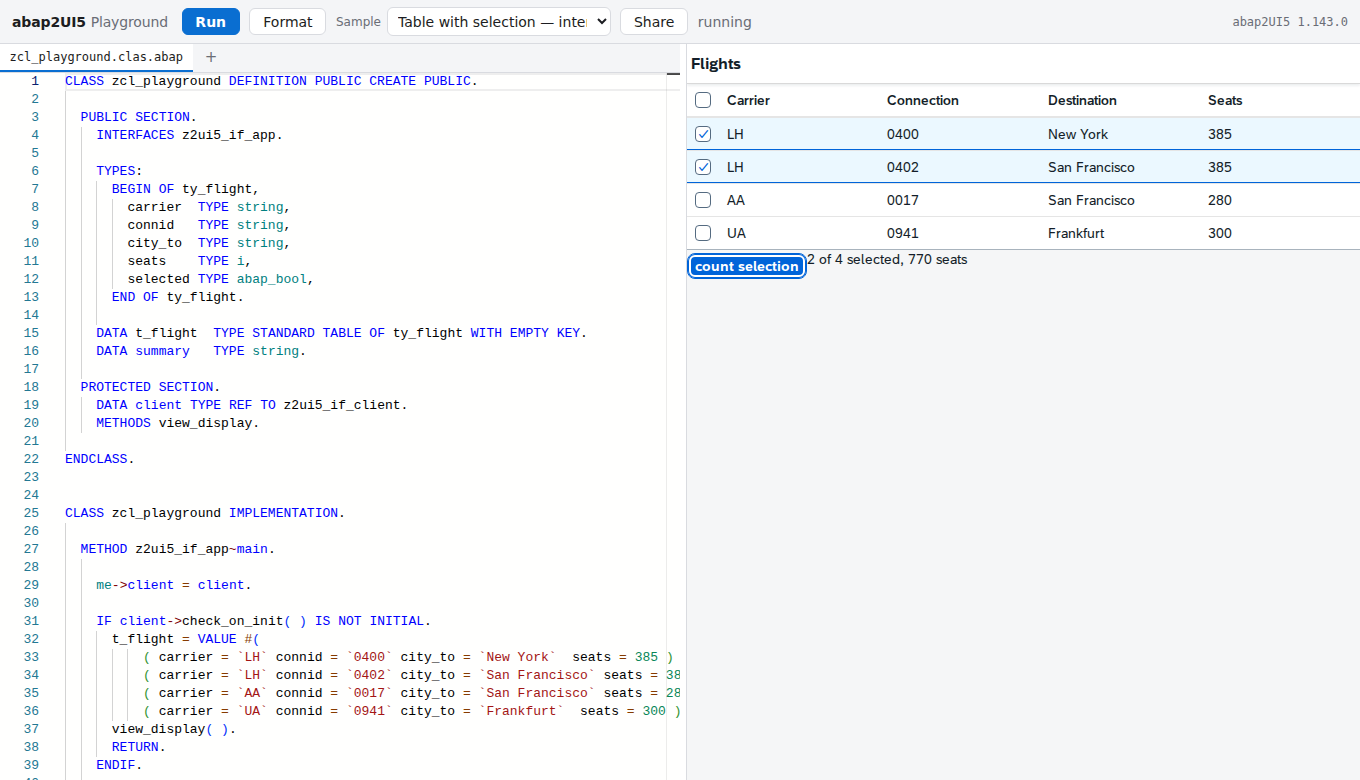
ABAP in the editor on the left and the abap2UI5abap2UI5One ABAP class implementing z2ui5_if_app is the whole app: the browser loads a generic UI5 shell once, and every interaction after that is an HTTP roundtrip back into ABAP.community org, abap app it builds on the right, both inside one browser tab: the framework is transpiled to JavaScript at build time and the class in the editor is compiled when Run is pressed.
Trying an abap2UI5 idea normally needs a system with the framework installed, a class activated in it and a browser pointed at the handler. This page carries the framework instead: the abap2UI5 sources are transpiled to JavaScript at build time, the classes in the editor are compiled on Run in about 20 ms, an in-memory SQLite stands in for the database the framework keeps its drafts in, and the UI5 frontend runs in an iframe whose window.fetch is redirected into the parent page for the one request it makes. Two checkers read what you type: abaplintabaplintStatic analysis for ABAP that runs outside a system on serialised source in a repository, so ABAP checks run in a pull request and in CI before the code ever reaches a system.community org, abap for whether the ABAP compiles, the abap2UI5 linter for whether the view the builder chain produces works on UI5 1.71. Both rule sets are editable in a tab. What it holds is a few classes rather than a package: no tables of your own, no RFC, no files, and only the ten UI5 libraries that were built in. Share puts every open file into the URL fragment, and Download for abapGit writes a zip laid out as a repository, to import with abapGitabapGitA Git client written in ABAP that runs inside the system, so objects are cloned, pulled and pushed without leaving it; with no package manager in ABAP, a cloned repository is how code is distributed.community org, abap.
Facts
Where it sits
Who is behind it

In the atlas: maintains 18@abap2UI5maintaineroblomov-devContributes to this

In the atlas: maintains 4, contributes to 44@oblomov-dev1 contributor
Before choosing this
Conditions
PracticalFunctional boundary
A SELECT from a business table has nothing to select from: the database in the page holds the framework's own tables, and nothing can reach outside the browser, so an app that reads a system's data cannot be tried here. Only the UI5 libraries built in are available and a control from anywhere else will not load; what the transpiler cannot compile is reported in the output panel rather than run. State lives in the tab — a reload, and a press of Run, starts over on a fresh database.
What it declares
Every artifact
- Type
- Web tool
- Origin
- By a community org
As a web tool
- Access
- does not say
- What it sends to its vendor
- does not say
Connections
Rewriting source to match one layout
Finding answers in written documentation, and writing what is missing
Editor help with source: completion, navigation, errors, refactoring
Running the whole stack on a laptop against real bindings
Catching problems in code before execution
A hosted git service: repositories, pull requests with reviews, and branch rulesets that decide what may reach a branch. Things here that push objects out of an SAP system, or keep a review record outside it, call its API and open their pull requests on it.
Transpiles ABAP to JavaScript to run on Node.js
UI5 apps written as one ABAP class, rendered by a generic shell
abap2UI5 frontend as ABAP artefacts installed with abapGit
Static analysis for ABAP source outside a system
Core ABAP artifacts for code transpiled by @abaplint/transpiler
An embedded SQL database engine used as a selectable local cache store by CAP caching plugins.
Download
README
quoted from abap2UI5/playground under MIT, readabap2UI5 Playground
Write abap2UI5 apps in the browser. ABAP on the left, the running app on the right, and nothing in between but the browser — no server, no SAP system, no backend of any kind.
First time here? The playground opens on a first lesson, with a strip of four first steps over the editor's last lines: change the code and press Run, turn on Auto, edit the view in the View tab, browse the samples. ✕ or Escape closes it for good in this browser. While the app in the editor is one of the learning path's "Start here" lessons (Basics I–VII), Lesson n of m over the file strip steps to the lesson before or after. Neither appears on a link somebody sent you, an embed or the AI pages.
How it works
The abaplint transpiler translates ABAP to JavaScript. abap2UI5 already relies on it — its CI transpiles the whole framework and runs the ABAP unit tests under Node. The playground takes that pipeline and moves the last step into the browser.
                     ┌──────────────────────── the page ────────────────────────┐
                     │                                                          │
  build time         │   Monaco + abaplint            the ABAP runtime          │
  ──────────         │   ┌─────────────────┐          ┌──────────────────┐      │
  abap2UI5 sources ──┼──▶│ registry:       │          │ abap2UI5,        │      │
  (910 files)        │   │ the real        │  Run     │ transpiled at    │      │
                     │   │ framework       │──ABAP───▶│ build time       │      │
  abap2UI5 src ──────┼──▶│ + your classes  │  → JS    │ + your classes   │      │
  downported,        │   └─────────────────┘          └────────┬─────────┘      │
  transpiled,        │                                         │ roundtrip      │
  bundled            │   ┌─────────────────────────────────────▼─────────┐      │
                     │   │ iframe: the abap2UI5 UI5 frontend             │      │
  OpenUI5 ───────────┼──▶│ window.fetch redirected to the runtime above  │      │
  built from npm     │   └───────────────────────────────────────────────┘      │
                     └──────────────────────────────────────────────────────────┘
- Build time. The abap2UI5 sources are downported to 702-compatible syntax
(abaplint
--fix), transpiled, and bundled into one static module along with the open-abap standard library. The UI5 frontend is built against a pinned OpenUI5, so the site carries its own UI5 rather than linking a CDN. - Page load. That bundle boots the ABAP runtime, and an in-memory SQLite (sql.js, compiled to WebAssembly) takes the place of the database abap2UI5 keeps its drafts in. In parallel, abaplint parses the real framework sources so the editor can check your classes against them.
- Editing. Monaco — the editor from VS Code — with abaplint behind it:
diagnostics against the actual framework, hover, go to definition, rename,
references and quick fixes. Format ({ } in the bar, and Shift+Alt+F, which does the same) is
abaplint's pretty printer with its layout fixes in front of it — indentation
and keyword case, and also the tab, the trailing space, the double space
after a keyword, an
=or a bracket (padding in front of a token is kept, as alignment), the space before the full stop and the two statements sharing a line — over every file that is open, as one edit that Ctrl+Z takes back. It never reflows a builder chain and never changes what the code does. Under the editor, a resizable panel with the view your chain builds, every problem, an outline of the class, the unit tests, the conversation between the app and the ABAP, the app's State after each roundtrip (its attributes, with what changed marked — the debugger's variables view for a program that runs a roundtrip at a time), the Console (what the appWRITEs, per roundtrip), the log, and the configuration of each checker — editable, so "why is it not warning here?" has an answer you can try rather than only read. - A second opinion. The abap2UI5 linter runs beside abaplint and answers a different question: abaplint says whether the ABAP compiles, the linter reconstructs the view your builder chain produces and says whether that works on UI5 1.71 — a control or property that release does not have, an icon that is in no icon font. Those compile, and at run time they render nothing and log nothing.
- Editing the view instead of the chain. The View tab shows the XML
that reconstruction produces, coloured; Edit turns it around. Change the
XML — move a control, add a property, insert a
Label— press Save, and the builder chain is written again to build it, in the layout the abap2UI5 repositories hold their chains in. An attribute you leave alone keeps the ABAP that produced it, so aclient->_bind( … )stays a bind rather than freezing into the string it happened to render as — and so does the code around it: change one word and one word changes, in the shape the method was written in, rather than the whole chain coming back reformatted. It is the shortest way there is to learn the builder: change the view, read the ABAP that changed with it. What it cannot rewrite — a view filled from aLOOP, a control name held in a variable — it says instead of guessing, and the ABAP editor greys out and stops taking typing for as long as the view is the one being typed into. - Run. Only the classes in the editor are compiled, in about 20 ms, and registered with the running runtime. Auto beside it presses Run for you, shortly after you stop typing: while it is on, Run itself is inactive and every edit reaches the app on its own. It is off to begin with, because a run is a fresh database and a reloaded app frame — which is exactly what you do not want halfway through filling in a form, and exactly what you do want while a view is taking shape.
- Rendering. The abap2UI5 frontend runs in an iframe and talks to its backend
over a plain
fetchPOST, so the playground replaceswindow.fetchfor that one request with a message to the parent page, which hands it to the framework and posts the answer back. The frame and the page exchange messages and nothing else. From the framework's point of view nothing changed.
Roughly 3 MB travels to a visitor, compressed: the page bundle, the transpiled framework, the ABAP corpus and SQLite. UI5 loads its libraries on demand on top of that.
What it can and cannot do
It runs real abap2UI5. Not a subset and not a simulation: the framework in
the page is the framework from the repository, at a pinned commit, and the
roundtrip it answers is the one a real system answers. Modern ABAP works as
written — inline declarations, VALUE #( FOR … ), COND #, string templates,
table expressions.
Where it stops:
- A few classes, not a package. The playground holds several ABAP files, named as abapGit names them, and the first one is the app - the playground starts the class it declares. What it does not have is most of what else a package brings: no message classes, no CDS.
- Tables of your own, but nobody else's. A table is two files beside the
classes:
<name>.tabl.xml, the abapGit TABL definition, and optionally<name>.tabu.json, the rows it starts with — a JSON array of objects keyed by field name (either case), at most 1000.SELECT,INSERT,UPDATEandDELETEwork against it. + table in the file strip adds a starter pair,zproductswith five rows. The table is created afresh with its rows at every Run, and nothing an app writes outlives the Run. A field typed by a data element needs that data element to exist in the framework corpus; aMANDTthe rows leave out is the current client; a table may not reuse a name the framework or open-abap already has.?src=still opens ABAP only; a gist carries both files, and Download for abapGit puts the table insrc/and its rows indata/, abapGit's own data layout. - No business tables, no RFC, no files. The database holds the
framework's own tables and yours.
SELECTfrom a business table has nothing to select from, and nothing can reach outside the browser. - Only what the transpiler implements. It covers a lot, and abap2UI5's whole CI depends on it, but it is not an ABAP kernel. Anything it cannot compile is reported in the output panel rather than failing silently.
- Only the UI5 libraries that were built in.
sap.m,sap.f,sap.ui.core,sap.ui.layout,sap.ui.table,sap.ui.unified,sap.tnt,sap.uxap,sap.ui.integration,sap.ui.codeeditor. A control from anywhere else will not load — seeUI5_LIBRARIESinsrc/shell/ui5-libraries.mjs, the one list the UI5 build, the examples browser and the sample catalogue all read. - State lives in the tab. Reloading the page starts over, and so does pressing Run — your tables included. Your code is kept in local storage; the app's data is not.
Both halves follow your system's light or dark setting — the editor through Monaco, the app through UI5's Horizon themes. Changing it while an app is running recolours it in place rather than restarting it.
Which problems it reports
abaplint runs with a deliberately small rule set: the ones that answer would this work, not the ones that answer is this the house style. A playground that underlines a missing pragma teaches nothing.
check_syntax, parser_error, implement_methods, method_implemented_twice,
global_class, begin_end_names, superclass_final, unknown_types —
checked against release v750, the one abap2UI5 lints itself against. The list
lives in src/editor/registry.mjs.
definitions_top is the rule that had to come off that list, and it is
worth naming: abap2UI5 enables it because the framework is downported to 702
before it is transpiled, and nothing here downports what is in the editor. It
was rejecting FIELD-SYMBOLS after a CREATE DATA — ABAP that compiles on
every system this playground is about — and an abaplint error stops Run, so the
reader was told to fix code that had nothing wrong with it.
The abap2UI5 linter runs its own rules on top, against UI5 1.71 — the floor
abap2UI5 holds its own shipped apps to, and therefore the floor an example
copied out of the playground has to clear. UI5 in the bar, after Auto
("Check against UI5" in the ⋯ menu on a phone), moves that floor: 1.71, 1.84,
1.96, 1.108, 1.120 or the latest this site carries — "my system runs 1.84,
what will not render there?". It is the same setting as the abap2UI5 lint
tab's ui5, kept between visits the same way.
The two are kept apart on purpose, in the list and in what they block: an abaplint error means the ABAP does not compile, so Run stops and says so. An abap2UI5 finding means the app runs and is wrong somewhere — and the fastest way to understand one is to look at the app it produced, so Run goes ahead.
A missing full stop is said as one. abaplint reports a statement it cannot parse as "Statement does not exist in the configured ABAP version (or a parser error)", and the commonest reason is a full stop that is not there — two lines read as one statement. Where the shape says so, the Problems row asks whether a full stop is missing and sits on the line that wants it.
Fix them appears over the list when something is repairable and says what — how many errors, warnings and hints it can repair, and which errors it leaves — abaplint's own fixes and the linter's, applied together. It goes in as one edit per file, so Ctrl+Z takes the whole rewrite back rather than unpicking it fix by fix. Nothing that has no correct answer is guessed at: an icon that does not exist stays reported rather than invented.
Both lists are only a default. The abaplint and abap2UI5 lint tabs hold the live configuration: add any of abaplint's 188 rules, change the ABAP release the syntax check holds you to, or lower the UI5 floor the view is checked against to find a control an older system would not render. Apply reports how many problems there are now, so a rule can be tried rather than argued about, and what you change is still there the next time you open the page — Reset puts it back to the curated list of the day.
Build an app by describing it
The AI Studio has a page of its own, /playground/ai/
-
the AI Studio button beside Samples, and the menu's Tools section on every page of this site. It starts on a minimal class:
z2ui5_if_appimplemented,mainstill empty. The chat runs down the left, and the stage beside it shows the running app in a window of its own, the code, or both side by side (Preview, Code, Split in the studio's bar; a phone takes them in turns, the chat first). Every run that starts the app is a card in the conversation that brings the app forward; ⛶ makes it the browser's full screen. Describe the app you want — "a table of flights with a search field" — and Claude writes it as an abap2UI5 class into the editor, presses Run, reads what the two checkers and the app said, fixes it, and runs it again until it is clean. You watch the code arrive in the editor and the app appear on the right while you talk; ask for changes until it fits, then Download for abapGit takes the class home as a repository you import with abapGit. -
Your own key, and no server. The first message asks for an Anthropic API key. It is held in the page's memory for the visit, never stored — the playground runs ABAP from any link, and stored it would be readable by that code — and sent to
api.anthropic.comand nowhere else — or, with an OpenAI-compatible server picked in the key form (OpenAI, Ollama, LM Studio), to that server, which the form names; there is still nothing behind this page. Usage is billed to that key; the chat's header counts the tokens. A key that is not tied to a workspace (the API answers "This API key is not scoped to a workspace") also needs the workspace ID (wrkspc_…, in the Console under Settings → Workspaces), which the key form takes as an optional second field. -
The app cannot reach your key. On this page the app runs in a frame on an origin of its own (a sandbox), and talks to the page by message only: a script in an app's view — whoever wrote it, Claude included — cannot read the key form, the page or its storage. The ABAP runs in a worker that has no page and no storage to read either. The cost is that the app frame here loads UI5 from the network every time and does not work offline.
-
The model uses the playground the way you do. It has no compiler of its own: it writes files into the editor (Ctrl+Z takes them back), presses the same Run, and is told what you would see — the abaplint errors, the abap2UI5 linter's findings against UI5 1.71, the unit tests, the view the app rendered and the line a dump was raised at. Switch the chat off and the code it wrote is in the editor, ready to edit by hand; switch it on again and the model is told what changed.
-
It knows abap2UI5 from the source. Its instructions are abap2UI5's own guide to building apps, at the same commit as the framework this page runs, and it can search the sample catalogue and read a sample's code before it writes its own.
-
Files in the chat. 📎, a drop anywhere on the page or a paste adds a specification (PDF, Word), a screenshot or mockup of the screen you want, an Excel sheet whose rows become the app's data, or a text file — the same formats and limits as in the AI Pilot below, read in your browser.
-
It tries what it built. Once a run is clean, the model can type into the app's fields and press its buttons - the Pilot's eyes and hands, on the same frame - and read the toast or the message box the app answered with, so what it hands you is an app that worked once, not code that compiled.
-
Every step can be taken back, and the last message changed. A step that changed the files offers them back under its answer; ✎ on your latest message takes the exchange out and puts the text back to send again. Export writes the conversation as a markdown file, and the files stay in this browser - the welcome offers the last build back.
-
The limits are the playground's. No tables of your own, no RFC, only the UI5 libraries built in (see What it can and cannot do) — the model is told so, and fills internal tables where a real app would
SELECT.
The select in the chat's header picks the model and how long it thinks: Balanced (Opus 5.5, the default), Thorough (Opus 5.5, thinking longer) or Fast (Sonnet 5.5, which answers soonest) — it applies from the next message. After every change the page runs the app by itself and hands the model the report, so no turn is spent asking for a run, and while a turn is under way the chat shows the model's short notes and counts the lines of the class it is writing. A request a safety classifier declines is answered by the fallback model the API picks rather than dropped. The SDK and the guide are a chunk of their own (~70 KB compressed), downloaded only by somebody who sends a message.
Let Claude operate an app
Still being built, and not linked from the playground either: the AI
Pilot has a page of its own, /playground/pilot/.
Where the AI Studio builds an app, the Pilot uses one: the app runs on the
stage, the chat stands beside it, and you say what you want done — "greet
Carol", "open the value help sample and pick the third colour". Claude reads
the screen, types into the fields and presses the buttons, in the app on your
screen: you watch the values arrive, the popup open, the message box come up.
Take the controls yourself whenever you like — Claude is told what you did and
carries on from there.
- What Claude sees (the button in the bar) shows the screen the way the model reads it: the agent snapshot — fields with their values, the actions it can fire, the tables, what the app said. Nothing else: no screenshot, no CSS selector.
- The same protocol as everywhere else. The client that turns "fill these fields, fire that event" into the request the browser would send is abap2UI5/mcp-server's own, vendored unchanged — the one the VS Code extension runs against an SAP system and cap2UI5 runs inside CAP. Its requests are sent by the app frame, so the frontend renders every answer with its own code.
- Strict. An event that is not on the screen, a field that is not editable, a value outside a dropdown's choices are refused with what is possible, and nothing is sent.
- Any sample. It opens on Basics II; Change app opens the samples
browser, and Claude can look an app up in the catalogue and open it itself.
A shared link or
?src=opens your own class:/playground/pilot/?src=<raw url>- after you said so: the app's code cannot reach your key, but the app is what Claude reads and acts on, and an app written to mislead can steer what Claude does in this chat. - Several apps at once. Up to four, one tab each over the stage — + App opens one beside the others, and so does Claude when a task spans two apps ("look the colour up in the value help app and greet it in the first"). They run in one runtime on one database, so opening an app keeps the others as they are; Restart starts all of them again on a fresh database.
- Files in the chat. 📎, a drop on the chat or a paste adds files to the
next message — up to five, 10 MB each: a PDF and images go to the
model as they are, an Excel sheet (
.xlsx) as CSV with its dates as dates, a Word document (.docx) as its text with its tables as rows, a PowerPoint deck (.pptx) as its slides' text, and text files (CSV, JSON, XML, …) as text — "enter every order in this sheet". The Office files are read in your browser; the old binary formats (.xls,.doc) are refused with what to save them as. - Your own key, and no server — exactly as in the AI Studio: held in
memory for the visit, sent to
api.anthropic.comand nowhere else, and out of reach of the apps' code — every app frame on this page, each tab's included, is on an origin of its own and talks to the page by message only.
The sample catalogue
https://abap2ui5.github.io/playground/samples/ — every abap2UI5 sample in one searchable page: the learning path of abap2UI5/samples, the UI5 demo kit ports of abap2UI5/samples-controls, and the OData/RAP/launchpad samples of abap2UI5/samples-stack.
It answers two questions the repositories' own catalogues cannot:
"which samples use
sap.m.Tableat all?" — not the one filed under it, but every view that actually builds one "my system runs UI5 1.84 — which of these will render on it?"
Both come out of the abap2UI5 linter, which each repository runs over its own
classes and commits the answer to as catalogue-derived.json; this site joins
those onto the catalogue.json beside them and builds one index at deploy
time. The filters live in the URL, so a search is a link you can send:
?q=table&lib=sap.ui.table&rel=1.84.
A row is a link to that sample's page, and that is all it is: what a
sample builds, what it needs, the ABAP itself, and a box that runs the sample
in that page are all on the page it opens — ▶ Run it here under its title
starts it. A title's (A) and (C) markers are shown as frontend action and
custom control badges, which a search finds. Most samples run in your
browser with nothing installed. What cannot — a stack sample, which needs a
real system; a port whose library only SAPUI5 has — is listed all the same,
says what it needs, and opens for reading instead: a sample you cannot find is
worse than one you cannot run. Run it from its page and the playground's bar
offers Back to the catalogue, in the same tab.
Every sample has a page of its own — samples/<class>/, a static
document with the sample's description, the class, every control it builds, the
release it needs, what it needs when it cannot run here, the sample running —
press the demo box and the app mounts in the page, on its own, without the
editor over it —, the whole class printed and
syntax-coloured, every line of it with an address — #L42 highlights a line,
#L42-L58 a passage, and Copy link hands the result over —, and the links
out: the class on GitHub, SAP's own sample running in the demo kit for a
port of one, the whole playground, back to the search. The catalogue itself is one
URL that JavaScript fills in, which is right for searching and useless for
being found: there was no address for "the abap2UI5 port of sap.m.Wizard"
and so nothing a search engine could return. Now there is one for each of them,
listed in sitemap.xml
and reachable from the full list.
This replaced three separate GitHub Pages sites, one per sample repository.
The examples browser
Samples in the bar is the same list without leaving the editor, and it
takes the screen while it is open: a full-size window over the playground, the
filters down its side, the rows in as many columns as fit. Your drafts
is one folded line at the top, with how many there are (it stays open or
closed as you left it, and a search that matches a draft opens it); under it
everything the catalogue holds — "N of M samples", the same count as the
catalogue page — searched by several words in any order, over titles,
summaries, class names, badges and the controls a sample builds, and narrowed
by the same facets the catalogue page has: the control it uses, the library,
the release your system runs, plus the repositories, "Only samples that run in
this browser", "Leave out samples that need SAPUI5" and "Include samples that
need a UI5 newer than 1.71". Every row says
what it is, what group it belongs to, what release it needs and — where it
cannot run here — what it needs instead, and links to its ABAP on GitHub and to
its documentation page. A sample the page carries is listed once, as its
row of abap2UI5/samples, and opens the
copy the page carries; "In the page" lists only a carried sample the index
does not have. A chosen entry opens through the same
path a ?src= link takes — the raw URL of its class, fetched, checked and run
— so it arrives with the Source link back to where it lives.
It reads the same index the catalogue page does, from this site rather than from GitHub, and nothing is fetched until the button is clicked. Where the index cannot be had, the browser quietly lists the samples in the page and your drafts alone. Everything offered is judged the way typed code is judged — a catalogued sample the transpiler cannot compile says so in the Problems list, which is the designed behaviour.
Linking a playground
Unit tests. A file named <class>.clas.testclasses.abap beside a class —
the + in the file strip offers one, with a skeleton that passes — holds its
local test classes, exactly as abapGit keeps them. Run runs them first,
through the runner open-abap ships, and starts the app after: a failing test
is listed in the Tests tab with what was expected and what was there, its
row goes to the assertion, and the status line says how many failed.
Drafts. The playground keeps whatever was last in the editor on its own. Opening a sample over it never loses it: the status line says which way back there is — one Undo away when the sample went in under the same file name, and otherwise kept in Samples, under Your drafts, under the name it was saved as or as "Before the last pick" (only where the browser refuses to store it does the line fall back to comes back if you reload). For more than one piece of work, the samples browser has Your drafts at the top: name what is open, save it, and it is listed there — in this browser — to open or delete another day.
Compare and Reset to original. Code that was opened from something — a
sample, a share link, ?src=, a gist, a saved draft — has an original, and
± beside Source shows your changes against it, file by file, in a diff;
⟲ puts every file back as it was opened, as one edit per file that Ctrl+Z
takes back (a file you added goes to Your drafts). Where there is nothing to
compare with — the last session restored, or what an AI wrote — they say so
instead.
Share puts every open file in the URL fragment, deflated: a 2500-character
class becomes a link of about 700 characters. Being a fragment, it never leaves
the browser — it is not sent to the server and does not appear in any log. The
link is copied first; the dialog that opens then has the other ways out: the
block that embeds this demo in a documentation page (the loader with the class
inline, or the playground framed when there are several files), the markdown
fence a docs page prints an example in, and Download for abapGit — a zip
laid out as a repository rather than as a bag of files: the sources and their
metadata under src/, the .abapgit.xml that says so (the shape
app-template carries), and a README
naming the app, how to start it and the link this code came from. Import it
offline with abapGit, or push it as it stands. Gist writes the open files
to a secret GitHub gist with your token (held for the visit, never stored) and
hands back a ?gist=<id> link; once code from a link has run in the page, it
asks you to tick that you know before it takes a token. Open in Layout
Editor hands the app class to the
abap2UI5 layout editor, to design
its view by drag and drop and export the class back: a class still exactly as
it came from GitHub opens there by its address; anything else is copied to
your clipboard to paste into Open ABAP class there, and rides in the link as
well, for a layout editor that reads it.
Light or dark. The page follows the system until the switch in the menu behind the bar's last button says otherwise — the same menu the sample catalogue and the documentation carry, after LinkedIn and GitHub, with the project's tools and repositories under the switch. A choice is kept between visits; a choice that agrees with the system is forgotten rather than stored, so a page switched back follows the system again from then on. The button reaches the editor and the running app as well, without restarting it.
Installable. The page carries a web app manifest, so a browser that supports it offers to install the playground; opened from a home screen it runs with no network at all, on the build the last online visit left in the service worker's cache — the two documents included, and whatever UI5 modules the apps run so far have loaded. The ABAP runs in the tab either way, so there is no server to be away from.
Full screen opens the app on its own in a new tab — the whole window for the
app, nothing around it: no editor, and no bar over it either. It is the same URL
Share writes plus ?view=full, so the new tab is a second playground rather
than a window onto this one: it compiles the code it was handed and runs it
against a runtime of its own. What happens back in the first tab — another Run,
an edit, closing it — leaves it alone.
?src= opens ABAP that lives somewhere else, which is what a documentation
page links when it wants to show its example running rather than only printed:
?src=https://raw.githubusercontent.com/abap2UI5/samples/main/src/z2ui5_cl_smp_app_493.clas.abap
A github.com/…/blob/… page URL works as well — it is read as the raw file
behind it. Several src parameters open several files; the first is the app — and the
classes that app needs are looked for beside it and opened too, so a link to an
app that calls another app opens both. Only siblings in the same directory, only
from the hosts above, at most six files two levels deep; a name that is not
there is skipped in silence, because most of them are in the framework corpus
rather than in the repository. Code opened this way carries a Source
link in the bar (its GitHub page — the bar's GitHub mark, at the far end, is
the framework's repository), following whichever file is open — the raw URL
the playground was given translated back into the page a human would want,
with the repository and the history around it. Sources are
limited to this site and GitHub's raw hosts — the playground fetches on behalf
of whoever opened the link, and should not be a general-purpose reader for
arbitrary URLs.
?embed=1 drops the brand, the examples browser, the share button and the
right-hand end of the bar, leaving the editor, Run and the app — for embedding
in a documentation page. An embedded playground never touches the stored draft,
so it cannot overwrite what a reader has open in a normal one, and follows its
reader's system theme rather than a choice made in some other tab.
?view=app drops the editor too, for a paragraph about what an app does
rather than how it is written; the ABAP still compiles and runs, it is simply
not on screen. ?view=full is the same view under the name Full screen
opens it by. Neither shows the bar — the app and nothing else — because Run,
the source and undo are all one click away in "Open in the playground" beside
the frame, and a bar over a demo is this site's furniture in somebody else's
page. It comes back if something goes wrong, because the status line it carries
is the only channel either view has left.
Two more parameters work only in an embedded playground: ?readonly=1
takes the typing away — and Format, Undo, Redo, Fix them and the View tab's
Edit with it — while Run still runs, and ?lines=12-18,25 marks those
lines of the app's file and scrolls to the first (L42-L58 reads the same, the
shape a sample page's line links have).
Live demos in a documentation page
embed/abap2ui5-embed.js turns an empty element into a running example:
<div class="abap2ui5-demo"
     data-src="https://raw.githubusercontent.com/.../z2ui5_cl_demo.clas.abap"></div>
<script src="https://abap2ui5.github.io/playground/embed/abap2ui5-embed.js"></script>
data-src takes one URL or several (the first is the app), data-code carries
ABAP that lives only in that page, data-view="app" hides the editor,
data-height sets the starting height and data-label the button text.
data-readonly shows an example to read and run but not to change,
data-lines="12-18,25" marks and scrolls to those lines, and data-reset
shows a Reset example button under the demo once the reader has edited it,
which puts the page's code back (as an edit Ctrl+Z takes back) and runs it. For a
documentation framework that swaps pages without reloading, call
window.abap2ui5Embed.setUp() after each navigation.
Inline code keeps the name the page gave it: the file it is put into is
named after the class in it, the way abapGit names one, so data-code carries
the example a manual prints under the name its reader is meant to create.
A page that draws its own button — because it wants one under a code block it already styles — asks the loader for the URL instead of writing the fragment itself:
const href = await window.abap2ui5Embed.url({ code, view: "app" });url() takes readonly and lines as well.
That matters more than it looks: a fragment the playground cannot read is replaced by the sample the page opens on, with the status line and the Log saying so - so an encoder written by hand fails by showing the wrong code with a warning under it rather than by failing outright.
Nothing loads until the reader clicks. Each demo is a whole ABAP runtime
plus an abaplint parse of nine hundred sources — a second or two of processor
and a few hundred megabytes, per frame. Demos on one page share the browser
cache, and after the first visit they share the playground's service worker
cache as well, so the bytes are paid once and then not again; the parsing is
not shared either way, and a page with ten autoloading examples would be the
slowest thing in the manual. data-auto="1" overrides it where the page is
about its one demo.
The app frame is served with UI5's frameOptions set to allow rather than the
trusted abap2UI5 ships. trusted means "only in a frame whose top window is
the same origin", and an embedded demo's top window is somebody else's manual:
UI5 asks it for permission over postMessage, waits ten seconds for an answer no
documentation site knows to give, and then hides everything it rendered — an
app that is in the DOM, correct and invisible, under a status bar saying
"running". What is unprotected is a demo compiled from code the embedding page
supplied, with no session and nobody's credentials.
An embedded playground posts four kinds of message to the page that framed it —
ready once it has something to show, status for each line its status bar
shows, height for what an app-only demo wants to be, and edited
({ edited: true|false }, only when it changes) — and the loader turns the
last into a bubbling abap2ui5-edited event on the demo's element
(event.detail.edited), so a page can tell whether its example was changed.
One message goes the other way: { source: "abap2ui5-embed", type: "reset" },
accepted only from the window that framed the playground, which is what
data-reset's button sends. embed/ on the
published site is a worked example of all of it, and is what the tests drive.
Development
npm ci
npm run build     # pins deps, builds the framework, builds UI5, assembles dist/
npm run serve     # serves dist/ on http://localhost:8080
npm test          # Playwright, against a freshly built dist/
npm run check     # build -> size budget -> tests, in the order that cannot go wrong
npm run lint      # ESLint; with typecheck and test:unit: no build, no browser
npm run typecheck # tsc over the modules that start with // @ts-check
npm run test:unit # node:test over the pure modules in tests/node/
PORT=8091 npm test moves the test server and the tests together, so two
checkouts can test at once.
The first build takes a few minutes: the downport is three of them and the UI5 build one, and the two run at the same time because neither reads what the other writes. Both are cached by a hash of their inputs, so the second build is seconds.
The five steps — fetch the pins, build the framework, build UI5, build the
sample catalogue, assemble the site — and what each one caches are described
in docs/design/build-pipeline.md;
tools/check-size.mjs is the budget for what a visitor downloads.
PG_DEBUG=1 builds the page and framework bundles unminified and with source
maps; without it neither ships one.
src/runtime is the ABAP side of the page (run in a worker), src/editor is
Monaco and abaplint (the registry in a worker of its own),
src/shell is the page around them, src/catalogue is the sample catalogue at
/samples/ (a second document with a bundle of its own), src/abap is the one
class of ABAP the playground adds to the framework - the bridge into the request
handler - and src/examples is ABAP served as static files so ?src= has
something to point at; AGENTS.md lists every module. There are no
samples here: the ones the page carries are
named by class in src/editor/sample-list.mjs and come out of the pinned
abap2UI5/samples at build time, so the
playground holds no copy of a sample that can drift from the one upstream
maintains.
Bumping abap2UI5 or OpenUI5
node tools/fetch-deps.mjs --print-latest   # what upstream has today
# edit the sha in tools/fetch-deps.mjs (or UI5_VERSION in src/shell/ui5-libraries.mjs)
npm run build && npm test
A weekly workflow (.github/workflows/upstream.yml) builds and tests against
upstream HEAD without changing the pins, and opens an issue when that stops
working — so a bump is a two-line commit rather than an investigation.
Deployment
.github/workflows/pages.yml builds and publishes dist/ to GitHub Pages on
every push to main, after the tests pass — and nightly, which a static
site would not otherwise need: the sample catalogue is built from files the
three sample repositories commit, and those change when a sample is merged
there, which is no reason for anything to be pushed here.
.github/workflows/check.yml runs the same build and tests on every other
branch and pull request.
Setup required once, by a repository admin: Settings → Pages → Source → "GitHub Actions". Until that is switched on the deploy job fails and the published page does not exist.
Where the work is written down
AGENTS.md is the short version for anyone changing the code: the layout, the commands, the CI gates, the rules and the deliberate limits. Each area's reasoning — with its measurements and what was tried and refused — is in docs/design/, and docs/design/build-traps.md holds the traps found while building it — the transpiler flag without which nothing links, the bundler option without which ABAP's own type system stops working, the caches that have to be dropped when a class is redefined. Read it before changing the build. The plan the playground was built from, phase by phase, is kept in docs/history/PLAYGROUND_PLAN.md.
License
MIT. abap2UI5, abaplint and OpenUI5 are the work of their respective authors and carry their own licenses.
Others providing
- web-abap2UI5web-abap2UI5A build pipeline and the page it deploys: the abap2UI5 backend downported, transpiled to JavaScript and webpacked into one script that runs inside a browser tab, with no server and no SAP system behind it.community org, abapabap2UI5 transpiled to JavaScript and run in a browser tabfrom ABAP
- vite-plugin-cdsvite-plugin-cdsA CAP plugin that serves a Vite app from the app folder through cds watch, makes .cds files importable into the frontend build, and can polyfill enough of Node to run @sap/cds in the browser.independent, capServes a Vite app through cds watch and imports .cds filesfrom CAP
- com.sap.cds:cds-feature-dev-dashboardcom.sap.cds:cds-feature-dev-dashboardA browser dashboard for a running CAP Java service that shows and manages its messaging, resilience and multitenancy state while developing, open to users with the cds.Developer role.sap official, capBrowser dashboard for a running CAP Java service during developmentfrom CAP
- com.sap.cds:cds-maven-plugincom.sap.cds:cds-maven-pluginThe Maven plugin that runs CDS build steps in a CAP Java project: compiling the model, generating typed Java accessor interfaces and adding facets to an existing project.sap official, capMaven plugin running CDS build steps in a CAP Java projectfrom CAP
- @cap-js-community/common@cap-js-community/commonSix independent features for CAP services in one package: replication cache, migration check, rate limiting, a Redis client broker, a local HTML5 repository and a CDM builder.community org, capSix CAP features in one package, from replication cache to rate limitsfrom CAP
- abap_trial_dockerabap_trial_dockerShell scripts that build a Docker image from the SAP NetWeaver ABAP Developer Edition 7.52 SP04 installation files and run it as an unprivileged container, setting the stable hostname the installer wants.independent, abapScripts running the ABAP Developer Edition in Dockerfrom ABAP
- @neoimpulse/cap-js-bootstrap@neoimpulse/cap-js-bootstrapA command-line tool that starts a local CAP environment with several services and an AppRouter together from one command, documented in German and requiring Node 22 or newer.independent, capCLI starting several CAP services and an AppRouter locally togetherfrom CAP
- open-steamgateopen-steamgateAn ABAP application server you clone and run on your own machine: transpiled ABAP serving classic /IWBEP/ OData v2 to Fiori over a local database, with no SAP system attached.independent, abapLocal ABAP server serving /IWBEP/ OData v2 without an SAP systemfrom ABAP
- pokrakam/abapDevSysInitpokrakam/abapDevSysInitA single ABAP report that automates setting up a new ABAP Developer Edition or trial system, from the user profile and a GitHub RFC destination to fetching abapGit and pulling repositories.independent, abapABAP report setting up a new ABAP Developer Edition or trial systemfrom ABAP
- @sang2x/captools@sang2x/captoolsA CLI of eight CAP development commands aimed at Cloud Foundry workflows, shipped without a repository or README, whose binding step writes resolved VCAP_SERVICES into default-env.json.independent, capCLI of CAP development tools for Cloud Foundry workflowsfrom CAP
- @sap/ams-dev@sap/ams-devCompiles the DCL authorization policies of SAP's Authorization Management Service to DCN, so an AMS-secured application runs and is tested on a laptop.sap official, capCompiler from AMS DCL policies to DCN for local runs and testsfrom CAP
- @sap/cds-dk@sap/cds-dkThe command line client and development toolkit for CAP projects, with the commands cds build, cds deploy, cds watch and cds add among them.sap official, capCommand line client and development toolkit for CAPfrom CAP
- @sap/cds@sap/cdsThe CAP Node.js runtime, which compiles the CDS model, serves the services declared in it, answers generic requests before any handler runs, and loads every cds-plugin.sap official, capCAP Node.js runtimefrom CAP
- dev-approuterdev-approuterA development-time wrapper for the SAP Application Router that serves UI5 and CDS modules once they are added to the project as dependencies.community org, capDev-time wrapper for the SAP Application Routerfrom CAP
- abap-adt-apiabap-adt-apiA JS/TS client for the ADT resources an ABAP system exposes, so a program outside the system can do against it what the maintainer calls a good share of what the Eclipse tools do.independent, abapJS/TS client for the ADT resources of an ABAP systemfrom ABAP
- abap2UI5 for VS Codeabap2UI5 for VS CodeA VS Code extension for abap2UI5 apps: F9 starts the app class in a preview beside the source, Ctrl+F3 activates the class and reloads it, and the abap2UI5 linter runs in the editor while you type.community org, abapVS Code extension to preview, activate and lint abap2UI5 appsfrom ABAP
- vscode-tabl-ddicvscode-tabl-ddicA VS Code extension that registers .tabl.ddic files, the DDIC DDL form of an ABAP table definition, as a language of their own with a TextMate grammar for syntax highlighting, and nothing more.community org, abapVS Code syntax highlighting for .tabl.ddic table definitionsfrom ABAP
- HammerHammerA native macOS code editor for ABAP and CDS, with an Object Navigator, Transport Organizer, Data Browser and Gateway Client in the same app as the editor.independent, abapNative macOS code editor for ABAP and CDSfrom ABAP
- cds-eclipse-plugincds-eclipse-pluginEclipse plugin for the CDS language.independent, capEclipse plugin for the CDS languagefrom CAP
- @arc-mcp/adt-ls@arc-mcp/adt-lsA TypeScript SDK over adt-ls, the headless language server SAP ships inside ABAP Development Tools for VS Code, so a program drives it without the discovery, JVM and handshake work.independent, abapTypeScript SDK over SAP's headless adt-ls language serverfrom ABAP
- abapthemesabapthemesThree colour themes for ABAP source in ABAP Development Tools for Eclipse, shipped as an Eclipse plugin and installed from the maintainer's own update site.independent, abapThree colour themes for ABAP source in ADT for Eclipsefrom ABAP
- SAP Build CodeSAP Build CodeSAP's development environment on BTP for SAPUI5, SAP Fiori, mobile and CAP applications that run on the SAP BTP, Cloud Foundry Runtime, in which Joule generates models, services, logic, tests and apps.sap official, btpDevelopment environment on BTP for UI5, Fiori, mobile and CAPfrom BTP/BAIP
- SAP Business Application StudioSAP Business Application StudioSAP's development environment for business applications, delivered as a cloud service and opened in a browser, where work happens in preconfigured dev spaces.sap official, btpBrowser-based development environment with dev spacesfrom BTP/BAIP
- SAP Web IDE Full-StackSAP Web IDE Full-StackSAP's IDE service on BTP for SAPUI5 and SAP Fiori apps, full-stack SaaS applications, SAP S/4HANA extensions, hybrid mobile apps and IoT apps, with an SDK for extending the IDE itself.sap official, btpIDE service on SAP BTP for SAPUI5, Fiori and full-stack appsfrom BTP/BAIP
- cds-intellijcds-intellijSAP CDS language support for IntelliJ IDEA.sap official, capSAP CDS language support for IntelliJ IDEAfrom CAP
- Cloud ALM Link for ADTCloud ALM Link for ADTAn Eclipse plugin that shows the transports and SAP Cloud ALM features behind an ABAP object, and turns Cloud ALM IDs in source comments into links.independent, abapEclipse plugin linking ABAP transports to SAP Cloud ALM featuresfrom ABAP
- ABAP Call HierarchyABAP Call HierarchyAn Eclipse plugin that shows which members a class method, function module or subroutine calls, read from its own ADT backend in the system and published on a beta update site only.independent, abapEclipse plugin showing the call hierarchy of ABAP membersfrom ABAP
- abap-call-hierarchyabap-call-hierarchyThe ADT backend needed by the separate ABAP Call Hierarchy Eclipse plugin, installed in the ABAP system with abapGit and still in beta, which its maintainer calls not feature complete.independent, abapADT backend for the ABAP Call Hierarchy Eclipse pluginfrom ABAP
- abap-tags-backendabap-tags-backendThe ADT backend needed by the separate ABAP Tags Eclipse plugin, installed in the ABAP system with abapGit; an upgrade to v2.0.0 or later runs a migration program for its new database tables.independent, abapADT backend for the ABAP Tags Eclipse pluginfrom ABAP
- ABAP TagsABAP TagsAn Eclipse plugin for putting arbitrary tags on repository objects, with a Tag Manager view, tagged object search and tag import and export, served by its own ADT backend in the system.independent, abapEclipse plugin for tagging ABAP repository objectsfrom ABAP
- BellaBellaAn Eclipse plugin that puts Claude into ABAP Development Tools: explain, generate, rework and implement from the editor's context menu, completion as ghost text, and a chat whose tools reach the system through the developer's existing ADT logon.independent, abapEclipse plugin bringing Claude into ABAP Development Toolsfrom ABAP
- ABAP Syntax HighlightingABAP Syntax HighlightingA VS Code extension that registers .abap files as the language abap and colours them with a TextMate grammar.independent, abapVS Code syntax highlighting for .abap filesfrom ABAP
- abapfs_extensionsabapfs_extensionsABAP imported with abapGit that sets the stateful session flag on systems older than 7.51, so an HTTP client of the ADT resources can update objects there.independent, abapABAP objects enabling ADT updates on systems older than 7.51from ABAP
- ABAP remote filesystemABAP remote filesystemA Visual Studio Code extension that opens an ABAP system over ADT as an editable filesystem and exposes system tools to GitHub Copilot and external MCP clients.independent, abapVS Code extension editing ABAP systems over ADT as a filesystemfrom ABAP
- ABAP Development Tools for EclipseABAP Development Tools for EclipseSAP's Eclipse plugins for ABAP: source, dictionary and CDS editors, Project Explorer, Outline and ABAP Unit, calling ADT resources on the connected system.sap official, abapSAP's Eclipse plugins for ABAP development over ADTfrom ABAP
- ABAP Development Tools for VS CodeABAP Development Tools for VS CodeSAP's ABAP tools in VS Code: editing, debugging, ABAP Unit, ATC and transports for classes, CDS and RAP objects, over RFC to an on-premise or Private Cloud system and HTTP to a cloud one, with Joule's ADT MCP server and code completion behind an AI-unit licence.sap official, abapSAP's ABAP tools in VS Code for editing, debugging, ATC and transportsfrom ABAP
- @sap/cds-lsp@sap/cds-lspLanguage server for CDS — the engine behind completion, navigation and inline errors in every supported editor.sap official, capLanguage server for CDSfrom CAP
- cds-textmate-grammarcds-textmate-grammarThe TextMate grammar for the CDS language, which highlights .cds files where the CDS language server does not run, most visibly in GitHub's own file viewer through Linguist.sap official, capTextMate grammar for the CDS languagefrom CAP
- @sap/ux-cds-odata-language-server-extension@sap/ux-cds-odata-language-server-extensionAdds the OData annotation features to @sap/vscode-cds, the CDS plug-in for Visual Studio Code: completion, micro-snippets, diagnostics, vocabulary documentation, Go to Definition and an i18n check inside a .cds file.sap official, capOData annotation features for the @sap/vscode-cds extensionfrom CAP
- @sap/vscode-cds@sap/vscode-cdsSAP CDS language support for Visual Studio Code and Business Application Studio, published as an npm library.sap official, capCDS language support for VS Code and Business Application Studiofrom CAP
- vscode-ui5-language-assistantvscode-ui5-language-assistantSAP's VS Code extension for SAPUI5 and OpenUI5: completion, validation, hover tooltips, go to definition, quick fix and formatting for XML views, and completion and validation for manifest.json.sap official, ui5VS Code extension for SAPUI5 and OpenUI5 XML views and manifestfrom UI5
- @saptools/hana-lens@saptools/hana-lensCompiles every CAP package in a workspace into one minified CSN cache, so "where is this entity and what columns does it have" is a query rather than a monorepo load.independent, capWorkspace-wide CSN cache for querying CAP entities and columnsfrom CAP
- @saptools/sqltools@saptools/sqltoolsA command line that turns the HANA service binding of a Cloud Foundry app into a connection for the SQLTools extension in VS Code, written to the workspace's .vscode/settings.json.independent, btpSQLTools connection from a Cloud Foundry app's HANA bindingfrom BTP/BAIP
- zed-cds-extensionzed-cds-extensionCDS language support for the Zed editor, wiring the CDS language server into it.independent, capCDS language support for the Zed editorfrom CAP
- my-ide-actionsmy-ide-actionsA collection of eight ABAP Development Tools IDE Actions covering class creation, conversion of classic Open SQL to ABAP SQL, code snippets and RAP tooling.independent, abapCollection of ABAP Development Tools IDE Actionsfrom ABAP
- @abap2ui5/linter@abap2ui5/linterA command line that checks an abap2UI5 app class together with the UI5 view its builder chain produces, with no SAP system and no UI5 project.community org, abapCommand-line checker for abap2UI5 app classes and their viewsfrom ABAP
- abapcdsgrammarabapcdsgrammarAn ANTLR4 grammar for ABAP CDS, with the lexer and parser generated from it, so CDS source can be read as a parse tree outside a system.independent, abapANTLR4 grammar, lexer and parser for ABAP CDSfrom ABAP
- @abapify/acds@abapify/acdsA parser for ABAP CDS DDL source — tokenizer, parser and a typed AST covering tables, structures, simple types, service definitions and metadata extensions.independent, abapParser for ABAP CDS DDL source with a typed ASTfrom ABAP
- abaplint-sci-clientabaplint-sci-clientThe ABAP-side client that hands objects to the abaplint Server, so the checks of abaplint surface inside SAP Code Inspector, ABAP Test Cockpit and abapGit.community org, abapABAP client surfacing abaplint checks in Code Inspector and ATCfrom ABAP
- abaplintabaplintStatic analysis for ABAP that runs outside a system on serialised source in a repository, so ABAP checks run in a pull request and in CI before the code ever reaches a system.community org, abapStatic analysis for ABAP source outside a systemfrom ABAP
- BellaBellaAn Eclipse plugin that puts Claude into ABAP Development Tools: explain, generate, rework and implement from the editor's context menu, completion as ghost text, and a chat whose tools reach the system through the developer's existing ADT logon.independent, abapEclipse plugin bringing Claude into ABAP Development Toolsfrom ABAP
- abapOpenChecksabapOpenChecksAn open-source rule pack for SAP Code Inspector and ABAP Test Cockpit, installed via abapGit and activated as a check variant.independent, abapOpen-source rule pack for SAP Code Inspector and ATCfrom ABAP
- upDOWNciupDOWNciA tool that uploads and downloads SAP Code Inspector check variants as XML files, one variant at a time or several in one ZIP file, installed through abapGit.independent, abapUploads and downloads Code Inspector check variants as XMLfrom ABAP
- abaplint-Ext-for-abapGitabaplint-Ext-for-abapGitSurfaces abaplint results inside abapGit itself, at the point where a developer is already looking.independent, abapShows abaplint results inside abapGitfrom ABAP
- ABAP remote filesystemABAP remote filesystemA Visual Studio Code extension that opens an ABAP system over ADT as an editable filesystem and exposes system tools to GitHub Copilot and external MCP clients.independent, abapVS Code extension editing ABAP systems over ADT as a filesystemfrom ABAP
- code pal for ABAPcode pal for ABAPATC and Code Inspector checks for the parts of Clean ABAP a static analyser can actually check, installed into a system with [abapGit](artifact:abapgit-abapgit) rather than delivered with it.sap official, abapATC and Code Inspector checks for Clean ABAPfrom ABAP
- Clean-Core.ioClean-Core.ioA free hosted workspace that reads one piece of custom ABAP, redraws its business process as BPMN with a line anchor on every element, grades the SAP objects it uses Level A–D and ends in a keep, rebuild, move-to-standard or retire decision.independent, abapHosted workspace redrawing custom ABAP as BPMN and grading itfrom ABAP
- ACEACEA SAP GUI tool that parses ABAP source statically to show call flow, data dependencies, control structure and code metrics such as McCabe complexity, without running the code.independent, abapSAP GUI tool for static analysis of ABAP call flow and code metricsfrom ABAP
- abapPrettyabapPrettyA command-line ABAP pretty printer that formats every supported include under a base object on a server over ADT in one invocation, activates the result and can put it on a transport.independent, abapCommand-line ABAP pretty printer over ADTfrom ABAP
- ABAP remote filesystemABAP remote filesystemA Visual Studio Code extension that opens an ABAP system over ADT as an editable filesystem and exposes system tools to GitHub Copilot and external MCP clients.independent, abapVS Code extension editing ABAP systems over ADT as a filesystemfrom ABAP
- @cap-js/mcp-server@cap-js/mcp-serverSAP's MCP server for CAP development, run as cds-mcp: search_model searches the project's compiled CDS model, search_docs searches the CAP documentation indexed as embeddings on the developer's own machine.sap official, capMCP server for CAP development: model and docs searchfrom CAP
- mcp-sap-docsmcp-sap-docsAn MCP server over seventeen cloned SAP documentation repositories — ABAP keyword docs, capire, OpenUI5, Cloud SDK, BTP — searched with BM25 and prebuilt embeddings fused by reciprocal rank fusion.independent, capMCP server searching seventeen SAP documentation repositoriesfrom CAP
- sap-api-hub-mcpsap-api-hub-mcpA read-only MCP server over the SAP Business Accelerator Hub catalogue: categories, search, metadata, resources, specs and packages, reached as the caller's own SAP user.independent, btpRead-only MCP server over the SAP Business Accelerator Hubfrom BTP/BAIP
- sap-note-search-mcpsap-note-search-mcpAn MCP server over SAP Notes and Knowledge Base articles: search finds a note, fetch returns it whole, and a scripted browser does the S-user login the content sits behind.independent, btpMCP server searching and fetching SAP Notes and KBAsfrom BTP/BAIP
- sap-roadmap-mcpsap-roadmap-mcpAn MCP server over SAP Road Map Explorer, so an agent can read what SAP has announced as planned rather than inferring it from a release that has shipped.independent, btpMCP server over SAP Road Map Explorerfrom BTP/BAIP
- ui5-lib-diffui5-lib-diffA hosted app that lists what changed between two SAPUI5 or OpenUI5 versions from the UI5 API's change records, and publishes the same data as static JSON files at fixed paths for tools and agents.independent, ui5Hosted app listing changes between SAPUI5 or OpenUI5 versionsfrom UI5
- abap-docabap-docA Node.js command that reads an ABAP package and its sub-packages over ADT and writes one PDF documenting every object in it, with an LLM writing the prose.independent, abapNode.js command writing PDF documentation for an ABAP packagefrom ABAP
- sap-ai-docs-mcpsap-ai-docs-mcpAn MCP server with semantic search, category filtering and whole-page retrieval over SAP AI Core's documentation, from the SAP-docs/sap-artificial-intelligence repository.independent, btpMCP server with semantic search over SAP AI Core documentationfrom BTP/BAIP
- sap-btp-docs-mcpsap-btp-docs-mcpAn MCP server for semantic search over the SAP BTP documentation repository, filtered by area such as development, administration, integration or security, with full document retrieval.independent, btpMCP server with semantic search over SAP BTP documentationfrom BTP/BAIP
- @sap-ux/fiori-docs-embeddings@sap-ux/fiori-docs-embeddingsFiori documentation indexed as embeddings, which is what makes it searchable by something other than a person scrolling it.sap official, capFiori documentation indexed as embeddingsfrom CAP
- Clean-Core.ioClean-Core.ioA free hosted workspace that reads one piece of custom ABAP, redraws its business process as BPMN with a line anchor on every element, grades the SAP objects it uses Level A–D and ends in a keep, rebuild, move-to-standard or retire decision.independent, abapHosted workspace redrawing custom ABAP as BPMN and grading itfrom ABAP
- abapdocs-code-scannerabapdocs-code-scannerReads the abapDoc comments of a class or interface's public methods and type definitions and returns their text at runtime.independent, abapReads the abapDoc comments of a class or interface's public methods and type definitions and returns their text at runtime.from ABAP
- @ui5/webcomponents-mcp-server@ui5/webcomponents-mcp-serverFour tools that answer an agent's questions about UI5 Web Components from the framework's own documentation — component API, integration guides, and the docs themselves.sap official, ui5MCP server answering questions on UI5 Web Componentsfrom UI5
- vscode-ui5-api-referencevscode-ui5-api-referenceVS Code extension that shows the SAPUI5 and OpenUI5 API reference in a side bar view, with inherited members, member filters and a favourites list, for one framework version at a time.independent, ui5VS Code side bar view of the SAPUI5 and OpenUI5 API referencefrom UI5
Details
Sources
Sources are graph entities: the same page may back several entries, and an unreachable source flags every row that rests on it.
Compatibility and provenance
Contributors
History in the atlas
- First seen.
For your agent
- Ref
artifact:abap2ui5-playground- JSON
- /artifacts/abap2ui5-playground.json
- MCP
- Connecting an agent