SAP-samples/hana-developer-cli-tool-example
A developer-centric command line for SAP HANA, built for local development outside SAP tooling and connecting to a local, cloud or remote HANA instance the same way.
hdbsql already gives a generic SQL console; this groups the commands developers otherwise script by hand into over 200 named commands for connecting, inspecting, exporting and comparing schemas, tables and views, and for managing BTP resources such as HDI containers through a bundled wrapper around the btp CLI. It reads connectivity from a default-env.json the way local SAP HANA development already does, so it runs unchanged from a laptop, SAP Business Application Studio, a cloud shell, or against a SAP HANA CloudSAP HANA CloudThe managed database under most of this: CAP's default target, the store Datasphere and Analytics Cloud sit on, and a service with plans and components.sap official, btp instance. A --web flag starts a Fiori launchpad and a documented REST API over the same commands, and a bundled Model Context Protocol server exposes a discoverable subset that grows from around 22 tools to the full command set on demand, so an AI assistant can query and inspect the database in natural language through the same connection.
Facts
Where it sits
Who is behind it

In the atlas: maintains 222@SAP-samplesmaintainerHP SeitzContributes to this

In the atlas: contributes to 1@6of5Ajinkya PatilContributes to this

In the atlas: contributes to 112@ajinkyapatil8190Brian BernardContributes to this

In the atlas: contributes to 64@btbernardGregor WolfContributes to this

In the atlas: maintains 17, contributes to 59, wrote 2@gregorwolfThomas JungContributes to this

Developer Advocate
In the atlas: contributes to 15, wrote 6@jung-thomasJoerg MeyerContributes to this

In the atlas: contributes to 1@Meyer-JSamuele BarzaghiContributes to this

In the atlas: contributes to 2@sbarzaghialteaupPetr PlenkovContributes to this

In the atlas: contributes to 13@ThePlenkov8 contributors
Before choosing this
Conditions
PolicySAP API Policy 4.2026a§ 1.1, 1.2, 2.2.2from Agent access to your systemsAn MCP server uses SAP APIs to supply tools, resources or data to an agent.
- § 1.1 Published APIs. Published APIs are made available for the documented purposes identified by SAP, including integration, extensions and data exchange.
- § 1.2 Non-Published APIs. Customer and third-party applications must not access non-published APIs except where documentation permits it or SAP otherwise authorizes it.
- § 2.2.2 AI call sequences and data extraction. Outside SAP-endorsed architectures, data services or expressly identified pathways, the policy prohibits specified agentic API use and systematic or large-scale extraction.
MCP does not replace the API's documented-use boundary. Check that every endpoint is published for the intended use and whether the policy's AI-call or extraction provisions apply to the design.
SAP API Policy 4.2026a →What it declares
Every artifact
- Type
- CLI
- Origin
- By SAP
- Runtime
- Node.js
As a CLI
- Distributed through
- npm
Parts and add-ons
Parts 1
Connections
Giving an AI agent access to the systems you run over MCP
Monitoring, users and privileges, backups for a database
Using native SAP HANA database objects beside the generated model
Claude Code plugin registering hana-cli's MCP server
Download
Install
npm add SAP-samples/hana-developer-cli-tool-exampleDerived from the package name. No recipe recorded; the README has the configuration.
README
quoted from SAP-samples/hana-developer-cli-tool-example under Apache-2.0, readSAP HANA Developer Command Line Interface
⚠️ Important Notice - Major Updates (Feb/March 2026)
Version 4.x introduces significant changes including Express 5 migration, refactored database connection handling, and major performance improvements. While we've tested extensively, please be aware of potential issues in your specific environment.
If you encounter problems:
-
Report Issues: Please open an issue on our GitHub Issues page with details about your environment and the problem you're experiencing.
-
Rollback to Stable Version: If you need to quickly revert to the last stable release before these major changes, you can install version 3.202601.0 (January 2026):
npm install -g hana-cli@3.202601.0
What's Changed: The change log describes all notable changes including Express 5 migration, database connection refactoring, CLI startup performance optimization (60-77% faster), expanded test coverage (85%+ coverage), and the new VitePress documentation site.
📚 Documentation
Complete documentation is available in the docs/ folder and organized with VitePress. This README will maintain a high-level overview and quick links to the most important sections of the documentation but over time expect that more and more detailed documentation will be added to the docs folder as the project evolves.
Quick Links:
- Getting Started - Installation and setup
- Command Reference - All 20+ commands with examples
- Features Guide - CLI, API, MCP, and more
- API Reference - REST API documentation
- FAQ - Frequently asked questions
- Troubleshooting - Common issues and solutions
Run Documentation Locally
cd docs
npm install
npm run docs:dev
# Open http://localhost:5173
Build For Production
cd docs
npm run docs:build
npm run docs:serve
See docs/README.md for complete documentation setup details.
Description
This sample is intended to shown how one could build a developer-centric SAP HANA command line tool, particularly designed to be used when performing local SAP HANA development in non-SAP tooling (like VSCode). It utilizes the default-env.json that is often used in local development for connectivity to a remote SAP HANA DB (although it can of course be used with a local SAP HANA, express edition instance as well). There is no intention to replacing the hdbsql tool as a generic SQL console. Instead this sample will focus on simplifying and grouping common and complex commands that otherwise might a lot of separate scripts.
Introduction Video: https://youtu.be/dvVQfi9Qgog
However the tool isn't limited to only local development. It also works well when developing in the cloud. The hana-cli tool can also run well from a cloud shell in the SAP Business Application Studio, Google Cloud Shell, AWS Cloud9, etc. We can also run against a SAP HANA service for SAP BTP or SAP HANA Cloud instance. This demonstrates that the tool can run just about anywhere you can get a command line that has access to the Node.js Runtime. We can also connect to a remote HANA instance even if it isn't running in the same cloud environment in which we are performing our development tasks.
Supported Environments
Running in Cloud Shells Video: https://youtu.be/L7QyVLvAIIQ
Requirements / Download and Installation
If you would rather just access the tool directly, it is now available in npm as well. You can install via:
npm install -g hana-cliInstallation Methods
Otherwise you can also run it from the sources as described here:
-
Install Node.js on your development machine https://nodejs.org/en/download/. Version 22 or later is required; Node.js 24 (LTS) is highly recommended, following the SAP CAP 10 recommendation.
-
Clone the repository from https://github.com/SAP-samples/hana-developer-cli-tool-example
git clone https://github.com/SAP-samples/hana-developer-cli-tool-example- Run NPM install from the root of the hana-developer-cli-tool-example project you just cloned to download dependencies
npm install- Run NPM link from the cloned project root to make the hana-cli command available from everywhere https://docs.npmjs.com/cli/link
npm link
BTP CLI Installation
The hana-cli tool includes several commands that interact with SAP Business Technology Platform (BTP) services. All BTP-related functionality in this tool relies on the SAP BTP Command Line Interface (btp CLI) being installed and available in your system's PATH.
About the BTP CLI
The btp CLI is SAP's official command-line tool for managing resources and services on the SAP Business Technology Platform. It provides capabilities for managing global accounts, directories, subaccounts, entitlements, service instances, and more. The hana-cli tool wraps and extends many of these capabilities with developer-friendly commands.
Installing the BTP CLI with install-btp.sh
For Linux and macOS users, this repository includes a convenient installation script install-btp.sh that automates the installation of the BTP CLI.
The script performs the following actions:
- Downloads the latest BTP CLI installer from the SAP Development Tools download page
- Makes the installer executable and runs it with automatic confirmation
- Configures shell aliases for easier BTP CLI usage
- Adds the BTP CLI binary location to your PATH
To use the installation script:
chmod +x scripts/install-btp.sh
./scripts/install-btp.sh
After running the script, you may need to restart your terminal or run source ~/.bashrc to apply the PATH changes.
Note: Windows users should download the BTP CLI from the SAP Development Tools page and follow the platform-specific instructions there.
Verifying the Installation
Once installed, you can verify the BTP CLI is available by running:
btp --versionYou can also use the hana-cli tool itself to check your BTP CLI configuration:
hana-cli btpThis will display your current BTP target information including global account, directory, and subaccount if configured.
Security
This application primarily uses the default-env.json that is often used in local development for connectivity to a remote HANA DB (although it can of course be used with a local SAP HANA, express edition instance as well). For more details on how the default-env.json works, see the readme.md of the @sap/xsenv package or the @sap/hdi-deploy package.
Connection Configuration Resolution Order
The tool doesn't simply look for a default-env.json file in the current directory however. There are numerous options and places it will look for the connection parameters. Here is the order in which it checks:
- First we look for the Admin option and use a default-env-admin.json - this overrides all other parameters
- If no admin option or if there was an admin option but no default-env-admin.json could be found in this directory or 5 parent directories, then look for
.cdsrc-private.jsonin this directory or 5 parent directories and usecds bindfunctionality to lookup the credentials securely. This is the most secure option, but please note: this will make each command take a few seconds longer as credentials are no longer stored locally but looked up from cf or k8s dynamically with each command - If no
.cdsrc-private.jsonfound in this directory or 5 parent directories, then look for a .env file in this directory or up to 5 parent directories - No .env file found or it doesn't contain a VCAP_SERVICES section, then check to see if the --conn parameter was specified. If so check for that file in the current directory or up to 5 parent directories
- If the file specified via the --conn parameter wasn't found locally then check for it in the ${homedir}/.hana-cli/ folder
- If no specific configuration file was was found then look for a file named default-env.json in the current directory or up to 5 parent directories
- Last resort if nothing has been found up to this point - look for a file named default.json in the ${homedir}/.hana-cli/ folder
Examples
A lot of the functionality of this tool revolves around typical tasks you face while doing HANA database development. For example you might want to get a list of all views in your current schema/container:
C:\github\hana-xsa-opensap-hana7\user_db>hana-cli views
Schema: OPENSAP_HANA_USER, View: *
SCHEMA_NAME        VIEW_NAME                                    VIEW_OID  COMMENTS
-----------------  -------------------------------------------  --------  ------------
OPENSAP_HANA_USER  user.models::USER_DETAILS                    171133    USER_DETAILS
OPENSAP_HANA_USER  user.models::USER_DETAILS/hier/USER_DETAILS  171139    null
Then perhaps you want to inspect a view to see the columns and their data types:
C:\github\hana-xsa-opensap-hana7\user_db>hana-cli view * user.models::USER_DETAILS
Schema: %, View: user.models::USER_DETAILS
{ SCHEMA_NAME: 'OPENSAP_HANA_USER',
  VIEW_NAME: 'user.models::USER_DETAILS',
  VIEW_OID: 171133,
  COMMENTS: 'USER_DETAILS',
  IS_COLUMN_VIEW: 'TRUE',
  VIEW_TYPE: 'CALC',
  HAS_STRUCTURED_PRIVILEGE_CHECK: 'TRUE',
  HAS_PARAMETERS: 'TRUE',
  HAS_CACHE: 'NONE',
  CREATE_TIME: '2019-07-30 13:14:15.594000000' }


SCHEMA_NAME        VIEW_NAME                  VIEW_OID  COLUMN_NAME  POSITION  DATA_TYPE_NAME  OFFSET  LENGTH  SCALE  IS_NULLABLE  DEFAULT_VALUE  CS_DATA_TYPE_NAME  COLUMN_ID  COMMENTS
-----------------  -------------------------  --------  -----------  --------  --------------  ------  ------  -----  -----------  -------------  -----------------  ---------  ---------
OPENSAP_HANA_USER  user.models::USER_DETAILS  171133    EMAIL        1         NVARCHAR        0       255     null   TRUE         null           STRING             171135     Email
OPENSAP_HANA_USER  user.models::USER_DETAILS  171133    FIRSTNAME    2         NVARCHAR        0       40      null   TRUE         null           STRING             171136     FirstName
OPENSAP_HANA_USER  user.models::USER_DETAILS  171133    LASTNAME     3         NVARCHAR        0       40      null   TRUE         null           STRING             171137     LastName
OPENSAP_HANA_USER  user.models::USER_DETAILS  171133    USERID       4         INTEGER         0       10      0      TRUE         null           INT                171138     UserId
But there are multiple output options for inspection. Perhaps you are using Cloud Application Programming Model and need to create a proxy entity in CDS for a view. This tool will read the catalog metadata and convert it to CDS:
C:\github\hana-xsa-opensap-hana7\user_db>hana-cli view OPENSAP_HANA_USER user.models::USER_DETAILS -o cds
Schema: OPENSAP_HANA_USER, View: user.models::USER_DETAILS
@cds.persistence.exists
Entity user_modelsUSER_DETAILS {
 key    "EMAIL": String(255) null  @title: 'EMAIL: Email' ;
key     "FIRSTNAME": String(40) null  @title: 'FIRSTNAME: FirstName' ;
key     "LASTNAME": String(40) null  @title: 'LASTNAME: LastName' ;
key     "USERID": Integer null  @title: 'USERID: UserId' ;
}
Or maybe you are service enabling this view and you want to see it converted to EDMX:
C:\github\hana-xsa-opensap-hana7\user_db>hana-cli view OPENSAP_HANA_USER user.models::USER_DETAILS -o edmx
Schema: OPENSAP_HANA_USER, View: user.models::USER_DETAILS
<?xml version="1.0" encoding="utf-8"?>
<edmx:Edmx Version="1.0" xmlns:edmx="http://schemas.microsoft.com/ado/2007/06/edmx" xmlns:m="http://schemas.microsoft.com/ado/2007/08/dataservices/metadata" xmlns:sap="http://www.sap.com/Protocols/SAPData">
  <edmx:Reference Uri="https://wiki.scn.sap.com/wiki/download/attachments/448470974/Common.xml?api=v2" xmlns:edmx="http://docs.oasis-open.org/odata/ns/edmx">
    <edmx:Include Alias="Common" Namespace="com.sap.vocabularies.Common.v1"/>
  </edmx:Reference>
  <edmx:DataServices m:DataServiceVersion="2.0">
    <Schema Namespace="HanaCli" xmlns="http://schemas.microsoft.com/ado/2008/09/edm">
      <EntityContainer Name="EntityContainer" m:IsDefaultEntityContainer="true">
        <EntitySet Name="user_modelsUSER_DETAILS" EntityType="HanaCli.user_modelsUSER_DETAILS"/>
      </EntityContainer>
      <EntityType Name="user_modelsUSER_DETAILS">
        <Key>
          <PropertyRef Name="EMAIL"/>
          <PropertyRef Name="FIRSTNAME"/>
          <PropertyRef Name="LASTNAME"/>
          <PropertyRef Name="USERID"/>
        </Key>
        <Property Name="EMAIL" Type="Edm.String" MaxLength="255"/>
        <Property Name="FIRSTNAME" Type="Edm.String" MaxLength="40"/>
        <Property Name="LASTNAME" Type="Edm.String" MaxLength="40"/>
        <Property Name="USERID" Type="Edm.Int32"/>
      </EntityType>
      <Annotations Target="HanaCli.user_modelsUSER_DETAILS/EMAIL" xmlns="http://docs.oasis-open.org/odata/ns/edm">
        <Annotation Term="Common.Label" String="EMAIL: Email"/>
      </Annotations>
      <Annotations Target="HanaCli.user_modelsUSER_DETAILS/FIRSTNAME" xmlns="http://docs.oasis-open.org/odata/ns/edm">
        <Annotation Term="Common.Label" String="FIRSTNAME: FirstName"/>
      </Annotations>
      <Annotations Target="HanaCli.user_modelsUSER_DETAILS/LASTNAME" xmlns="http://docs.oasis-open.org/odata/ns/edm">
        <Annotation Term="Common.Label" String="LASTNAME: LastName"/>
      </Annotations>
      <Annotations Target="HanaCli.user_modelsUSER_DETAILS/USERID" xmlns="http://docs.oasis-open.org/odata/ns/edm">
        <Annotation Term="Common.Label" String="USERID: UserId"/>
      </Annotations>
    </Schema>
  </edmx:DataServices>
</edmx:Edmx>
This tool will even create a temporary OData V4 service for any existing table, view or Calculation View and launch a test Fiori Ui locally.
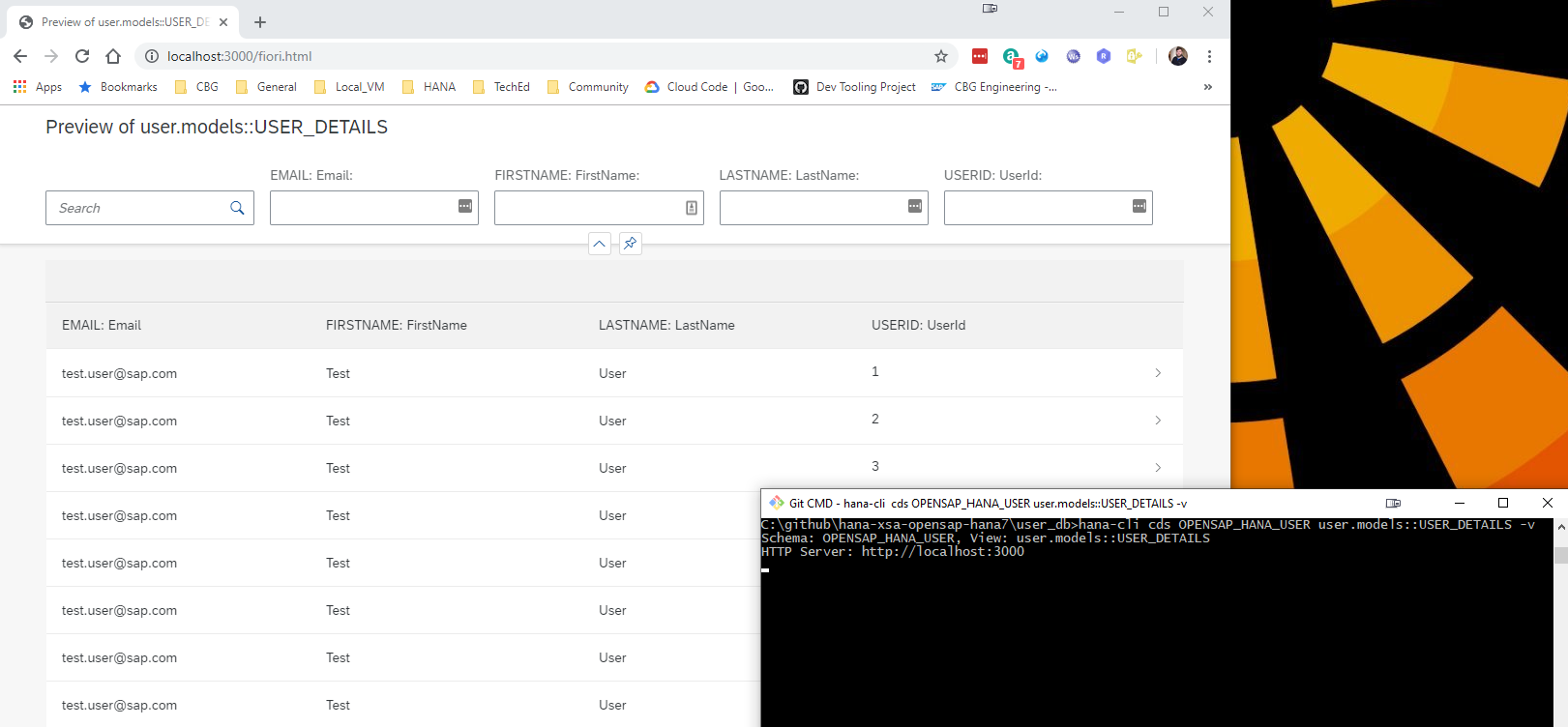
Project Structure and Documentation
Utils Documentation
For developers looking to understand or extend the internal utilities used by this CLI tool, comprehensive documentation is available in the utils/README.md file. This documentation covers:
- Core Utilities: base module, connection management, database inspection, SQL injection protection
- CLI Integration: BTP, Cloud Foundry, and XSA CLI integration utilities
- Database Abstraction: Multi-database support (HANA, PostgreSQL, SQLite) with factory pattern
- Usage Examples: Practical examples for using the utility modules
The utils folder contains reusable modules that provide the foundation for all CLI commands, including database connectivity, terminal UI components, security utilities, and internationalization support.
HTTP Routes Documentation
The hana-cli tool includes a built-in web server that exposes all CLI functionality through RESTful HTTP endpoints. Detailed documentation for all HTTP routes is available in the routes/README.md file. This documentation covers:
- Base Configuration Endpoints: GET/PUT operations for managing CLI prompts and settings
- HANA Database Endpoints: Complete API for listing and inspecting HANA database objects (tables, views, schemas, containers, etc.)
- Documentation Endpoints: Access to README and CHANGELOG as HTML
- WebSocket Support: Real-time communication for long-running operations
- Static Resources: UI5 application and DFA integration
The web server is automatically started when using certain CLI commands with the -w or --web flag, making all hana-cli functionality accessible via HTTP requests at http://localhost:3010 (configurable port).
Swagger/OpenAPI Documentation
The hana-cli web server now includes comprehensive Swagger/OpenAPI 3.0 documentation for all REST API endpoints. This provides an interactive interface for exploring and testing all HTTP APIs, making it easier to integrate hana-cli functionality into your own applications.
Key Features:
- Interactive API Documentation: Browse all 27+ documented endpoints with full request/response schemas
- Try-It-Out Functionality: Test any API endpoint directly from the browser
- Auto-Generated Specification: Documentation automatically generated from JSDoc comments in route files
- OpenAPI 3.0 Standard: Industry-standard specification for maximum compatibility
- Organized Categories: Endpoints grouped into 10 logical categories (Configuration, HANA System, HANA Objects, HDI, Cloud Services, etc.)
- Export Support: Download the raw OpenAPI JSON specification for client SDK generation
Accessing Swagger UI:
# Start the UI server
hana-cli ui

# Open browser to Swagger UI
http://localhost:3010/api-docs

# Get raw OpenAPI JSON specification
http://localhost:3010/api-docs.json
For complete implementation details, usage examples, and customization options, see the SWAGGER_IMPLEMENTATION.md documentation.
Web Applications (Fiori Launchpad UI)
The hana-cli tool includes a complete browser-based interface built with SAP UI5 and the Fiori Launchpad, providing a graphical alternative to the command-line interface. This web interface offers an intuitive, tile-based navigation system for all database operations.
Key Features:
- Fiori Launchpad Interface: Modern, responsive UI with organized tile groups
- Multiple UI5 Applications: Specialized apps for listing, inspecting, and managing database objects
- Real-Time Operations: WebSocket-based communication for live updates and long-running tasks
- Mass Conversion Tool: Bulk convert tables to CDS, HDBTable, or HDBMigrationTable formats
- System Information Dashboard: View connection details, version info, and system status
- Database Object Browser: Interactive exploration of tables, views, schemas, functions, indexes, and more
- Cloud Foundry Integration: Manage HDI, SBSS, Schema, and SecureStore service instances
- Theme Support: Automatic light/dark mode detection and customization
- Integrated Help: SAP Digital Foundation Adapter (DFA) with contextual assistance
Quick Start:
hana-cli tables -w    # Launch web interface with tables view
hana-cli serve        # Start the web server standalone
The web UI runs on http://localhost:3010 by default and provides access to all CLI functionality through an easy-to-use graphical interface. For complete documentation of all web applications, UI5 components, configuration, and development guides, see the app/README.md file.
MCP (Model Context Protocol) Integration
The hana-cli tool includes a Model Context Protocol (MCP) server, enabling AI assistants like Claude to interact with SAP HANA databases through natural language. The server uses a progressive discovery model — starting with ~22 focused tools and expanding on demand to all 186 commands.
Key Features:
- Progressive tool discovery — tier-1 tools always available, others via router or dynamic promotion
- Router tool (
hana_execute) dispatches any of 183+ commands by name - AI-guided command recommendations and smart search
- Seamless integration with Claude Desktop, VS Code, Cursor, and other MCP clients
--fullmode available for environments where tool count is not a concern
For detailed setup instructions, configuration options, and usage examples, please refer to:
- docs/03-features/mcp-integration.md - Complete MCP overview and setup guide
- mcp-server/README.md - Server installation and configuration
Standard Parameters and Conventions
The hana-cli tool follows consistent parameter naming, aliasing, and default value conventions across all commands to provide a predictable and intuitive user experience.
Command Categories Overview
Global Standard Parameters
All commands support the following standard connection and debugging parameters:
| Parameter | Alias | Type | Default | Description |
|---|---|---|---|---|
--admin | -a | boolean | false | Connect via admin credentials (uses default-env-admin.json) |
--conn | — | string | — | Connection filename to override default-env.json |
--disableVerbose | --quiet | boolean | false | Disable verbose output for scripting |
--debug | -d | boolean | false | Enable debug output for troubleshooting |
Common Command Parameters
Commands are organized into categories, each with their own standardized parameters:
Data Manipulation Commands
Commands like export, import, compareData, tableCopy, dataSync, etc.
| Parameter | Alias | Type | Default | Description |
|---|---|---|---|---|
--schema | -s | string | **CURRENT_SCHEMA** | Target schema name |
--sourceSchema | -ss | string | **CURRENT_SCHEMA** | Source schema for operations |
--targetSchema | -ts | string | **CURRENT_SCHEMA** | Target schema for operations |
--table / --sourceTable | -t / -st | string | — | Table name(s) |
--output | -o | string | — | Output file path |
--format | -f | string | see note | Output format (csv, json, excel, summary, etc.) |
--limit | -l | number | 1000 | Maximum result set size |
--batchSize | -b, --batch | number | 1000 | Batch size for processing |
--timeout | -to | number | 3600 | Operation timeout in seconds (1 hour) |
--dryRun | -dr, --preview | boolean | false | Preview operation without committing changes |
--profile | -p | string | — | Database profile (hana, postgresql, sqlite, etc.) |
Batch Operations
Commands like massGrant, massUpdate, massDelete, massExport, etc.
| Parameter | Alias | Type | Default | Description |
|---|---|---|---|---|
--schema | -s | string | — | Schema containing objects |
--object | -o | string | — | Object name pattern |
--limit | -l | number | 1000 | Maximum objects to process |
--dryRun | -dr, --preview | boolean | false | Preview without executing |
--log | — | boolean | false | Enable operation logging |
List/Inspect Commands
Commands like tables, schemas, users, procedures, functions, etc.
| Parameter | Alias | Type | Default | Description |
|---|---|---|---|---|
--schema | -s | string | **CURRENT_SCHEMA** | Filter by schema |
--limit | -l | number | 200 | Maximum results to return |
--profile | -p | string | — | Database profile selector |
Naming Conventions
The tool follows these conventions for parameter naming:
- Single Operations: Use singular names (e.g.,
schema,table,user) - Source/Target Operations: Use paired names (e.g.,
sourceSchema/targetSchema,sourceTable/targetTable) - Boolean Flags: Use descriptive names (e.g.,
dryRun,includeHeaders,withGrantOption) - Aggregation Parameters: Use plural or descriptive names (e.g.,
columns,indexes,keyColumns)
Alias Conventions
Aliases follow these consistent patterns:
- Single-letter alias: First letter of the parameter (e.g.,
-sfor schema,-tfor table) - Extended alias: Meaningful abbreviation (e.g.,
-drfor dryRun,-batchfor batchSize) - No self-referential aliases: Parameter name itself is not used as an alias (e.g.,
--schemahas alias-sonly) - Maximum aliases: Parameters typically have at most 2 aliases to avoid confusion
Default Values
Default values are standardized to ensure consistent behavior:
| Parameter | Standard Default | Note |
|---|---|---|
schema | **CURRENT_SCHEMA** | Uses the connection's current schema |
limit | 200 (lists) / 1000 (data) | Configurable per command based on context |
batchSize | 1000 | Applies to all data manipulation operations |
timeout | 3600 | 1 hour standard timeout for long-running operations |
dryRun | false | Changes are committed by default; use --dryRun to preview |
format | "csv" (export) / "json" (reports) | Varies by command type |
compress | true | Data backups are compressed by default |
Usage Examples
Using Standard Parameters
# List all tables in current schema with preview of first 100
hana-cli tables -s myschema -l 100

# Export data with dry-run preview
hana-cli export -t CUSTOMERS -s SALES -f csv -dr

# Copy table structure without data (dry-run)
hana-cli tableCopy --sourceTable ORDERS --targetTable ORDERS_ARCHIVE --structureOnly --dryRun

# Compare schemas between databases with 2-hour timeout
hana-cli compareSchema --sourceSchema PROD --targetSchema TEST -to 7200

# Batch grant permissions (preview first)
hana-cli massGrant -s MYSCHEMA -o MYTABLE -g DEVELOPER_USER -p SELECT -dr
Common Parameter Combinations
# Preview and log operations
hana-cli massUpdate -s SCHEMA -o TABLE -c "STATUS='ACTIVE'" --dryRun --log

# Limit results and increase timeout for large datasets
hana-cli dataValidator -t BIGDATA -l 1000000 -to 7200

# Specify output format and location
hana-cli export -t CUSTOMERS -f json -o ./exports/customers.json
Current Schema Defaults (**CURRENT_SCHEMA**)
The vast majority of schema-aware commands now use **CURRENT_SCHEMA** as the default value for schema parameters. This special placeholder allows you to work with your current database context without explicitly specifying the schema name each time.
Supported Commands with Current Schema Default
The following command categories fully support the **CURRENT_SCHEMA** placeholder:
Listing Commands (30+ commands):
- All schema navigation:
tables,views,indexes,functions,procedures,triggers,sequences,synonyms,libraries,roles,objects - Specialized lists:
partitions,columnStats,spatialData,ftIndexes,graphWorkspaces,tableHotspots,tableGroups,calcViewAnalyzer
Data Manipulation Commands (10+ commands):
export,import,dataProfile,dataDiff,compareData,compareSchema,tableCopy,dataSync
Analysis Commands (10+ commands):
dataValidator,duplicateDetection,erdDiagram,dataLineage,referentialCheck, and more
Current Schema Examples
# Without explicit schema - uses CURRENT_SCHEMA
hana-cli tables                          # List tables in current schema
hana-cli procedures                      # List procedures in current schema
hana-cli export -t CUSTOMERS             # Export from current schema

# With explicit schema override
hana-cli tables -s PRODUCTION            # List tables in PRODUCTION schema
hana-cli procedures -s OTHER_SCHEMA      # List procedures in OTHER_SCHEMA
hana-cli export -t CUSTOMERS -s SALES    # Export from SALES schema
For a complete list of all commands with **CURRENT_SCHEMA** support, see the CONSISTENCY_REVIEW_COMPLETE.md document.
Multi-Profile Database Support
All database-connected commands now support the --profile parameter (alias -p), enabling you to work with different database configurations without switching connections or redefining credentials.
Supported Commands with Profile Parameter
The --profile parameter is available in:
- All data operations:
export,import,dataProfile,dataDiff,dataSync,duplicateDetection,referentialCheck,tableCopy - List operations:
tables,views,indexes,functions,procedures,triggers,sequences,libraries,roles,objects,partitions,columnStats,spatialData,ftIndexes,graphWorkspaces,tableHotspots,tableGroups,calcViewAnalyzer - Analysis tools:
compareData,compareSchema,dataValidator,dataLineage,erdDiagram, and more
Profile Parameter Examples
# Specify database profile
hana-cli tables --profile production     # Connect using 'production' profile
hana-cli export -t CUSTOMERS -p staging  # Export from staging environment
hana-cli dataValidator -t TABLE -p dev   # Validate data in development

# Works with other parameters
hana-cli tables -s MYSCHEMA -p prod      # List tables in schema using prod profile
hana-cli compareSchema -ss SRC -ts TGT -p target  # Schema comparison using target profile
For more details on database profile configuration, see the utils/README.md documentation.
Quality Assurance Notes
The consistency of these parameters has been standardized across all 200+ commands in the tool. This standardization ensures:
- Predictability: Users can rely on consistent parameter behavior across commands
- Discoverability: Common parameters work the same way in different contexts
- Scripting: Automation scripts are more maintainable with consistent patterns
- Error Reduction: Familiar patterns reduce mistakes and learning curve
- Multi-Environment Support: Profile parameter enables seamless switching between database instances
For detailed analysis of all command consistency improvements deployed in February 2026, including the 30 commands and 50+ parameters updated, see:
- CONSISTENCY_REVIEW_COMPLETE.md - Complete review report
- COMMAND_CONSISTENCY_FIXES.md - Implementation details
- COMMAND_CONSISTENCY_ANALYSIS.md - Detailed audit findings
For detailed information about specific commands, use the built-in help:
hana-cli help <command>
hana-cli <command> --help
Commands
📊 Visual Command Reference Guide: For command structure diagrams, parameter relationships, and quick examples for all commands, see the Command Structure Reference Guide. This separate document provides visual flowcharts and detailed usage patterns for:
- Connection & setup commands
- Data operations (export, import, sync)
- Database inspection & analysis
- HDI container management
- Backup & recovery operations
- Performance analysis tools
- Mass operations
- Cloud integration
Each command diagram shows the command syntax, available parameters, and typical usage patterns.
Unit Testing
This project includes comprehensive unit tests to ensure code quality and reliability. The test suite covers core functionality, command execution, and database operations.
For detailed information about running tests, writing new tests, and understanding the test structure, please refer to the Unit Testing Documentation.
Running Tests
Quick start for running tests:
# Run all tests
npm test

# Run specific test suites
npm run test:cli      # CLI tests only
npm run test:utils    # Utils tests only
npm run test:routes   # Routes tests only
Code Coverage
The project uses nyc (Istanbul) for code coverage reporting. To generate code coverage reports:
# Run all tests with coverage
npm run coverage

# Run specific test suites with coverage
npm run coverage:cli      # CLI tests with coverage
npm run coverage:utils    # Utils tests with coverage
npm run coverage:routes   # Routes tests with coverage

# Generate detailed HTML coverage report
npm run coverage:report

# Check if coverage meets thresholds (80%)
npm run coverage:check
After running coverage tests, open ./coverage/index.html in your browser to view the detailed interactive coverage report.
The project aims for 80% code coverage across:
- Lines
- Statements
- Functions
- Branches
For more information about code coverage configuration and interpretation, see the Coverage section in the Unit Testing Documentation.
Cross-Platform Support
The HANA CLI tool is designed to work seamlessly across Windows, Linux, and macOS platforms. This section describes the cross-platform features and testing strategies employed to ensure consistent behavior.
Platform Compatibility
The tool has been tested and validated on:
- Windows: Windows 10 and later
- Linux: Ubuntu, Debian, RHEL, and other major distributions
- macOS: macOS 10.15 (Catalina) and later
Cross-Platform Features
Path Handling
The tool automatically handles platform-specific path differences:
- Uses Node.js
pathmodule for all path operations - Automatically detects and uses correct path separators (
/on Unix,\on Windows) - Normalizes paths for consistent behavior across platforms
- Supports both absolute and relative paths on all platforms
Environment Variables
Platform-specific environment variables are handled correctly:
- Windows: Uses
APPDATAfor configuration files - macOS: Uses
HOME/Library/Preferenceswith fallback toHOME/Library/Application Support - Linux: Uses
HOME/.configfor configuration files
Line Endings
The project uses .gitattributes to ensure consistent line endings:
- Text files (
.js,.json,.md, etc.) use LF (\n) in the repository - Windows scripts (
.cmd,.bat,.ps1) use CRLF (\r\n) - Binary files are handled appropriately
Cross-Platform Testing
The project includes comprehensive cross-platform testing:
# Run cross-platform specific tests
npm run test:platform

# Run tests tagged for Windows
npm run test:windows

# Run tests tagged for Unix systems (Linux/macOS)
npm run test:unix
Continuous Integration
GitHub Actions CI runs the full test suite on all three platforms:
- Ubuntu Latest: Tests Linux compatibility
- Windows Latest: Tests Windows compatibility
- macOS Latest: Tests macOS compatibility
- Node.js versions: 20.x, 22.x, and 24.x on each platform
The CI workflow validates:
- Package installation on each platform
- All unit tests pass on each platform
- Cross-platform specific tests
- Platform-specific path handling
- CLI command execution
Mock Filesystem Testing
Tests use mock-fs to simulate different filesystem structures:
- Tests can simulate Windows, macOS, and Linux filesystems
- Validates path handling without requiring multiple OS environments
- Tests platform-specific configuration file locations
- Ensures consistent behavior across platforms
Development Recommendations
When contributing to this project, follow these cross-platform best practices:
- Always use
path.join()orpath.resolve()instead of string concatenation for paths - Use
os.EOLfor platform-appropriate line endings in generated content - Test environment variable fallbacks for Windows (
APPDATA,USERPROFILE) and Unix (HOME) - Tag platform-specific tests with
@windowsor@unixas appropriate - Use
cross-envin npm scripts for environment variable consistency - Avoid hard-coded path separators (
/or\) in code
For more details on cross-platform testing, see the Cross-Platform Testing section in the Unit Testing Documentation.
How to obtain support
This project is provided "as-is": there is no guarantee that raised issues will be answered or addressed in future releases.
License
Copyright (c) 2026 SAP SE or an SAP affiliate company. All rights reserved. This project is licensed under the Apache Software License, v. 2 except as noted otherwise in the LICENSE file.
History
Other 3
Notes
Fixed
- hana-cli-mcp binary failed to start because @modelcontextprotocol/sdk was only declared in the nested mcp-server package (stripped from the published tarball); it is now a root dependency (#231)
- Patched dependency vulnerabilities via npm audit fix plus qs and brace-expansion overrides (#233)
Changed
- Migrated WebdriverIO UI tests off the deprecated devtools automation service to standard WebDriver/BiDi; dropped devtools and @wdio/devtools-service dev dependencies (#234)
Other 5
Notes
Fixed
- VS Code extension: resolve HANA connection when the CAP project (with .cdsrc-private.json / default-env.json) lives in a subfolder rather than the workspace root; scans subfolders and prompts when multiple projects are found (#182)
- VS Code extension: artifact inspectors (hdbtable, hdbview, hdbfunction, hdbprocedure, hdbsynonym, hdbrole, hdbsequence) now pre-fill the object name from the opened file
- VS Code extension: type-ahead suggestions now work in webview inputs (schema/table/etc.) by using the local server base URL instead of relative fetch paths
Added
- VS Code extension: hana-cli.projectPath setting to explicitly point at the connection-config folder and skip auto-detection (#182)
Changed
- hana-cli vscode status now compares the installed extension against the packaged .vsix and suggests updating; vscode install upgrades in place via --force (#182)
Other 5
Notes
Added
- VS Code extension now ships a self-contained, OS-portable .vsix via the npm package (installable through hana-cli vscode install) — bundles the web UI and uses Node built-in node:sqlite, no native binaries (#159)
Changed
- Upgrade to CAP 10 (@sap/cds 10) with cds-10-native drivers @cap-js/hana 3, @cap-js/sqlite 3, @cap-js/postgres 3, @cap-js/telemetry 2; remove incompatible @sap/cds-hana (#160)
- TypeScript 7 for the VS Code extension and MCP server; consolidated dependency updates across all subprojects (#160, #162)
- Group B major dependency upgrades: glob 13, @vscode/test-electron 3, vue-tsc 3, vue-router 5, csv-parse 7, js-yaml 5, inquirer 14 (#162)
Fixed
- Add missing vscode + error.cfNotLoggedIn i18n keys across all 9 locales (#163)
Other 10
Notes
Added
- MCP server tiered tool architecture: tier-1 essential tools are always available, category-specific tools activate on demand via hana_discover_by_category
- New hana_execute router tool for generic command dispatch without per-command tool registration
- JSON test reporter (npm run test:json) for structured result querying with jq
Fixed
- MCP server: preserve empty cell values in ASCII table parser
- MCP server: deduplicate tier-1 tools on category activation
- querySimple now exits 0 for DML/DDL statements
- Security: update uuid to 11.1.1 in docs to resolve vulnerability alert
Changed
- MCP server: extract shared utilities into reusable modules and add mocked querySimple tests
- MCP server: add dynamic registration callback to discovery-tools for on-demand tool loading
- Dependency updates to latest patch/minor versions
Other 18
Notes
Fixed
- MCP server connection context: wired up dead connFile code so HANA_CLI_CONN_FILE env var is now honored when resolving connection files
- MCP server default working directory: executor now prefers the launch directory over the hana-cli install directory when project markers (package.json, default-env.json, .env, .cdsrc-private.json) are detected
Changed
- Minimum Node.js version raised from 20.19.0 to 22.0.0 (preparing for CDS 10)
- Added CDS 10 forward-compatibility flags: ieee754compatible, compat_srv_getters, compat_texts_entities, calc_elements
- Added queue.legacyLocking: false for CDS 10 outbox locking behavior
- Updated peerDependencies to accept @sap/cds-dk >=10.0.0
- Updated CI matrix to Node.js 22.x and 24.x (dropped 20.x)
- Updated @cap-js/hana from ^2.7.1 to ^2.8.0
- Updated @cap-js/postgres from ^2.2.1 to ^2.3.0
- Updated @cap-js/sqlite from ^2.2.1 to ^2.4.0
- Updated @sap/cds-common-content from ^3.1.0 to ^3.2.0
- Updated chromedriver from ^147.0.4 to ^148.0.1
- Updated eslint from ^10.2.1 to ^10.3.0
- Updated @wdio/* packages from ^9.27.0 to ^9.27.1
- Updated webdriverio from ^9.27.0 to ^9.27.1
- Upgraded TypeScript from 5.x to 6.x across project (MCP server ^6.0.2, root devDependencies)
- Updated tsconfig.json files for TypeScript 6 compatibility: moduleResolution Node→Bundler (root), Node16→NodeNext (MCP server)
- Updated @types/node from ^25.5.0 to ^25.6.0
Other 1
Notes
Added
- New mcpServerInstall command (hana-cli mcp) for one-command MCP server configuration in Claude Desktop, Claude Code, Cursor, Windsurf, Cline, VS Code, Continue, and Zed
- New mcpServerStatus command (hana-cli mcp-status) to check MCP server installation status across all 8 supported AI assistant clients
- MCP resources for knowledge base content and documentation index metadata
Changed
- Major MCP server refactor: modular architecture replacing monolithic 1,700-line index.ts
- Reduced MCP tool count by removing alias registrations and consolidating search tools
- Updated MCP SDK from 1.27.1 to 1.29.0
- Fixed MCP server version to read dynamically from package.json
- Fixed fragile command name matching in output formatter
- Added isError signaling to all MCP error response paths
Removed
- Removed simulated workflow execution tools (LLMs orchestrate multi-step tasks more effectively)
- Removed no-op validateEnvironment function and low-value metadata tools
Other 11
Notes
Added
- New mcpServerInstall command (hana-cli mcp) for one-command MCP server configuration in Claude Desktop, Claude Code, Cursor, Windsurf, Cline, VS Code, Continue, and Zed
- New mcpServerStatus command (hana-cli mcp-status) to check MCP server installation status across all 8 supported AI assistant clients
- MCP resources for knowledge base content and documentation index metadata
Changed
- Major MCP server refactor: modular architecture replacing monolithic 1,700-line index.ts
- Reduced MCP tool count by removing alias registrations and consolidating search tools
- Updated MCP SDK from 1.27.1 to 1.29.0
- Fixed MCP server version to read dynamically from package.json
- Fixed fragile command name matching in output formatter
- Added isError signaling to all MCP error response paths
Removed
- Removed simulated workflow execution tools (LLMs orchestrate multi-step tasks more effectively)
- Removed no-op validateEnvironment function and low-value metadata tools
Other 4
Notes
Fixed
- Fix for CDS 9.8x compatibility - corrected CDS binding and path resolution when hana-cli commands are invoked from a project sub-directory, ensuring proper project root detection and CDS model loading regardless of working directory
Changed
- Update MCP SDK version in mcp-server package for improved compatibility and stability
- MCP Server Infrastructure Cleanup - refactored command-metadata, resources, readme-knowledge-base, and examples-presets modules for cleaner architecture and better maintainability
- Improve WDI5 end-to-end test infrastructure and update shrinkwrap dependencies for UI testing
Other 8
Notes
Changed
- Patch release to align all package and release metadata to version 4.202603.1
- Bump MCP server package version to 1.202603.1
- Update changelog and lockfile metadata for March 2026 patch release
- Add new documentation URL in package.json
- Clean shrinkwrap file to remove old version references and ensure consistency with new version
- Blog Posts added to Documentation site
- Fixed issue with three commands not having the correct documentation link
- Fix issue Mass Export is giving Invalid Column Name: COLUMN_POSITION for each table exported
Other 11
Notes
Changed
- Update SAPUI5 version to 1.145.0
- Maintenance version update for March 2026
- Various dependency updates and security patches
- Improved stability and performance optimizations
- Expanded localization support with full translation bundles for Simplified Chinese (zh), Hindi (hi), and Polish (pl) across CLI and feature property files
- Updated i18n validation and documentation to include the current supported language set and locale examples
- Enhanced CLI UX with suggestions for unknown commands and unsupported options to help users recover quickly from typos
- Added configuration management workflow to load and apply saved command settings across supported CLI operations
- Improved analysis and comparison tooling with better current-schema handling and stronger error handling in compareSchema and duplicateDetection/dataValidator workflows
- Enhanced UI command server configuration with prompt-driven host and port options for more flexible local startup
- Improved CDS binding resolution and connection error handling by loading @sap/cds-dk from global node modules when needed
Other 15
Notes
Changed
- Major version bump to 4.x reflecting significant internal improvements and enhanced stability
- Update SAPUI5 version and dependencies to 1.144.1
- Various dependency updates and maintenance - especially update to @sap/cds-dk 9.7.1 for better compatibility with cds-fiori plugin and the latest CAP features
- Migrate from Express 4.x to 5.x now that CAP supports Express 5 as well. This is a major internal change but should be mostly transparent to users. If you do see any issues please report them.
- Convert from node-zip to JSZip for better support and maintenance going forward
- Low level refactoring of DB connection handling to better support MCP server and future features. This should be mostly transparent to users but if you see any issues please report them.
- Using AI Code Generation - massive expansion of test cases and test coverage - 317+ new tests added across 6 new test files, improving coverage from ~40% to ~85% of critical paths
- Enhanced README files throughout the project with better documentation and more examples
- First version of German Localization - added German translations for key commands (inspect, massConvert, messages, systemInfo, tables)
- MCP (Model Context Protocol) Server enhancements - added comprehensive troubleshooting documentation and improved error handling for better AI assistant integration
- New MCP server troubleshooting guide (mcp-server/TROUBLESHOOTING.md) with common issues and solutions
- Improved error messages and debugging capabilities throughout the codebase
- CLI Startup Performance Optimization - Implemented lazy-loading strategy for command modules and dependencies, resulting in 60-77% faster startup times for most commands. Key improvements: ultra-fast path for --version flag bypassing all heavy module imports, deferred yargs loading until after fast-path checks, conditional debug module loading only when DEBUG environment variable is set, elimination of completion overhead, and simplified validation logic. Average command execution now starts in ~700ms vs previous ~2,200ms.
- New import command features - added support for matching columns by order, name, or auto (try name then fall back to order), improved error handling and reporting for mismatched columns and data type issues, and added support for additional data types in the import process
- Completely new documentation website build on VitePress with improved navigation, search, and user experience. The new documentation site is built with VitePress and features a modern design, better organization, and enhanced content including more examples and troubleshooting guides. The documentation is now also available in German for key sections.
Other 6
Notes
Changed
- Update SAPUI5 version and dependencies to 1.144.0
- Update license year, version, and Node.js requirement
- Update Node.js version to 24 and copyright year
- Various dependency updates and maintenance
- Removed Fiori Preview page from cds command and replaced it with calls to @sap/cds-fiori plugin for better future compatibility
- Experimental: First, very rough, version of an MCP server that exposes all hana-cli commands
Other 5
Notes
Changed
- Update yargs to v18 and improve type definitions
- Update SAPUI5 version and dependencies to 1.142.0
- Update license year, version, and Node.js requirement
- Update Node.js version to 22 and copyright year
- Various dependency updates and maintenance
Other 2
Notes
Changed
- CAP Version 8.9.0
- Emergency Fix for CAP version 8.9 - changes to how binding works. This version of hana-cli only works with @sap/cds-dk 8.9 and higher. If you are using older version of @sap/cds-dk then you must also use older versions of the hana-cli.
Other 4
Notes
Changed
- CAP Version 7.9.0
- SAPUI5 to version 124.0
- Added @cap-js/telemetry that is activated when the command is in debug
- Switch to @cap-js/hana for the CAP HANA DB implementation
Other 5
Notes
Changed
- Update btpSubs and bas commands to support SAP Build Code. Will launch Build Code Lobby when subscribed.
- Beta Support for HANA Vector data type in CDS
- General Support for HANA Vector Engine at the DB/SQL level
- CAP Version 7.8.0
- SAPUI5 to version 122.0
Other 2
Notes
Changed
- Mass Convert of Tables to CDS if you use Pure Catalog Definitions, it will output sql append content
- Table inspect to CDS if you choose no Persistence Exists, it will output sql append content
Other 3
Notes
Changed
- CAP version 7.6.0
- Fix cds bind auth on the cds command
- Upgrade Inquirer
Other 3
Notes
Changed
- CAP version 7.4.0
- Restore openapi export with fix for CAP 7.x
- Remove node-xlsx and corresponding Export to Excel because this module is causing install issues on Business Application Studio
Other 4
Notes
Changed
- CAP version 7.3.0
- Major upgrade to Marked for conversion from Markdown in the documentation commands
- Update to SAPUI5 1.120.1
- Fix Issue #115 and #116 around the btp-cli commands
Other 6
Notes
Changed
- CAP version 7.2.0
- New Node.js minimum version of 18. 16 is end of life
- Load HANA Connection via CDS Env API and profile Hybrid instead of direct binding with cds-dk
- cds bind based connections are MUCH faster after the first call
- PostgresSQL and SQLite support on key commands thanks to CDS abstraction
- Commands: tables and querySimple support profile based access and db abstraction
Other 5
Notes
Changed
- CAP version 7.1.2
- Fixed Web Socket Error Handling
- Upgrade to SAPUI5 1.117.1
- Fix Issue #111 - add checks on container and group names for createContainer
- Complete Issue #83 - add support for SQL and Calculation view parameters
Other 3
Notes
Changed
- Major new CAP version 7.0.2
- New minimum Node.js version of 16
- Tested and supported on Node.js 20.x
Other 1
Other 2
Other 3
Notes
Changed
- External Dependency Updates - CDS to 6.6.0 (Feb 2023 Update) and SAPUI5 to 1.111.0
- Switch to Glob 9.x
- Fix CDS Exit Handler
Other 9
Notes
Changed
- Complete Feature Request Issue 100 Add Views to massConvert
- Equalize the interface and parameters between inspectTable and inspectView
- Add new parameters to massConvert to allow logging errors and continue processing rather than stopping on error
- Add list Views to the Web UI
- Add inspectView to the Web UI
- Add link between Views and inspectView in the Web UI
- External Dependency Updates - CDS-DK to 6.5.2 and SAPUI5 to 1.110.1
- Add progress bar to the massConvert command in the terminal
- Add new fancy table output based upon terminal-kit
Other 7
Notes
Changed
- Lazy Load dependent modules to reduce initial command processor boot time - 10x performance improvement
- CAP Upgrade to Jan 2023 - 6.5.0 version
- Switch to @json2csv/node as json2csv is abandoned
- New 'sub' command to list all active BTP Subscriptions and their URLs
- New 'btpInfo' command to list detailed information about th btp CLI target
- New 'issue' command to create GitHub issue preloaded with technical details
- version command now returns information about @sap/cds-dk, the cf cli, and the btp cli
Other 10
Notes
Changed
- Add support for using btp CLI
- Allows managing HANA Cloud instances that are multi-environment (not managed by Cloud Foundry) - hc, start, stop commands
- New command: bas - Allows launch the Business Application Studio from the hana-cli
- New command: btp - Add helper to target BTP Sub Account
- Improved HANA Cloud Information Formatting
- Use BTP CLient Config Environment Variable
- Parallel Loading of all cli commands for performance improvements
- Updated devcontainer configuration
- Proper handling if btp CLI is not installed on target machine
- Fix btp CLI config lookup on Linux
Other 3
Notes
Changed
- CAP December 2022 Release
- Switch to @cap-js/graphql Open Source GraphQL Adapter
- SAPUI5 to version 109.3
Other 4
Notes
Changed
- Remove the quoted naming as the default and instead put it behind an optional parameter Issue #90
- CAP October 2022 Release
- SAPUI5 to version 109.0
- New Node.js minimal version is 14.18
Other 5
Notes
Changed
- CAP September 2022 Release
- SAPUI5 to version 107.0
- Support New CAP Integer Types - TINYINT UInt8 and SMALLINT Int16
- Support for Postgres in Inspect Table and View
- Default Values Support Issue #87
Other 2
Notes
Changed
- Fix for Calculation Views when Non-Qualified Name - / instead of ::
- Add support for useExists default to true. Allows you choose during inspect and massConvert if you want the persistence exists annotations on the output. Issue 84
Other 3
Notes
Changed
- Update Dependencies
- First version of support for Calculation View metadata in inpsectView - no input parameters yet
- Update to SAPUI5 1.106
Other 3
Notes
Changed
- Update to SAP Cloud Application Programming Model 6.1
- Adjust cds command read exit logic for changes in 6.1
- Update to SAPUI5 1.105
Other 1
Notes
Changed
- Update to SAP Cloud Application Programming Model 6.0 (including switch to GraphQL GA version as well as other technical optimizations)
Other 1
Notes
Changed
- Add connection support for
cds bindand the resulting.cdsrc-private.json. Note this will make each command take a few seconds longer as credentials are no longer stored locally but looked up from cf or k8s dynamically with each command
- Add connection support for
Other 4
Notes
Changed
- Issue 74 fixed by Meyer-J
- Issue 75 fixed by Meyer-J
- Initial support for Node.js 18. Technically some of the inner modules don't support 18. We've tested many scenarios of this tool with 18. Use at your own risk.
- Minor dependency updates
Other 3
Notes
Changed
- Add support for container groups by Meyer-J
- Remove support for Node.js 12 as it is End of Life as of the end of April 2022
- Minor dependency updates
Other 3
Notes
Changed
- Update to CAP March 2022 5.9
- Update to SAPUI5 1.100
- Web UI now uses OS setting and adjusts to dark theme - new sap_horizon_dark
Other 2
Notes
Changed
- Fix for connect and incorrect options format for hdb module
- CDS output escape quotes within comments
Other 2
Notes
Changed
- Various minor dependency updates in used packages
- SAPUI5 update to 1.99.0
Other 3
Notes
Changed
- Update @sap/cds to Feb 2022 release - 5.8.0
- inspectTable and inspectView now support graphQL output (CDS Experimental Option)
- systemInfo new output options - env (display environment connection as JSON) or dbx (display connection details ready to input in the new Database Explorer VSCode Extension)
Other 1
Notes
Changed
- Major New Version: Remove dependency upon @sap/hdbext and @sap/hana-client. Replaced with smaller footprint hdb module.
Other 2
Notes
Changed
- Update the Web UI Web Assistant feature to work with the experimental SAP Horizon theme
- GraphQL option of cds command now fully works and cross references entity name in the exit correctly
Other 1
Notes
Changed
- Fix Issue #66 - account for different return JSON in cf service-key depending upon if the cf cli is ver 7 or ver 8
Other 1
Notes
Changed
- Replace Node.js module colors with chalk https://www.bleepingcomputer.com/news/security/dev-corrupts-npm-libs-colors-and-faker-breaking-thousands-of-apps/
Other 3
Notes
Changed
- Updates to support SAP BTP Free Tier and the hana-free service plan
- createModule command update package.json it produces to support newer versions of Node.js
- Version dependency updates @sap/hdbext 7.5, @sap/hana-client 2.11.14, @sap/cds to 5.7.4 and SAPUI5 to 1.97.1
Other 4
Notes
Changed
- Upgrade dependencies @sap/hdbext 7.4.1, @sap/hana-client 2.10.20, @sap/cds to 5.6.4 and SAPUI5 to 1.96.1
- Add first support for GraphQL Experimental (queries don't exit and cross reference table name yet)
- Switch to SAP_HORIZON new visual theme
- Support for Node.js 16.x although you might see some warnings for inner packages upon install
Other 1
Notes
Changed
- Upgrade dependencies @sap/hdbext 7.4, @sap/hana-client 2.10.x, @sap/cds to 5.5.5 and SAPUI5 to 1.95.0
Other 2
Notes
Changed
- Tested and made fixes for upcoming Node.js 16.x support. Tested under Node.js 16.9.0. You can use with Node.js 16, but will receive installation warnings and a warning on each command as some packages haven't been fully updated for 16.x yet
- Upgrade dependencies @sap/hdbext 7.3.7, @sap/hana-client 2.9.28, @sap/cds to 5.4.3 and SAPUI5 to 1.92.1
Other 3
Notes
Changed
- Added status of hana cloud instance to output of command hc by sbarzaghialteaup Pull Request 64
- Optimize performance for the inspectTable feature in the Browser based UI
- Switch to the UI5 CodeEditor for output in the inspectTable command in the Browser
Other 4
Notes
Changed
- querySimple Export to CSV Format feature added by sbarzaghialteaup
- Update Dependencies - especially HANA Client to 2.9.28
- Update to SAPUI5 1.93.0
- Convert entire project to ECMAScript Modules (ESM) - this is a massive internal change and we appologize in advance if it results in any instablity. If you hit any issues please report then you can target specifically the last version until they are resolved
Other 4
Notes
Changed
- Update dependencies - especially SAP Cloud Application Programming Model to 5.4.1
- Trimmed several unused dependencies in an effort to keep hana-cli as slim as possible
- Remove @sap/cds-dk as a direct dependency. To use the openAPI features in commands like inspectTable, inspectView or cds; you must have @sap/cds-dk globally. But most development environments where this option would be used should already have @sap/cds-dk installed this way. Remove many unneded depenencies and duplicated modules from hana-cli most importantly removing the sqlite3 depenency that was never used but caused lots of install issues.
- New Browser UI for indexesUI and inspectTableUI
Other 4
Notes
Changed
- Add a devcontainer configuration to allow contributors or testers of this project to start in a remote container or CodeSpaces with all necessary tools (like cf, @sap/cds-dk, etc) and VSCode extensions preinstalled. https://code.visualstudio.com/docs/remote/containers and https://docs.github.com/en/codespaces/customizing-your-codespace/configuring-codespaces-for-your-project
- Improved error handling in the Browser Based UI especially during start up scenarios where a default-env.json or equivelant is missing.
- Add Web Assistant embedded help and changelog
- Add full in-app assistance for massConvert command
Other 5
Notes
Changed
- Add node.js engines version check on startup and output a warning if there is a mismatch based upon the engines specification in package.json
- Add busy indicator in browser based UI
- massConvert to HDBTABLE or HDBMIGRATIONTABLE with the useCatalogPure option now removes CS_* Types from the output for compatibility with target SAP HANA Cloud systems
- massConvert to HDBTABLE or HDBMIGRATIONTABLE without the useCatalogPure option also includes associations now. However when coming from HDBCDS based sources the column names contain dots which are incompatible with CAP CDS. The associations will still have the old column names while the rest of the table defition must replace the dot with underscore or recieve CDS Compiler errors. I will leave this functionality in place, although imperfect. If you have associations in your source system, strongly consider using the useCatalogPure option instead.
- Added new commands featuresUI, featureUsageUI, functionsUI, hdiUI, sbssUI, schemaInstancesUI, schemaInstancesUI, securestoreUI, and upsUI
Other 2
Notes
Changed
- version command returned error due to change in latest-version. Reverted to old version of the module
- Rebuilt npm shrinkwrap due to some install errors with Sqlite3 - errors can be ignored as they don't impact hana-cli but still rather not show errors if possible
Other 4
Notes
Changed
- Allow quoted names in massConvert when the target is HDBTABLE
- UI theme (light or dark) will now adjust automatically to user's OS setting
- New commands: containersUI, dataTypesUI, schemasUI, and tablesUI
- Refactored list operations (like schemas, tables, etc) to allow them to be reused in the new Browser UI
Other 3
Notes
Changed
- Upgrade to @sap/cds 5.3.1, @sap/hana-client 2.9.23, @sap/hdbext 7.3.0, and sap-hdbext-promisifed 2.202107.1
- Major addition of new browser based UIs for certain complex commands. First focus is on the massConvert command. No new external depencencies. We launch Express web server from the CLI and then open the web browser. You can complete the command with visual options, value help and extended documentation. Command is still executed in the CLI and the output is piped to the web broswer using web sockets.
- New commands: massConvertUI, systemInfoUI, changesUI, readMeUI, and UI (last one opens a LaunchPad with tiles for all the other commands)
Other 3
Notes
Changed
- Upgrade to @sap/cds 5.3.0 and @sap/xsenv 3.1.1
- Upgrade SAPUI5 version to 1.91.1
- Change cds command READ exit to req.reply instead of returning the query itself
Other 1
Notes
Changed
- massConvert - change
require('fs/promises')torequire('fs').promisesfor compatibility with Node 12.x - see Update fs.md #35740
- massConvert - change
Other 1
Notes
Changed
- New commands schemaInstances, securestore, and sbss to list cf/xs services instances of these plan types
Other 3
Notes
Changed
- Merge mass rename from @ThePlenkov
- Fix Issue with connecting to XS Advance Database #53
- Remove warning during HDI deploy from db module created with createModule due to reference to afllangprocedure in the generated .hdiconfig
Other 4
Notes
Changed
- New functionality for massConvert command to also generate hdbsynonyms. Generate hdbsynonyms along with CDS for massConvert operation #48 - thanks to @ThePlenkov
- Add no colons mode for massConvert. This is an option to remove :: from namespaces which would complicate usage from CAP CDS. :: will be replaced by dot. no colons mode for massConvert #50 - thanks to @ThePlenkov
- Exclude user defined types from generated CDS in massConvert - thanks to @ThePlenkov
- cds command wasn't using the new connection information lookup logic
Other 2
Notes
Changed
- Added hana client disconnect at error and normal end conditions to avoid segmentation fault in WSL and slightly older versions of Node.js - thanks to sbarzaghialteaup
- First round of TypeScript types inclusion - more to come. Will mostly help project maintainers
Other 3
Notes
Changed
- Missing npm shrinkwrap in last release
- Improved details in thrown errors and added debug info from util/cf and util/xs
- hana-cli version now reports latest avaialble version on npm and propmpts users to upgrade if they are outdated
Other 6
Notes
Changed
- @cds dependency updated to May 2021 release 5.1.4
- Update cds preview to UI5 1.89.0
- cds preview new parameter to allow use to choose HTTP port (and validate that input)
- Issue #42 Optional namespace for generated cds - thanks to @ThePlenkov
- serviceKey command no longer requires to pre-create the service key. If the key you specify doesn't exist it will call cf/xs create-service-key for you automatically Issue #41
- Increase the page size for the xs/cf services commands (ups and hdi) Issue #40
Other 4
Notes
Changed
- Issue #39 - Add support for HANA XSA in the UPS and HDI commands
- Issue #38 - Add support for hdbmigrationtable in massConvert and inspectTable
- Add option useCatalogPure to massConvert command. Defaults to false and uses the cds.compile api to produce its hdbtable or hdbmigrationtable output. When set to true it will instead use the HANA SYS.GET_OBJECT_DEFINITION which includes more metadata but might produce results which are incompatible with HDI
- Remove the Schema from output of massConvert commands
Other 2
Notes
Changed
- Upgraded dependencies @sap/cds to 5.1, @sap/hana-client to 2.8.20, and @sap/hdbext to 7.2.0
- Add User Admin and Role Admin grants to the adminHDI and adminHDIGroup commands for XSA
Other 1
Notes
Changed
- quiet output added to most commands allowing for a wide range of scripted usage of the tool overall
Other 3
Notes
Changed
- copy2DefaultEnv fix to support hanatrial (old HaaS offering) but produce a warning that people should consider using SAP HANA Cloud trial instead
- Fix not a function error in inspectView with output option of openapi
- swagger-jsdoc output format, which is actually commented YAML version of openAPI, added to inspectTable and inspectView
Other 15
Notes
Changed
- Match the @sap/hdbext and @sap/hana-client versions exactly to remove duplicate copies of the HANA Client in node_modules removing about 135Mb from the footprint of this tool overall
- Major internal refactoring to streamline the code and reduce duplication. Reusable base code for basic handling of Yargs and Prompts. Consistent error handling and other general stability improvments
- The default-env*.json file no longer needs to be in the same directory in which you are running the command. If not found in the current directory, the tool will search in up to 5 parent directories to find it
- New parameter --conn added to most commands that allow you specify any filename you want to override the default-env.json. conn can specify a file in the current directory, up to 5 parent directories or in your ${homedir}/.hana-cli/ folder
- New parameter --quiet that disables extra output and human readable formatting for when you want to script commands and get pure results output
- New parameter --debug - for troubleshooting of the hana-cli tool itself. It will produce a LOT of detailed output. Nice if you are curious what queries are being sent to SAP to fullfill a command
- Options in the help are now grouped by Conneciton Parameters, Troubleshooting, and Options
- New order of processing for making connections as follows:
- First we look for the Admin option and use a default-env-admin.json - this overrides all other parameters
- If no admin option or if there was an admin option but no default-env-admin.json could be found in this directory or 5 parent directories then look for a .env file in this directory or up to 5 parent directories
- No .env file found or it doesn't contain a VCAP_SERVICES section, then check to see if the --conn parameter was specified. If so check for that file in the current directory or up to 5 parent directories
- If the file specified via the --conn parameter wasn't found locally then check for it in the ${homedir}/.hana-cli/ folder
- If no specific configuration file was was found then look for a file named default-env.json in the current directory or up to 5 parent directories
- Last resort if nothing has been found up to this point - look for a file named default.json in the ${homedir}/.hana-cli/ folder
- Add Syntax Highlighting to various command outputs
Other 5
Notes
Changed
- New Inspect* output options for sqlite, hdbtable, hdbview and hdbcds
- Upgrade to @sap/cds 5.x
- Drop support for Node.js version 10
- cds preview updated to SAPUI5 1.88.1
- connect command now prompts for Encyrypt setting
Other 2
Notes
Changed
- New command copy2Secrets to rewrite default-env.json as K8S Secrets format expected by @sap/xsenv - Pull Request 35
- thanks to @ThePlenkov
Other 2
Notes
Changed
- querySimple now allows output to a file and supports table, json, and Excel output formats Issue #30
- README.md was reorganized to list all commands alphabetical Issue [#31](https: //github.com/SAP-samples/hana-developer-cli-tool-example/issues/31)
Other 2
Notes
Changed
- Option to massConvert, inspectTable, inspectView, and cds to use HANA native data types if no CAP CDS direct conversion can be made. Issue #27 - thanks to @ThePlenkov
- Decimal types without decismals generates CDS Error. Issue #29 - thanks to @ThePlenkov
Other 5
Notes
Changed
- New commands: changes & readme - output the CHANGELOG.md and README.md to the CLI
- Issue #25 - Add filename option to massConvertion Operation - thanks to @ThePlenkov
- Updated several dependent modules including hana-client
- Put hana-cli on a diet and removed some old module dependencies no longer used. Especially the openAPI related ones which had functionality now offered by CAP directly
- help command now lists all commands in alphabetical order
Other 9
Notes
Changed
- Updated @sap/textbundle
- Add readme command that opens ReadMe Documentation in your browser
- Add changelog command that opens Change Log in your browser
- Formatting of output copy2DefaultEnv improved for compatibility to CAP cds run
- New command copy2Env - copy default-env.json to .env and reformat contents
- Support for HANA Cloud Instance Administration - requires cf cli to be installed and you must be logged into cf with a target org and space
- Added Command: hdi to list all SAP HANA Cloud HDI container instances in your target space
- Added Command: ups to list all Cloud Foundry user provided service instances in your target space
- Switch to the standard CAP Compile to openAPI in inspectTable, inspectView and cds commands. Now supports entity diagrams in the Swagger UI
Other 5
Notes
Changed
- Updated @sap/cds to 4.5.x
- Support for HANA Cloud Instance Administration - requires cf cli to be installed and you must be logged into cf with a target org and space
- Added Command: hc to list all SAP HANA Cloud instances in your target space
- Added Command: hcStart to Start SAP HANA Cloud instance
- Added Command: hcStop to Stop SAP HANA Cloud instance
Other 2
Notes
Changed
- Renaming to match new SAP Business Technology Platform branding
- Minor dependent package version updates
Other 2
Notes
Changed
- Default value on createModule command changed to SAP HANA Cloud
- Remove postinstall build script from SAP HANA Cloud option - only needed in SAP Web IDE
Other 6
Notes
Changed
- Update @sap/hana-client to v2.7.16, @sap/cds to 4.4.7 and sap-hdbext-promisfied to 2.202101
- Correct dump if you run hana-cli with no commmand, no defaults to help command
- Correct error when using .env for connections and there are multiple SAP HANA and User Provided Services both in the configuration
- Correct openDBX command in SAP Business Application Studio when using .env for connections
- Node.js 14.x support
- New command copy2DefaultEnv - which copies a .env file to default-env.json and reformats the content. Designed for SAP Business Application Studio and the HANA tooling where a .env file is generated by a binding but CAP still requires a default-env.json for testing
Others providing
- mcp-integration-suitemcp-integration-suiteAn experimental Node MCP server covering the general CPI functions of the Integration Suite, which its author recommends running alongside the TPM server for Trading Partner Management.independent, btpMCP server for the general Integration Suite functionsfrom BTP/BAIP
- mcp-is-tpmmcp-is-tpmA Java MCP server for Trading Partner Management in the Integration Suite, where trading partners, their agreements and their B2B configuration live, paired by its author with the general server.independent, btpJava MCP server for Integration Suite Trading Partner Managementfrom BTP/BAIP
- @abap2ui5/mcp-server@abap2ui5/mcp-serverAn MCP server that puts the abap2UI5 development loop on the machine an agent runs on: check the view the ABAP builds, photograph it, deploy the class into a sandbox, boot the app headless and read the errors.community org, abapMCP server for the abap2UI5 check, deploy and run loopfrom ABAP
- abap2UI5 for VS Codeabap2UI5 for VS CodeA VS Code extension for abap2UI5 apps: F9 starts the app class in a preview beside the source, Ctrl+F3 activates the class and reloads it, and the abap2UI5 linter runs in the editor while you type.community org, abapVS Code extension to preview, activate and lint abap2UI5 appsfrom ABAP
- SF-MCPSF-MCPSixty-two purpose-built tools over SAP SuccessFactors' OData APIs — employee data, permissions, compliance reports and HR administration, asked for in plain language.independent, successfactorsMCP server with 62 tools over SAP SuccessFactors OData APIsfrom SAP SuccessFactors
- hybris-mcp-litehybris-mcp-liteA read-only MCP server that answers questions about a local SAP Commerce Cloud instance by calling HAC, so types, beans, configuration, cronjobs, logs and FlexibleSearch come back in the editor.independent, commerceRead-only MCP server over a local SAP Commerce Cloud's HACfrom SAP Commerce
- calmcpcalmcpAn MCP server in front of the SAP Cloud ALM APIs: four read tools over tasks, projects, features, documents, tests and analytics, run over stdio locally or Streamable HTTP on Cloud Foundry.independent, btpMCP server with read tools over the SAP Cloud ALM APIsfrom BTP/BAIP
- CostingGeek/sap-mcpCostingGeek/sap-mcpA Python server that fetches sales orders from SAP's business data graph and hands them to Claude Desktop — the only entry here pointed at that API rather than at one system's own services.independent, btpPython MCP server fetching sales orders from SAP's business data graphfrom BTP/BAIP
- mcp-sap-focusedrunmcp-sap-focusedrunSAP Focused Run's Landscape Management Database as MCP tools — hosts, systems, databases, cloud tenants, technical instances, ABAP clients, software components and product versions.independent, btpMCP tools over SAP Focused Run's Landscape Management Databasefrom BTP/BAIP
- abapsmithabapsmithAn MCP server that lets an LLM develop in ABAP on a live system over ADT, with writes off by default and every mutation recorded in a local journal that can undo it.independent, abapABAP MCP server over ADT with a local journal that can undo writesfrom ABAP
- cloud-alm-itsm-mcpcloud-alm-itsm-mcpQueries installations through SAP Cloud ALM's ITSM API — filtered by system type or customer number, with OAuth token handling and caching done for you.independent, btpMCP server querying installations via the SAP Cloud ALM ITSM APIfrom BTP/BAIP
- hana-mcp-serverhana-mcp-serverSchema discovery and guard-railed SQL against SAP HANA and HANA Cloud, with an optional layer of business metadata so an agent reads a coded column the way the business does.independent, btpMCP server for schema discovery and guarded SQL on SAP HANAfrom BTP/BAIP
- sap_analytics_cloud_mcpsap_analytics_cloud_mcpThe SAP Analytics Cloud REST API as ninety tools across eleven service areas — content, data import and export, user management, transport, scheduling and translation.independent, btpMCP server for the SAP Analytics Cloud REST APIfrom BTP/BAIP
- mcp-sap-cpimcp-sap-cpiThe runtime half of Cloud Integration: failed messages with their full processing logs and traces, artifact deployment, security material, and a health summary.independent, btpMCP server for Cloud Integration runtime: messages, logs, deploymentfrom BTP/BAIP
- AI Core MCP ServerAI Core MCP ServerAn MCP server that exposes SAP AI Core's APIs as tools, defined entirely in one JSON config file for a proxy, so deployments, configurations and scenarios are managed through an assistant.independent, btpSAP AI Core APIs as MCP tools from one JSON config filefrom BTP/BAIP
- BTP CF MCP ServerBTP CF MCP ServerThe Cloud Foundry V3 API on SAP BTP as MCP tools — apps, orgs, spaces, services, routes and quotas — declared in one JSON config file and run by odata-mcp-proxy.independent, btpCloud Foundry V3 API on SAP BTP as MCP toolsfrom BTP/BAIP
- BTP MCP ServerBTP MCP ServerBTP Core Services as MCP tools, and the only server in this corner that renders dashboards inside the chat — a subaccount overview with drill-down, a geomap of data-centre locations, consumption and users.independent, btpBTP Core Services as MCP tools with in-chat dashboardsfrom BTP/BAIP
- btp-sap-odata-to-mcp-serverbtp-sap-odata-to-mcp-serverExposes every OData service on an S/4HANA or ECC system as MCP tools, in three discovery levels so a large catalogue does not have to be loaded at once.independent, btpExposes S/4HANA or ECC OData services as MCP toolsfrom BTP/BAIP
- CI MCP ServerCI MCP ServerAn MCP server that exposes SAP Cloud Integration's OData APIs as tools, defined entirely in one JSON config file, so an assistant works integration content, logs and configurations in natural language.independent, btpSAP Cloud Integration OData APIs as MCP toolsfrom BTP/BAIP
- odata-mcp-proxyodata-mcp-proxyA config-driven proxy that turns OData and REST endpoints into MCP tools from a JSON file — no code — and runs on BTP Cloud Foundry against BTP Destinations.independent, btpConfig-driven proxy turning OData and REST endpoints into MCP toolsfrom BTP/BAIP
- sap-pi-mcp-serversap-pi-mcp-serverThe only entry pointed at SAP PI and PO rather than at Cloud Integration — monitoring and Integration Directory metadata from the middleware that came before.independent, btpMCP server for SAP PI and PO monitoring and directory metadatafrom BTP/BAIP
- sap-bdc-mcp-serversap-bdc-mcp-serverAn MCP server over SAP's BDC Connect SDK that creates, validates, publishes and deletes Databricks Delta shares as data products in SAP Business Data Cloud.independent, btpMCP server managing Delta shares in SAP Business Data Cloudfrom BTP/BAIP
- @mariodefe/sap-datasphere-mcp@mariodefe/sap-datasphere-mcpForty-five tools across a Datasphere tenant — discovery, metadata, analytics, ETL extraction, database users, lineage and column profiling — with config-driven PII masking applied before anything reaches the model.independent, btpMCP server with forty-five tools across a Datasphere tenantfrom BTP/BAIP
- midasol/sap-mcp-servermidasol/sap-mcp-serverA Python MCP server for SAP Gateway with four read-only tools that authenticate, query, fetch one entity and list services, and one of the few here that publishes its test results.independent, btpPython MCP server for SAP Gateway OData operationsfrom BTP/BAIP
- odata_mcp_goodata_mcp_goA Go binary that bridges any OData v2 or v4 service to MCP — and can collapse the whole service into one tool when the generated tool list is too large to be usable.independent, btpGo binary bridging any OData v2 or v4 service to MCPfrom BTP/BAIP
- odata_mcpodata_mcpThe Python original: reads an OData v2 service's metadata and generates MCP tools from it, with the SAP-specific conversions the raw protocol leaves to you.independent, btpPython bridge generating MCP tools from OData v2 metadatafrom BTP/BAIP
- sap-bdc-mcpsap-bdc-mcpDiscovery and contract tooling for SAP Business Data Cloud — ORD discovery, CSN contract checks and non-executing share planning — behind redaction, policy gates and bounded output.independent, btpMCP tooling for SAP Business Data Cloud discovery and contractsfrom BTP/BAIP
- mcp-sap-datasphere-servermcp-sap-datasphere-serverThe read-only Datasphere server: explore spaces, list assets, preview rows, profile columns and summarise analytical models — and nothing that changes anything, by design.independent, btpRead-only MCP server for exploring SAP Dataspherefrom BTP/BAIP
- sap-mcp-serversap-mcp-serverReads SAP ECC and S/4HANA for an agent over Gateway OData and RFC, with a Node bridge that speaks the RFC protocol without the proprietary SAP NetWeaver RFC SDK.independent, abapReads SAP ECC and S/4HANA for an agent over Gateway OData and RFC, with a Node bridge that speaks the RFC protocol without the proprietary SAP NetWeaver RFC SDK.from ABAP
- cap-mcp-bridgecap-mcp-bridgePoints at a running CAP or OData V4 service, reads its $metadata, and turns what it finds into MCP tools — list, describe, query with validated filters, expand, and invoke functions and actions.independent, capMCP server generating tools from a CAP or OData V4 service's metadatafrom CAP
- MCP Server for SAP BTP AdministrationMCP Server for SAP BTP AdministrationSAP-hosted MCP endpoint that exposes BTP account administration — accounts, security, services and connectivity — as tools an AI client discovers and calls on your behalf.sap official, btpSAP-hosted MCP endpoint for BTP account administrationfrom BTP/BAIP
- SAP LeanIX MCP ServerSAP LeanIX MCP ServerHosted MCP endpoint onto an SAP LeanIX instance, exposing selected enterprise-architecture APIs as tools — fact sheets, applications, completeness and custom reports.sap official, btpHosted MCP endpoint onto an SAP LeanIX instancefrom BTP/BAIP
- SAP-samples/hana-cli-claude-pluginSAP-samples/hana-cli-claude-pluginA Claude Code plugin that registers the MCP server of hana-cli, so Claude Code can work on SAP HANA Cloud and on-premise SAP HANA databases.sap official, btpClaude Code plugin registering hana-cli's MCP serverfrom BTP/BAIP
- Skybuffer AI MCP serverSkybuffer AI MCP serverAn ABAP add-on that serves SAP business data, transactions and development context as MCP tools from an ICF node inside SAP ECC and S/4HANA, each call running as the signed-in user under PFCG authorization checks.independent, abapABAP add-on serving business data and transactions as MCP toolsfrom ABAP
- sap-security-mcpsap-security-mcpAn entirely read-only security analysis surface: nineteen tools, five resources and eight prompts for audits, SOX and segregation-of-duties review, behind OAuth 2.0 with PKCE. The vendor hosts an endpoint, and the README documents running it yourself.independent, abapRead-only security analysis MCP server for SAP audits and SoD reviewfrom ABAP
- cpi-mcp-servercpi-mcp-serverA Go server over Cloud Integration's design-time content — integration packages and integration flows, listed and searched by id, version, name, vendor or mode.independent, btpGo MCP server over Cloud Integration packages and integration flowsfrom BTP/BAIP
- KlystronKlystronAn MCP server written in ABAP that runs inside the application server behind an ICF service and exposes typed tools for ABAP development, quality, transports, customizing, roles, Basis operations and integration, with a client-side plugin of SAP skills.independent, abapMCP server in ABAP inside the application server, with agent skillsfrom ABAP
- pyrfc-mcppyrfc-mcpAn MCP server for calling an SAP system's RFC-enabled function modules from an agent, built so that discovering a function does not authorise calling it: a read or a write is denied unless the function name matches an allowlist the server is configured with.independent, abapMCP server calling RFC-enabled function modules behind an allowlistfrom ABAP
- cds-federation-synonymscds-federation-synonymsAn experimental CAP plugin for CAP-to-CAP data federation over SAP HANA synonyms, so one project reads another's tables without the rows being copied.sap official, capCAP-to-CAP data federation over SAP HANA synonymsfrom CAP
- @sap/cds-dk@sap/cds-dkThe command line client and development toolkit for CAP projects, with the commands cds build, cds deploy, cds watch and cds add among them.sap official, capCommand line client and development toolkit for CAPfrom CAP
- @sap/cds@sap/cdsThe CAP Node.js runtime, which compiles the CDS model, serves the services declared in it, answers generic requests before any handler runs, and loads every cds-plugin.sap official, capCAP Node.js runtimefrom CAP
- @sap/hdi-deploy@sap/hdi-deployThe Node.js deployer for SAP HANA Deployment Infrastructure: it writes a database module's design-time files into an HDI container as a delta, and it is what cds deploy runs for SAP HANA.sap official, capNode.js deployer for SAP HANA Deployment Infrastructure containersfrom CAP
- SAP HANA CloudSAP HANA CloudThe managed database under most of this: CAP's default target, the store Datasphere and Analytics Cloud sit on, and a service with plans and components.sap official, btpManaged SAP HANA database service on BTPfrom BTP/BAIP
Details
Sources
Sources are graph entities: the same page may back several entries, and an unreachable source flags every row that rests on it.
Compatibility and provenance
Contributors
History in the atlas
- capability:agent-systems-access and capability:hana-native-artifacts; serves cap; domain data-and-persistence
- adds capability:database-administration
- First seen.
For your agent
- Ref
artifact:sap-samples-hana-developer-cli-tool-example- JSON
- /artifacts/sap-samples-hana-developer-cli-tool-example.json
- MCP
- Connecting an agent